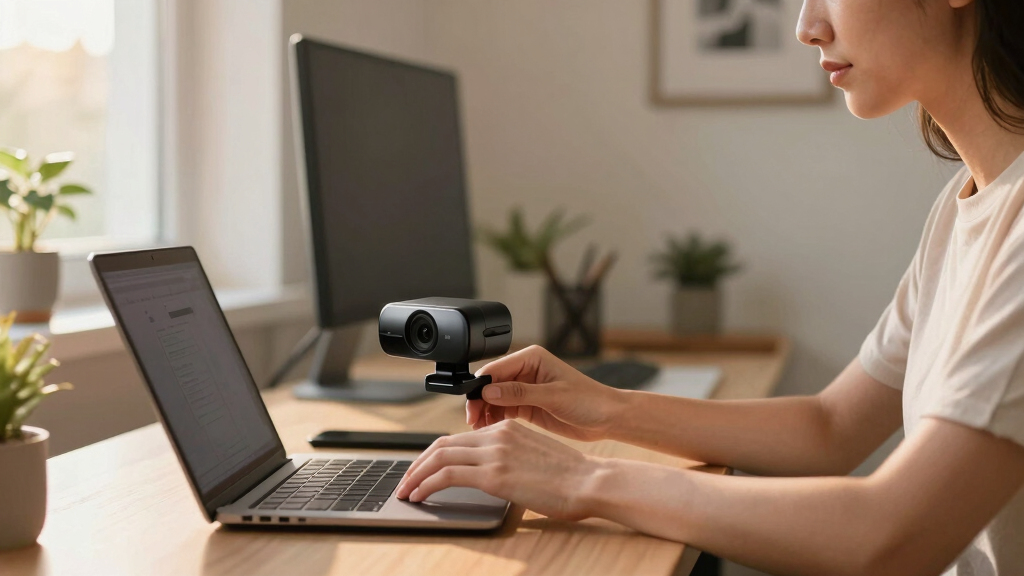

If you’re searching for the best 4K webcam in 2026, you probably want crystal-clear video quality for streaming, meetings, or content creation. The Logitech Brio remains a top overall choice thanks to its reliable performance and versatile features. For those needing advanced tracking, the Insta360 Link 2 Pro offers impressive AI features and low-light handling. Meanwhile, the Elgato Facecam 4K appeals to content creators seeking cinematic control. Each option comes with its own tradeoffs—whether in price, complexity, or specific feature sets. Continue reading to see how these models compare and find the best fit for your needs.
Key Takeaways
- Top-performing webcams combine high-quality sensors with advanced auto-focus and light correction for consistent image clarity.
- AI tracking and PTZ features are game-changers for streamers and presenters needing flexible framing without manual adjustments.
- Build quality and design matter, especially for professional setups—metal bodies and compact footprints add durability and convenience.
- Price varies widely; premium models often add features like HDR, cinematic controls, or facial recognition, but may not suit every budget.
- Compatibility and ease of use are essential—look for plug-and-play options that work across major platforms without complicated setup.





More Details on Our Top Picks
EMEET C960 4K Webcam for PC, 4K UHD CMOS Sensor, PDAF Auto Focus, Dual Omnidirectional Mics, Auto Light Correction, 73° FOV, Plug&Play Webcam w/Privacy Cover, Works w/Zoom/Teams/Skype/Google Meet
The EMEET C960 stands out for delivering genuine 4K quality without upscaling, ensuring every detail is crisp enough for professional settings. Compared to the Insta360 Link 2 Pro, this model defaults to 1080P, but offers reliable auto light correction and PDAF autofocus that keeps your image sharp across various lighting conditions. Its plug-and-play USB connection makes setup effortless, especially for users who dislike complex configurations, and the included privacy cover adds peace of mind. While its 73° FOV is sufficient for most tasks, it’s narrower than the 99° FOV of the AOC model, which might be preferable for wider shots. The dual omnidirectional mics provide clear audio, but lack advanced noise-canceling features found in higher-end options. Overall, this webcam suits remote professionals needing reliable, high-quality visuals with easy privacy controls.
Pros:- Authentic 4K resolution with no upscaling artifacts
- Reliable PDAF autofocus and auto light correction
- Plug-and-play USB connectivity for quick setup
- Includes privacy cover for added security
Cons:- Default resolution limits to 1080P without switching software
- Narrow 73° FOV may not suit wide-shot needs
- Basic audio microphones lacking noise-canceling capabilities
Best for: Business professionals and educators seeking dependable 4K video with straightforward setup.
Not ideal for: Content creators or streamers who need cinematic wide-angle shots or advanced audio features.
- Resolution:4K UHD
- Focus Technology:PDAF autofocus
- Microphone:Dual omnidirectional microphones
- Field of View:73°
- Connectivity:USB-A
- Auto Light Correction:Yes
- Privacy Cover:Included
- Compatibility:Windows, macOS, Linux, Android TV
Bottom line: This webcam offers excellent clarity and ease of use, making it ideal for professionals prioritizing reliable 4K quality and privacy.
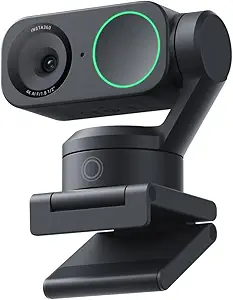
Insta360 Link 2 Pro – 4K PTZ Webcam for PC/Mac, 1/1.3” Sensor, Low-Light, AI Tracking, HDR, Directional Noise-Canceling Mics, Supports Stream Deck, Zoom, Teams, Twitch for Streaming or Meetings
The Insta360 Link 2 Pro excels at combining professional-grade 4K quality with AI-powered features like auto-tracking and gesture controls, making it a favorite among streamers and content creators. Its large 1/1.3” sensor outperforms many competitors, including the EMEET NOVA, especially in low-light environments, delivering cleaner, more detailed images. The AI tracking keeps you perfectly framed without manual adjustments, and the ability to control modes via smartphone or hand gestures enhances flexibility during live sessions. However, its software isn’t compatible with ARM-based Windows systems, which could limit some users. The built-in HDR and directional noise-canceling mics significantly boost audio-visual quality, but the higher price point and complexity mean it may be overkill for casual users. This pick makes the most sense for professionals seeking cinematic-quality video with advanced automation and control.
Pros:- Large 1/1.3” sensor for superior low-light performance
- AI tracking and gesture control for hands-free operation
- HDR support for better contrast and color
- Supports Elgato Stream Deck integration
Cons:- Higher price compared to basic webcams like NexiGo N680E
- Incompatibility with ARM-based Windows systems
- Complex setup may overwhelm casual users
Best for: Professional streamers, educators, and online content creators needing cinematic quality and intelligent framing.
Not ideal for: Users on a tight budget or those requiring simple plug-and-play solutions without AI features.
- Resolution:4K@30fps
- Sensor Size:1/1.3”
- Autofocus:AI tracking
- Microphone:Directional noise-canceling
- Features:HDR, gesture control
- Compatibility:Windows, macOS
Bottom line: Ideal for creators who need cinematic quality, AI automation, and versatile controls, despite a higher price.
NexiGo N680E Pro 4K Webcam with Ring Light, PDAF Autofocus, 1080p 60FPS, Dual Noise-Canceling Mics, Privacy Shutter, USB Plug-and-Play for Zoom, Teams, Twitch, Google Meet
The NexiGo N680E Pro offers a compelling mix of 4K clarity and practical features at an attractive price point, making it a strong choice for budget-conscious users who still want professional quality. Its Sony 1/2.5” sensor provides sharp visuals, while the built-in ring light ensures good lighting even in less ideal environments. With PDAF autofocus and dual noise-canceling microphones, this webcam handles focus and audio well, rivaling more expensive models like the EMEET NOVA. The plug-and-play USB connection simplifies setup for all users, including those less tech-savvy, and the privacy shutter adds security. Its downside is that the maximum frame rate is 60FPS at 1080P, not 4K, which might disappoint users seeking high-frame-rate 4K streaming. Overall, this webcam is perfect for professionals and casual users who prioritize value without sacrificing essential quality.
Pros:- Trusted Sony 4K sensor for sharp, true-to-life images
- Built-in ring light for consistent lighting
- Dual noise-canceling mics for clear audio
- Simple plug-and-play setup
Cons:- Limited to 1080p 60FPS for smooth video, not true 4K at high frame rates
- No advanced noise reduction features
- Some users may find 73° FOV too narrow for wide shots
Best for: Home office workers, educators, and streamers looking for a reliable, affordable 4K webcam.
Not ideal for: High-end content creators or gamers who require high frame rates at 4K resolution.
- Resolution:4K UHD (video at 1080p 60FPS)
- Sensor:Sony 1/2.5”
- Microphone:Dual noise-canceling
- Field of View:73°
- Lighting:Built-in ring light
- Connectivity:USB-A
Bottom line: A highly capable webcam that balances quality and affordability, perfect for everyday professional use.
EMEET NOVA 4K Webcam for PC – Ultra 4K HD, PDAF Autofocus, Dual Omnidirectional Mics, 73° FOV, Auto Light Correction, USB-A, Privacy Cover, Ideal for High-End Business Meetings&Live Streaming
The EMEET NOVA 4K combines ultra-high resolution with professional features tailored for high-stakes meetings and live streaming. Its 30FPS rate with CMOS sensor ensures crisp, smooth visuals, rivaling more expensive options like Logitech Brio. The PDAF autofocus maintains sharp focus even with movement, while the auto light correction adapts to various lighting conditions. Dual omnidirectional mics deliver clear voice pickup, making this webcam ideal for conference calls or streaming. Its versatility is enhanced by 360° rotation and a sturdy tripod mount, providing flexible positioning. Compared with the NexiGo N680E, the NOVA offers slightly better low-light handling and a more robust build. A minor drawback is its lack of HDR support, but overall, this webcam suits professionals who demand both quality and reliability.
Pros:- Ultra 4K resolution with smooth 30FPS video
- PDAF autofocus and auto light correction
- Dual omnidirectional microphones for clear audio
- 360° rotation and tripod compatibility
Cons:- No HDR support for enhanced contrast
- Price point higher than basic webcams like NexiGo N680E
- Limited to 30FPS at 4K, which may not satisfy high-speed streaming needs
Best for: Corporate users, remote workers, and streamers needing high-quality visuals and dependable audio.
Not ideal for: Casual users or gamers who prioritize high frame rates or cinematic effects.
- Resolution:4K @30fps
- Focus:PDAF autofocus
- Microphones:Dual omnidirectional
- Field of View:73°
- Light Correction:Auto
- Mounting:360° rotation, tripod compatible
Bottom line: A professional-grade webcam that balances high resolution, flexible mounting, and reliable audio for high-end meetings and streaming.
AOC 4k Webcam for PC with Microphone, Computer Camera with Noise Cancellation, Privacy Cover, 99° FOV, Plug & Play USB Webcam for Streaming, Conferencing, Zoom, Skype, Facetime, Laptop, PC, Skype
The AOC 4K Webcam is notable for its exceptionally wide 99° field of view, making it ideal for group calls, panel discussions, or capturing wider scenes. Its 4K resolution ensures sharp images, comparable to the EMEET NOVA, but with a broader perspective. The noise-canceling mic enhances audio clarity, and the privacy cover provides security when not in use. Its plug-and-play USB setup works seamlessly across platforms like Zoom, Skype, and Facetime, making it suitable for users who need a quick, reliable upgrade. The main tradeoff is that its wider FOV can sometimes cause distortion or include unwanted background, so careful framing is needed. Compared to narrower FOV webcams, this model is perfect for team meetings or creative presentations where capturing more of the environment is essential.
Pros:- Extremely wide 99° field of view
- 4K resolution for crisp images
- Noise-canceling microphone for clear audio
- Plug-and-play compatibility with major platforms
Cons:- Wide FOV may cause distortion or background inclusion
- Potential for less control over framing compared to narrower webcams
- Lack of advanced autofocus features
Best for: Team leaders, educators, and content creators who need a wide-angle view for collaborative sessions.
Not ideal for: Individuals requiring focused, close-up shots or narrow framing for professional portraiture.
- Resolution:4K UHD
- Field of View:99°
- Microphone:Noise-canceling
- Connectivity:USB
- Plug & Play:Yes
- Privacy Cover:Included
Bottom line: Perfect for group meetings and presentations requiring a broad scene, with the tradeoff of potential distortion for wider coverage.
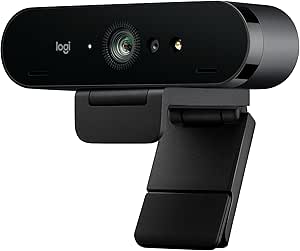
Logitech 4k Webcam
The Logitech 4K Webcam distinguishes itself with its ultra HD resolution, delivering sharp, detailed video that makes it ideal for professional settings such as remote work and virtual meetings. Compared with the Elgato Facecam 4K, it offers broader compatibility and a more versatile field of view, although it lacks the advanced DSLR-like control and lens filtration options of the Facecam. Its auto light adjustment with HDR technology ensures consistent clarity in varied lighting conditions, a feature especially valuable for those working from less controlled environments. The dual omni-directional microphones with noise-canceling technology capture clear audio, minimizing background distractions—crucial for seamless communication. The privacy shade and Windows Hello integration add security and convenience, making it a strong all-around choice. Setup is straightforward, fitting easily on monitors, laptops, or desktops with a universal mounting clip. While it performs reliably across platforms, some users may find the resolution and feature set less tailored for content creators compared to high-end streaming webcams. The main tradeoff is that it lacks the DSLR-like control and lens customization of more specialized models, but it remains a highly adaptable and reliable option for general professional use.
Pros:- Ultra 4K HD resolution ensures crisp, detailed video quality
- HDR auto light adjustment maintains clarity in various lighting conditions
- Dual noise-canceling microphones provide clear, distraction-free audio
- Supports Windows Hello for secure login and privacy shade for security
Cons:- Lacks manual focus and lens filter options found in DSLR-like webcams
- No built-in image stabilization, so motion may be less smooth during movement
- Limited advanced customization features for content creators
Best for: Remote professionals and corporate users who need high-quality, reliable video for regular meetings across multiple platforms.
Not ideal for: Content creators or streamers seeking advanced manual control, lens filters, or cinematic effects, as this webcam is optimized for clarity and convenience rather than creative customization.
- Resolution:Ultra 4K HD
- Frame rate:Up to 90 fps
- Field of view:Adjustable presets: 90°, 78°, 65°
- Microphones:Dual omni-directional with noise cancellation
- Light adjustment:RightLight 3 HDR technology
- Compatibility:Windows, Mac, ChromeOS
- Mounting:Universal detachable clip
- Special features:Windows Hello, Privacy shade
Bottom line: This webcam is perfect for professionals who prioritize reliable, high-quality video conferencing with ease of use and security features.
EMEET S600 4K Webcam for Streaming
The EMEET S600 excels in delivering crisp 4K streaming quality with a high-performance Sony 1/2.55” sensor, making it a top pick for streamers, gamers, and content creators who need superior image clarity. Compared to the Logitech Brio, it offers a versatile FOV adjustable from 40° to 73°, giving more control over framing, although it doesn’t support the wide 90° view of the Logitech. Its PDAF autofocus and auto light adjustment ensure sharp images even in challenging lighting, which is vital for high-quality content. The built-in privacy cover and rugged design emphasize durability and security, while the plug-and-play compatibility with most software simplifies setup. Its noise reduction microphones also improve audio clarity during live streams. However, it lacks the advanced manual control and lens filters available on DSLR-style webcams like the Elgato Facecam, making it less suited for cinematic or professional editing purposes. The primary tradeoff is focusing on streaming performance over manual customization, but it remains an excellent choice for dynamic, high-quality live content.
Pros:- Crisp 4K resolution at 30FPS for high-quality streaming
- Versatile adjustable FOV from 40° to 73° for flexible framing
- PDAF autofocus keeps images sharp in all scenes
- Built-in privacy cover and durable design for security and longevity
Cons:- No manual focus or lens filter support
- Limited creative control compared to DSLR-like webcams
- Software customization mainly limited to basic settings
Best for: Aspiring streamers and content creators needing crisp 4K video with flexible framing and easy setup.
Not ideal for: Professional videographers or filmmakers requiring manual lens control and cinematic effects, as the S600 is optimized for streaming simplicity.
- Sensor:Sony 1/2.55”
- Resolution:4K at 30FPS, 1080P at 60FPS
- FOV:40°-73° adjustable
- Microphones:Noise reduction, dual
- Autofocus:PDAF
- Compatibility:Plug and Play with most streaming platforms
- Privacy:Built-in privacy cover
- Build:Rugged, durable construction
Bottom line: This webcam is ideal for streamers and creators who prioritize high-quality, flexible video with straightforward setup and reliable autofocus.
Elgato Facecam 4K
The Elgato Facecam 4K offers a cinematic experience with its 4K60 uncompressed video, making it a favorite among streamers and video professionals seeking DSLR-like control. Its Sony STARVIS 2 CMOS sensor and Prime Lens technology produce vibrant, sharp images with rich color and detailed textures, surpassing the standard webcams in visual fidelity. Compared to the Logitech Brio, the Facecam provides manual control over focus, lens filters, and effects via Elgato’s Camera Hub software, giving content creators the ability to craft a truly cinematic look. The uncompressed 4K60 video and HDR support ensure the highest quality streams and recordings. However, it lacks built-in microphones, so users must rely on external audio sources, unlike the Brio which includes noise-canceling mics. Its focus on creative control makes it less suitable for straightforward conference calls. The main tradeoff is that it’s more specialized for content creation, not general video calling, but it excels at cinematic productions.
Pros:- Cinematic 4K60 uncompressed video quality
- DSLR-like manual control over focus and lens filters
- Vibrant color and sharp detail from Sony STARVIS sensor
- HDR support for high dynamic range footage
Cons:- No integrated microphones—requires external audio setup
- Higher cost and complexity for casual users
- Requires software for advanced control and customization
Best for: Professional streamers, videographers, and content creators who want DSLR-like control over their visuals and cinematic effects.
Not ideal for: Business users or casual remote workers who need a simple, all-in-one webcam for meetings, as it prioritizes creative features over convenience.
- Video resolution:4K60 uncompressed
- Sensor:Sony STARVIS 2 CMOS
- Frame rate:60 FPS
- HDR:Yes
- Lens:Prime lens with filter support
- Connectivity:USB-C
- Microphone:External required
- Control:Manual focus, lens filters via software
Bottom line: This webcam is best suited for high-end content creators demanding cinematic visuals and manual creative control.
Acer 4K Webcam for PC/Mac
The Acer 4K Webcam impresses with its sleek all-metal unibody design, offering a premium feel and durability that appeals to professionals who want a stylish yet functional device. Its Sony 1/2″ sensor provides balanced, true-to-life visuals with HDR and excellent low-light performance, making it especially suitable for high-stakes business meetings or live streaming. Compared to the Logitech Brio, it has a more elegant, lightweight build and a magnetic privacy cover that snaps securely, enhancing security and aesthetic appeal. Its PDAF autofocus ensures crisp focus even during movement, and the dual high-sensitivity digital microphones deliver clear audio. The plug-and-play USB-A connection makes setup simple across Windows, Mac, and ChromeOS. However, it lacks some of the software-based customization options and wide-angle flexibility seen in more advanced webcams. The tradeoff is prioritizing a premium, durable design over extensive manual controls, ideal for those seeking a stylish, high-performance device for professional use.
Pros:- Premium all-metal unibody design
- Balanced 4K visuals with HDR and low-light performance
- Magnetic privacy cover for security
- PDAF autofocus and dual digital microphones
Cons:- Limited manual control options for creative effects
- Less customizable software features compared to DSLR-style webcams
- No built-in lens filters or cinematic effects
Best for: Business professionals and executives who desire a combination of premium design, reliable 4K quality, and straightforward setup.
Not ideal for: Content creators seeking cinematic effects or extensive manual control, as this webcam is more focused on balanced, true-to-life visuals for meetings.
- Sensor:Sony 1/2”
- Resolution:UHD 4K
- Frame rate:Up to 30 FPS
- Design:All-metal unibody
- Audio:Dual digital microphones
- Privacy:Magnetic privacy cover
- Compatibility:Windows, Mac, ChromeOS
- Focus:PDAF autofocus
Bottom line: This webcam is a top choice for high-end professionals who need a stylish, reliable device for premium video meetings.
Logitech MX Brio Ultra HD 4K Webcam for Collaboration and Streaming, 1080p 60 FPS, Show Mode, Works with Microsoft Teams, Zoom, Google Meet, Nintendo Switch 2, Graphite
The Logitech MX Brio stands out for its exceptional 4K resolution, AI-enhanced image clarity, and extensive controls that make it suitable for both streaming and professional calls. Compared with the Insta360 Link 2, it offers superior compatibility and more refined image adjustments, but it sacrifices some of the dynamic tracking features. Its dual microphones with noise reduction ensure clear audio, ideal for meetings in noisy environments. The ability to tilt into Show Mode is a unique benefit for sharing desk notes, though the camera’s size and complexity might be overkill for casual users. The main tradeoff is its higher price and slightly less advanced AI tracking compared to the Insta360 Link 2. Overall, this pick makes the most sense for users who need a reliable, high-quality webcam with versatile controls and broad platform compatibility, especially in professional settings.
Pros:- Exceptional 4K resolution with AI-enhanced clarity
- Extensive manual controls for fine-tuning image quality
- Tilt-down Show Mode for desk sharing and collaboration
- Works seamlessly with Windows, macOS, Chrome OS, Linux
Cons:- Relatively high price point compared to basic webcams
- Lacks advanced AI tracking features of dedicated PTZ models
- Larger form factor may be less portable
Best for: Business professionals and streamers who prioritize sharp image quality and customizable controls for meetings and streaming.
Not ideal for: Casual users or gamers seeking a budget-friendly option with advanced AI tracking and automatic framing.
- Video Resolution:4K UHD
- Frame Rate:1080p 60 FPS
- Connectivity:USB-C
- Microphones:Dual noise-reducing
- Adjustable Controls:ISO, Shutter Speed, White Balance, Vibrance
- Compatibility:Windows, macOS, Chrome OS, Linux
Bottom line: Ideal for professionals needing a high-quality, customizable webcam with broad compatibility and premium features.
Insta360 Link 2 – PTZ 4K Webcam for PC/Mac, 1/2″ Sensor, AI Tracking, HDR, AI Noise-Canceling Mic, Gesture Control for Streaming, Video Calls, Gaming, Works with Zoom, Teams, Twitch & More
The Insta360 Link 2 offers a compelling combination of 4K HDR visuals, AI tracking, and DSLR-like depth of field, making it perfect for streamers and content creators seeking dynamic framing. Unlike the Logitech MX Brio, it excels in automatic subject tracking, with smooth PTZ movements and multiple scene modes such as DeskView and Whiteboard. Its AI-powered face detection and gesture controls add a layer of interactivity that surpasses traditional webcams, though it does come at a higher cost and is less compatible with ARM-based systems. The camera’s size is compact, but setup can be slightly tricky, especially on Macs where background features require enabling camera extensions. The main tradeoff is its limited compatibility with certain hardware and the lag in software controls, which can impact fast-paced use. This camera is best suited for creators who want cutting-edge AI features and excellent video quality for streaming and professional presentations.
Pros:- Stunning 4K HDR video with low-light performance
- Advanced AI tracking with smooth PTZ movement
- DSLR-like background bokeh and depth effect
- Gesture and remote smartphone control
Cons:- Higher price compared to basic webcams
- Limited compatibility with ARM-based Windows systems
- Setup can be complex and software laggy at times
Best for: Streamers, educators, and content creators who need AI tracking and DSLR-like aesthetics for engaging videos.
Not ideal for: Users with older or ARM-based hardware, or those needing a budget-friendly, plug-and-play webcam without AI features.
- Sensor Size:1/2 Inch
- Video Resolution:4K HDR
- Frame Rate:30FPS / 60FPS
- Connectivity:USB-C to A
- Features:AI Tracking, Gesture Control, HDR
- Compatibility:Windows 10+, macOS 10.14+
Bottom line: Best suited for creative professionals and streamers who prioritize AI-driven framing and high-quality visuals over plug-and-play simplicity.
EMEET PIXY Dual-Camera AI-Powered PTZ Camera 4K, AI Tracking, PDAF&AI Autofocus 0.2s, 1/2.55” Sony Sensor, 3 Mics, Presets, Gesture Control, 4K Webcam for Streaming and OBS/Twitch/Switch 2 Compatible
The EMEET PIXY offers a unique dual-camera setup with AI-powered auto-tracking, making it ideal for multi-scene streaming, online teaching, or business presentations. Its fast 0.2s autofocus and 310° pan/180° tilt provide comprehensive coverage, especially useful for dynamic content like dance, fitness, or product demos. The three-mic array ensures clear audio, and the device’s presets and gesture controls add convenience. However, its setup can be more complex, and the software’s learning curve might be steep for beginners. Compared to the Insta360 Link 2, PIXY is more geared toward multi-scene applications, but it may lag behind in overall image sharpness and HDR quality. The main tradeoff is its slightly bulkier design and a higher price point. It’s perfect for creators who want flexible framing and multi-angle options in a single device.
Pros:- Dual-camera setup with 4K ultra-clear video
- Fast 0.2s PDAF & AI autofocus
- Seamless 310° pan and 180° tilt
- Supports presets and gesture control
Cons:- More complex setup process
- Larger and heavier than typical webcams
- Higher price compared to standard single-camera models
Best for: Content creators, online teachers, and streamers needing multi-scene setups and AI tracking for varied content.
Not ideal for: Casual users or those seeking a simple, single-angle webcam with minimal setup and advanced AI features.
- Sensor Size:1/2.55 Inch Sony
- Video Resolution:4K
- Autofocus:PDAF & AI
- Pan/Tilt:310° / 180°
- Microphones:3 Mics, Noise-Canceling
- Compatibility:OBS, Twitch, Switch 2
Bottom line: Best for professionals and streamers who need versatile multi-angle content with AI tracking and quick autofocus.

How We Picked
I evaluated each webcam based on core performance factors that matter most to buyers, such as video quality, autofocus reliability, low-light performance, and overall usability. Additional considerations included build quality, ease of connection, and the availability of advanced features like AI tracking or HDR. Value was also a key factor—did the feature set justify the price? I prioritized models that offered a clear balance between professional-level performance and user-friendly operation, ranking them according to how well they meet different user needs—from streamers to corporate users. This approach ensures the list highlights options suited for a range of budgets and technical expertise.Factors to Consider When Choosing Best 4K Webcam
Choosing the best 4K webcam involves more than just pixel count. Understanding your primary use case and environment can help narrow down the options. Beyond resolution, factors like autofocus, light correction, and sensor quality significantly impact video clarity. Compatibility with your device and software is another critical aspect, especially if you need plug-and-play ease or advanced streaming features. Budget considerations often influence feature tradeoffs, so knowing what matters most to you will lead to a more satisfying purchase. Let’s explore key factors to keep in mind when selecting your ideal 4K webcam.Video Quality and Sensor Technology
The core of any good webcam is its sensor. Higher-quality sensors—like Sony or 1/1.3-inch types—deliver sharper, more color-accurate images, especially in varied lighting conditions. 4K resolution alone isn’t enough if the sensor struggles with noise or low-light performance. Look for models that incorporate HDR or auto light correction if your setup isn’t perfectly lit. The sensor size and technology directly influence how well the camera reproduces fine details and maintains clarity during fast motion or complex backgrounds.
Autofocus and Tracking Features
Auto-focus systems determine how well the webcam keeps you in sharp focus during movement. PDAF (phase detection) autofocus is common and reliable, but some models add AI-powered tracking that can follow your movements seamlessly. For streamers or presenters, these features reduce the need for manual adjustments and keep the focus locked on you. However, more advanced tracking often comes at a higher price and may require specific software compatibility, so assess whether these capabilities align with your use case.
Light Handling and Image Processing
Lighting conditions vary widely, and a webcam’s ability to handle low-light environments is crucial. Cameras with automatic light correction or HDR can produce clearer images without additional lighting gear. Beware models that produce washed-out images or struggle in dim settings, as this can diminish professionalism in business or content creation. A good webcam balances hardware and software enhancements to deliver consistent quality across different environments.
Build Quality and Ease of Use
Durability and design influence how well a webcam fits into your setup. Metal bodies and sturdy mounts are preferable for long-term use, especially if you frequently move or adjust your camera. Plug-and-play connectivity simplifies setup, but some models require extra software or drivers, which can introduce compatibility issues or slow down your workflow. Consider webcams with privacy shutters, adjustable mounts, and intuitive controls to enhance usability and security.
Price and Value Proposition
Investing in a high-end 4K webcam can pay off if you need professional-grade features, but not everyone requires ultra-premium specs. Balance your budget against the features you actually need—such as AI tracking, HDR, or cinematic controls. Cheaper models might suffice for casual use or occasional video calls, but they often lack advanced auto-focus or low-light performance. Recognize that paying more generally provides better durability, software support, and future-proofing, especially for high-stakes applications like streaming or business presentations.
Frequently Asked Questions
Is a 4K webcam necessary for professional video calls?
While a 4K webcam provides sharper, more detailed images, it isn’t always necessary for standard professional calls. Many platforms compress video streams, so the difference between 4K and 1080p can be less noticeable during typical meetings. However, if your work involves high-quality content creation, product demos, or large-scale presentations where detail matters, a 4K webcam can add a polished, professional look. Consider your platform compatibility and whether your internet connection can support higher bandwidth streams before investing in 4K hardware.
How important is autofocus in a 4K webcam?
Autofocus is vital for maintaining sharp images when you move or change positions during a video session. In a 4K webcam, reliable autofocus ensures your face remains crisp without manual adjustments, especially if you’re sharing different content or demonstrating products. Models with PDAF or AI tracking tend to perform better, reducing distractions caused by blurry images. If your setup involves dynamic movement or multitasking, prioritize a webcam with advanced autofocus capabilities.
Do I need additional lighting for a 4K webcam?
Yes, even the best 4K webcams benefit from proper lighting. While many models feature automatic light correction, they still perform best with consistent, soft lighting that minimizes shadows and glare. Investing in a ring light or softbox setup can dramatically improve image clarity and color accuracy, especially in indoor or dim environments. Good lighting reduces noise and enhances the overall professional appearance of your video feed.
Are premium 4K webcams worth the extra cost?
Premium models often include features like cinematic controls, HDR, AI tracking, and higher build quality, which can be valuable if your work demands top-tier video. For content creators, these features translate into more polished streams and recordings. However, for casual users or occasional Zoom calls, mid-range models often deliver sufficient quality at a better price point. Ultimately, whether the extra cost is justified depends on your specific needs and how much you value advanced features or durability.
What should I consider regarding compatibility and software?
Ensure the webcam is compatible with your operating system and preferred conferencing or streaming software. Most modern webcams are plug-and-play with Windows, Mac, and popular platforms like Zoom and Teams, but some higher-end models require specific drivers or companion apps for advanced features. Check if the camera supports your setup’s hardware connections—USB-C or USB-A—and whether it integrates smoothly with your existing workflow. Compatibility issues can cause delays or limit functionality, so verify these details before purchase.