The best HomeKit smart home devices depend on what you want to automate, but I’d start with the Aqara Smart Thermostat W200 for its focused climate-control role and Apple-oriented features. For everyday lighting and appliance control, the Linkind Matter Smart Plug 4-Pack offers a flexible starting point, while the Tapo P316M Power Strip suits setups that need several outlets and energy monitoring. The main tradeoffs are whether you need a hub, how well a device fits your wiring or home layout, and whether you prefer Matter flexibility or a more narrowly focused accessory. I compare all 15 options by their HomeKit fit, practical usefulness, and limitations below. Read on for the full breakdown and advice on matching a device to your home.

Get home appliances delivered free with Prime
- Fast, free delivery on millions of items
- Prime Video, Amazon Music and more included
- Member-only deals all year
Complete the kit


Key Takeaways
- The lineup covers more than plugs: the Aqara thermostat, Meross garage controller, and Aqara indoor camera address climate, access, and monitoring needs that a plug cannot.
- Matter plugs stand out for broad platform flexibility: Linkind, Tapo, and the Tapo power strip offer different outlet formats, so the best fit depends on whether you need a multipack, compact plug, or several monitored outlets.
- Lighting choices depend on the installation: Kasa dimmers provide brightness control, while standard Kasa and meross switches replace wall controls; wiring and switch type matter more than pack size.
- Scene buttons serve different habits: Onvis and Airversa give HomeKit users physical controls, a useful alternative when tapping an app or asking Siri is inconvenient.
- Special-purpose devices bring more setup questions: the garage opener, camera, thermostat, and outdoor plug each require closer attention to placement, compatibility, or installation than a basic indoor plug.
| Meross MSG100HK Smart Garage Door Opener with HomeKit, Alexa, and Google Assistant |  | Best for Garage Door Control | Model: MSG100HK | Connectivity: 2.4 GHz Wi-Fi | Compatible platforms: Apple HomeKit, Siri, CarPlay, Amazon Alexa, Google Assistant, and SmartThings | VIEW LATEST PRICE | See Our Full Breakdown |
| Onvis 5-Key Smart Button Scene Controller for Apple HomeKit |  | Best Physical HomeKit Scene Controller | Model: HS2 | Keys: 5 | Press actions: Single, double, and long press | VIEW LATEST PRICE | See Our Full Breakdown |
| Linkind Matter Smart Plug, 4-Pack | 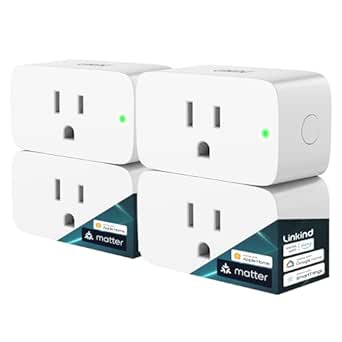 | Best Value for Multiple HomeKit Outlets | Model: LC09003256 | Pack count: 4 | Connectivity: 2.4 GHz Wi-Fi and IPv6 | VIEW LATEST PRICE | See Our Full Breakdown |
| Aqara Smart Thermostat W200 with Apple Adaptive Temperature |  | Best Premium HomeKit Thermostat | HVAC compatibility: Works with about 85% of HVAC systems, including furnaces, air conditioners, heat pumps, boilers, and PTAC units | Display: 4-inch full-color touchscreen | Presence detection: Built-in mmWave radar | VIEW LATEST PRICE | See Our Full Breakdown |
| Tapo P316M Matter Smart Wi-Fi Power Strip with Energy Monitoring |  | Best for Multi-Device Energy Monitoring | Model: P316M | AC outlets: 6 individually controlled | USB ports: 3 always-on ports, 5 V 2.4 A | VIEW LATEST PRICE | See Our Full Breakdown |
| Philips Hue Smart Plug, White, 2-Pack |  | Best for Hue Households | Model: 552349-2 | Quantity: 2 smart plugs | Connectivity: Bluetooth and Zigbee | VIEW LATEST PRICE | See Our Full Breakdown |
| Kasa EP40A Outdoor Smart Plug with Apple HomeKit, 2 Outlets |  | Best Outdoor Pick | Model: EP40A | Outlets: 2 independently controlled AC outlets | Maximum load: 15 A / 1875 W per outlet | VIEW LATEST PRICE | See Our Full Breakdown |
| Aqara Camera E1 2K Indoor Security Camera |  | Best HomeKit Security Camera | Resolution: 2304 × 1296 pixels (2K) | Viewing: 360° pan and tilt | Night vision: 940 nm infrared | VIEW LATEST PRICE | See Our Full Breakdown |
| Tapo P125 Smart Mini Wi-Fi Plug, 15A, 2-Pack |  | Best Hub-Free Value | Model: P125 | Quantity: 2 smart plugs | Maximum power: 1800 W | VIEW LATEST PRICE | See Our Full Breakdown |
| Kasa Smart Plug Mini 15A with Energy Monitoring, Apple HomeKit Support |  | Best for Energy Monitoring | Model: EP25P4 | Maximum current: 15 A | Maximum wattage: 1800 W | VIEW LATEST PRICE | See Our Full Breakdown |
| Kasa KS220P3 Apple HomeKit Smart Dimmer Switch, 3-Pack |  | Best Multi-Room Dimmer Pack | Model: KS220P3 | Pack size: 3 switches | Switch type: Single-pole dimmer | VIEW LATEST PRICE | See Our Full Breakdown |
| Airversa QliQ AC1 HomeKit Button Controller, White |  | Best for Physical Scene Control | Model: AC1 | Buttons: 3 | Supported actions: Up to 9 | VIEW LATEST PRICE | See Our Full Breakdown |
| TP-Link Tapo Matter Smart Plug Mini, 15A/1800W, 3-Pack |  | Best Cross-Platform Plug Pack | Pack size: 3 plugs | Maximum current: 15 A | Maximum wattage: 1800 W | VIEW LATEST PRICE | See Our Full Breakdown |
| Kasa KS200P3 Apple HomeKit Smart Light Switch, Single Pole |  | Best Basic HomeKit Wall Switch | Model: KS200P3 | Operation: On/off | Switch type: One-way, SPST | VIEW LATEST PRICE | See Our Full Breakdown |
| meross Smart Light Switch, Single Pole, 4-Pack |  | Best Multi-Switch HomeKit Pack | Model: MSS510 | Pack size: 4 switches | Switch type: Single-pole, 1-way | VIEW LATEST PRICE | See Our Full Breakdown |
| HomeKit smart home device | Connectivity | Model |
|---|---|---|
| Meross MSG100HK Smart Garage D | 2.4 GHz Wi-Fi | MSG100HK |
| Onvis 5-Key Smart Button Scene | Thread and Bluetooth | HS2 |
| Linkind Matter Smart Plug | 2.4 GHz Wi-Fi and IPv6 | LC09003256 |
| Aqara Smart Thermostat W200 wi | Dual-band Wi-Fi: 2.4 GHz and 5 GHz | — |
| Tapo P316M Matter Smart Wi-Fi | 2.4 GHz Wi-Fi; Matter-certified | P316M |
| Philips Hue Smart Plug | Bluetooth and Zigbee | 552349-2 |
| Kasa EP40A Outdoor Smart Plug | — | EP40A |
| Aqara Camera E1 2K Indoor Secu | Wi-Fi 6, 2.4 GHz only; WPA3 | — |
| Tapo P125 Smart Mini Wi-Fi Plu | 2.4 GHz Wi-Fi and Bluetooth | P125 |
| Kasa Smart Plug Mini 15A with | 2.4 GHz Wi-Fi | EP25P4 |
| Kasa KS220P3 Apple HomeKit Sma | 2.4 GHz Wi-Fi | KS220P3 |
| Airversa QliQ AC1 HomeKit Butt | Thread; Apple Home (HomeKit) | AC1 |
| TP-Link Tapo Matter Smart Plug | 2.4 GHz Wi-Fi, Bluetooth, Matter | — |
| Kasa KS200P3 Apple HomeKit Sma | 2.4 GHz Wi-Fi | KS200P3 |
| meross Smart Light Switch | — | MSS510 |
More Details on Our Top Picks
Meross MSG100HK Smart Garage Door Opener with HomeKit, Alexa, and Google Assistant
The Meross MSG100HK is the most targeted HomeKit upgrade in this group: it adds app and voice control to a compatible garage opener rather than replacing the opener itself. Its wired sensor reports door status and keeps an opening and closing history, making it more useful for checking whether the garage is actually shut than a basic remote-control accessory. Scheduled or automatic closing can also reduce the chance of leaving the door open. Compared with the Linkind Matter Smart Plug, this is a single-purpose device, not a general way to automate household equipment—but it solves a more consequential task. Compatibility spans many opener models, though some require an adapter, and Security+ 3.0 is not supported. It also needs 2.4 GHz Wi-Fi.
Pros:- Adds app and voice control to many compatible existing garage door openers
- Wired sensor reports door status and provides open-and-close history
- Supports automatic and scheduled closing
- Works with HomeKit and several other smart home platforms without subscription fees
Cons:- Requires 2.4 GHz Wi-Fi
- Some garage door openers need an adapter
- Not compatible with Security+ 3.0
Best for: HomeKit households with a compatible existing garage door opener that want door-status checks, remote control, and scheduled closing without replacing the opener
Not ideal for: Owners of Security+ 3.0 openers, people whose opener needs an unavailable adapter, or households without 2.4 GHz Wi-Fi
- Model:MSG100HK
- Connectivity:2.4 GHz Wi-Fi
- Compatible platforms:Apple HomeKit, Siri, CarPlay, Amazon Alexa, Google Assistant, and SmartThings
- Opener compatibility:200+ brands and 1,600+ models; Security+ 1.0 and 2.0, not Security+ 3.0
- Sensor:Wired door-status sensor
- Maximum supported devices:1
- Dimensions:3 × 2 × 1 in
- Subscription fees:None
Our verdict“Choose the MSG100HK if you want to bring a compatible garage door into HomeKit and value door-status checks more than broad-purpose smart control.”
Onvis 5-Key Smart Button Scene Controller for Apple HomeKit
The Onvis HS2 gives a HomeKit household a physical alternative to voice commands and phone-based controls. Five keys, each with single, double, and long-press actions, can trigger as many as 15 scenes—handy for putting lighting, accessories, or other compatible devices within reach in one place. Unlike the Meross MSG100HK, which controls one specific garage opener, this controller can call on a range of HomeKit devices through scenes. It connects over Thread or Bluetooth; Thread use requires a Thread-enabled Apple Home hub, while iOS 17.4 or later is required. Local data storage may suit privacy-conscious buyers, but this is a HomeKit-only choice, and its plastic body offers a simpler feel than a dedicated wall switch. Adhesive and magnetic mounting options help with placement.
Pros:- Five keys and three press actions per key support up to 15 scenes
- Controls compatible HomeKit devices through configurable scenes
- Offers Thread and Bluetooth connectivity
- Includes adhesive tape and magnetic strips for surface mounting
Cons:- Thread connectivity requires a compatible Apple Home hub
- Requires iOS 17.4 or later
- Limited to Apple HomeKit rather than multiple smart home platforms
Best for: Apple Home users who want a mounted, tactile way to trigger lighting and accessory scenes without reaching for a phone
Not ideal for: Households centered on Alexa or Google Home, buyers who need a Thread connection but lack a compatible Apple Home hub, or anyone seeking a wired wall switch
- Model:HS2
- Keys:5
- Press actions:Single, double, and long press
- Maximum scenes:15
- Connectivity:Thread and Bluetooth
- Compatibility:Apple HomeKit
- Thread hub requirement:Thread-enabled Apple Home hub
- Dimensions:2.17 × 0.79 × 2.17 in
- Mounting:Surface mount with adhesive tape and magnetic strips included
Our verdict“Pick the Onvis HS2 if you want a flexible physical scene controller for an Apple Home setup and have the hub and iOS version it requires.”
Linkind Matter Smart Plug, 4-Pack
The Linkind Matter Smart Plug 4-Pack is the practical choice for adding control to several lamps or small appliances at once. Matter support lets the plugs join Apple Home and other listed platforms, so they can fit a mixed-brand setup more readily than a HomeKit-only accessory such as the Onvis HS2. Each plug supports up to 15 A and 1,800 W, with scheduling, timers, remote control, and short-circuit and overload protection. The four-plug set is more useful for outfitting multiple rooms than the Tapo P316M if you do not need a centralized strip with energy monitoring. The tradeoff is setup: Apple Home and the other named platforms require a compatible Matter hub, and the plugs need 2.4 GHz Wi-Fi and IPv6. Without a hub, the AiDot app is an alternative.
Pros:- Four plugs let buyers automate multiple outlets in one purchase
- Matter support spans Apple Home, Alexa, Google Home, and SmartThings with a compatible hub
- Scheduling, timers, and remote app control support everyday automation
- Rated for up to 15 A and 1,800 W, with short-circuit and overload protection
Cons:- Requires 2.4 GHz Wi-Fi and IPv6
- A compatible Matter hub is required for Apple Home and the other listed smart home platforms
- Does not list energy monitoring, unlike the Tapo P316M power strip
Best for: Households setting up several lamps or compatible appliances across Apple Home and other Matter-supported platforms
Not ideal for: Buyers who need energy-use monitoring, lack a compatible Matter hub for Apple Home, or cannot use 2.4 GHz Wi-Fi with IPv6
- Model:LC09003256
- Pack count:4
- Connectivity:2.4 GHz Wi-Fi and IPv6
- Smart home compatibility:Apple Home, Alexa, Google Home, SmartThings, and AiDot
- Maximum power:1,800 W
- Maximum current:15 A
- Plug type:Type A
- Certifications:FCC and ETL
Our verdict“Choose the Linkind four-pack to automate several outlets across a Matter-capable home, provided you have the required network and hub.”
Aqara Smart Thermostat W200 with Apple Adaptive Temperature
The Aqara W200 is the most ambitious climate-control pick here: its 4-inch touchscreen, built-in mmWave presence detection, and support for a broad range of HVAC systems combine thermostat control with a more capable smart-home hub role. Matter, Zigbee, and Thread support can make it a better fit for a home mixing Apple Home with other platforms than a single-purpose control such as the Meross MSG100HK. Presence detection can support comfort automations based on whether a room is occupied, while the screen also provides smart-home and doorbell controls. The feature set comes with compatibility homework: the thermostat works with about 85% of HVAC systems, and homes without a C-wire need a separately sold Aqara adapter. Apple Adaptive Temperature also depends on a compatible home hub and devices running version 26 or later; Clean Energy Guidance is limited to the contiguous U.S.
Pros:- Supports about 85% of HVAC systems, including heat pumps, boilers, and PTAC units
- Built-in mmWave radar enables presence-based comfort automations
- Matter 1.4, Zigbee, and Thread support a range of smart home platforms
- 4-inch touchscreen combines thermostat controls with smart-home and doorbell controls
Cons:- Requires a separately sold Aqara C-Wire Adapter if the home lacks a C-wire
- Apple Adaptive Temperature needs a compatible home hub and devices running version 26 or later
- Clean Energy Guidance is available only in the contiguous U.S.
Best for: Homeowners with compatible HVAC who want a touchscreen thermostat, occupancy-based automations, and Matter connectivity across multiple platforms
Not ideal for: Renters, buyers who want a simple thermostat replacement, homes with unsupported HVAC, or households unwilling to check C-wire and Apple software requirements
- HVAC compatibility:Works with about 85% of HVAC systems, including furnaces, air conditioners, heat pumps, boilers, and PTAC units
- Display:4-inch full-color touchscreen
- Presence detection:Built-in mmWave radar
- Connectivity:Dual-band Wi-Fi: 2.4 GHz and 5 GHz
- Smart home protocols:Matter 1.4, Zigbee, and Thread
- Compatible platforms:Apple Home, Google Home, Amazon Alexa, Samsung SmartThings, and Home Assistant
- C-wire:Aqara C-Wire Adapter required if no C-wire is available; sold separately
- Included accessory:Trim kit
Our verdict“Choose the W200 if you want a feature-rich, multi-protocol thermostat and your HVAC setup meets its wiring and compatibility requirements.”
Tapo P316M Matter Smart Wi-Fi Power Strip with Energy Monitoring
The Tapo P316M is the better fit when several devices share one location and you want more than basic on/off automation. Its six individually controlled AC outlets let HomeKit routines target equipment separately, while energy monitoring can help identify which connected devices draw power. Three always-on USB ports add charging capacity, though they cannot be controlled individually. Compared with the four separate plugs in the Linkind Matter Smart Plug 4-Pack, this power strip keeps a desk or media area together and adds monitoring; the Linkind set may suit outlets spread across different rooms. The P316M also offers surge protection and local app control, but its 37-inch cord limits placement, and it needs 2.4 GHz Wi-Fi. Buyers should not choose it if they need switched USB ports or a longer reach to the wall.
Pros:- Six AC outlets can be controlled individually
- Energy monitoring helps track use by connected equipment
- Three always-on USB ports provide extra charging connections
- Matter support, surge protection, schedules, and local app control broaden its usefulness
Cons:- USB ports are always on and cannot be controlled individually
- Requires 2.4 GHz Wi-Fi
- The 37-inch power cord may limit placement
Best for: HomeKit users organizing a desk, entertainment center, or work area who want separate outlet control and energy monitoring
Not ideal for: People who need individually switched USB ports, outlets spread across multiple rooms, or a power strip with a longer cord
- Model:P316M
- AC outlets:6 individually controlled
- USB ports:3 always-on ports, 5 V 2.4 A
- Maximum current:15 A
- Voltage:120 V
- Connectivity:2.4 GHz Wi-Fi; Matter-certified
- Power cord:37 in (3 ft)
- Dimensions:16.2 × 4.8 × 1.9 in
- Features:Energy monitoring, surge protection, schedules, timers, remote and local app control, and voice control
Our verdict“Pick the P316M for a concentrated cluster of devices where individual outlet control and energy monitoring matter more than a longer cord or switched USB ports.”
Philips Hue Smart Plug, White, 2-Pack
I’d choose the Philips Hue Smart Plug when I already use Hue lights and want to bring a lamp or other compatible device into that setup. Its two-plug bundle and Bluetooth control without a Bridge make basic operation straightforward, while Zigbee connectivity adds a path to Hue automations with a separately sold Bridge. That Bridge requirement is the main tradeoff: unlike the Tapo P125, which connects directly over Wi-Fi without a hub, this Hue plug’s fuller automation features depend on extra Hue hardware. Its compact shape is useful when an adjacent socket needs to stay free, but the listed 10-watt specification is a limit buyers should check against their intended device. I’d pick it for Hue-centric lighting, not as the most flexible general-purpose plug.
Pros:- Includes two plugs for controlling separate lights
- Bluetooth allows basic control without a Hue Bridge
- Compact body helps preserve access to the neighboring socket
- Supports Apple HomeKit alongside Alexa and Google Assistant
Cons:- Hue Bridge is sold separately for automations and additional features
- The listed 10-watt specification may rule it out for higher-load devices
Best for: HomeKit households already using Philips Hue that want two compact plugs for lamps and are comfortable adding a Hue Bridge for expanded automations
Not ideal for: Buyers seeking a hub-free Wi-Fi plug or planning to control appliances whose load may exceed the listed 10-watt specification
- Model:552349-2
- Quantity:2 smart plugs
- Connectivity:Bluetooth and Zigbee
- Smart home compatibility:Apple HomeKit, Amazon Alexa, Google Assistant
- Listed wattage:10 watts
- Dimensions:2.7 × 1.5 × 2.1 inches
- Warranty:2 years
Our verdict“Choose this two-pack for compact lamp control in a Philips Hue home, but choose the Tapo P125 if you want hub-free Wi-Fi operation.”
Kasa EP40A Outdoor Smart Plug with Apple HomeKit, 2 Outlets
For outdoor lighting or seasonal setups, I’d favor the Kasa EP40A over indoor plugs such as the Kasa Smart Plug Mini EP25P4. Its two independently controlled outlets let me schedule separate devices without adding another smart plug, and IP64 protection helps it handle dust and water splashes. It connects directly to 2.4 GHz Wi-Fi, so there’s no hub to add; the tradeoff is that it depends on a suitable wireless signal where the plug is installed. Each outlet is rated for up to 15 A / 1875 W, giving it a different use case from compact indoor models. HomeKit remote control also requires a networked Apple device at home, so local Wi-Fi access alone may not meet every remote-control need.
Pros:- Two outlets can be controlled independently
- IP64 protection suits dusty locations and water splashes
- Works with HomeKit without requiring a separate hub
- Each outlet supports loads up to 15 A / 1875 W
Cons:- Requires a 2.4 GHz Wi-Fi connection
- HomeKit remote control requires a networked Apple device at home
- IP64 protection does not make it suitable for every exposure to water
Best for: HomeKit users automating outdoor lights or other outdoor devices who need two separately scheduled outlets
Not ideal for: Buyers who need a plug for wet locations beyond splash protection, lack 2.4 GHz Wi-Fi outdoors, or want HomeKit remote control without a networked Apple device at home
- Model:EP40A
- Outlets:2 independently controlled AC outlets
- Maximum load:15 A / 1875 W per outlet
- Weather resistance:IP64
- Wi-Fi:2.4 GHz, 802.11 b/g/n
- Voltage and plug type:125 V AC; Type A
- Certification:ETL
- Warranty:2 years
Our verdict“Pick the EP40A for independently controlled outdoor devices, while the Kasa EP25P4 is the more suitable choice for compact indoor energy tracking.”
Aqara Camera E1 2K Indoor Security Camera
The Aqara Camera E1 earns a distinct place in this roundup because it adds indoor monitoring rather than another way to switch a plug. Its 2K video and 360° pan-and-tilt view give it more room coverage than a fixed camera, while HomeKit Secure Video support fits Apple households looking to manage security through HomeKit. Local motion and person detection, plus a privacy mode that pivots the lens away and deactivates the camera, give buyers useful control over monitoring. Unlike the Kasa EP40A, this is a powered indoor camera, not a weather-ready device; it needs USB-C power and a 2.4 GHz Wi-Fi network. Buyers can use microSD or NAS storage, but cloud storage and advanced recognition require an Aqara subscription, and the power supply is not included.
Pros:- 2K resolution with 360° pan-and-tilt viewing
- Supports HomeKit Secure Video and local motion and person detection
- Privacy mode pivots the lens and deactivates the camera
- Supports microSD storage up to 512 GB and SMB3-compatible NAS backup
Cons:- USB-A power supply is not included
- Connects only to 2.4 GHz Wi-Fi
- Cloud storage and advanced recognition require an Aqara subscription
Best for: HomeKit households wanting a movable indoor camera with local storage options and a physical privacy mode
Not ideal for: Buyers needing an outdoor camera, 5 GHz Wi-Fi support, an included power adapter, or subscription-free access to Aqara cloud features
- Resolution:2304 × 1296 pixels (2K)
- Viewing:360° pan and tilt
- Night vision:940 nm infrared
- Connectivity:Wi-Fi 6, 2.4 GHz only; WPA3
- Power:USB-C; requires a 5 V, 2 A USB-A power supply, not included
- Local storage:microSD up to 512 GB; SMB3-compatible NAS backup
- Smart home compatibility:HomeKit Secure Video, Alexa, IFTTT
- Detection:Local motion and person detection; AI sound detection
Our verdict“Choose the Aqara E1 for flexible indoor HomeKit monitoring and local storage, but skip it if you need outdoor coverage or 5 GHz Wi-Fi.”
Tapo P125 Smart Mini Wi-Fi Plug, 15A, 2-Pack
I’d shortlist the Tapo P125 for buyers who want two everyday HomeKit plugs without a separate hub. It connects over 2.4 GHz Wi-Fi and adds scheduling, timers, and Away Mode, making it a practical choice for lamps and other compatible devices that benefit from routine control. The compact build helps keep a neighboring socket available. Compared with the Philips Hue Smart Plug, it avoids a separate bridge for its Wi-Fi setup and supports loads up to 1800 W; Hue may be a better fit for an existing Hue system, but its listed wattage is much lower. The P125’s limitation is its reliance on 2.4 GHz Wi-Fi, and remote HomeKit control requires an additional Apple device at home. I’d choose it for straightforward plug automation rather than energy-use tracking, which the Kasa EP25P4 offers.
Pros:- Two plugs connect to HomeKit without a separate hub
- Compact design helps keep adjacent outlets accessible
- Supports scheduling, timers, and Away Mode
- Rated for loads up to 1800 W
Cons:- Requires 2.4 GHz Wi-Fi
- Remote HomeKit control requires an additional Apple device at home
- Does not list energy monitoring, unlike the Kasa EP25P4
Best for: HomeKit households wanting a compact two-pack for lamps and compatible devices, with schedules and Away Mode but no hub
Not ideal for: Buyers without 2.4 GHz Wi-Fi, those needing remote HomeKit control without an Apple device at home, or anyone wanting energy monitoring
- Model:P125
- Quantity:2 smart plugs
- Maximum power:1800 W
- Operating voltage:120 V AC
- Connectivity:2.4 GHz Wi-Fi and Bluetooth
- Control:App, voice, and touch
- Compatible platforms:Apple HomeKit, Siri, Amazon Alexa, Google Home, Samsung SmartThings
- Warranty:2-year limited warranty
Our verdict“Choose the Tapo P125 for a hub-free two-pack with routine controls, or the Kasa EP25P4 if energy tracking matters more.”
Kasa Smart Plug Mini 15A with Energy Monitoring, Apple HomeKit Support
Among these indoor plugs, the Kasa Smart Plug Mini EP25P4 is the clearest choice when tracking power use matters as much as switching a device on and off. Its real-time and historical energy monitoring can help me spot usage patterns, while schedules, timers, app control, and voice support cover routine automation. It is a single-plug alternative to the Tapo P125 two-pack: the Tapo gives buyers more plugs in the box and Away Mode, while this Kasa adds energy data. Both rely on 2.4 GHz Wi-Fi and need a networked Apple device for remote HomeKit control. Its 15 A / 1800 W rating suits many compatible household devices, but it remains an indoor plug and won’t replace the Kasa EP40A for outdoor use.
Pros:- Tracks real-time and historical energy consumption
- Supports Apple HomeKit, Siri, Alexa, Google Assistant, and SmartThings
- Compact form helps keep a second outlet free
- Supports schedules, timers, and app control
Cons:- Requires 2.4 GHz Wi-Fi
- Remote HomeKit control requires a networked Apple device at home
- Unlike the Tapo P125, the listed product is not a two-pack
Best for: HomeKit users who want to monitor a device’s energy use and automate it with schedules or timers
Not ideal for: Buyers seeking a two-plug bundle, outdoor protection, or remote HomeKit control without a networked Apple device at home
- Model:EP25P4
- Maximum current:15 A
- Maximum wattage:1800 W
- Operating voltage:120 V AC
- Connectivity:2.4 GHz Wi-Fi
- Energy monitoring:Real-time and historical consumption
- Compatible assistants:Apple HomeKit, Siri, Amazon Alexa, Google Assistant, SmartThings
- Warranty:2-year limited warranty
Our verdict“Choose the EP25P4 when energy-use data is the deciding feature; select the Tapo P125 if you’d rather get two plugs and Away Mode.”
Kasa KS220P3 Apple HomeKit Smart Dimmer Switch, 3-Pack
The Kasa KS220P3 suits HomeKit households that want adjustable lighting in several rooms without adding a hub. Its three-switch pack makes it a more focused choice than the on/off Kasa KS200P3: dimming is useful for setting a softer evening scene or lowering brightness without changing bulbs. It also supports Siri, Alexa, and Google Assistant, so it can fit homes using more than Apple Home. Schedules, Away Mode, and gentle fade-off add routine control beyond simple dimming. The tradeoff is the wiring: installation requires a neutral wire, and it only connects over 2.4 GHz Wi-Fi. HomeKit remote access also depends on a networked Apple device at home. Choose this over the KS200P3 when brightness control matters; skip it if you only need a basic on/off switch.
Pros:- Three switches make it practical to add dimming in multiple rooms
- Works with Apple HomeKit, Siri, Alexa, and Google Assistant
- Supports schedules, timers, Away Mode, and gentle fade-off
- Connects over Wi-Fi without a separate hub
Cons:- Requires a neutral wire and a 2.4 GHz Wi-Fi network
- HomeKit remote control requires a networked Apple device at home
- Single-pole design is not suited to multi-way switching
Best for: HomeKit households replacing multiple single-pole switches who want dimming and schedules across several rooms.
Not ideal for: Buyers without neutral wires, or anyone who needs multi-way switching or remote HomeKit access without a networked Apple device at home.
- Model:KS220P3
- Pack size:3 switches
- Switch type:Single-pole dimmer
- Input voltage:100–120 VAC, 50/60 Hz
- Wattage:150 W
- Connectivity:2.4 GHz Wi-Fi
- Installation:Neutral wire required
- Dimensions:5.04 × 3.33 × 1.77 inches
Our verdict“Choose this three-pack over the Kasa KS200P3 if you want HomeKit dimming in several single-pole locations and have compatible wiring.”
Airversa QliQ AC1 HomeKit Button Controller, White
The Airversa QliQ AC1 gives a HomeKit setup a physical control point for scenes and actions, rather than replacing a wall switch or controlling a plugged-in appliance. Three buttons with single, double, and long presses can trigger up to nine actions, making it more flexible for scene shortcuts than a basic smart button. Thread connects it to Apple Home, and the wall plate and magnetic attachment let you place it where a phone-based control would be inconvenient. Unlike the Wi-Fi Kasa KS200P3, it needs a Thread-enabled Apple Home hub within 30 feet and works only with Apple Home. Its rechargeable battery is specified for up to two months per charge, so it adds a recurring charging task. I’d pick it for a HomeKit-only home with a nearby hub, not as a general-purpose controller for mixed platforms.
Pros:- Three buttons and three press types support up to nine actions
- Thread connectivity integrates with Apple Home
- Includes both a wall plate and magnetic attachment
- Rechargeable battery is rated for up to two months per charge
Cons:- Requires a Thread-enabled Apple Home hub within 30 feet
- Works exclusively with Apple Home
- Needs periodic recharging
Best for: Apple Home users with a nearby Thread-enabled hub who want wall-mounted shortcuts for scenes, lights, or other HomeKit actions.
Not ideal for: Households without a compatible Thread-enabled Apple Home hub nearby, or buyers who need controls shared across Alexa, Google Home, or SmartThings.
- Model:AC1
- Buttons:3
- Supported actions:Up to 9
- Connectivity:Thread; Apple Home (HomeKit)
- Hub requirement:Thread-enabled Apple Home hub within 30 feet
- Battery:Rechargeable lithium-ion; up to 2 months per charge
- Dimensions:2.99 × 1.26 × 0.57 inches
- Mounting:Surface mount; magnetic attachment
Our verdict“Choose the QliQ AC1 for flexible physical HomeKit scene controls if you already have a compatible Thread hub nearby.”
TP-Link Tapo Matter Smart Plug Mini, 15A/1800W, 3-Pack
The Tapo Matter Smart Plug Mini is a practical HomeKit pick for buyers who want the same plugs to remain usable across Apple Home and other smart-home platforms. Its Matter support spans Apple Home, Alexa, Google Home, and SmartThings, while local network control can keep working if the internet goes offline. That wider platform choice distinguishes it from Apple-focused controls such as the Airversa QliQ AC1. The three-pack and compact shape suit several lamps or small appliances without needlessly blocking adjacent outlets. Bluetooth onboarding is intended to simplify setup, and schedules and timers cover everyday automation. The limits are a 2.4 GHz Wi-Fi requirement and a maximum load of 15 A/1800 W, so it is not a fit for devices that exceed that rating. For HomeKit buyers who value platform flexibility, this is a stronger match than a single-platform plug.
Pros:- Matter supports Apple Home, Alexa, Google Home, and SmartThings
- Local network control can remain available when the internet is offline
- Compact plug design helps preserve access to adjacent outlets
- Three-pack includes app, voice, schedule, and timer control
Cons:- Requires a 2.4 GHz Wi-Fi network
- Maximum load is limited to 15 A and 1800 W
- Bluetooth onboarding does not remove the ongoing Wi-Fi requirement
Best for: Households using Apple Home alongside Alexa, Google Home, or SmartThings that want three compact plugs with local network control.
Not ideal for: Buyers with a Wi-Fi network that lacks 2.4 GHz, or anyone intending to control an appliance above the 15 A/1800 W limit.
- Pack size:3 plugs
- Maximum current:15 A
- Maximum wattage:1800 W
- Operating voltage:120 V AC
- Connectivity:2.4 GHz Wi-Fi, Bluetooth, Matter
- Compatible platforms:Apple Home, Amazon Alexa, Google Home, Samsung SmartThings
- Control methods:App, voice, scheduling
- Warranty:2-year limited
Our verdict“Pick the Tapo three-pack over the Apple-only QliQ AC1 when you want Matter plugs that can serve a mixed-platform home.”
Kasa KS200P3 Apple HomeKit Smart Light Switch, Single Pole
The Kasa KS200P3 is the straightforward wall-switch choice for HomeKit users who want remote on/off control and routines without a separate hub. Compared with the dimming-focused Kasa KS220P3, it gives up brightness adjustment in exchange for a simpler job: switching compatible lights on and off. It supports Siri, Alexa, and Google Assistant, and the Kasa app can guide installation; schedules, timers, and Away Mode help automate lights without replacing bulbs. This is a useful route to smart control for existing fixtures, but it depends on both a neutral wire and 2.4 GHz Wi-Fi. It is also a one-way, single-pole switch, so it will not suit every wiring setup. HomeKit remote access requires a networked Apple device at home. Choose it for basic switching; pay attention to the KS220P3 if dimming is part of the plan.
Pros:- Works with Apple HomeKit, Siri, Alexa, and Google Assistant
- Supports remote control, schedules, timers, and Away Mode
- No separate hub is required
- Kasa app provides installation guidance
Cons:- Requires a neutral wire and 2.4 GHz Wi-Fi
- One-way SPST switch does not provide dimming or multi-way control
- HomeKit remote access requires a networked Apple device at home
Best for: HomeKit users replacing a compatible single-pole wall switch who want app and voice control for existing lights without buying smart bulbs.
Not ideal for: Buyers who need dimming, multi-way switching, neutral-free installation, or HomeKit remote access without a networked Apple device at home.
- Model:KS200P3
- Operation:On/off
- Switch type:One-way, SPST
- Input voltage:100–120 VAC, 50/60 Hz
- Wattage:600 W
- Connectivity:2.4 GHz Wi-Fi
- Installation requirements:Neutral wire; no hub required
- Warranty:2 years
Our verdict“Choose the KS200P3 over the KS220P3 when you need reliable HomeKit on/off control and do not need dimming.”
meross Smart Light Switch, Single Pole, 4-Pack
The meross MSS510 four-pack is aimed at buyers replacing several single-pole switches at once, with HomeKit and other voice-assistant support in the same package. Unlike the Kasa KS200P3, which comes in a three-pack, this option includes four switches and adds sunrise and sunset routines alongside timers and schedules. Its saved schedules can keep running when the internet is down, which helps routine lighting feel less dependent on cloud access. It remains an on/off switch, not a dimmer like the Kasa KS220P3, and installation calls for a neutral wire and 2.4 GHz Wi-Fi. The 400 W rating also makes the supported load a point to check against the connected lighting. I’d favor this pack for homes with several compatible switches to replace, but the KS200P3 is a better fit if a three-switch pack and guided installation matter more.
Pros:- Four switches suit projects covering several rooms
- Works with Apple HomeKit, Siri, Alexa, Google Assistant, and SmartThings
- Schedules can continue when the internet is down
- Supports timers, schedules, and sunrise or sunset routines
Cons:- Requires a neutral wire and 2.4 GHz Wi-Fi
- Single-pole on/off control does not provide dimming
- 400 W maximum wattage may not suit higher-load lighting
Best for: HomeKit households replacing four compatible single-pole switches that want schedules, sunrise or sunset routines, and multi-assistant support.
Not ideal for: Buyers who need dimming, have no neutral wire, use multi-way switch wiring, or need a switch rated above 400 W.
- Model:MSS510
- Pack size:4 switches
- Switch type:Single-pole, 1-way
- Neutral wire:Required
- Wi-Fi:2.4 GHz
- Operating voltage:110 V
- Wattage:400 W
- Dimensions:4.7 × 2.8 × 1.5 inches
Our verdict“Choose the meross four-pack over the Kasa KS200P3 when you need four switches and value local schedule operation over dimming.”

How We Picked
I ranked these devices by how well they serve a clear HomeKit use case, how straightforward they are to fit into an existing home, and what buyers gain beyond basic app control. I weighed supported smart-home standards, device-specific functions such as dimming or energy monitoring, physical installation needs, and the usefulness of each product’s form factor. I also looked at where a device may ask for extra setup, such as checking a garage-door configuration, outdoor placement, wall-switch wiring, or a camera’s location.
The order favors products that solve common household tasks with a clear role and useful flexibility, then moves toward more specialized or installation-dependent choices. Similar products are separated by their intended job: a power strip is not interchangeable with a mini plug, and a dimmer is not the same upgrade as an on/off switch. I do not treat HomeKit compatibility alone as a reason to rank one device above another; fit, function, and likely setup tradeoffs shape the recommendations.
Factors to Consider When Choosing Best HomeKit Smart Home Devices
Before choosing a device, I’d map the task to the room and the way people in the home already control it. HomeKit compatibility is only one part of the decision: standards, wiring, placement, and the controls you actually use can change whether a device feels convenient or becomes another app-based chore.
Check HomeKit and Matter Setup Requirements
HomeKit support and Matter support can overlap, but they do not mean every device works identically in every setup. Check the manufacturer’s current requirements for your chosen Apple home hub, router, and any optional brand hub before buying. A Matter device may be attractive if you want the option to use more than one smart-home platform, while a device built around a specific ecosystem may offer features tied to its own app or hub. Do not assume that a product’s Wi-Fi connection removes all setup restrictions. If the device will become part of automations shared across a household, confirm that each person can access the relevant Home app controls. This step can prevent buying a device that technically connects but does not support the routine you want.
Match the Device to the Job, Not Just the Room
A smart plug, wall switch, dimmer, and scene controller can all affect lighting, yet they solve different problems. A plug is a simple route for a lamp or appliance with a physical on/off state, while a wall switch is better when people expect to use the existing switch location. A dimmer is only useful when the connected lighting and wiring support dimming; do not treat it as a direct substitute for a standard switch. Buttons can trigger scenes without requiring a phone, which may suit bedrooms, entryways, or shared spaces. For less common tasks such as garage access or temperature control, prioritize the device’s specific compatibility and installation needs over broad claims about smart-home control. Choosing by task first helps avoid paying for functions the household will not use.
Treat Wiring and Electrical Load as Buying Filters
Wall devices require more homework than plug-in accessories. Check the switch type in the electrical box, the circuit arrangement, and the manufacturer’s wiring guidance before ordering; a single-pole switch is not automatically suitable for every location. If you are unsure about the wiring, ask a qualified electrician rather than guessing from the front of the existing switch. For plugs and power strips, compare the device’s rated load with the actual appliance, especially for equipment that draws substantial power or runs for long periods. Energy monitoring can help you observe usage, but it does not make an unsuitable load safe. These checks narrow the shortlist before appearance or pack size becomes the deciding factor.
Plan Placement for Cameras, Outdoor Plugs, and Sensors
Special-purpose devices depend heavily on where they can be installed. An indoor camera needs a useful view, a reliable network connection, and a location that respects household privacy; a convenient corner may not provide a clear view of the area you need to monitor. Outdoor plugs need a suitable protected outlet and a layout that reaches the equipment without creating a cable hazard. Garage controllers depend on the opener and door setup, so verify compatibility before planning around remote operation. Climate devices need to be positioned and configured in a way that reflects the area they control. A little planning around distance, exposure, and access can matter more than adding another feature to the shopping list.
Choose Between Individual Devices and Multipacks
Multipacks can make sense when several rooms need the same basic function, but they can also leave you with extras that never get installed. Before choosing a four-pack or a larger switch bundle, list the actual outlets or wall locations you intend to automate. A power strip may be a better fit than separate plugs when several devices share one area, while separate plugs offer more placement flexibility around the home. For switches, count compatible locations rather than assuming every room uses the same wiring or switch type. Compare the convenience of one shared product family with the risk of spreading setup across different apps and standards. Buying for a planned layout is usually more useful than buying by pack size alone.
Decide Which Controls Your Household Will Actually Use
App control is not always the fastest option for guests, children, or anyone carrying something through the room. Voice commands work well for some routines, but they can be inconvenient when the home is noisy or a phone is not nearby. A physical scene button can make a preferred routine accessible without opening an app, while a conventional wall switch keeps familiar control in place. Think through what should happen when Wi-Fi or the smart-home hub is unavailable, and check the manufacturer’s details for manual operation and automation behavior. If several people share the home, prioritize controls that are easy to understand without explaining a custom routine. This usability check can distinguish a device that gets used from one that only looks capable on a feature list.
Frequently Asked Questions
Should I choose a Matter plug or a HomeKit-only plug?
I’d choose Matter when cross-platform flexibility matters or you may change smart-home systems later. A HomeKit-focused plug can still be a sensible choice if its features and setup fit your Apple home and you have no need to share control with another platform. Before deciding, check the exact model’s supported platforms and any requirements for remote access or automations. Matter does not guarantee that every feature appears the same way in every app. Choose based on the controls you plan to use, not the standard name alone.
Can I use a smart plug to control any appliance?
No: check the appliance’s electrical load and the plug’s stated rating before connecting it. A smart plug is generally most useful for devices that resume their previous state when power returns, such as many lamps. Appliances with heating elements, motors, or their own electronic controls may have additional requirements, so consult both manufacturers’ guidance. Remote power control is not a substitute for a device’s built-in safety features. If the appliance’s behavior after power loss is unclear, test that behavior manually before relying on an automation.
Do I need an electrician to install a HomeKit wall switch or dimmer?
Not every installation requires an electrician, but wall controls involve mains wiring and should not be treated like plug-in accessories. Check the product’s wiring diagram and confirm that your switch location and circuit match its supported configuration before removing the existing switch. A dimmer also needs compatible lighting, so confirm that the bulbs or fixtures can be dimmed. If the wiring is unfamiliar, the circuit is more complex than expected, or you are unsure how to work safely, hire a qualified electrician. The extra check is preferable to choosing a device that cannot be installed at that location.
Will these devices keep working if my internet goes down?
Internet outages and local network or hub outages are different, and device behavior can vary by model and automation. Some controls may continue to work locally, while remote access and cloud-linked functions may stop until service returns. Physical switches and buttons can offer a useful fallback, but they do not guarantee that every automation will run offline. Check the manufacturer’s documentation for local control, hub dependencies, and what happens after a router restart. For anything tied to security or access, keep a familiar manual method available.
What should I buy first if I am building a HomeKit setup from scratch?
Start with one routine you want to improve, such as controlling a lamp, replacing a frequently used wall switch, or adding a physical scene button. A plug is a low-commitment way to learn how Home app control and automations fit your household, while a switch makes more sense if the wall control itself is the problem. Check network and hub requirements before expanding, especially if you are considering Matter or devices with brand-specific setup needs. Add devices gradually so you can confirm coverage and household usability before buying multipacks. A small, useful first setup is easier to troubleshoot than a whole-home order.
Conclusion
For the strongest all-around starting point, I’d choose the Aqara Smart Thermostat W200 if climate control is a priority, and the Linkind Matter Smart Plug 4-Pack for a broader everyday automation pick. The Linkind pack is my best value-style choice for buyers who need several simple plug-in controls, while the Tapo P316M is the better premium-style fit for a concentrated setup that benefits from multiple outlets and energy monitoring. Beginners should start with a plug or scene button before taking on wall wiring or specialized installation. For targeted needs, choose the Meross garage opener for garage control, the Aqara Camera E1 for indoor monitoring, the Kasa dimmer for compatible dimmable lighting, or the Kasa outdoor plug for equipment outside. I’d make the final call by matching the device to a real daily task, then checking its setup requirements and fit before buying.