Choosing a Thunderbolt monitor for your MacBook in 2026 involves balancing resolution, color accuracy, connectivity, and cost. The Apple Studio Display stands out as the best for seamless Mac integration with stunning 5K visuals, while the BenQ PD3225U offers a compelling mix of professional-grade color and versatile features at a slightly lower price. If budget and space are concerns, the INNOCN 27-Inch 4K provides excellent value with good connectivity and 4K clarity. Each option has distinct tradeoffs, whether it’s price, size, or feature set, making your decision depend heavily on your specific needs.

Get home appliances delivered free — and shop member deals
- Fast, free delivery on millions of items
- Access to Prime Big Deal Days deals on October 6–7
- Prime Video, Amazon Music and more included
Complete the kit


Key Takeaways
- The Apple Studio Display excels for Mac users prioritizing native macOS support and stunning 5K resolution.
- The BenQ PD3225U offers professional color accuracy and features like daisy chaining for multi-monitor setups.
- The INNOCN 27-Inch 4K is a budget-friendly, versatile choice for casual use, with good connectivity but limited high-refresh gaming performance.
- Size and ergonomics vary significantly; larger monitors like the ASUS and BenQ models provide more workspace but require bigger desks.
- Premium models often come with higher prices and sometimes require additional accessories, like VESA mounts or stands.
| INNOCN 27-Inch 4K USB-C Monitor for Laptop MacBook/Mac mini |  | Best Value for Versatile 4K Display | Display Size: 27 inches | Resolution: 3840 x 2160 (4K UHD) | Panel Type: IPS | VIEW ON AMAZON | See Our Full Breakdown |
| Apple Studio Display with Standard Glass and Tilt-Adjustable Stand |  | Premium Mac Experience with 5K Retina Clarity | Display Size: 27 inches | Resolution: 5K Retina | Brightness: 600 nits | VIEW ON AMAZON | See Our Full Breakdown |
| BenQ PD3225U 32 Inch 4K IPS Monitor for MacBook with Thunderbolt, Calibrated Color, USB-C, KVM Switch |  | Best for Color Accuracy and Professional Use | Display Size: 32 inches | Resolution: 4K UHD | Panel Type: IPS | VIEW ON AMAZON | See Our Full Breakdown |
| BenQ MA270U 27” 4K Monitor for MacBook with USB-C, P3 Color Gamut, Adjustable Stand | 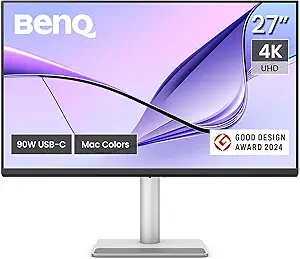 | Best for Calibrated P3 Color Gamut & Ergonomics | Display Size: 27 inches | Resolution: 3840 x 2160 (4K) | Color Gamut: P3 | VIEW ON AMAZON | See Our Full Breakdown |
| ASUS ProArt PA32QCV 32-Inch 6K DCI-P3 Thunderbolt 4 Monitor for Mac |  | Ultimate Professional Creative Display | Display Size: 32 inches | Resolution: 6016 x 3384 (6K) | Color Gamut: 98% DCI-P3, 100% sRGB | VIEW ON AMAZON | See Our Full Breakdown |
| thunderbolt monitor for macbook | Display Size | Resolution | Connectivity | Power Delivery |
|---|---|---|---|---|
| INNOCN 27-Inch 4K USB-C Monito | 27 inches | 3840 x 2160 (4K UHD) | USB-C, HDMI, DisplayPort, 3.5mm Audio Jack | — |
| Apple Studio Display with Stan | 27 inches | 5K Retina | — | — |
| BenQ PD3225U 32 Inch 4K IPS Mo | 32 inches | 4K UHD | Thunderbolt 3, USB-C, USB Hub | 85W |
| BenQ MA270U 27” 4K Monitor for | 27 inches | 3840 x 2160 (4K) | 2 USB-C, 2 HDMI | 90W |
| ASUS ProArt PA32QCV 32-Inch 6K | 32 inches | 6016 x 3384 (6K) | Dual Thunderbolt 4, HDMI 2.1, DisplayPort 1.4, USB Hub | Up to 96W |
More Details on Our Top Picks
INNOCN 27-Inch 4K USB-C Monitor for Laptop MacBook/Mac mini
This 27-inch 4K monitor shines with a vibrant IPS panel and HDR400 support, offering detailed images for work or entertainment. Its multiple connectivity options, including USB-C, HDMI, and DisplayPort, make it flexible for various setups. The ergonomic stand with tilt, height, and pivot adjustments ensures comfortable use. However, the 60Hz refresh rate limits gaming performance, and HDR benefits depend on content quality. It’s an excellent choice for users seeking good quality at an accessible price but not for those needing high-refresh gaming or advanced HDR.
Pros:- Vivid 4K UHD display with wide viewing angles
- Multiple versatile connectivity options including USB-C and HDMI
- Ergonomic stand with adjustable tilt, height, and pivot
- Built-in speakers for convenience
Cons:- Limited to 60Hz refresh rate, not suited for fast-paced gaming
- HDR performance varies depending on content
- No DVI or VGA ports
Best for: Budget-conscious users who want a versatile, high-resolution monitor for general use and multimedia.
Not ideal for: High-end gamers or users needing professional color calibration for critical workflows.
- Display Size:27 inches
- Resolution:3840 x 2160 (4K UHD)
- Panel Type:IPS
- Brightness:400 nits
- Contrast Ratio:1000:1
- Color Depth:1.07 billion colors
- Refresh Rate:60Hz
- HDR:HDR 400
- Connectivity:USB-C, HDMI, DisplayPort, 3.5mm Audio Jack
Our verdict“A solid, affordable 4K monitor that balances image quality and connectivity for everyday use.”
Apple Studio Display with Standard Glass and Tilt-Adjustable Stand
The Apple Studio Display offers a stunning 5K Retina resolution with P3 wide color support, making it ideal for creative professionals needing precise visuals. Its built-in 12MP camera and six-speaker spatial audio elevate video calls and media consumption to a new level. Multiple Thunderbolt 5 ports facilitate fast data transfer and charging, simplifying desk setup. The main tradeoff is its premium price, which might be a barrier for casual users, and the stand is sold separately—adding to the overall cost. Its design and seamless macOS integration make it a perfect choice for dedicated Apple users who value quality and aesthetics above all.
Pros:- High-resolution 5K Retina display with vibrant colors
- Excellent built-in camera and audio for video calls
- Multiple Thunderbolt 5 ports with high data transfer and charging
- Adjustable tilt stand for comfortable viewing
Cons:- Stand and VESA mount sold separately
- Premium price may be too high for some
- Limited to Mac compatibility
Best for: Creative professionals and Mac enthusiasts seeking top-tier display quality and seamless integration.
Not ideal for: Budget-conscious buyers or users requiring VESA compatibility without extra purchases.
- Display Size:27 inches
- Resolution:5K Retina
- Brightness:600 nits
- Color Support:1 billion colors
- Camera:12MP Center Stage
- Speakers:Six speakers with spatial audio
- Ports:Two Thunderbolt 5, two USB-C
- Stand:Tilt-adjustable
Our verdict“A premium, beautifully designed monitor that delivers exceptional visuals and seamless Apple ecosystem integration.”
BenQ PD3225U 32 Inch 4K IPS Monitor for MacBook with Thunderbolt, Calibrated Color, USB-C, KVM Switch
This 32-inch monitor from BenQ combines a large workspace with factory calibration and wide color coverage, including 98% P3 and 100% sRGB, making it a favorite for creative professionals. Thunderbolt 3 connectivity with 85W power delivery simplifies your setup, while the ergonomic stand supports multiple adjustments. The inclusion of a KVM switch allows for easy switching between multiple devices, streamlining workflows. The main drawback is its higher price and size, which might be too large for small desks, plus it’s optimized for Mac but not solely limited to it.
Pros:- Excellent color accuracy with wide P3 and sRGB coverage
- Versatile Thunderbolt 3 with 85W charging
- Ergonomic stand with multiple adjustments
- Supports daisy chaining for multi-monitor setups
Cons:- High price point
- Large size may not fit small desks
- Requires compatible Mac devices for full features
Best for: Professionals needing high color fidelity, multiple device connectivity, and large screen space.
Not ideal for: Casual users or those with limited desk space seeking smaller monitors.
- Display Size:32 inches
- Resolution:4K UHD
- Panel Type:IPS
- Contrast Ratio:2000:1
- Color Coverage:98% P3, 100% sRGB
- Color Accuracy:Delta E ≤ 2
- Connectivity:Thunderbolt 3, USB-C, USB Hub
- Power Delivery:85W
Our verdict“A professional-grade monitor with exceptional color and connectivity features, suited for demanding workflows.”
BenQ MA270U 27” 4K Monitor for MacBook with USB-C, P3 Color Gamut, Adjustable Stand
The BenQ MA270U provides a calibrated 4K display with P3 wide color gamut, making it ideal for MacBook users who prioritize color accuracy. Its dual USB-C ports support 90W power delivery, simplifying cable management by combining display and charging functions. The stand offers height, tilt, swivel, and pivot adjustments to suit ergonomic preferences. The main limitation is its focus on Mac compatibility for optimized color matching and its higher cost compared to more general-purpose monitors. It’s best suited for creative professionals who need calibrated visuals with flexible ergonomics.
Pros:- Calibrated for Mac with vibrant P3 color support
- Single USB-C for display and 90W power delivery
- Adjustable stand for ergonomic comfort
- Vivid, color-accurate display
Cons:- Limited to Mac for full color matching
- No built-in speakers
- Higher price due to professional features
Best for: Mac users demanding accurate color reproduction and flexible ergonomic options.
Not ideal for: Budget shoppers or users requiring non-Mac-specific compatibility.
- Display Size:27 inches
- Resolution:3840 x 2160 (4K)
- Color Gamut:P3
- Connectivity:2 USB-C, 2 HDMI
- Power Delivery:90W
- Stand Adjustments:Height, tilt, swivel, pivot
Our verdict“An excellent choice for Mac-centric workflows needing calibrated visuals and flexible ergonomics.”
ASUS ProArt PA32QCV 32-Inch 6K DCI-P3 Thunderbolt 4 Monitor for Mac
The ASUS ProArt PA32QCV offers a staggering 6K resolution in a 32-inch form factor, designed for professionals needing ultra-precise color accuracy and detail. Its wide DCI-P3 and sRGB coverage, factory calibration, and Thunderbolt 4 support make it a powerhouse for high-end creative workflows. The ergonomic stand and extended warranty add further value. However, its high price and large footprint make it less suitable for casual or small-desk setups. This monitor makes the most sense for creative studios or professionals requiring the highest resolution and color fidelity available for Mac users.
Pros:- Exceptional 6K resolution with precise color reproduction
- Wide DCI-P3 and sRGB coverage
- Thunderbolt 4 with high data transfer and charging
- Extended warranty and professional calibration
Cons:- Very high price
- Large size demands ample desk space
- Designed mainly for professional workflows
Best for: Advanced creative professionals requiring ultra-high resolution and comprehensive color accuracy.
Not ideal for: Home users or those with limited budgets or space.
- Display Size:32 inches
- Resolution:6016 x 3384 (6K)
- Color Gamut:98% DCI-P3, 100% sRGB
- Connectivity:Dual Thunderbolt 4, HDMI 2.1, DisplayPort 1.4, USB Hub
- Power Delivery:Up to 96W
- Calibration:Calman Verified, Delta E < 2
Our verdict“A top-tier professional monitor delivering unmatched resolution and color accuracy for demanding creative tasks.”

How We Picked
I selected these monitors based on their compatibility with MacBooks via Thunderbolt or USB-C, ensuring seamless connectivity and charging capabilities. I prioritized resolution, color accuracy, and build quality, especially for creative professionals who need precise visuals. Price ranges and ergonomic features were also considered, along with user reviews and industry reputation. The goal was to find a range of options from budget-friendly to high-end, making it easier for different types of buyers to find a suitable monitor.
Factors to Consider When Choosing Thunderbolt Monitor For Macbook
When selecting a Thunderbolt monitor for your MacBook, it’s important to consider several key factors to ensure compatibility and meet your needs. Resolution, color accuracy, and connectivity are critical for creative professionals, while affordability and ergonomic features matter for everyday users. Size and desk space also influence your choice, especially if you want a large display or multiple screens. This guide will walk you through these considerations to help you make an informed decision.Compatibility and Connectivity
Ensure the monitor has Thunderbolt 3 or 4 ports for seamless integration with your MacBook, providing fast data transfer and charging capabilities. USB-C ports are common, but check if they support Power Delivery to avoid needing separate chargers. Compatibility with macOS features like Target Display Mode (if applicable) can enhance your experience, especially for professional workflows.
Resolution and Color Accuracy
Higher resolutions like 5K or 6K deliver sharper images, crucial for creative work. Color accuracy, measured in color gamut (P3, sRGB, DCI-P3) and calibration, is essential for tasks like photo editing or video production. Decide whether you need professional-grade color fidelity or if a standard 4K display suffices for your use.
Size and Ergonomics
Monitor size impacts workspace and desk space. Larger screens (32 inches or more) offer more room for multitasking but require more space and a suitable viewing distance. Ergonomic adjustments like height, tilt, swivel, and pivot are vital for comfort during prolonged use, especially for creative professionals who spend hours at their desk.
Price and Additional Features
Premium displays with advanced features—like high resolution, professional calibration, and extensive ports—come at higher prices. Budget options may lack some features but still meet basic needs. Consider additional features such as built-in speakers, KVM switches, or factory calibration based on your workflow and budget constraints.
Frequently Asked Questions
Can I use a Thunderbolt monitor with my MacBook Air?
Yes, most modern Thunderbolt monitors are compatible with MacBook Air models that support Thunderbolt 3 or 4, offering fast data transfer, charging, and seamless display integration. Just verify that the monitor includes the appropriate ports and supports Power Delivery if you want to charge your MacBook while connected.
Is a 4K monitor sufficient for professional photo editing on a MacBook?
A 4K monitor can be suitable for photo editing if it offers good color accuracy and supports wide color gamuts like P3. However, for critical color workflows, a higher-end display with professional calibration, such as the BenQ PD3225U or ASUS ProArt, will provide more precise color reproduction and greater confidence in your edits.
Do I need a VESA mount for my Thunderbolt monitor?
Many high-end monitors support VESA mounting, which provides flexibility to mount the display on an arm or wall bracket for ergonomic positioning. Check whether the monitor has VESA compatibility built-in or if an additional VESA adapter is required. This is especially useful for large, professional-grade screens like the ASUS ProArt or BenQ models.
Can I connect multiple monitors via Thunderbolt on my MacBook?
Yes, Thunderbolt ports support daisy chaining multiple compatible monitors, allowing you to expand your workspace efficiently. The BenQ PD3225U and ASUS ProArt both support daisy chaining, but ensure your MacBook and graphics setup can handle the total number of displays you intend to connect.
Are higher resolution monitors worth the extra cost?
Higher resolution monitors like 5K or 6K are beneficial for detailed editing, rendering, and professional workflows that demand precise visuals. However, they come at a premium, and for casual or general use, a 4K display often provides a great balance of clarity and affordability without the extra expense.
Conclusion
For creative professionals and Mac users who prioritize top-tier visuals, the Apple Studio Display or ASUS ProArt PA32QCV are ideal choices, offering exceptional resolution and color accuracy. Those seeking a versatile, professional-grade monitor with extensive connectivity will find the BenQ PD3225U to be a compelling option. Budget-conscious buyers or casual users will appreciate the INNOCN 27-Inch 4K for its value and flexibility, while Mac-centric professionals needing calibrated visuals and high resolution might prefer the BenQ MA270U. Ultimately, your selection hinges on your specific workflow, space, and budget constraints.
Fall Picks
fall essentials
As an affiliate, we earn on qualifying purchases.