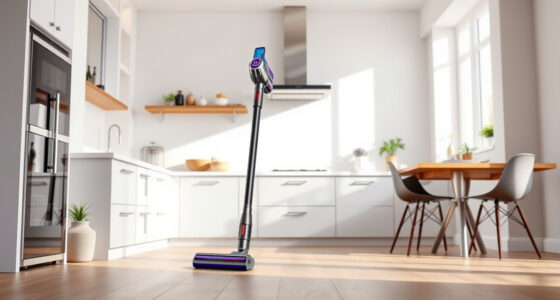
Maintaining your Dyson V15 Detect is essential for ensuring it continues to deliver powerful, efficient cleaning. Regular cleaning of filters, brushes, and other components can prevent performance issues and extend the lifespan of your vacuum. This guide provides clear, practical steps to clean your Dyson V15 Detect thoroughly and safely.

Get home appliances delivered free with Prime
- Fast, free delivery on millions of items
- Prime Video, Amazon Music and more included
- Member-only deals all year
Follow these instructions carefully to keep your vacuum operating at peak performance, and troubleshoot common issues with confidence.
Key Takeaways
| Regular Filter Cleaning | Pre-filters and V10 filters should be cleaned every 2-3 months. |
| Emptying the Bin | Empty the dust bin after each use to prevent clogging. |
| Cleaning the Brush Bar | Remove hair and debris from the brush to maintain suction. |
| Use Proper Attachments | Utilize compatible tools like crevice attachments for hard-to-reach spots. |
| Check for Blockages | Inspect and clear obstructions in the wand and nozzle. |
Step 1: Power Down and Unplug
- Turn off your Dyson V15 Detect and unplug it from the charging station or power outlet.
- Ensure the vacuum is cool and has not been in use recently to prevent injury.
Step 2: Remove and Clean the Dust Bin
- Press the bin release button to detach the dust bin from the vacuum.
- Empty the contents into the trash, and rinse the bin with water if necessary.
- Allow the bin to air dry completely before reattaching.
Step 3: Clean or Replace the Filters
Remove the pre-filters or V10 filters as per your model’s instructions. Rinse them under cold water, gently squeezing out dirt. Let them air dry completely for at least 24 hours before reinstalling. Replace filters if they are damaged or excessively dirty.
Step 4: Check and Clear Blockages
- Inspect the wand, nozzle, and brush bar for any debris or hair entanglement.
- Use a dry cloth or a small brush to remove stubborn dirt and hair.
- If needed, detach parts to access hard-to-reach areas and clear obstructions.
Step 5: Clean Attachments and Brush Bar
Detach the brush bar if possible and remove hair or debris wrapped around it. Use scissors carefully to cut away hair if necessary. Wipe attachments with a damp cloth and dry thoroughly.
The Products in This Guide
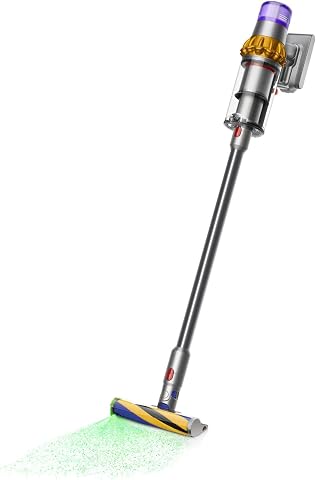
Dyson V15 Detect Total Clean Extra
- ✔ Battery Life: 60 mins
- ✔ Weight: 7.4 lbs
- ✔ Filter Type: Pre-filter and V10 filters

LANMU Crevice Tool Vacuum Attachments Compatible
- ✔ Material: Plastic
- ✔ Compatibility: Multiple Dyson models
- ✔ Length: 20 inches
Dyson V15 Detect Total Clean Extra
The Dyson V15 Detect Total Clean Extra offers cutting-edge technology, including an LCD screen that shows debris and maintenance alerts. Its deep-clean capabilities reveal invisible dust and adapt power based on debris, making it a top choice for thorough home cleaning.
Pros:
- Powerful suction with 100% more power
- Intelligent debris detection
- Long 60-minute runtime
- LCD screen displays real-time data
Cons:
- Refurbished units require extra attention to maintain
- May be heavier than handheld models
- Requires regular filter cleaning
Best for: Whole-home deep cleaning and advanced dust detection
Not ideal for: Light cleaning tasks or small apartments
Bottom line: A top-tier vacuum that combines power, intelligence, and durability.
LANMU Crevice Tool Vacuum Attachments Compatible
The LANMU Crevice Tool Vacuum Attachments are compatible with a variety of Dyson models, including the V15 Detect. Its slender profile makes it perfect for cleaning tight corners, sofa cushions, or car interiors.
Pros:
- Narrow nozzle for tight spaces
- Compatible with multiple Dyson models
- Flexible and easy to maneuver
- Effective for detailed cleaning
Cons:
- May be too slim for larger debris
- Requires proper attachment to vacuum
Best for: Cleaning corners, upholstery, and car interiors
Not ideal for: Large debris or broad surface cleaning
Bottom line: A versatile tool for reaching the smallest and hardest spots.
Frequently Asked Questions
How often should I clean the filters on my Dyson V15 Detect?
It is recommended to rinse the filters every 2-3 months, or more frequently if used heavily. Allow them to dry completely before reinstalling.
Can I wash the dust bin?
Yes, the dust bin can be rinsed with water. Make sure it is fully dry before reattaching to prevent mold or damage.
What should I do if my vacuum isn’t picking up debris effectively?
Check and clean the filters, empty the dust bin, and inspect for blockages or tangled hair in the brush bar and wand.
Is it safe to clean the vacuum with water?
Only the dust bin and filters should be rinsed with water. Avoid wetting the motor or electronic components to prevent damage.
Keep Your Dyson V15 Detect Performing at Its Best
Regular cleaning and maintenance of your Dyson V15 Detect ensure it maintains optimal suction and dust detection capabilities. Follow these steps routinely to prevent issues and prolong the life of your vacuum. Proper care not only improves cleaning results but also extends the lifespan of your device, keeping your home spotless with less hassle.
Affiliate disclosure: As an Amazon Associate we earn from qualifying purchases. Prices and availability are accurate as of the time of publishing.
Fall yard work Picks
leaf blowers
As an affiliate, we earn on qualifying purchases.