
Searching for the best ergonomic mouse can feel overwhelming with so many options promising comfort and reduced strain. The Logitech MX Vertical stands out as the overall top choice due to its proven design that minimizes muscle fatigue. For those seeking a more budget-friendly alternative, the Anker Vertical Ergonomic Mouse offers solid performance at a lower price, though it may lack some premium features. Another standout is the Logitech MX Master 4 for users who want advanced performance alongside ergonomic benefits. Keep in mind, tradeoffs often involve balancing comfort with features or price. Continue reading for a detailed breakdown of these options and what makes each unique.
Key Takeaways
- The top ergonomic mice focus on vertical design to reduce wrist strain.
- Wireless connectivity options like Bluetooth and USB receivers are common, but may affect latency.
- Adjustable DPI and programmable buttons enhance usability for different tasks.
- Build quality and materials vary, impacting long-term comfort and durability.
- Price ranges reflect differences in features, build, and advanced ergonomics.







More Details on Our Top Picks
Logitech MX Vertical Wireless Mouse – Ergonomic Design Reduces Muscle Strain, Move Content Between 3 Windows and Apple Computers, Rechargeable, Graphite
This mouse stands out for its scientifically-engineered 57° vertical angle that significantly reduces wrist pressure, making it ideal for prolonged use. Compared to the Anker Vertical Mouse, it offers a more natural handshake position and a high-precision 4000 DPI sensor that minimizes hand movement, lowering fatigue. While the MX Vertical provides excellent multi-device connectivity and a long battery life of up to four months, it is bulkier and commands a higher price. The textured surface and ergonomic shape suit larger hands well, and the device has been tested and approved by ergonomists—offering peace of mind for ergonomic benefits. The tradeoff is its size and higher cost, which might not suit users with smaller hands or budget constraints.
Pros:- Ergonomist-approved design with a natural handshake position
- High-precision 4000 DPI sensor reduces hand movement and fatigue
- Multi-device pairing with quick device switching
Cons:- Bulky size may be uncomfortable for smaller hands
- Higher price point compared to simpler vertical mice
- Coating can migrate over time, affecting appearance
Best for: Large-handed professionals seeking a high-performance ergonomic mouse for long work sessions.
Not ideal for: Users with small hands or those seeking a budget-friendly option, as its size and price may be unsuitable.
- Connectivity Technology:Bluetooth, USB receiver
- Wireless Operating Distance:10 meters
- Maximum Sensitivity:4000 DPI
- Battery Life:Up to 4 months
- Hand Orientation:Right-handed
- Compatible Devices:Windows, macOS, iPadOS, Linux
Bottom line: This pick is perfect for users with larger hands or those prioritizing ergonomic science and multi-device connectivity.
Anker 2.4G Wireless Vertical Ergonomic Optical Mouse for Work, Multi-Device Connectivity, 800/1200 /1600 DPI, 5 Buttons for Laptop, Desktop, PC – Black
This mouse is a smart choice for those new to ergonomic mice, offering a simple, effective design that alleviates wrist strain with a comfortable ‘handshake’ grip. Unlike the Logitech M720, it provides a more straightforward ergonomic shape without additional programmable buttons or advanced features, making it easier for beginners to adapt. Its DPI options (800/1200/1600) ensure smooth control across various surfaces, and the wireless connection is reliable within a 5-meter range. The mouse’s lightweight and compact form make it portable, but its plastic build feels less durable compared to high-end options. The main tradeoff is fewer customization options and a basic design, which might not satisfy advanced users or those needing extensive programmability.
Pros:- Ergonomic ‘handshake’ design reduces wrist pressure
- Simple, intuitive to use for beginners
- Reliable wireless connection with a 5-meter range
Cons:- Build feels less durable than premium mice
- Limited customization and programmable buttons
- No advanced features like adjustable DPI or multi-device switching
Best for: New users seeking a comfortable, easy-to-use ergonomic mouse for daily work or casual use.
Not ideal for: Experienced professionals or gamers who need advanced features or durability, as it offers limited customization and build quality.
- Connectivity Technology:2.4G wireless
- DPI Settings:800/1200/1600
- Range:5 meters
- Number of Buttons:5
- Battery Life:Not specified
- Hand Orientation:Right-handed
Bottom line: This mouse is well-suited for newcomers to ergonomic design seeking comfort without complexity.
Logitech Ergo M575S Wireless Trackball Mouse, Wireless Ergonomic Mouse with Bluetooth and Encrypted Dongle, Comfortable Thumb Control, Precise and Smooth Tracking, for PC/Mac – Graphite Blue Ball
The Ergo M575S excels for users with limited desk space or those who prefer a stationary mouse with minimal hand movement. Its thumb-controlled trackball allows precise navigation without moving the entire arm, which reduces muscle strain—especially beneficial for users with wrist or forearm discomfort. Compared to traditional vertical mice like the Anker, it offers a unique form factor that stays still, freeing up more space. The mouse supports both Bluetooth and encrypted dongle connection, with an impressive 18-month battery life, making it highly convenient. However, the learning curve can be steep for new users, and some might find the thumb control less intuitive initially. Its compact size and trackball mechanism make it ideal for small setups but less suitable for users who prefer full hand movement or require extensive button customization.
Pros:- Compact, space-saving design with thumb control
- Supports Bluetooth and encrypted USB connections
- Long battery life of 18 months
Cons:- Steep initial learning curve for new users
- Limited button customization options
- Less intuitive than traditional mice for some users
Best for: People with small desks or those needing a stationary, space-efficient ergonomic mouse.
Not ideal for: Users who prefer traditional mice with full hand movement or extensive button customization, as it relies on thumb control and has limited programmable buttons.
- Connectivity Technology:Bluetooth, USB dongle
- Battery Life:18 months
- Tracking Technology:Optical with thumb control
- Number of Buttons:3 customizable buttons
- Hand Orientation:Right-handed
- Compatible Devices:Windows, Mac
Bottom line: This mouse is ideal for space-conscious users who want ergonomic comfort with minimal desk footprint.
ProtoArc Ergonomic Mouse, EM11 NL Bluetooth Rechargeable Wireless Vertical Mouse, 3 Multi-Device Connectivity for Computer/PC/Laptop, 2.4GHz USB-A Optical Mice for Windows, Mac OS, Blue
The ProtoArc EM11 NL shines for multi-device users who need seamless switching among several computers. Its dual Bluetooth 5.0 and 2.4Ghz USB-A connection support up to three devices simultaneously, making it perfect for multitasking environments. The ergonomic vertical design ensures a natural wrist and forearm position, reducing strain during prolonged use. Its rechargeable 500mAh battery adds convenience, and the compact size makes it suitable for users with small to medium hands. Compared with the Logitech M720, it offers similar multi-device functionality but with a straightforward, no-frills ergonomic shape. The main tradeoff is that it lacks advanced customization and programmable buttons, potentially limiting flexibility for power users. Its compatibility with Windows, Mac, and Android broadens its versatility.
Pros:- Supports up to 3 devices with easy switching
- Ergonomic vertical design for wrist comfort
- Rechargeable battery with USB Type-C
Cons:- Limited button customization
- Smaller size may not suit larger hands
- Basic feature set without advanced controls
Best for: Professionals managing multiple devices who want a comfortable, ergonomic mouse with easy switching.
Not ideal for: Users who require extensive button customization or larger hand support, as its size and feature set are more basic.
- Connectivity Technology:Bluetooth, USB-A
- Battery Capacity:500mAh rechargeable
- DPI Settings:Maximum 1600 DPI
- Number of Buttons:3
- Range:Up to 10 meters
- Hand Orientation:Right-handed
Bottom line: This mouse is perfect for multitaskers needing ergonomic comfort across multiple devices with simple operation.
Logitech M720 Triathlon Multi-Device Wireless Mouse, Bluetooth, USB Unifying Receiver, 1000 DPI, 6 Programmable Buttons, 2-Year Battery, Compatible with Laptop, PC, Mac, iPadOS – Black
The Logitech M720 Triathlon is a reliable, versatile choice for users who switch frequently between multiple computers. Its 6 programmable buttons and the Logitech FLOW feature enable smooth text and file transfer across up to 3 devices, which enhances productivity. The 1000 DPI sensor offers precise control, and the two-year battery life reduces maintenance worries. Compared with the simpler Anker or Anker’s basic design, the M720 provides more customization options and a more refined ergonomic shape suited for long hours. The main tradeoff is that it is larger and slightly heavier, which may be less comfortable for small hands, and the price is higher than entry-level models. Its durability and multi-device features make it ideal for busy professionals managing multiple workflows.
Pros:- Supports multi-device switching with Logitech FLOW
- Six programmable buttons for customization
- Two-year battery life for low maintenance
Cons:- Size may be uncomfortable for small hands
- Higher price compared to basic mice
- Larger footprint may take up more desk space
Best for: Power users who need seamless switching, programmable buttons, and long-lasting performance across multiple devices.
Not ideal for: Small-handed users or those seeking minimalistic, lightweight mice, as it is bulkier and more feature-rich than simpler options.
- Connectivity Technology:Bluetooth, USB Unifying
- DPI:1000
- Battery Life:2 years
- Number of Buttons:6
- Range:Up to 10 meters
- Hand Orientation:Right-handed
Bottom line: This mouse is ideal for multitaskers and professionals who value multi-device control and customization.
Logitech Lift Vertical Ergonomic Mouse, Wireless, Bluetooth or Logi Bolt USB Receiver, Quiet clicks, 4 Buttons, Compatible with Windows/macOS/iPadOS, Laptop, PC – Graphite
This mouse stands out for its innovative 57-degree vertical angle that promotes a natural forearm posture, making it ideal for long hours of work or gaming. Compared to the ProtoArc EM11 NL, it offers a more refined ergonomic shape and customizable buttons, but at a slightly higher price. The quiet clicks and SmartWheel enable seamless, distraction-free operation, while its multi-OS compatibility ensures versatility across devices. The two-year battery life reduces downtime, and connection options via Bluetooth or Logi Bolt USB provide flexibility. However, its size may be less suitable for very small hands, and the premium build involves a higher cost. This pick makes the most sense for users prioritizing comfort and extended use without sacrificing performance.
Pros:- Innovative 57-degree ergonomic angle promotes natural wrist posture
- Wireless connectivity via Bluetooth and Logi Bolt USB
- Customizable buttons and SmartWheel for precision control
- Long-lasting 2-year battery life
Cons:- Higher price point compared to basic ergonomic mice
- Size may be uncomfortable for very small hands or those with different grip styles
Best for: Professionals and gamers who spend many hours at the desk and value a highly adaptable, ergonomic mouse.
Not ideal for: Users with very small hands or those seeking a budget-friendly option, as the design and features come at a premium.
- Connection Technology:Bluetooth, Logi Bolt USB
- Buttons:4
- DPI:4000 fully adjustable
- Battery Life:24 months
- Compatibility:Windows, macOS, iPadOS, Linux
- Weight:125 g
Bottom line: Ideal for users who need a durable, comfortable, and highly customizable mouse for extended use.
ProtoArc Ergonomic Mouse, EM11 NL Bluetooth Rechargeable Wireless Vertical Mouse, 3 Multi-Device Connectivity for Computer/PC/Laptop, 2.4GHz USB-A Optical Mice for Windows, Mac OS, Black
This compact, rechargeable vertical mouse is designed with a natural grip in mind, reducing wrist strain for users with hands under 7.5 inches. In comparison to the Logitech MX Master 4, it offers multi-device connectivity and a more affordable price, though it lacks the advanced haptic feedback and ultra-fast scrolling features. The 3-device pairing supports seamless workflow across different machines, and its ergonomic shape aligns well with smaller palms, providing comfort during long sessions. However, its size may not suit larger hands, and the software customization options are limited. This model makes the most sense for small to medium hand users who need multi-device support and a rechargeable, portable ergonomic option.
Pros:- Designed specifically for small/medium hands
- Supports multi-device Bluetooth and USB-A pairing
- Rechargeable with Type-C port
- Lightweight and portable for travel
Cons:- Limited advanced features compared to higher-end models
- May not fit larger hands comfortably
Best for: Small to medium-sized hand users who frequently switch between multiple devices and need a comfortable, portable mouse.
Not ideal for: People with larger hands or those seeking highly customizable advanced features like haptic feedback or ultra-fast scrolling.
- Connection:Bluetooth, 2.4GHz USB-A
- Buttons:7
- DPI:1000/1600/2400
- Battery:500mAh rechargeable
- Compatibility:Windows, Mac
- Weight:250 g
Bottom line: Best suited for smaller hands and multi-device workflows, with an emphasis on portability and comfort.
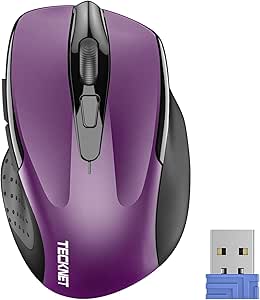
TECKNET Wireless Mouse, 2.4G Ergonomic Optical Mouse, Computer Mouse for Laptop, PC, Computer, Chromebook, Notebook, 6 Buttons, 24 Months Battery Life, 2600 DPI, 5 Adjustment Levels – Purple
This budget-friendly mouse offers a contoured, ergonomic shape with rubber side grips that fit comfortably in the hand, making it an excellent choice for casual or budget-conscious users. Compared to the Logitech M510, it provides similar battery life and a high DPI of 2600 for precise tracking, but with fewer customization options. Its compact design enhances portability, and the five adjustable DPI levels support varied tasks from browsing to detailed work. The 6-button layout adds functionality, though the build quality is less premium, and the plastic may feel less durable over time. This mouse makes the most sense for users who want an ergonomic design without the premium price tag but still need reliable performance.
Pros:- Affordable price point
- Contoured ergonomic shape with rubber grips
- Adjustable DPI up to 2600
- Long battery life of 24 months
Cons:- Less premium build quality
- Limited customization and fewer advanced features
Best for: Budget-conscious users needing an ergonomic mouse for everyday tasks and light use, including students and home office workers.
Not ideal for: Power users or those with larger hands who require more advanced features or a more robust build.
- Connection:2.4Ghz wireless
- Buttons:6
- DPI:800-2600
- Battery Life:24 months
- Compatibility:Windows, Chrome OS, Linux
- Weight:85 g
Bottom line: A reliable, budget-friendly ergonomic mouse suited for light to moderate use and casual users.
This mouse is a classic choice for those seeking a comfortable, full-sized ergonomic design with a broad palm area and soft rubber grips, making it ideal for all-day use. In comparison to the Logitech MX Vertical, it offers a more traditional shape but with less advanced ergonomic technology. The 7 buttons, including back and forward, enhance productivity, while the 1000 DPI laser-grade tracking ensures smooth cursor control on most surfaces. The long battery life of 24 months and the Unifying receiver simplify wireless management. Its straightforward design and reliable performance make it an excellent choice for office workers and casual users, though it lacks the high-tech features of premium mice like haptic feedback or ultra-fast scrolling.
Pros:- Ergonomic full-size shape with soft rubber grips
- Long battery life of 24 months
- Unifying receiver for multiple devices
- 7 programmable buttons
Cons:- Limited advanced features
- Basic DPI setting of 1000 may not suit high-precision tasks
Best for: Office workers and casual users who need a reliable, comfortable mouse that lasts for years without frequent charging.
Not ideal for: Gamer or power users who benefit from higher DPI or customizable advanced features.
- Connection:2.4GHz Unifying Receiver
- Buttons:7
- DPI:1000
- Battery Life:24 months
- Compatibility:Windows, Mac, Linux
- Weight:0.28 lbs
Bottom line: A dependable, comfortable mouse perfect for prolonged daily work and general productivity.
Logitech MX Master 4, Ergonomic Wireless Mouse with Advanced Performance Haptic Feedback, Ultra-Fast Scrolling, USB-C Charging, Bluetooth, Windows, MacOS – Graphite
The MX Master 4 redefines ergonomic mice with its immersive haptic feedback, customizable Actions Ring, and ultra-fast MagSpeed scrolling, making it ideal for creative professionals and power users. Unlike the Logitech M510, which offers basic comfort, the MX Master 4 provides a suite of advanced features that enhance workflow efficiency, such as the ability to assign shortcuts and commands directly to the mouse. Its 8,000 DPI sensor tracks seamlessly on any surface, including glass, and the long-lasting battery supports up to 70 days of use. The build quality is premium, with recycled plastics contributing to sustainability. However, its higher price may be a barrier for casual users, and the feature set might be more than necessary for simple tasks. This mouse makes the most sense for those who value precision, customization, and cutting-edge ergonomics.
Pros:- Advanced haptic feedback for immersive control
- Ultra-fast MagSpeed scroll wheel
- High DPI sensor tracks on any surface
- Sustainable build with recycled materials
Cons:- Premium cost
- Complex setup for users unfamiliar with customization
Best for: Creative professionals, developers, and power users demanding high precision, customization, and ergonomic comfort.
Not ideal for: Budget-conscious users or those requiring only basic functionality, as the high-tech features come at a premium.
- Connection:Bluetooth, USB-C dongle
- Buttons:7
- DPI:8000
- Battery Life:up to 70 days
- Features:Haptic feedback, ultra-fast scroll
- Material:Recycled plastics
Bottom line: Perfect for users who need maximum precision and advanced ergonomic features for demanding workflows.
Logitech M510 Wireless Mouse, 2.4 GHz with USB Unifying Receiver, 1000 DPI Laser-Grade Tracking, 7-Buttons, 24-Months Battery Life, PC/Mac/Laptop – Graphite
This mouse offers a classic ergonomic design with a broad palm area and soft rubber grips, ideal for all-day work sessions. When compared to the MX Master 4, it sacrifices some advanced customization and premium features but makes up for it in simplicity and reliability. The 7 buttons, including back and forward, support productivity, and the 1000 DPI laser tracking provides accurate cursor movement across most surfaces. The long-lasting battery of 24 months reduces interruptions, and the Unifying receiver allows easy device management. Its straightforward, no-frills design is perfect for users who prioritize comfort and durability over high-tech features, though it may not satisfy those needing ultra-high DPI or advanced gesture controls.
Pros:- Ergonomic shape with soft rubber grips
- Long battery life of 24 months
- Unifying receiver for multiple devices
- Reliable laser tracking
Cons:- Limited DPI (1000)
- Lacks advanced customization features
Best for: Office workers and long-term users who prefer a simple, reliable, and comfortable ergonomic mouse.
Not ideal for: Gamers or high-precision users needing DPI settings above 1000 or extensive customization options.
- Connection:2.4GHz Unifying Receiver
- Buttons:7
- DPI:1000
- Battery Life:24 months
- Compatibility:Windows, Mac, Linux
- Weight:0.28 lbs
Bottom line: Suitable for users seeking a durable, comfortable mouse for prolonged daily use without extra bells and whistles.
TECKNET Ergonomic Mouse, Wireless Bluetooth Vertical Mouse, 4800 DPI Optical Tracking, 6 Adjustable DPI, Quiet Clicks, 2.4GHz with USB A Receiver, 12 Months Battery, 6 Buttons, Wide Compatibility
This TECKNET vertical mouse stands out for offering a highly ergonomic design at a very affordable price, making it ideal for those new to vertical mice or on a budget. Compared to premium models like the Logitech Lift, it provides comparable comfort but with fewer premium features and a simpler build. Its adjustable DPI settings (up to 4800) deliver smooth responsiveness across various surfaces, while the quiet clicks minimize disturbance. However, it is designed exclusively for right-handed users and lacks some advanced customization found in higher-end options. The broad compatibility with Windows, Mac, Linux, and ChromeOS guarantees versatility for different setups. The tradeoff is slightly less premium feel and fewer programmable buttons, but for everyday use, it’s a solid choice.
Pros:- Affordable price point with solid ergonomic design
- 6 adjustable DPI levels for versatile sensitivity
- Nearly silent clicks for quiet environments
- Broad compatibility across major OSes
Cons:- Limited to right-handed use only
- Fewer programmable buttons compared to premium models
Best for: Budget-conscious users or beginners seeking ergonomic relief without extra bells and whistles.
Not ideal for: Power users who want extensive customization or ambidextrous design.
- Connectivity Technology:2.4GHz, Bluetooth
- DPI Range:800/1200/1600/2400/3200/4800
- Number of Buttons:6
- Battery Life:12 months
- Range:33 feet
- Compatibility:Windows, Mac, Linux, ChromeOS
Bottom line: This mouse is perfect for users new to ergonomic mice who prioritize comfort at a budget-friendly price.
Logitech Lift Vertical Ergonomic Mouse, Wireless, Bluetooth or Logi Bolt USB Receiver, Quiet clicks, 4 Buttons, Compatible with Windows/macOS/iPadOS, Laptop, PC – Rose
The Logitech Lift makes a strong case as the best choice for users with small to medium hands seeking a natural, upright posture. Its 57-degree vertical design reduces wrist strain more effectively than traditional mice, similar to the Microsoft Sculpt, but with added customization and quiet clicks. The textured grip and snug thumb rest increase comfort during long work sessions, and the wireless connectivity via Bluetooth or Logi Bolt offers seamless multi-device switching. Its four buttons are easy to access, but the limited number of programmable controls might be a drawback for power users. The two-year battery life and compatibility with multiple OS platforms make it a versatile option. The tradeoff is its slightly higher price and smaller size, which may not suit larger hands.
Pros:- Ergonomic shape with 57° tilt for natural wrist posture
- Quiet clicks for distraction-free work
- Multi-device connectivity via Bluetooth or Logi Bolt
- Long battery life with 24 months of use
Cons:- Limited to 4 buttons, less customizable for power users
- Smaller size may not fit larger hands comfortably
Best for: Small to medium-handed professionals who want a comfortable, ergonomic mouse for all-day use.
Not ideal for: Large-handed users who need a more substantial grip or extensive button customization.
- Connectivity Technology:Bluetooth, Logi Bolt USB
- DPI:4000 (adjustable)
- Number of Buttons:4
- Battery Life:24 months
- Range:10 meters
- Compatibility:Windows, macOS, iPadOS, Linux, Chrome OS
Bottom line: Ideal for those with small or medium hands prioritizing comfort and natural alignment over extensive controls.
The LEKVEY Vertical Mouse offers a straightforward ergonomic solution for users new to vertical mice. Its simple design, with three DPI levels (800/1200/1600), provides reliable responsiveness for everyday tasks, matching the functionality of the Anker Vertical Mouse but with a more affordable price. The six buttons, including back/forward navigation, enhance browsing efficiency, though they are less customizable than premium models. Its rechargeable battery lasts over 150 hours of continuous use, eliminating the need for batteries. The mouse’s size is suitable for medium to large hands, but it might feel too bulky for smaller users. The primary tradeoff is the basic feature set, which may not satisfy power users seeking advanced customization or premium materials.
Pros:- Rechargeable with over 150 hours of use
- Simple ergonomic design reduces wrist strain
- Includes back/forward buttons for browsing
- Plug-and-play with no driver installation
Cons:- Limited customization and fewer advanced features
- Bulkier design may not suit small hands
Best for: New users or casual professionals needing comfortable, reliable performance without complex features.
Not ideal for: Advanced users requiring extensive button programming or a more refined build quality.
- Connectivity Technology:Wireless 2.4G
- DPI Levels:800/1200/1600
- Number of Buttons:6
- Battery Life:150+ hours
- Range:10 meters
- Compatibility:Windows, Mac
Bottom line: A solid choice for beginners or general users seeking comfort and simplicity in a vertical mouse.
acer Ergonomic Mouse Wireless, Vertical Computer Mouse for Office, Ergo Mice Rechargeable for Medium to Large Sized Hands, 2.4GHz USB Receiver, 800/1200/1600 DPI, 6 Buttons for Laptop, PC and Desktop
The acer Ergonomic Vertical Mouse is designed with larger hands in mind, providing a comfortable grip and reducing wrist strain for prolonged office tasks. Its 58° tilt aligns well with the natural hand position, similar to the Microsoft Sculpt, but with a more straightforward feature set. The six buttons, including customizable forward/backward navigation, complement everyday browsing and work activities, though it lacks the extensive customization options of higher-end models. The rechargeable 500mAh battery offers up to 150 hours of use, with a reliable 10-meter wireless range via USB receiver. Its simple ergonomic design makes it suitable for medium to large hands, but smaller users might find it too bulky. The main tradeoff is fewer advanced features and a basic aesthetic.
Pros:- 58° tilt for natural wrist positioning
- Rechargeable battery lasting over 150 hours
- Six functional buttons for browsing and productivity
- Stable 2.4GHz wireless connection
Cons:- Limited customization compared to premium mice
- Bulkier size may not suit small hands
Best for: Users with medium to large hands seeking a comfortable, office-ready ergonomic mouse.
Not ideal for: Small-handed users or those needing highly customizable controls.
- Connectivity Technology:Wireless 2.4GHz USB
- DPI:800/1200/1600
- Number of Buttons:6
- Battery Life:150 hours
- Range:10 meters
- Compatibility:Laptop, PC, Desktop
Bottom line: Ideal for larger-handed office workers who want comfort without extra complexity.

How We Picked
To determine the best ergonomic mice, I evaluated each product based on key factors that impact daily comfort and usability. Performance metrics like DPI range and tracking accuracy were considered, along with ergonomic design features that reduce muscle strain. Build quality and material choices were assessed for durability and comfort, while connectivity options and battery life influenced practicality. Value was also a major criterion, balancing cost against features and comfort benefits. These criteria helped rank the mice, emphasizing models that best combine ergonomic benefits with user-friendly features for a variety of needs.Factors to Consider When Choosing Best Ergonomic Mouse
Choosing the right ergonomic mouse involves more than just comfort. It’s important to consider how the design supports your specific use case, whether for long work hours, gaming, or general use. Additional factors like adjustability, connectivity, and build quality can significantly impact your experience. Being aware of common pitfalls, such as sacrificing comfort for extra buttons or opting for a size that doesn’t fit your hand, can save you from buyer’s remorse. Understanding these broader considerations ensures you select a mouse that genuinely reduces strain and enhances productivity.Ergonomic Design & Fit
Not all ergonomic mice are the same, and finding a shape that fits your hand comfortably is essential. Vertical mice are popular because they promote a natural wrist position, but the size and contour vary. A mouse that’s too small or too large can cause discomfort over time. Look for models with a shape that matches your hand size and grip style, whether palm, claw, or fingertip. Remember, an ergonomic design that doesn’t fit well can negate the benefits of a specialized shape, so prioritize comfort above all.
Adjustability & Customization
Features like adjustable DPI, programmable buttons, and customizable grips allow you to tailor the mouse to your specific needs. DPI settings impact cursor sensitivity, which can improve precision or ease navigation. Programmable buttons can streamline workflows, especially for repetitive tasks. However, more customization options often increase complexity and price. Consider what features are truly necessary for your work or hobbies, and avoid overpaying for bells and whistles you won’t use regularly.
Connectivity & Compatibility
Wireless options like Bluetooth and USB receivers are common, offering freedom of movement, but they can introduce latency or connection issues depending on the setup. Some mice support multi-device switching, beneficial if you work across multiple computers. Compatibility with your operating system and existing hardware is crucial, so double-check device support before purchasing. Also, consider battery life—models with rechargeable batteries reduce ongoing costs and inconvenience, especially if you prefer a clutter-free workspace.
Build Quality & Durability
Material choice and construction influence how long your mouse will last and how comfortable it remains over time. High-quality plastics, textured grips, and sturdy buttons matter, especially for daily use. Cheaper models may feel flimsy or degrade quickly, leading to discomfort or failure. Think about how much use your mouse will get and whether investing in a more durable, premium build is worthwhile for your needs—particularly if you require a reliable, long-term ergonomic solution.
Price & Value
The cost of ergonomic mice varies widely. While premium models offer advanced features and superior comfort, budget options can still provide meaningful ergonomic benefits. Balance your budget with the features that matter most—if you spend hours at your desk, investing in a higher-end model makes sense. Conversely, for casual or occasional use, a more affordable option might suffice. Remember, a higher price often correlates with better build quality and more refined ergonomic design, but not always.
Frequently Asked Questions
Can an ergonomic mouse really reduce wrist pain?
Yes, ergonomic mice are designed to promote a more natural hand and wrist position, which can significantly reduce strain and discomfort over long periods. By minimizing awkward angles and supporting the hand’s natural curve, these mice help prevent repetitive strain injuries like carpal tunnel syndrome. However, proper usage and regular breaks are also important factors in reducing wrist pain, so ergonomic design is one part of an effective strategy.
Is a vertical mouse suitable for gaming?
Vertical mice can be used for gaming, but they often lack some of the rapid response features or button configurations found in gaming mice. If gaming performance and speed are priorities, look for ergonomic models with high DPI, customizable buttons, and fast tracking. Some gamers prefer vertical mice for comfort during extended play sessions, but for competitive or fast-paced games, a traditional gaming mouse might still be preferable.
How important is DPI adjustment in an ergonomic mouse?
DPI adjustment is quite important because it determines how sensitive the mouse is to movements. A higher DPI allows for quicker cursor movement with less physical effort, which can reduce strain. Conversely, lower DPI settings offer more precise control, useful for detailed work. Many ergonomic mice feature adjustable DPI, enabling you to switch settings based on your task, which enhances comfort and efficiency.
Should I choose a wired or wireless ergonomic mouse?
Wireless ergonomic mice offer greater freedom of movement and reduce cable clutter, which can enhance comfort. However, they rely on batteries or recharging, and some users may experience latency or connectivity issues. Wired mice eliminate these concerns and often provide a more consistent connection, which can be important for accuracy. Your choice depends on your workspace setup and personal preference—both can be ergonomic if chosen correctly.
Are expensive ergonomic mice worth the investment?
Higher-priced ergonomic mice often feature better materials, more adjustable settings, and refined designs that can provide superior comfort and durability. If you spend many hours at your desk or suffer from discomfort with standard mice, investing in a premium model can be worthwhile. However, for casual use or light workloads, more affordable options still offer meaningful ergonomic benefits, making the value of the investment relative to your usage and needs.
Conclusion
For those seeking the best overall ergonomic mouse, the Logitech MX Vertical strikes a balance between comfort, performance, and build quality. If you prioritize value, the Anker Vertical Ergonomic Mouse offers solid features at a budget-friendly price. Premium buyers aiming for advanced functionality and top-tier ergonomics should consider the Logitech MX Master 4. Beginners or casual users will find the Logitech Lift Vertical Mouse intuitive and comfortable. For specific needs like multi-device workflows or quiet operation, options like the ProtoArc EM11 NL or TECKNET Bluetooth Mouse provide tailored solutions. Select based on your workspace, usage habits, and ergonomic priorities to find the best fit.