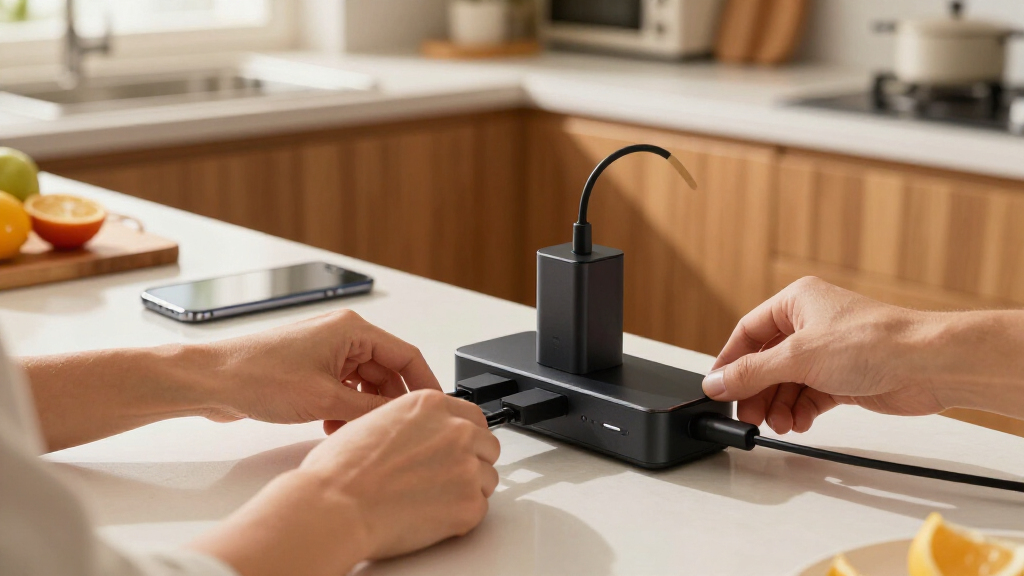

Multi-port USB charging stations solve one problem: too many devices, too few outlets. After comparing 14 leading models on power output, port configuration, and price per port, the 245W 10-Port GaN Charging Station stands out as the best overall pick for its rare mix of high total wattage, included cables, and smart power distribution. Budget shoppers should look at the 50W 10-Port Station, which charges a classroom or family’s worth of devices for a fraction of the price, while the Anker 112W 6-Port Desktop Charger is the better choice if you want brand-name reliability for a smaller setup. The core tradeoff in this category is simple: cheap 50W stations split power across many slow ports, while premium 200W+ GaN hubs can fast-charge multiple laptops at once but cost three to five times more. Continue reading for the full breakdown of what each model does well, where each one falls short, and which station fits your specific device load.

Get home appliances delivered free with Prime
- Fast, free delivery on millions of items
- Prime Video, Amazon Music and more included
- Member-only deals all year
Complete the kit


Key Takeaways
- Total wattage divided by port count matters more than port count alone — the 50W 12-port station delivers barely 4W per port, while the 245W 10-port model can fast-charge laptops on every USB-C port.
- Only five of the fourteen models (the 245W, 200W GaN III, 320W, 380W, and 100W hubs) can charge a MacBook at or near full speed; the rest are phone-and-tablet stations only.
- GaN technology appears in every high-wattage pick and explains both the price gap and the size gap — the 200W GaN III is smaller than some 50W stations despite quadruple the output.
- Anker‘s two entries cost more per port than generic rivals but back it with a longer warranty and more consistent power delivery, a tradeoff worth making for buyers who keep devices plugged in overnight.
- 2-pack kits (the 60W Max and 60W 5-port bundles) are the hidden value plays here, effectively halving the per-station cost if you need to equip two rooms, desks, or locations.


| multi-port USB charging station | Ports | Input Voltage | Cable Length |
|---|---|---|---|
| 50W 10-Port USB Charging Stati | — | 100-240V | — |
| 2-Pack USB C Fast Charger Bloc | — | 240V | — |
| USB C Charging Station 10 Port | — | — | — |
| USB C Charger Block | — | 240V | 5ft |
| USB C Charger 200W GaN III 8-P | — | — | 1.5 meters |
| 50W 12-Port USB Charging Stati | 12 (6 USB-C, 6 USB-A) | — | 1.4 meters |
| Anker PowerPort 6 60W 6-Port U | 6 USB-A | 100-240V | 5ft / 150cm |
| USB Charging Station 50W 10 Po | 10 | AC 100-240V | — |
| 12 Ports Aluminum Alloy USB-C | 12 (8 USB-C, 4 USB-A) | — | 1.5 meters |
| 10-Port USB-A Power Strip Char | 10 USB-A | 100-240V AC | 3.3 feet |
| 10-Port USB Wall Charger Stati | 10 USB | 100-240V 50-60Hz | — |
| USB C Fast Charger Block | 3 USB-C, 2 USB-A (per unit) | — | — |
| 320W USB-C Charger Block | 5 USB-C, 5 USB-A | — | 5ft / 1.5m |
| Anker 112W 6-Port Desktop Char | 3 USB-C, 3 USB-A | — | — |
More Details on Our Top Picks
50W 10-Port USB Charging Station with 6 USB-A and 4 USB-C Ports
When the goal is simply keeping a household of phones, earbuds, and tablets alive overnight, raw port count at a low price beats wattage — and that’s exactly the trade this model makes. Ten ports split across six USB-A and four USB-C handle a busy kitchen counter, and the automatic device detection spreads power sensibly. But 50W across ten devices means roughly 5W per port when everything is plugged in, so this is a slow-and-steady charger, not a fast one. Compared with the USB C Charging Station 10 Port 245W, it gives up laptop support and serious speed in exchange for a much lower price. The UL certification and anti-fire housing are welcome reassurance at this budget tier, where safety shortcuts are common.
Pros:- Ten ports for the price of a single-device fast charger
- UL certified with anti-fire PC housing and surge protection
- Mixed USB-A and USB-C layout fits older and newer cables
- Compact enough to stash in a bag for group travel
Cons:- 50W total is thin when all ten ports are occupied — expect slow charging
- No per-port power ratings published, so planning around speed is guesswork
- Not suitable for laptops or high-wattage devices
Best for: Families with many small devices — phones, earbuds, kids’ tablets — that charge overnight and don’t need speed
Not ideal for: Anyone charging laptops or wanting fast top-ups; 50W total won’t move a MacBook or quickly revive a dead phone alongside other gear
- Total Ports:10
- USB-A Ports:6
- USB-C Ports:4
- Total Power Output:50W
- Input Voltage:100-240V
- Material:Anti-fire PC
- Certification:UL
Our verdict“Buy this if you charge many small devices overnight and care more about port count than speed; skip it if a laptop is ever on the menu.”
2-Pack USB C Fast Charger Block 60W Max Output Multiport Charging Station
Getting two five-port chargers for the price of one desktop station is the whole argument here, and it’s a good one for households that charge in more than one room. Each unit pairs two USB-C and three USB-A ports with up to 60W of output — enough to fast-charge a phone while topping up accessories, though not enough for a power-hungry laptop at the same time. Compared with the 6-Port GaN 100W Charger Block, this pair trades per-unit power and port count for flexibility: you can leave one at home and drop the other in a travel bag. The absence of cables in the box is a genuine annoyance, so factor that cost in. Realistically, one unit handles a bedside table; two cover a couple’s setup nicely.
Pros:- Two chargers in one purchase covers two rooms or home-plus-travel
- 5 ports per unit (2 USB-C, 3 USB-A) fits a phone, watch, earbuds, and tablet
- Compact wall-plug format saves outlet and counter space
- Fire-resistant ABS+PC construction
Cons:- 60W per unit disappears quickly across five ports
- No charging cables included
- Output tops out at 5V/3A, so no laptop-grade voltages
Best for: Couples or roommates who want multi-device charging in two separate locations without buying two premium hubs
Not ideal for: Single-desk power users — one 100W desktop unit like the 6-port GaN model delivers more headroom in one place for similar money
- Quantity:2-pack
- Ports Per Unit:5 (2 USB-C, 3 USB-A)
- Max Output Per Unit:60W
- Output:5V / 3A
- Input Voltage:240V
- Plug Type:Type A, 2-pin (North American)
- Material:ABS + PC, fire-resistant
Our verdict“The smart buy when you need charging in two places at once; the wrong buy if all your gear lives at one desk.”
USB C Charging Station 10 Port with 4 Cables, 245W GaN Charger Block
This is the charger for the desk where a laptop, a tablet, and a pile of phones all need power at once. With 245W on tap, six USB-C ports (one delivering a genuine 65W) and four USB-A ports, it clears the bar that budget ten-port units like the 50W 10-Port Station can’t touch. The bundled cables — including a 6.6ft USB-C — mean it works out of the box rather than after a cable-box dig. The catch: only the first USB-C port reaches 65W, so a second laptop will trickle-charge at 20W. Against the 200W GaN III 8-Port, it offers more ports and included cables but less raw laptop-grade output, which makes it the better fit for one-laptop homes with lots of accessories.
Pros:- 245W total output keeps all ten ports genuinely useful
- Dedicated 65W port supports laptop charging
- Four included cables plus a 5ft power cord, ready out of the box
- GaN construction keeps it compact despite the wattage
Cons:- Only one port delivers laptop-grade 65W power
- Reported misprints in some instruction manuals
- Per-device charging details for less common gadgets are sparse
Best for: Households or shared offices with one laptop plus many phones, tablets, and accessories to charge together
Not ideal for: Multi-laptop workspaces — with only one 65W port, two notebooks charging simultaneously means one waits
- Total Ports:10
- USB-C Ports:6 (1x 65W, 5x 20W)
- USB-A Ports:4 (20W each)
- Total Power Output:245W
- Power Cord:5ft
- Included Cables:4 (6.6ft and 3.3ft USB-C)
- Technology:GaN
Our verdict“The best one-plug solution for a single-laptop household drowning in accessories — just don’t expect two notebooks at full speed.”
USB C Charger Block, GaN Fast USB Charging Station Hub with 100W Max, 6-Port
At 3.4 x 2.2 x 0.9 inches, this is the charger that fits unobtrusively on a nightstand or slips into a laptop bag without renegotiating the packing list. The 3+3 USB-C/USB-A split with 100W total is a sensible middle ground: faster than the 50W 10-Port Station for everyday phone-and-tablet duty, though it explicitly doesn’t support laptops, which the similarly-priced 6-port Anker 112W desktop unit can partially manage. The 5ft extension cable is the quiet win here — the hub sits where you want it, not where the outlet dictates. For travelers and minimalists, that footprint-to-capacity ratio is the whole pitch. Just know that six devices drawing simultaneously still split that 100W thin.
Pros:- Genuinely pocketable 3.4 x 2.2 x 0.9 inch footprint
- 100W total output with an even 3 USB-C / 3 USB-A split
- 5ft detachable cable allows flexible desk or bedside placement
- Over-current and overheat protections built in
Cons:- No laptop support despite the 100W headline figure
- Output drops noticeably when all six ports are in use
- Requires a wall outlet — not a power-bank style solution
Best for: Travelers and nightstand minimalists who want six ports without a brick-sized charger dominating the space
Not ideal for: Laptop owners — this model is explicitly not laptop-compatible, unlike the 245W or 200W GaN stations in this roundup
- Total Ports:6 (3 USB-C, 3 USB-A)
- Max Total Power:100W
- Size:3.4 x 2.2 x 0.9 inches
- Cable Length:5ft
- Input Voltage:240V
- Technology:GaN
Our verdict“The right size-first pick for phone-and-accessory charging at home or on the road; laptop users should step up to a higher-wattage GaN station.”
USB C Charger 200W GaN III 8-Port Fast Charging Station Hub
This is the pick I’d point most people toward, because it solves the problem the others only partially address: eight devices charging fast, laptops included, from one outlet. GaN III lets it push up to 65W for a MacBook while the remaining USB-C and USB-A ports keep phones and accessories moving — a capability the 50W 10-Port Station simply lacks and the 245W 10-Port charger limits to a single port. Compared with that 245W rival, this model trades two ports and bundled cables for more flexible laptop-grade power distribution, which matters more in real households with mixed devices. The 1.5-meter attached cord is desk-friendly, though the documentation is thin on multi-device speed splits, and the lack of stated surge protection means pairing it with a decent power strip is a reasonable precaution.
Pros:- 200W across 8 ports with up to 65W for laptops
- GaN III design delivers high wattage in a compact body
- Balanced 4 USB-C / 4 USB-A layout handles mixed cable collections
- 1.5m power cord suits desk and nightstand setups
Cons:- No explicitly stated surge protection or safety certifications
- Multi-device charging-speed breakdowns are poorly documented
- No cables included, unlike the 245W 10-port competitor
Best for: Tech-heavy households or work-from-home desks needing laptops, phones, and tablets charged simultaneously from one outlet
Not ideal for: Buyers on a tight budget or those charging only small devices overnight — the 50W options cover that job for far less
- Total Ports:8 (4 USB-C, 4 USB-A)
- Total Power Output:200W
- Max Single-Port Output:65W (laptop-capable)
- Technology:GaN III
- Cable Length:1.5 meters
- Form Factor:Compact desktop hub
Our verdict“The best all-around station for households that mix laptops with everyday devices — worth the premium unless your needs are purely budget or purely small-gadget.”
50W 12-Port USB Charging Station with 10A Power Output
Twelve ports for under the price of most six-port hubs is the whole story here, and it’s a legitimate story if your devices are mostly phones, earbuds, watches, and e-readers. With an even split of 6 USB-C and 6 USB-A, this option covers mixed cable households better than the all-USB-A 10-Port Power Strip Charger Station, which struggles the moment someone shows up with a modern phone. The tradeoff is thin power sharing: at 50W total across 12 ports, you’re averaging roughly 4W per port when everything is plugged in. That’s fine for overnight charging of accessories, but it can’t compete with the 380W aluminum 12-port station if laptops are in the mix. Compared with the Anker PowerPort 6, you give up brand pedigree and per-port speed to gain double the ports.
Pros:- Highest port count in its price bracket (12 ports)
- Balanced 6 USB-C / 6 USB-A layout suits mixed-device households
- Genuinely compact and light at 150 grams for travel or drawers
- Built-in safety protections across all ports
Cons:- 50W total output is slow when many devices charge at once
- No dedicated high-wattage port for laptops or power-hungry tablets
Best for: Families or classrooms charging many small accessories overnight where port count matters more than speed
Not ideal for: Anyone charging laptops or tablets at full speed — 50W split across 12 ports leaves little headroom per device
- Power Output:50W total
- Ports:12 (6 USB-C, 6 USB-A)
- Max Total Current:10A
- Cable Length:1.4 meters
- Dimensions:13.5 x 6 x 3 cm
- Weight:150 grams
Our verdict“Buy this if you need to charge a dozen small gadgets overnight and speed is not a priority; skip it if any laptop is involved.”
Anker PowerPort 6 60W 6-Port USB Charging Hub
The PowerPort 6 wins on trust rather than raw specs. Anker’s MultiProtect system and UL certification mean you can leave this plugged into a wall permanently without second-guessing, which is exactly why it earns a spot despite having half the ports of the 50W 10-Port Multi-Device Charger. Its 60W budget spread across only six ports gives each device a fairer share of power than the 12-port budget models, so phones finish charging faster in mixed loads. The catch is aging architecture: no USB-C ports and no Quick Charge support, which makes it feel dated next to GaN hubs like the 100W 6-port GaN charger elsewhere in this lineup. If your household still runs mostly USB-A cables and values a proven safety record over modern charging protocols, this model makes more sense than the cheaper no-name alternatives.
Pros:- UL certification and Anker’s well-established safety track record
- 60W across only 6 ports means better per-device speeds than 10-12 port 50W hubs
- Compact, travel-friendly chassis with a 5ft attached cable
- Broad compatibility with Android, Apple, and USB laptops
Cons:- USB-A only — no USB-C ports at all
- Does not support Qualcomm Quick Charge or USB-PD fast charging
Best for: Buyers who prioritize a reputable brand, certified safety, and permanent desk-side installation over the latest fast-charging standards
Not ideal for: USB-C-first households or anyone wanting Quick Charge/PD speeds — this hub predates both
- Power Output:60W total
- Ports:6 USB-A
- Input Voltage:100-240V
- Cable Length:5ft / 150cm
- Safety Certification:UL Certified
- Compatibility:Android, Apple, laptops, and other USB devices
Our verdict“This is the pick for buyers who want a name they can trust running 24/7, but anyone with modern USB-C devices should look at newer GaN options.”
USB Charging Station 50W 10 Ports Multi-Device Charger
This is the straightforward value play of the roundup: ten ports at a rock-bottom price with the surge, overcurrent, and overvoltage protection that cheap chargers often skip. It splits the difference between the 12-port 50W station (more ports, same power) and the Anker PowerPort 6 (fewer ports, better per-device speed), landing as the sensible middle for anyone who just needs a lot of devices topped up by morning. The honest limitation is transparency — the listing doesn’t specify per-port charging speeds or how power is distributed, so buyers with a power-hungry tablet may find it slower than expected. Unlike the 10-Port USB-A Power Strip, at least the product pages for this model don’t lock you out of USB-C entirely if you pair it with the right cables and adapters, though native USB-C users should verify the port mix before buying. For budget-conscious households, the price-to-port ratio is hard to beat.
Pros:- Excellent port-count-to-price ratio
- Surge, overcurrent, and overvoltage protection included
- Compact and light enough for travel or a nightstand
- Universal compatibility with 5V USB devices
Cons:- No published per-port charging speeds, making real-world performance unpredictable
- 50W total output limits speeds when most ports are occupied
Best for: Budget-conscious buyers who want maximum ports per dollar with basic safety protections for overnight charging
Not ideal for: Buyers who need predictable fast-charging speeds or documented per-port output — the specs are vague on both
- Power Output:50W total
- Ports:10
- Input Voltage:AC 100-240V
- Protection:Surge, overcurrent, overvoltage
- Compatibility:All 5V USB devices
- Design:Compact, travel-friendly
Our verdict“A safe bet for cheap, high-volume overnight charging — just don’t expect documented fast-charging performance.”
12 Ports Aluminum Alloy USB-C & A Charging Station 380W
If the rest of this roundup is about keeping phones alive, this one is about running an entire desk — laptops included. With 380W of GaN-driven output, a dedicated 65W PD port, and eight USB-C connections, it plays in a different league than the 50W hubs, which simply cannot deliver laptop-class power to even one device. The aluminum alloy chassis isn’t cosmetic: it dissipates heat far better than the plastic bodies of the Anker PowerPort 6 or the budget 10-port stations, which matters when you’re pushing hundreds of watts for hours. Compared with the 200W GaN III 8-port hub elsewhere in this guide, you’re paying a premium for four extra ports and higher total headroom. The tradeoffs are real, though: it’s the most expensive option here, it demands an outlet that can supply its full draw, and it’s frankly overkill if your heaviest device is a phone.
Pros:- 380W total output with a dedicated 65W PD laptop port
- 8 USB-C ports future-proof it against cable-standard changes
- Aerospace-grade aluminum body runs cooler than plastic rivals
- GaN technology keeps it efficient and relatively compact for its class
Cons:- Premium price far above the 50W hubs in this roundup
- Requires a wall outlet with sufficient capacity for full-load use
Best for: Power users, home offices, or families who need to charge multiple laptops, tablets, and phones from one hub simultaneously
Not ideal for: Casual users charging only phones and earbuds — the price and capacity go largely wasted
- Total Power:380W
- Ports:12 (8 USB-C, 4 USB-A)
- Dedicated PD Port:65W
- Technology:GaN
- Material:Aluminum alloy
- Cable Length:1.5 meters
Our verdict“If laptops and tablets share your charging hub, this is the one worth paying for; phone-only users should stick to the cheaper options.”
10-Port USB-A Power Strip Charger Station
Some homes and small offices are still fully stocked with USB-A cables and older gadgets, and for them this station is a deliberate, sensible choice rather than a compromise. Its PowerIQ and VoltageBoost tech squeezes real 2.4A output from every port, and the fire-resistant ABS housing plus UL certification put it ahead of the anonymous 50W budget hubs on safety paperwork. Where it loses ground is modernity: unlike the 12-port 50W station with its six USB-C ports, this model offers zero native USB-C support, so new iPhones, Android flagships, and MacBook-adjacent gear all need adapters. The 10A total ceiling also means it’s not a laptop solution in any configuration — buyers with mixed or modern devices will be better served by the GaN hubs in this guide. Think of it as the durable workhorse for a USB-A world that hasn’t fully disappeared yet.
Pros:- Up to 2.4A per port with PowerIQ and VoltageBoost fast charging
- UL certification and fire-resistant ABS/copper construction
- Compact 0.44 lb body with a 3.3ft cable for flexible placement
- Consistent 10-port output for tablets and phones
Cons:- USB-A only — no USB-C ports at all
- Total output caps at 10A, ruling out laptop charging
- No individual port switches to cut power to unused ports
Best for: Households, workshops, or small offices with mostly older USB-A devices and a stockpile of legacy cables
Not ideal for: Anyone with modern USB-C devices — every new phone or laptop will need an adapter or a different hub
- Ports:10 USB-A
- Max Output per Port:2.4A
- Total Power Output:10A / 50W class
- Input Voltage:100-240V AC
- Cable Length:3.3 feet
- Material:Fire-resistant ABS and copper
- Weight:0.44 lbs
Our verdict“A reliable, safety-certified hub for USB-A device collections — modern USB-C households should pay a little more for a mixed-port station.”
10-Port USB Wall Charger Station with Rapid Charging and Safety Features
When the goal is simply charging a lot of devices cheaply, this 10-port station gets the job done for far less than premium rivals. Its 5V/10A total output is enough for phones, earbuds, smartwatches, and tablets, but it lacks the higher-voltage Power Delivery of the 320W MGRNPONY station, so laptops are mostly off the menu. Compared with that GaN model, this one runs warmer under load, and its fire-resistant housing is a welcome safeguard rather than a guarantee of cool operation. The 3.6-foot power cable gives decent placement flexibility on a counter or nightstand, and at 8 ounces it slips into a travel bag without much fuss.
Pros:- Ten ports at a very low per-port cost
- Fire-resistant housing and multi-layer safety protections
- Lightweight and genuinely travel-friendly
- Works with virtually any USB-charged phone, tablet, or wearable
Cons:- No USB-C Power Delivery, capping it at 5V for all devices
- Runs warm when many ports are loaded simultaneously
Best for: Budget-conscious families or classrooms charging many phones, tablets, and accessories overnight
Not ideal for: Anyone charging laptops or power-hungry devices — 5V output won’t deliver meaningful laptop charging speeds
- Ports:10 USB
- Total Output:5V 50W 10A
- Input Voltage:100-240V 50-60Hz
- Weight:240g / 8.16 oz
- Dimensions:6.3″L x 4.72″W x 1.18″H
- Power Cable Length:3.6 feet
- Compatible Devices:Laptops, smartphones, smartwatches, speakers, tablets
Our verdict“A smart pick if you need lots of ports for small devices and don’t want to pay GaN prices.”
USB C Fast Charger Block, 60W, 2-Pack, 5-Port Wall Charger for Multiple Devices
The pitch here isn’t one charger — it’s two 5-port chargers for the price of one, which makes this the most flexible pick in the lineup for people powering a bedside table and a desk simultaneously. Each unit splits its 60W across three USB-C and two USB-A ports, so a phone plus earbuds charge quickly, but stack on more devices and per-port speeds drop noticeably — the Anker 112W desktop charger handles heavier simultaneous loads more gracefully. GaN construction keeps both plugs compact enough to share an outlet, and safety protections cover over-voltage, over-charging, and overheating. Just remember that cables aren’t included, so factor that into the real cost.
Pros:- Two chargers in one purchase covers two rooms or home plus travel
- GaN design keeps each plug compact and outlet-friendly
- Balanced mix of three USB-C and two USB-A ports per unit
- Broad compatibility across iPhone, Galaxy, Pixel, and iPad families
Cons:- Power splits across ports, slowing multi-device charging sessions
- No cables included, adding hidden cost
Best for: Couples or roommates who want multi-port charging in two separate rooms without buying two products
Not ideal for: Households charging five devices per unit at once — 60W split five ways means slow top-ups for everyone
- Power Output:60W per charger
- Ports:3 USB-C, 2 USB-A (per unit)
- Quantity:2-pack
- Technology:GaN fast charging
- Compatibility:iPhone 17-11, iPad, Galaxy S25, Pixel, Motorola, LG, tablets
- Safety Features:Over-voltage, over-charge, over-heating protection
Our verdict“The smartest buy when you need moderate multi-port charging in two places rather than maximum power in one.”
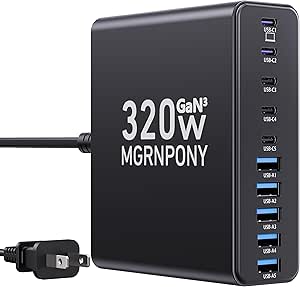
320W USB-C Charger Block, MGRNPONY 10-Port GaN USB-C Charging Station Black
With 320W of total output and a dedicated 65W Power Delivery port, this is the station that actually charges a laptop while nine other devices sip power — something neither the budget 50W 10-port stations nor the Anker 112W can match at full tilt. The GaN III internals keep the footprint smaller than its wattage suggests, and the 5-foot cable allows tucking it behind a monitor or under a conference table. The tradeoff is bulk: on a minimalist desk, this black slab is more command center than accessory, and if you only own three or four devices, most of those ten ports will sit idle. Compared with the Anker, you give up brand-name polish and a cable organizer but gain roughly triple the raw power.
Pros:- 320W total output with up to 65W on a single USB-C port for laptops
- Ten ports (5 USB-C, 5 USB-A) consolidate an entire device fleet
- GaN III runs cooler and more efficiently than older silicon designs
- 5ft cable gives flexible placement under desks or behind monitors
Cons:- Physically larger than desktop chargers like the Anker 112W
- Overkill — and overpaying — for users with only a few devices
Best for: Tech-heavy households or small offices running laptops, tablets, and phones off one central charging hub
Not ideal for: Minimalist setups with three or fewer devices — the size and port count go to waste
- Power Output:320W total
- Ports:5 USB-C, 5 USB-A
- Power Delivery:65W / 30W / 20W
- Technology:GaN III
- Cable Length:5ft / 1.5m
- Color:Black
Our verdict“The choice when laptops and a crowd of smaller devices all need real charging speed at once.”
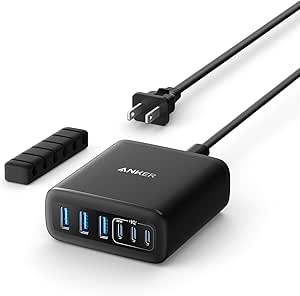
Anker 112W 6-Port Desktop Charger with Fast Charging USB-C and USB-A Ports
This Anker hits a sweet spot between the budget 10-port stations and the MGRNPONY 320W: six ports, 112W of shared power, and a reputation for reliability that the no-name alternatives can’t match. The included cable organizer is a genuinely useful touch that no other product in this batch offers, turning a tangle of cords into a tidy desktop setup. The catch is port power: only one USB-C port reaches 30W, which handles a MacBook Air slowly but won’t satisfy a MacBook Pro owner — that buyer should step up to the 320W station. Add the absence of cables or a power adapter in the box, and the true cost creeps upward, though the three-year-style brand confidence is part of what you’re paying for.
Pros:- 112W shared across six ports handles a typical desk’s devices comfortably
- Included cable organizer keeps the workspace tidy
- Anker’s established reliability and support network
- Compact 3-inch footprint fits under monitors or on nightstands
Cons:- Only one USB-C port reaches 30W; the rest are slower
- No charging cables or power adapter included
Best for: Desk-based professionals who value brand reliability and a clean workspace over raw wattage
Not ideal for: Laptop-heavy users — a single 30W USB-C port is slow for anything beyond a MacBook Air
- Max Power:112W
- Ports:3 USB-C, 3 USB-A
- USB-C Output:up to 30W per port
- USB-A Output:up to 18W per port
- Dimensions:3.0 x 3.2 x 1.3 inches
- Weight:10.65 oz (302 g)
- Extras:Cable organizer included
Our verdict“The safest all-around desktop station for buyers who want dependable mid-range power and a clutter-free desk.”
How We Picked
My ranking starts with power budget per port, because that single number determines whether a station fast-charges laptops or trickle-charges phones. I divided each model’s total wattage by its realistic simultaneous device load, not its marketing port count — a 12-port 50W hub fails this test, while a 6-port 100W hub passes easily. Next I weighed port mix: in 2026, USB-C ports are what most buyers actually use, so stations that lean heavily on USB-A ranked lower unless their price justified it for legacy-device households.
I also scored build quality and safety features, giving credit to aluminum housings, GaN components, and established brands with warranty support. Value per port broke ties: a station earns its rank by charging more devices, faster, for less money than the models around it. Finally, practical extras — included cables, detachable power cords, desktop versus wall-plug form factors — nudged picks into their final positions. The result is a list ordered from versatile high-power hubs down to budget bulk chargers, with each pick assigned to the buyer it serves best.
Factors to Consider When Choosing Multi-port USB Charging Stations
Before picking a station, you need a clear picture of what you’re actually charging. The biggest mistake buyers make in this category is counting ports instead of calculating watts.Total Wattage vs. Port Count
The port count on the box is a ceiling, not a promise. A 12-port station rated at 50W can only deliver about 4W per port when full, which is slower than a five-year-old phone charger. To fast-charge a modern laptop you need 45–100W on a single port, which means the whole station needs a 200W+ budget if laptops share it with phones. Write down your devices and their charging needs before shopping: an iPhone pulls 20–27W, an iPad around 30W, and a MacBook Pro 65–100W. Add those numbers up and buy a station with 20–30% headroom above the total. Buyers who skip this math end up with a station that looks impressive but charges everything at overnight speeds.
USB-C vs. USB-A Port Balance
In 2026, USB-C is the default connector for phones, tablets, laptops, and earbuds, but USB-A still matters for older cables, power banks, smartwatches, and cheap accessories. The ideal mix depends on your device drawer, not on trends. A station with six USB-A and four USB-C ports suits a household with mixed-generation devices, while a USB-C-heavy hub fits an all-modern tech setup. One common mistake: buying a USB-C station and then running every device through A-to-C dongles, which caps charging speed and adds cable clutter. Also check whether the USB-C ports support Power Delivery (PD) — a USB-C port without PD charges a laptop slowly, if at all. Some budget stations include USB-C ports that are little more than re-shaped USB-A connectors.
GaN Technology and Heat
Gallium nitride (GaN) circuitry is why modern high-wattage stations are smaller and cooler than older designs. Traditional silicon chargers waste more energy as heat, and heat is the enemy of battery longevity and component lifespan — a station that runs hot under load will degrade faster and can throttle charging speeds to protect itself. GaN stations like the 200W and 245W picks in this roundup stay cooler while delivering more power, and their compact size suits desktop placement. That said, GaN adds cost, and if you’re only charging phones overnight, a cheaper silicon-based station is perfectly adequate. Where GaN genuinely pays off is sustained multi-device loads — classrooms, offices, and family command centers where the station runs at capacity for hours.
Smart Power Distribution
How a station splits its wattage across ports matters as much as the total. Basic stations divide power statically — unplug one device and its share goes unused. Smarter hubs dynamically reroute power, so when you unplug your laptop, your phone grabs a faster charge automatically. This is the difference between a 100W hub that feels fast and a 100W hub that feels slow despite identical specs on paper. Look for descriptions mentioning dynamic or intelligent power allocation, and check whether at least one port supports full output solo — useful when you occasionally need to fast-charge one device. Buyers who charge unpredictable combinations of devices throughout the day benefit most from smart distribution; overnight chargers can skip this feature and save money.
Form Factor and Placement
Stations come in three shapes: desktop bricks with detach cords, wall-plug units, and strip-style chargers with built-in stands. Desktop models belong on a desk or nightstand where cable runs stay short; wall-plug units save counter space but strain the outlet if the unit is heavy, and strip-style stations with device slots work well for families that prop tablets and phones upright while charging. Consider cord length and whether the power cord detaches — a fixed cord limits placement and complicates travel. Ventilation deserves attention too: stations enclosed in cabinets or drawers run hotter and should be derated accordingly. Match the form factor to where it will actually live, not to where you imagine using it.
Safety Certifications and Brand Support
A charging station is a device that runs unattended for hours every day, so safety certifications are non-negotiable. Look for UL listing or equivalent certification, over-current protection, temperature monitoring, and surge protection — generic listings that omit these details should be treated cautiously regardless of price. Brand support matters more here than in most accessory categories: Anker’s picks cost more per port, but their warranty and replacement process are substantially easier than no-name alternatives. For overnight charging of expensive devices, that premium buys peace of mind. For supervised daytime charging of cheap devices, the generics in this list are reasonable risks. Decide which category your setup falls into before choosing where to save.
Frequently Asked Questions
Can a 50W charging station handle 10 devices at once?
Yes, but slowly — and that’s often fine. A 50W station split across 10 ports delivers roughly 5W per device, which is enough to charge phones and earbuds overnight but will not fast-charge anything and will struggle with tablets. The real question is when you charge. If all devices plug in at bedtime and come off at 7 AM, slow per-port speed is irrelevant because everything finishes long before morning. If devices need quick top-ups during the day, a 50W multi-port station will disappoint, and a 200W+ GaN hub is the better tool. Many households actually own one of each: a high-watt hub on the desk and a cheap 50W station on the nightstand.
Is it worth paying extra for GaN in a charging station?
It depends on your load. GaN stations cost roughly 30–60% more per watt than silicon equivalents, but they run cooler, take up less desk space, and handle sustained multi-device loads without throttling. If your station charges a laptop plus several phones at once — a combined load of 100W or more — GaN’s thermal advantage protects both the charger and your devices’ batteries over years of daily use. If you’re charging a handful of phones overnight at low wattage, a GaN station is paying for capability you’ll never use. The crossover point is around 100W of typical simultaneous load: below that, save your money; above it, GaN earns its premium.
How many USB-C ports do I actually need in 2026?
Count your cables, not your devices. Every device bought in the last few years — iPhones since the 15, all current Android phones, modern iPads, MacBooks, and most earbuds — uses USB-C, but older accessories, power banks, and smartwatch docks still ride on USB-A. A practical split for a mixed household is roughly 60% USB-C to 40% USB-A; for a fully modern setup, go 80% USB-C or higher. One warning: budget stations sometimes include USB-C ports without Power Delivery, which work for phones but crawl on laptops. Check the per-port PD rating before assuming every USB-C port can charge a MacBook, because on cheap hubs usually only one or two ports carry the full wattage.
Are 2-pack charging station bundles a good deal or a compromise?
For most buyers they’re a genuine deal, not a compromise, as long as the per-station specs match what you need. The 60W two-packs in this roundup effectively halve your cost per station, and each unit still delivers enough wattage for a desk or nightstand setup. The catch is capacity: each unit in a bundle is usually smaller than a single high-watt hub, so you’re buying two 60W stations instead of one 200W station. That works brilliantly for multi-room households or couples with separate desks, but poorly for one desk that hosts two laptops and four phones simultaneously. If your devices cluster in two locations, bundles win; if they cluster in one, buy a single powerful hub instead.
Is it safe to leave a multi-port charging station plugged in all the time?
Yes, with conditions. Certified stations from reputable brands include over-current, over-voltage, and temperature protection designed for continuous operation — this is exactly how they’re used in offices and classrooms. The risks come from uncertified generic units, overloaded power strips, and stations enclosed in cabinets with no airflow, all of which accumulate heat over months. Buy a UL-listed or equivalently certified model, plug it directly into a wall outlet rather than daisy-chained strips, and keep it in open air. Also inspect cables periodically: frayed cables cause more charging fires than the chargers themselves. Done properly, an always-on station is safer than repeatedly plugging and unplugging chargers, which wears out both the charger and the outlet.
Conclusion
Choosing among these fourteen stations comes down to matching wattage and port count to your real device load. For best overall, the 245W 10-Port GaN Station balances laptop-grade power, a sensible port mix, and included cables in a way no other pick matches. The 200W GaN III 8-Port and 320W MGRNPONY are the premium choices for tech-heavy desks, trading price for serious multi-laptop capability, while the 380W 12-Port aluminum station is the pick for specific needs — classrooms, offices, and anywhere twelve devices need real power at once.
On value, the 50W 10-Port Station wins outright for overnight family charging, and the 60W 2-pack bundles are the smartest play for equipping two rooms cheaply. For beginners who want a safe first purchase with no research required, the Anker PowerPort 6 or the Anker 112W Desktop Charger deliver brand-backed reliability and predictable power delivery, which matters most when you’re not yet sure what to look for. Whatever you choose, buy 20–30% more wattage than your current devices need — future devices only get hungrier.
Fall yard work Picks
leaf blowers
As an affiliate, we earn on qualifying purchases.