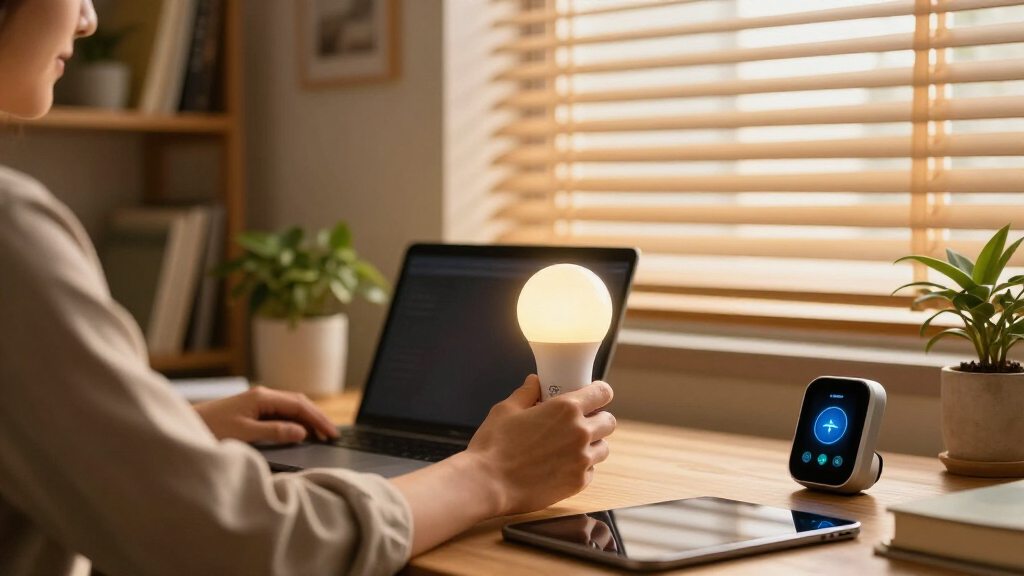

Smart home study lighting spans a wider range than most buyers expect, from app and voice-controlled lamps like the Hifree Smart Table Lamp to heavy-duty clamp-mounted architect lights like the Micomlan 24W Auto Dimming and Pzloz dual-head models. The Micomlan clamp lamp stands out as the best overall pick for serious study setups, thanks to auto-dimming and a wide light bar that covers a full desk, while the Hifree is the strongest budget choice for smart home integration with app control, voice commands, and RGB scenes. The main tradeoff in this category is intelligence versus illumination power: genuinely smart lamps tend to be dimmer and desk-bound, while the brightest, most eye-friendly task lights often skip app control entirely. Size and mounting style matter too — clamp lamps free up desk space but demand a suitable desk edge, whereas base lamps work anywhere but eat footprint. Read on for the full ranked breakdown.

Get home appliances delivered free with Prime
- Fast, free delivery on millions of items
- Prime Video, Amazon Music and more included
- Member-only deals all year
Complete the kit



Key Takeaways
- True smart home integration (app plus voice control) only appears at the budget end of this lineup — the Hifree Smart Table Lamp is the only pick with full RGB and app scheduling, while the most powerful study lamps rely on remote controls instead.
- Clamp-mounted architect lamps dominated the top rankings because they deliver wider, more even light coverage across a full study desk than any traditional base lamp in the comparison.
- Several pairs in this lineup are near-duplicates (two Motumen models, two LEPOWER models, two Pzloz models), and the differences come down to brightness, head configuration, and remote control — buyers should compare those specs closely before paying more.
- The Karidi lamp with a built-in power strip and the LED Desk Lamp with Clock show that convenience extras can outweigh raw brightness for students in small dorm-style spaces.
- Auto-dimming, found only on the Micomlan, was the single feature that best justified a price premium for long study sessions, since it adjusts brightness to ambient light without manual fiddling.




More Details on Our Top Picks
Motumen LED Desk Lamp for Home Office, Eye-Care Clamp Light
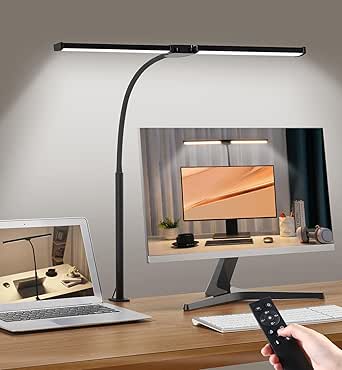
This option stands out for its dual-head design with a flexible gooseneck, which spreads light across a wide desk surface — something single-head models like the Lepro LED Desk Lamp can’t match for multi-monitor or spread-out workspaces. The 3000K–6500K range is broader than the Pzloz clamp lamp’s 3000K–5500K, giving night owls a cooler option for late study sessions. The remote with a timer function is genuinely useful for pomodoro routines. The tradeoff: the remote needs line of sight to work, and the five modes plus dimming curve involve a learning curve. It’s also desk-bound by design, unlike app-controlled lamps such as the Hifree that can be triggered from anywhere.
Pros:- Dual-head design covers a wide work area evenly
- Broad 3000K–6500K color temperature range
- Remote with timer for study sessions
- Clamp mount keeps the desk surface clear
Cons:- Remote requires line of sight to the lamp
- Mode-heavy controls overwhelm users who just want on/off
- No smart home integration
Best for: Students and remote workers with wide desks or dual monitors who need even, adjustable task lighting
Not ideal for: Smart-home enthusiasts who want app or voice control — this lamp’s remote-only operation won’t integrate with Alexa or Google routines
- Brightness Modes:5
- Color Temperatures:3000K–6500K
- Dimmable Brightness:20%–100%
- Remote Range:32.8 ft / 10 m
- Lamp Beads:168
- Design:Dual-head with flexible gooseneck clamp
Our verdict“Buy this if desk coverage matters more than smart features; skip it if you want voice or app control.”
Pzloz LED Desk Lamp for Home Office – Eye Caring Architect Lamp, 24W, Dimmable
Four independently adjustable heads and 24W of power make this the most capable pure task light in this batch. Compared with the Motumen dual-head clamp lamp, the extra two heads let you angle light around obstructions — a shelf, a second laptop — rather than just flooding a wide area. Memory and timer functions via remote mean settings survive power cycles, which the Lepro touch lamp doesn’t offer at any price. The real tradeoff is cost and complexity: four heads mean four things to adjust, and the higher price point buys capability many students will never use. The 3000K–5500K range also tops out cooler-light-shy compared to Motumen’s 6500K ceiling.
Pros:- Four adjustable heads for precision light placement
- 24W output is the strongest in this batch
- Remote with memory and timer functions
- Flicker-free, eye-friendly illumination
Cons:- Most expensive option in this lineup
- Four-head adjustment is time-consuming to dial in
- No smart home or voice control
Best for: Professionals with multi-screen setups or drafting tables who need precision-angled, high-output lighting
Not ideal for: Budget shoppers or minimalists — the price and four-head complexity exceed what a simple reading desk needs
- Number of Lamp Heads:4
- Color Temperatures:3000K–5500K
- Brightness Levels:20%–100%
- Power:24W
- Control:Wireless remote
- Features:Memory function, timer
Our verdict“Worth the premium only if you truly need four-way light steering; everyone else gets similar eye comfort for less with the LEPOWER.”
Hifree Smart Table Lamp, Dimmable Desk Lamp with App/Voice Control
This is the only lamp in this roundup that actually belongs in a smart home ecosystem — Alexa, Google Assistant, app, and touch control, plus RGB scenes and music sync. Where the Motumen and Pzloz models top out at remote controls, the Hifree lets you dim your study light by voice mid-essay or schedule a wind-down scene at night. The tradeoff is raw performance: at 7 watts, it can’t compete as a primary task light against the 12W LEOWER or 24W Pzloz — think of it as ambiance plus supplemental light, not a workhorse. It also depends on a stable 2.4GHz Wi-Fi connection for its best features, which is a fragility dumb lamps never have.
Pros:- Works with Alexa, Google Assistant, and a full mobile app
- RGB colors, scene modes, and music sync for ambiance
- Touch, voice, and app control from anywhere
- Timer functions for sleep and study routines
Cons:- 7W output is too dim for primary task lighting
- Requires Wi-Fi/BT setup and a stable 2.4GHz network
- Feature set skews toward ambiance over productivity
Best for: Smart-home users who want voice, app, and scheduled control plus RGB ambiance for a bedroom or reading nook
Not ideal for: Anyone needing serious task illumination for detailed work — 7W output is too dim for a primary study lamp
- Wattage:7W
- Control Methods:Touch, App, Voice (Alexa, Google Assistant)
- Connectivity:Bluetooth, Wi-Fi 2.4GHz
- Color Options:Adjustable RGB with color temperature and speed control
- Special Features:Music sync, timer, scene modes, eye protection
- Light Source:LED, corded electric
Our verdict“The right pick if smart control is the priority; the wrong pick if lighting brightness is.”
LEPOWER Desk Lamp, 800 Lumens LED for Home Office, Eye-Caring Reading Light
The standout here is RG0-certified blue-light safety — a spec none of the other four products in this batch advertise, and one that matters for anyone studying multi-hour stretches. At 800 lumens and a 50-inch lighting area, it outshines the Lepro 750LM while costing about the same, and the 360° gooseneck beats fixed-head designs for positioning light exactly where the page is. Stepless slide dimming with smart memory feels more refined than the Lepro’s five stepped levels. The tradeoffs are honest ones: 12W won’t light a huge room, there’s no remote or smart control like the Hifree offers, and the minimal aesthetic may read as plain next to architect-style lamps.
Pros:- RG0 certification virtually eliminates blue light hazard
- 800 lumens across a wide 50-inch lighting area
- 360° gooseneck for precise positioning
- Smart memory retains your last settings
Cons:- No remote, app, or voice control
- 12W output limits it to small and medium workspaces
- Spare, minimal design won’t suit everyone
Best for: Students and readers on a budget who want certified eye safety and precise positioning without paying for smart features
Not ideal for: Smart-home tinkerers and owners of very large desks — no app control, and 12W maxes out on bigger spaces
- Brightness:800 lumens
- Power:12W
- Lighting Area:50 inches
- Color Temperatures:5 options
- Brightness Levels:10 levels
- Adjustability:360° gooseneck
- Control:Touch with stepless slide and smart memory
Our verdict“The best pure value for eye comfort in this batch — buy it if you read for hours and don’t need smart features.”
Lepro LED Desk Lamp for Home Office, 9.5W 750LM Touch Desk Light, Black
This model makes the list as the affordable, no-nonsense entry point — five modes, five brightness levels, 25 total combinations, and nothing to configure or connect. Compared with the Hifree smart lamp, you give up voice and app control entirely; compared with the LEPOWER, you lose roughly 50 lumens and the gooseneck’s full rotation. What you get in return is diffused, flicker-free light in a sleek black frame that stays cool and draws only 9.5W. For a dorm desk or a kid’s homework station where a remote would get lost and Wi-Fi is unreliable, that simplicity is the feature. The stepped brightness levels are less fine-grained than LEPOWER’s stepless slide, which perfectionists will notice.
Pros:- Lowest-cost entry into eye-friendly task lighting
- 25 lighting combinations from 5 modes × 5 brightness levels
- Diffused, non-flickering light runs cool to the touch
- Minimalist black design fits any desk
Cons:- No remote, app, or voice control of any kind
- Stepped brightness is less precise than stepless dimming
- 750LM output is the weakest task lighting here
Best for: Budget-conscious students, dorm residents, or kids’ homework desks needing simple, reliable eye-friendly light
Not ideal for: Power users wanting remote, smart, or fine-grained dimming control — the five stepped levels and touch-only operation are basic
- Wattage:9.5W
- Brightness:750 lumens
- Color:Black
- Lighting Modes:5
- Brightness Levels:5
- Total Light Settings:25
Our verdict“Buy it for a simple, affordable study setup; upgrade to the LEPOWER or Motumen if adjustability and output matter.”
Motumen LED Desk Lamp for Home Office, Eye-Care Desk Light Clamp, Black
The clamp-mounted design is what sets this Motumen apart in a lineup full of tabletop lamps like the LEPOWER — it frees your entire desk surface, which matters when textbooks and a laptop already claim every inch. Its dual-head layout with a flexible gooseneck covers a wider work zone than single-head rivals, and the 3000K-6500K color range stretches warmer and cooler than the Pzloz’s 3000K-5500K span. The 32.8-foot remote range plus a one-hour timer means you can dim or kill the light from bed after a late study session.
The tradeoff: the clamp demands a compatible desk edge, and losing the remote means fumbling for basic functions. Compared with the foldable Honeywell HWT-H2, it’s less portable but far better at lighting a large desk.
Pros:- Clamp mount frees up the entire desktop work surface
- Dual heads with gooseneck cover a wider area than single-head lamps
- Very wide 3000K-6500K color temperature range
- Long-range remote with a 1-hour sleep timer
Cons:- Clamp won’t fit all desk thicknesses and shapes
- Full functionality depends on keeping track of the remote
Best for: Students and remote workers with cluttered desks who need wide, adjustable light without sacrificing surface space
Not ideal for: Anyone with thick or irregular desk edges, or buyers who hate relying on a remote for daily operation
- Color Temperature:3000K-6500K
- Brightness Levels:5
- LED Beads:168
- Remote Range:32.8 ft
- Timer:1 hour
- Mounting:Clamp
- Color:Black
Our verdict“This is the pick if desk space is your scarcest resource and a wide, remote-controlled beam is worth a clamp-mounting constraint.”
LEPOWER Desk Lamp, 800LM LED for Home Office, Eye-Caring Reading Light
Where the Motumen wins on coverage, the LEPOWER wins on eye safety credentials: its RG0 certification means it’s rated free of blue-light hazards, a claim most lamps in this roundup can’t make. The 50-inch lighting area is generous for a single-head lamp, easily covering a dual-monitor study setup, and the 360° gooseneck plus touch controls with smart memory mean it recalls your last settings instead of resetting every session.
It’s a corded, tabletop-only design, so it lacks the clamp flexibility of the Pzloz architect lamp and the USB charging perks of the Honeywell. And at 12 watts with 800 lumens, it’s bright enough for reading and study but not for detail work like drafting. Still, for pure eye-friendly reading light per dollar, this model makes the most sense.
Pros:- RG0-certified protection against blue-light hazards
- Wide 50-inch lighting coverage for a single-head lamp
- Smart memory recalls your last brightness and color settings
- 360° gooseneck allows precise aiming
Cons:- Corded tabletop design with no clamp or mounting options
- 12W output is modest for detailed craft or drafting work
Best for: Heavy readers and students who prioritize certified blue-light safety and long sessions without eye fatigue
Not ideal for: Crafters or drafters who need high-powered directional light, or anyone wanting clamp mounting or app control
- Brightness:800 lumens
- Wattage:12 watts
- Lighting Modes:50
- Switch Type:Touch
- Light Source:LED
- Gooseneck:360° flexible
- Mounting:Tabletop
- Material:Metal + ABS
Our verdict“If certified eye comfort during long reading sessions is your top priority, this is the safest low-stress choice in the roundup.”
Pzloz LED Desk Lamp for Office and Home – Eye-Caring Architect Lamp with Clamp, Dual Screen Compatibility, 24W, 5 Color Modes, Adjustable Brightness
This Pzloz is the most adjustable lamp in this batch: a 360° stand, 180° swing arms, and a 270° rotatable head let you sculpt light around two monitors in ways the fixed-base SIBRILLE or single-gooseneck LEPOWER simply can’t match. At 24 watts with 25 lighting modes, including dedicated night-light and reading presets, it also out-powers the 15W SIBRILLE and the 12W LEPOWER for serious task work.
Two caveats temper the enthusiasm. The wireless remote has known reliability issues — some buyers end up requesting replacements — and the sheer number of adjustment points can feel fiddly if you just want a lamp that turns on. Compared with the simpler Motumen clamp lamp, this model trades ease of use for reach and raw output.
Pros:- 24W output outshines most lamps in this price class
- Extensive articulation: 360° stand, 180° arms, 270° head
- 25 modes including night light and reading presets
- Clamp design keeps dual-screen desks uncluttered
Cons:- Remote control malfunctions reported by some buyers
- Complex adjustments can overwhelm users wanting simplicity
Best for: Professionals with dual monitors or drafting tables who need high output and articulating light placement
Not ideal for: Minimalists who want a simple on/off lamp — the many adjustment points and modes add complexity
- Power:24W
- Color Temperatures:3000K-5500K
- Brightness Range:20%-100%
- Lighting Modes:25 (incl. night light, reading)
- Adjustability:360° stand, 180° swing arms, 270° rotatable head
- Control:Wireless remote
- Mounting:Clamp
Our verdict“For a dual-monitor battlestation where light placement flexibility matters more than simplicity, this lamp justifies its steeper learning curve.”
Honeywell HWT-H2 LED Desk Lamp, Eye-Caring Full Spectrum, USB Charging
Color rendering is where the Honeywell HWT-H2 pulls ahead of everything else here: a CRI of 94 with full-spectrum, flicker-free output means colors and text look the way they would under natural daylight — a real difference for students reviewing color-coded notes or anyone sensitive to flicker. The LEPOWER matches the eye-care angle with RG0 certification, but doesn’t offer this level of spectral fidelity. The built-in USB-A and USB-C ports also let you charge a phone from the lamp, something only the Karidi power-strip lamp in the wider roundup competes with.
The compromises are real: it needs a stable plug-in connection (no battery), the 11-inch head suits one workspace rather than a sprawling desk, and you give up the clamp-mount freedom of the Pzloz. You’re paying for light quality, not reach.
Pros:- CRI 94 full-spectrum light with excellent color accuracy
- Flicker-free output reduces visual fatigue over long sessions
- Built-in USB-A and USB-C charging ports
- Foldable design with 30-minute auto-off timer
Cons:- Requires a stable plug-in power connection
- Compact 11-inch head limits coverage to a single small workspace
Best for: Buyers who want the most natural, flicker-free light quality plus device charging in a compact study lamp
Not ideal for: Owners of large or multi-monitor desks — the 11-inch head and tabletop base can’t cover that footprint
- CRI:94
- Color Modes:4 (2700K-5700K)
- Dimming Range:10%-100%
- Lamp Head Size:11 inches
- Charging Ports:USB-A, USB-C
- Timer:30-minute auto-off
- Control:Touch
- Design:Foldable, multi-angle
Our verdict“This pick makes the most sense for buyers who value daylight-quality light and charging convenience over wide coverage.”
SIBRILLE Metal LED Desk Lamp, 16-inch Dimmable Adjustable Table Light with Base, 15W, 1200 Lumens, Included Adapter, Black
The SIBRILLE is the tank of this batch: a full metal construction with an anti-slip, scratch-resistant base that feels more durable than the ABS-plastic LEPOWER or the clamp-dependent Pzloz. At 1200 lumens, it’s the brightest tabletop option here — 50% more output than the LEPOWER — making it strong for study sessions where paper text needs punchy illumination. The rotatable head, foldable arm, memory function, and timer cover the essentials without a manual.
What you give up is modern connectivity: no remote, no app, no voice control, and the built-in LEDs can’t be replaced, so the lamp is effectively disposable when the 50,000-hour lifespan ends. At just 16 inches tall, it also sits lower than taller alternatives like the LitONES height-adjustable lamp in the wider roundup.
Pros:- All-metal build with stable anti-slip scratch-resistant base
- 1200 lumens is the brightest tabletop output in this batch
- Memory function and timer built in
- 50,000-hour rated LED lifespan with adapter included
Cons:- No remote, app, or smart-home connectivity of any kind
- Non-replaceable LED modules make it disposable at end of life
- 16-inch height limits coverage on larger desks
Best for: Buyers who want a durable, bright, no-frills metal lamp that works out of the box with nothing to pair or charge
Not ideal for: Smart-home enthusiasts wanting app or voice control, or anyone wanting a replaceable light source
- Height:16 inches
- Power:15W
- Brightness:1200 lumens
- Color Modes:Cool White, Natural, Warm Yellow, Daylight
- Dimming Levels:6
- Material:Metal
- LED Lifespan:50,000 hours
- Adapter:Included
Our verdict“Choose this if you want bright, sturdy, plug-and-play lighting and couldn’t care less about smart features.”
Micomlan LED Desk Lamp with Clamp, 24W Auto Dimming Architect Light
Where the Micomlan architect lamp pulls ahead of standard base-mounted options like the SIBRILLE Metal LED Desk Lamp is coverage. The clamp mount and 7 rotatable joints let light reach across a wide workstation — something a 16-inch base lamp simply can’t do. The 45° asymmetric optics matter more than they sound: light is angled away from your eyes and screen, which reduces the glare that causes fatigue during long study sessions. The auto-dimming sensor adjusts brightness to room conditions, a genuine convenience compared with the LitONES model’s 50 manual modes. The tradeoff is complexity — the touch controls take time to learn, and the clamp won’t fit every desk edge.
Pros:- 7 rotatable joints allow precise aiming across wide workspaces
- Asymmetric 45° light design actively reduces glare and eye strain
- Auto-dimming sensor adapts brightness to ambient room light
- CRI above 90 renders colors accurately for reading and detail work
Cons:- Touch controls have a learning curve compared with simple dial lamps
- Clamp mount may not fit all desk thicknesses or drawer-front edges
- No battery or portable power option — desk-bound only
Best for: Students and remote workers with wide desks or dual monitors who need even, glare-free light across a large work surface
Not ideal for: Anyone with a thin or oddly shaped desk edge — the clamp mount needs a compatible thickness to hold securely
- Power:24W
- Light Source:LED
- Color Temperature:3000K – 6500K
- Brightness Adjustment:5 levels + stepless dimming
- CRI:>90
- Mounting:Tabletop clamp
- Control Method:Touch
- Special Features:45° asymmetric light, ambient light, smart sensor
Our verdict“This pick makes the most sense for anyone whose desk is too wide for a traditional lamp and who wants glare-free, sensor-driven lighting without fiddling with settings.”
LitONES Tall LED Desk Lamp with 50 Light Modes
The LitONES tall lamp occupies a different niche than everything else here: its 14-to-40-inch height range means it can light an entire desk area like a small floor lamp, not just a keyboard zone. Compared with the clamp-style Pzloz double-head lamp, it trades monitor-hugging precision for whole-workspace illumination — better for streamers, crafters, and anyone filming at their desk. The CRI above 97.8 is the highest in this roundup, making colors look truest on camera or on paper. Smart memory and a 45-minute auto-off timer are genuinely useful for study sessions. The cost is real, though: it sits at the top of the price range, and 50 modes will feel like overkill if you just want warm light for reading.
Pros:- Extendable 14-40 inch height adapts from desk lamp to near-floor-lamp coverage
- CRI above 97.8 delivers the most accurate color in this roundup
- Smart memory function recalls your last settings automatically
- 45-minute auto-off timer supports structured study blocks
Cons:- More expensive than most standard desk lamps in this guide
- 50 modes can overwhelm users who want simple on/off-dim operation
- 15W output is lower than the 24W architect lamps for very large surfaces
Best for: Streamers, content creators, and serious readers who want full-workspace coverage and the most accurate color rendering available
Not ideal for: Budget buyers or minimalists — if a basic dimmable lamp like the Lepro 9.5W would cover your needs, the price premium buys features you’ll never touch
- Power:15W
- Light Modes:50
- Color Temperature:2700K – 6500K
- Brightness Levels:10
- Height Range:14-40 inches
- CRI:>97.8
- Timer:45-minute auto-off
- Base:Metal, non-slip and scratch-resistant
Our verdict“Worth the premium only if you need vertical reach and broadcast-grade color accuracy; everyone else can spend less for equally comfortable light.”
Karidi LED Desk Lamp with Power Strip, 3 AC Outlets & 4 USB Ports
Most lamps in this roundup do one thing; the Karidi replaces two devices at once. Its built-in strip — 3 AC outlets plus 4 USB ports including 2 USB-C — means a laptop, monitor, phone, and earbuds can all charge from the lamp’s footprint, freeing up wall sockets and clearing cable clutter. Compared with the Honeywell HWT-H2, which offers only a single USB charging port, this is a full desk power station. The lighting side is more ordinary: 5 color modes and 5 brightness levels are adequate but far less refined than the Micomlan’s stepless dimming. The weighted base keeps everything stable, but it also makes the lamp a commitment — this is not something you’ll move between rooms.
Pros:- Built-in 3-outlet, 4-port (2 USB-C) power strip eliminates desk cable clutter
- Surge protection safeguards connected devices
- 180° rotatable head and adjustable arm for precise aiming
- Weighted base keeps the lamp stable despite connected cables
Cons:- Lighting controls are basic — fixed steps, no stepless dimming or auto sensor
- Heavy base makes it impractical to move between rooms or desks
- 1875W ceiling may not support power-hungry equipment like space heaters
Best for: Students and home-office workers with crowded desks and too few outlets who want lighting and charging in one purchase
Not ideal for: Anyone who already owns a desk power strip or charging hub — you’d be paying for redundant outlets and getting only average lighting in return
- AC Outlets:3
- USB Ports:4 (2 USB-C, 2 USB-A)
- Power Support:Up to 1875W
- Color Modes:5
- Brightness Levels:5
- Adjustability:180° rotatable head, adjustable arm
- Base:Weighted, sturdy
Our verdict“Buy this if outlet scarcity is your biggest desk problem; skip it if lighting quality alone is what you’re shopping for.”
LED Desk Lamp with Clock, Foldable Study Lamp
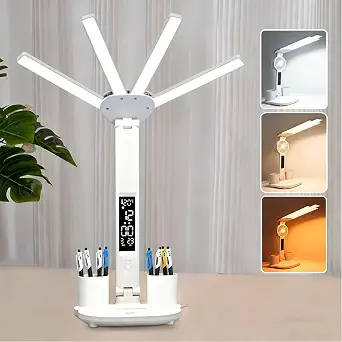
Of everything in this guide, the foldable study lamp is the easiest entry point. It does the small things well: a built-in display showing time, date, and temperature, a pen slot that clears desk clutter, and a 90° fold that tucks it into a drawer or backpack. Against the basic LEPOWER 800-lumen reading lamp, it offers more flexibility for similar money — three lighting modes and adjustable arms versus a fixed shape. It won’t compete with the Micomlan or LitONES on light quality or reach; three preset modes is the entire adjustment range, and the short 1-meter Type-C cord plus lack of a battery mean it must live beside a USB power source. For a dorm desk or a kid’s study corner, those limits rarely matter.
Pros:- Foldable, compact design stores easily in drawers or backpacks
- Built-in display shows time, date, and room temperature
- Integrated pen storage keeps the desk tidy
- Flicker-free frosted shade is comfortable for extended reading
Cons:- Only 3 preset color modes — no stepless dimming or fine control
- Requires a USB Type-C power source and has no battery, limiting placement
- Light output suits a small desk, not a full workstation
Best for: Students, kids, and anyone furnishing a small study nook who wants light plus a clock for minimal money
Not ideal for: Serious home-office setups — the three fixed modes and limited reach fall well short of what the 24W architect lamps provide
- Adjustability:180° extendable/retractable arms
- Foldable Design:90° foldable
- Lighting Modes:3 (cool white, warm white, daylight)
- Display:Time, date, temperature
- Power Cord:1-meter USB Type-C
- Eye Care:Frosted shade, flicker-free light
Our verdict“A sensible budget buy for casual study spaces where a clock and compact fold matter more than advanced lighting control.”
How We Picked
My ranking logic starts with the core promise of this roundup: lighting quality for sustained study work. That means I prioritized brightness in lumens, light bar width, color temperature adjustability, and flicker-free eye-care claims, because a lamp that causes eye strain fails at its one job no matter how smart it is. From there, I weighted smart features by usefulness rather than count — app control and voice compatibility scored highly, but so did practical remotes and auto-dimming, since a remote on a clamp lamp mounted behind a monitor is genuinely more usable day to day.
The second tier of criteria covered mounting flexibility, desk footprint, and value. Clamp models scored better for anyone with a crowded desk, while base models suited renters and students who cannot clamp to their furniture. I also compared warranty support, included adapters (the SIBRILLE including its adapter mattered, since many rivals make you supply your own), and price per lumen. Finally, I flagged near-identical sibling products and ranked them against each other on the few specs that actually differ, so the ordering reflects real distinctions rather than marketing copy.
Factors to Consider When Choosing Smart Home Study Lighting
Before settling on a specific lamp, it helps to understand the broader patterns in this category — because most buyer regret I see comes from mismatched expectations, not bad products.Smart Features: What Actually Matters
The term smart lighting is used loosely, and this roundup proves it. Some lamps offer full app control, scheduling, and voice assistant compatibility; others call an included remote control “smart”; and a few, like the Micomlan, use sensors to auto-dim without any app at all. Before buying, decide which of these actually fits your routine. If you already run a smart home ecosystem with routines and voice commands, a lamp without app support will feel disconnected no matter how bright it is. Conversely, if you just want to change brightness without reaching behind a monitor, a physical remote is faster and more reliable than any app. The most common mistake is paying extra for app features you will open twice and never again.
Brightness and Light Coverage
Lumens tell only part of the story — coverage area matters just as much as raw output. A 1200-lumen lamp with a narrow beam can feel harsh and uneven, while a 24W wide-bar architect lamp at similar output lights an entire desk uniformly, which is what actually reduces eye strain during long sessions. As a rule of thumb, a single monitor study setup needs far less light than a two-monitor or drafting-style workspace. Buyers consistently underestimate this and end up with a hot spot of glare next to shadowed areas. Look for wide light bars, dual heads, or asymmetrical optics designed to throw light forward across the desk rather than straight down.
Clamp Versus Base Mounting
Mounting style is the most commonly overlooked decision. Clamp lamps save desk space and allow higher, wider light placement, but they require a desk edge of the right thickness — they will not work on wall-mounted countertops, very thick butcher-block tops, or desks with aprons. Base lamps work on any surface and are easier to reposition, but they consume footprint and often sit too low to light a full desk evenly. Students in dorms and renters should generally default to a base or a tall pole-style lamp like the LitONES, while anyone with a proper desk edge and multiple monitors gets better results from a clamp. Check the clamp opening specification before ordering, not after.
Color Temperature and Eye Comfort
Adjustable color temperature is more useful than most buyers realize. Cooler light (5000K+) supports alertness for focused study, while warmer settings (3000–4000K) are kinder in the evening and interfere less with sleep if you study late. Fixed-temperature lamps force a compromise that suits neither use case well. Full-spectrum claims, like those on the Honeywell, can improve color rendering for design or art work, but they matter little for reading text. Also confirm the lamp is rated flicker-free and has diffused optics rather than bare LED strips — glare from exposed diodes is a bigger fatigue factor than most spec sheets suggest.
Power Extras and Desk Ecosystem
Some lamps in this category double as desk power hubs, and that changes the value math considerably. The Karidi’s built-in power strip with AC outlets and USB-C ports can replace a separate desktop charger, which is a genuine space win in a small study area. Similarly, USB charging ports on a lamp base free up wall adapters for other devices. The tradeoff is that these combo units tend to be bulkier and cost more than a basic lamp plus a cheap power strip would separately. If your desk is already wired the way you like, skip these and spend the difference on better light quality instead.
When to Pay More — and When Not To
The honest pattern in this roundup is that price does not scale cleanly with performance. Several mid-priced clamp lamps outperform pricier brand-name options on brightness and coverage, while the cheapest lamps cut corners on stands, hinges, and power adapters. Paying more makes sense for auto-dimming sensors, dual heads, remote controls, and solid metal construction. It rarely makes sense for decorative RGB or a clock display unless those specifically serve your workflow. A reasonable ceiling for most students is the price of a 24W clamp architect lamp — beyond that, you are usually paying for brand or aesthetics rather than light.
Frequently Asked Questions
Can I control these lamps with Alexa or Google Assistant if they don’t have Wi-Fi?
Not directly — a lamp needs built-in Wi-Fi or Bluetooth connectivity to pair with a voice assistant, and in this lineup only the Hifree Smart Table Lamp supports that natively. However, there is a workaround worth knowing: plugging a standard lamp into a smart plug adds voice control and scheduling for on/off commands, usually for under fifteen dollars. The limitation is that a smart plug cannot adjust brightness or color temperature, so you lose the finer control that makes smart lighting worthwhile for study sessions. If dimming via voice is a priority, choose a lamp with native app support rather than retrofitting one with a plug. The Micomlan’s auto-dimming is a sensor-driven alternative that sidesteps the ecosystem question entirely.
Is a clamp lamp or a base lamp better for studying?
For a dedicated study desk with a clampable edge, clamp lamps are almost always the better choice because they mount higher and farther back, throwing light evenly across the entire work surface instead of creating a bright pool near the base. Base lamps win when your desk has thick edges, an apron, or is a shared surface you cannot modify — common in dorms and rentals. Tall adjustable models like the LitONES split the difference by raising the light source on a pole without needing a clamp. If you use two monitors or spread out books and notes, the coverage advantage of a clamp or tall lamp becomes obvious within a week. For a laptop-only setup in a small space, a compact base lamp is perfectly adequate.
How many lumens do I actually need for a study desk?
For a single-monitor or laptop study area, roughly 500–800 lumens is plenty, which is why the LEPOWER and Lepro models around 750–800 lumens remain popular despite being basic. For larger desks, dual monitors, or paper-based work like drafting and reading textbooks, aim for 1000 lumens or more spread across a wide light bar — the SIBRILLE’s 1200 lumens and the 24W clamp lamps sit in this range. Brightness alone is misleading, though: 800 lumens from a wide architect bar will feel more comfortable than 1200 lumens from a small head concentrating light in one spot. Also check how low the lamp dims, because full brightness is often too much for evening work, and a lamp that will not dim below comfortable levels is a fatigue problem.
What’s the real difference between the duplicate-looking models in this list?
Several brands here appear twice with nearly identical names, and the differences are specific enough to change which one you should buy. The two Pzloz models differ mainly in head configuration and controls — one has a double head with a remote for wider coverage, while the other is a single bar with button controls, so the remote version suits multi-monitor setups and the simpler one suits tight budgets. The two Motumen clamp models differ in finish and light output tiers, so compare lumens and color modes rather than price alone. The two LEPOWER listings are effectively the same lamp, meaning you should just buy whichever is cheaper at checkout. This kind of sibling-product clutter is common in the desk lamp market, so always open both listings and compare the spec table before deciding.
Are color-changing RGB lamps practical for studying, or just decorative?
RGB lighting is genuinely useful in two narrow cases: ambient bias lighting behind a monitor to reduce contrast strain, and winding down at night with warm, low-intensity scenes. For the actual task of studying, RGB adds nothing — what matters is adjustable white light between roughly 3000K and 6000K. The Hifree handles both roles reasonably well because it offers dimmable white modes alongside its color scenes, making it a reasonable single-lamp solution for a bedroom desk. If your lamp is purely for work, skip RGB and put the budget toward brightness, coverage, and better dimming control. The mistake to avoid is buying a lamp marketed on color scenes and discovering its white-light output is underpowered for reading.
Conclusion
The right pick depends almost entirely on your desk and your study habits. For the best overall experience, the Micomlan 24W clamp lamp with auto-dimming delivers the widest, most adaptive light coverage in the lineup and suits anyone with a proper desk edge. Students watching every dollar get the best value from the LEPOWER or Lepro base lamps, which cover the fundamentals of eye-care lighting at a fraction of the clamp-lamp price. The Hifree Smart Table Lamp is the clear pick for smart home beginners and ecosystem builders, since it is the only option here with genuine app and voice control. At the premium end, the SIBRILLE metal lamp brings build quality and 1200 lumens for those who want a lamp that outlives several desks. For specific needs: multi-monitor users should choose the Pzloz dual-head with remote, small-space students will appreciate the Karidi’s built-in power strip, anyone with an unclampable desk should look at the tall LitONES, and the Honeywell full-spectrum model serves color-critical work like design and illustration. Whatever you choose, prioritize light coverage and mounting fit over feature count — those two factors determine whether a study lamp helps or hinders your work.
Fall yard work Picks
leaf blowers
As an affiliate, we earn on qualifying purchases.