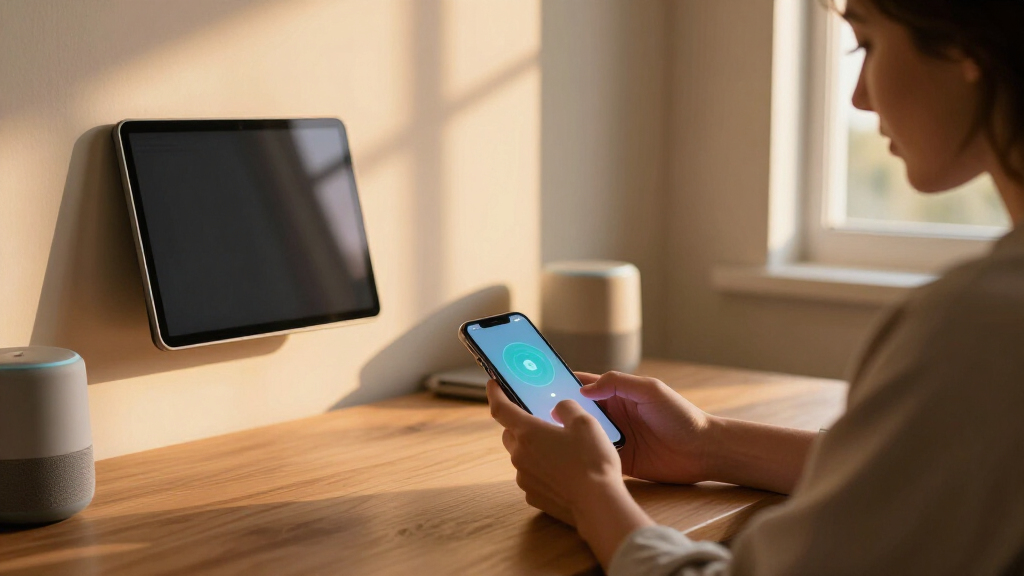

Smart home study lighting comes down to one core tradeoff: true smart connectivity (app and voice control) versus better light quality and ergonomics (higher wattage, auto-dimming, wider coverage). My top pick, the Micomlan LED Desk Lamp with Clamp, wins on overall performance with 24W output and auto-dimming that adjusts to your room without being asked. The Hifree Smart Table Lamp is the standout if app and Alexa control are non-negotiable, while the Karidi LED Desk Lamp with Power Strip earns a spot for combining light with three outlets and four USB ports — a genuinely useful trick for study desks short on sockets. Many so-called smart options in this category are really just touch-dimmable lamps, so knowing the difference before buying saves money and frustration. Read on for the full ranked breakdown.

Get home appliances delivered free with Prime
- Fast, free delivery on millions of items
- Prime Video, Amazon Music and more included
- Member-only deals all year
Key Takeaways
- Only the Hifree Smart Table Lamp offers genuine smart home integration with app and voice control — most “smart” picks here are touch-controlled instead, so don’t pay extra expecting Alexa support it doesn’t have.
- Auto-dimming (Micomlan) emerged as the single most useful differentiator for long study sessions, outperforming lamps with far more manual color modes.
- Clamp-mounted architect lamps (Micomlan, Pzloz dual-head, Motumen) consistently delivered better desk coverage and freed up workspace, making them better for dual-monitor or crowded study setups.
- The Karidi power-strip lamp replaces two desk gadgets with one, a surprisingly strong value play for students in dorms or rooms with few outlets.
- Budget lamps under the $30 mark (Lepro, LEPOWER) matched pricier models on eye comfort but fell behind on adjustability and light coverage — fine for occasional reading, limiting for daily study.






More Details on Our Top Picks
Touch Bedside Table LED Lamp with RGB Mode and Dimmable White Lights
This lamp earns its spot as the cheapest way to add color-changing mood lighting to a study corner. The three-step brightness (10%, 50%, 100%) and RGB modes cover the basics, and the touch sensor keeps operation simple for anyone who doesn’t want to fuss with apps. Compared with the Hifree Smart Table Lamp, though, the gap is obvious: no voice control, no scheduling, no scenes — just manual taps. That’s a fair trade at this price, but buyers should know they’re getting ambiance first and task lighting second, since the dimmable white mode tops out at limited output compared with the Lepro’s 750 lumens. The corded design also means it lives wherever your outlet is.
Pros:- RGB color modes for customizable ambiance at a low price
- Simple touch control with three brightness presets
- Minimalist design that blends with most decor
- Good gift option for dorm rooms and bedrooms
Cons:- No smart features — voice, app, and timer control are absent
- Outlets required, with no battery or portability
- Not bright enough to serve as a primary task light
Best for: Students or casual users who want affordable RGB mood lighting for late-night study sessions without any app setup
Not ideal for: Anyone wanting genuine smart home integration — there’s no Alexa, Google, or scheduling support here
- Color Modes:RGB, Warm White
- Brightness Levels:Low (10%), Medium (50%), High (100%)
- Control:Touch sensor
- Material:White finish, durable construction
- Power Source:Corded (power cord included)
- Smart Features:None
Our verdict“Buy this for cheap, colorful ambiance — skip it if you need smart control or serious reading brightness.”
Hifree Smart Table Lamp, Dimmable RGB LED Desk Lamp with App and Voice Control
This is the pick where the ‘smart’ in smart home study lighting actually means something. Alexa and Google Assistant support, app control, scene modes, and timers put it well ahead of the Touch Bedside Lamp, which offers similar RGB output but none of the automation. Setting a timer to dim the lamp at a study break, or triggering a focus scene by voice mid-essay, is the kind of workflow that justifies the price jump over basic touch lamps. The tradeoff: full functionality depends on the companion app, which adds setup friction that the Karidi desk lamp avoids entirely. Flicker-free, eye-friendly output makes it viable for extended reading, though serious task work is still better served by a dedicated desk lamp like the Lepro.
Pros:- Voice, app, and touch control for maximum flexibility
- Scene modes and timers enable automated study routines
- Flicker-free, eye-friendly light rated for 10,000+ hours
- USB or AC adapter power adds placement options
Cons:- Requires app setup to unlock full feature set
- App management may feel complex for less tech-savvy users
- Brightness output is modest for focused task work
Best for: Smart home owners with Alexa or Google ecosystems who want voice-controlled, schedulable mood lighting in their study
Not ideal for: Users who dislike app-based setup and management, or anyone without a smart speaker — much of the value goes unused
- Control Modes:Voice, App, Touch
- Color Options:RGB, dimmable
- Compatibility:Alexa, Google Assistant
- Lighting Features:Dimmable, Color Changing, Scene Modes
- Lifespan:Over 10,000 hours
- Housing Material:ABS and PC
- Power Source:USB or AC adapter
Our verdict“The clear choice if voice control and automation matter — overkill if you just want a tap-to-dim lamp.”
Karidi LED Desk Lamp with Power Strip, 3 AC Outlets & 4 USB Ports (2 USB-C), Eye-Caring Task Light, 5 Color Modes, Dimmable, Sturdy Base
The Karidi solves a problem no other lamp in this lineup addresses: desk outlet scarcity. With 3 AC outlets and 4 USB ports (2 USB-C) built into the base, it effectively replaces a power strip while lighting your workspace — a genuine space-saver for dorms and compact home offices. Compared with the Honeywell HWT-H01, which offers only two USB charging ports, the Karidi’s surge-protected 1875W capacity means you can run a monitor and charge a laptop simultaneously. The tradeoff is size and simplicity: the weighted base and strip hardware make it bulkier than the foldable Honeywell, and its 5 fixed color modes lack the Honeywell’s stepless dimming precision. Skip it if your desk already has plenty of outlets.
Pros:- Built-in power strip with 3 AC outlets and 4 USB ports (2 USB-C)
- Surge protection supports high-wattage devices up to 1875W
- Sturdy weighted base with 180° rotatable head
- 5 color modes and 5 brightness levels for versatile use
Cons:- Bulky footprint compared with slimmer lamps like the Lepro
- Fixed steps lack stepless dimming refinement
- Priced around features some buyers won’t use
Best for: Dorm residents and home-office users with more devices than outlets who want one unit to light and charge everything
Not ideal for: Minimalist setups or tiny desks — the hub base is bulky and the charging features add cost you may not need
- AC Outlets:3
- USB Ports:4 (2 USB-C + 2 USB-A)
- Color Modes:5
- Brightness Levels:5
- Wattage Support:1875W with surge protection
- Adjustable Head:Yes, 180° rotatable
- Base:Sturdy, weighted
Our verdict“The best pick for outlet-starved desks — pass if you only need light, not a charging station.”
Lepro LED Desk Lamp for Home Office, 9.5W 750LM Touch Desk Light, Black
For buyers who want bright, eye-friendly task lighting with zero gimmicks, the Lepro is the honest workhorse of this batch. Its 750 lumens comfortably outshine the Touch Bedside Lamp and the Hifree for actual study work, and the diffused, non-flickering panel reduces eye strain during long sessions. Five lighting modes with adjustable color temperature cover reading, crafting, and computer work without app menus or voice setup — a deliberate contrast to the Hifree’s app-dependent feature set. The tradeoffs are straightforward: no smart features at all, a cord that dictates placement, and a fixed form factor that can’t fold flat like the Honeywell HWT-H01 for storage. What you get instead is dependable brightness per dollar.
Pros:- 750 lm output, the brightest in this batch for focused work
- Eye-care diffused, non-flickering panel for long sessions
- Five modes with adjustable brightness and color temperature
- Sleek, space-saving design with fully adjustable light direction
Cons:- No smart or voice control features
- Corded design limits placement flexibility
- Cannot fold flat for storage or travel
Best for: Home-office workers and readers who prioritize bright, adjustable task light over smart features and mood colors
Not ideal for: Smart home enthusiasts — there’s no app, voice, or scheduling capability whatsoever
- Brightness:750 lm
- Wattage:9.5 W
- Color Temperature:Warm to cool
- Control Method:Touch
- Light Source:1x LED
- Height:15.1 inches
- Power Source:Corded electric (USB)
- Style:Modern, matte black
Our verdict“The best pure task light here — choose it when brightness and eye comfort matter more than connectivity.”
Honeywell HWT-H01 LED Desk Lamp, Foldable & Stepless Dimmable, Black
This is where light quality becomes the differentiator. The HWT-H01’s 48 full-spectrum LED beads and CRI of 95 or higher render colors far more naturally than standard LEDs — a real advantage for design work, detailed reading, or anyone sensitive to harsh artificial light. Its stepless 10–100% dimming gives finer control than the Karidi’s five fixed brightness steps, and the 0–180° foldable arm stores flat in a drawer, something the rigid Lepro can’t do. The brand-name build also inspires more confidence than generic alternatives. The catch: no smart features whatsoever, and only three fixed color temperatures (3000K/4000K/5500K), so it’s less flexible than the Hifree for automation or the Lepro for mode variety.
Pros:- Full-spectrum light with CRI ≥95 for accurate color rendering
- Stepless dimming from 10% to 100% for precise control
- Folds completely flat for storage or transport
- USB-A and USB-C charging ports built in
Cons:- No smart, app, or voice control features
- Only three fixed color temperature presets
- Power source details are sparse in product listings
Best for: Readers, designers, and detail-oriented workers who value natural, full-spectrum light quality and precise dimming over smart features
Not ideal for: Connected-home users — there’s no app, voice, or timer control, and color options are limited to three presets
- Color Temperature:3000K / 4000K / 5500K
- Dimming:Stepless 10%–100%
- CRI:≥95
- LED Beads:48 full-spectrum
- Charging Ports:USB-A + USB-C (5V/2.1A)
- Foldable Range:0°–180°
- Energy Use:75% lower than incandescent lamps
- Color:Black
Our verdict“The pick for light-quality purists who want natural, precisely dimmable illumination — not for anyone chasing smart home features.”
LitONES Tall LED Desk Lamp with 50 Light Modes, Eye-Care, Adjustable Height and Angle
This option stands out for one reason the others in this lineup can’t match: it stretches from 13.6 to 40 inches tall, which means it can light a standing desk or dual-monitor setup from above rather than from desk level. That height, combined with CRI ≥ 97 — the highest color accuracy in this batch — makes it a strong fit for design work and content creation where judging true colors matters. Compared with the SIBRILLE, which tops out around 16 inches, the LitONES simply covers more physical workspace. The 50 light modes, memory, and timer are genuinely useful once dialed in, though buyers who just want an on/off reading light will find the menu system overbuilt for simple tasks. It also needs a wall outlet, so placement is limited by cord length.
Pros:- Extends to 40 inches for standing desks and dual monitors
- CRI ≥ 97 delivers near-natural color rendering
- Side-lit, flicker-free design reduces glare and eye strain
- Memory and timer functions keep settings consistent day to day
Cons:- Pricier than simpler lamps like the LEPOWER
- Corded only — placement depends on outlet access
- Feature depth can overwhelm users with basic lighting needs
Best for: Standing-desk users and dual-monitor workstations that need tall, overhead-style task lighting
Not ideal for: Buyers who want a basic, plug-in-and-go lamp — the 50-mode system adds complexity and cost they won’t use
- Height Range:13.6″ – 40″ adjustable
- Light Modes:50 customizable modes
- CRI:≥ 97
- Wattage:15W LED
- Control:Touch + wireless control
- Special Features:Smart memory, timer, side-lit eye protection
Our verdict“If you work at a standing desk or across two screens, this is the tall, color-accurate light the rest of the lineup can’t replicate.”
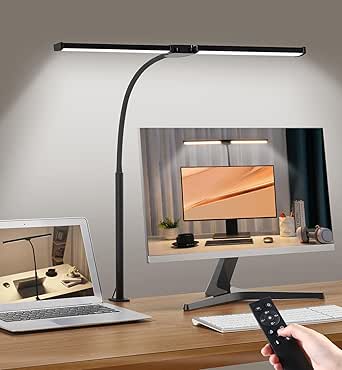
Micomlan LED Desk Lamp with Clamp, Auto Dimming, 24W, Adjustable Architect Light for Home Office
The Micomlan’s defining feature is its ambient light sensor, which adjusts brightness automatically as daylight in the room changes — something no other lamp in this roundup does. For anyone working long hours at a screen, that means less manual fiddling and more consistent eye comfort. Its 24W output across three light bars makes it brighter than both the LitONES (15W) and the LEPOWER (12W), so it handles wide desks and detailed craft work easily. The clamp mount frees up desk surface, unlike the base-mounted LEPOWER, though you’ll need a desk edge thick enough to grip. One quirk: the main and auxiliary light bars are controlled separately, so the learning curve is real, and there’s no published price, which makes comparison shopping awkward.
Pros:- Auto-dimming sensor maintains consistent lighting as room conditions change
- 24W with three light bars outshines most lamps in this lineup
- Seven rotatable joints allow precise positioning over a wide desk
Cons:- Main and auxiliary lights require separate control
- Complex adjustment system has a learning curve
- No listed price makes value hard to judge against rivals
Best for: Home-office workers who want brightness to adjust itself throughout the day without touching controls
Not ideal for: Desks without a clampedge or users who dislike multi-zone controls — the separate light bar adjustments add friction
- Power:24W
- Brightness Range:20%–100% stepless dimming
- Color Temperature:3000K – 6500K
- CRI:>90
- Joints:7 rotatable joints
- Control:Touch panel with memory
- Mounting:Desk clamp
Our verdict“The strongest pick here for hands-off brightness management on a large clamped desk.”
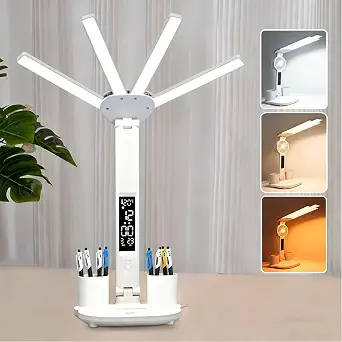
LED Desk Lamp with Clock, Foldable Study Lamp, Dimmable and Eye-Caring
Where the Micomlan and LitONES chase power users, this lamp targets the student desk with the essentials done cheaply: three color modes, flicker-free eye care, and a foldable arm that tucks away in a dorm or small bedroom. Its standout trick is the built-in display showing time, date, and temperature, plus pen storage in the base — small touches that reduce desk clutter for homework sessions. It’s not in the same performance class as the Micomlan: there’s no sensor, no stepless dimming, and only three preset modes rather than 50. The one-meter Type-C power cord is also short, so it has to sit close to an outlet or power strip. For the price, though, the tradeoffs are reasonable ones for a tidy, low-cost study setup.
Pros:- Foldable design saves space in small rooms
- Built-in clock, date, and temperature display
- Pen storage keeps the desk organized
- Flicker-free eye-caring light for long study sessions
Cons:- Only 3 fixed lighting modes with no fine dimming
- Short 1-meter Type-C cord limits placement
Best for: Students and teens who need an affordable, foldable lamp with a clock for homework desks
Not ideal for: Professionals needing precise dimming or wide coverage — three fixed modes and a short cord limit flexibility
- Lighting Modes:3 (cool white, warm white, daylight)
- Design:Foldable with adjustable arms
- Display:Time, date, temperature
- Lighting Technology:Flicker-free eye caring
- Power Cord:1 meter, Type-C
- Extras:Pen storage in base
Our verdict“A sensible budget choice for students who value a built-in clock and compact storage over advanced controls.”
SIBRILLE Metal LED Desk Lamp, 16-inch Dimmable Tall Table Light with Base, 15W 1200LM, Adjustable Color & Brightness
The SIBRILLE earns its place on materials alone: an all-metal body with an anti-slip base that feels more like furniture than gadget, unlike the mostly plastic student lamp from the previous entry. At 1200 lumens from 15W, it out-brightens the LEOWER-class lamps while offering four color modes and six dimming levels plus a 350° rotating arm. The touch controls with memory and timer functions put it closer to the LitONES in features, though at 16 inches it won’t reach over a dual-monitor array the way that taller model can. The real long-term concern is the non-replaceable LED modules — when the diodes eventually fail, the whole lamp is done, despite the 50,000-hour rating. It’s a stylish, sturdy middle ground between budget and premium picks.
Pros:- All-metal construction with stable anti-slip base
- 1200 lumens is brighter than most 12W rivals here
- Four color modes with six dimming levels plus memory and timer
- 350° rotating, 90° foldable arm for flexible aiming
Cons:- Built-in LEDs can’t be replaced when they fail
- Control scheme may feel overly feature-rich for casual users
Best for: Buyers who want a durable, attractive metal lamp for a home office or reading nook at moderate brightness
Not ideal for: Anyone wanting repairable gear or very tall coverage — sealed LEDs and a 16-inch reach limit its lifespan and scope
- Power:15W
- Brightness:1200 lumens
- Dimensions:16″ D x 3″ W x 7″ H
- Color Modes:Cool white, natural, warm yellow, daylight
- Dimming Levels:6
- Material:All metal, black with silver finish
- LED Lifespan:50,000 hours
- Control:Touch with memory and timer
Our verdict“The best-built traditional desk lamp in this batch — pick it for durability and style, not for repairability.”
LEPOWER Desk Lamp, 800LM LED for Home Office, Eye-Caring Reading Light
Of everything in this roundup, the LEOWER is the only lamp with RG0 certification — the strictest blue-light hazard rating — which matters most for late-evening readers and anyone prone to eye fatigue. The 360° gooseneck beats the SIBRILLE’s rotating arm for pure aiming freedom, letting you bend light exactly where a book or keyboard sits. Five color temperatures and ten brightness levels give it finer control than the three-mode budget clock lamp, and the memory function keeps your preferred setting ready. The catch is raw output: at 12W and 800 lumens it’s the weakest performer here for large desks, and there’s no smart-home integration or voice control — a gap if you’re building an automated setup. For a focused reading or single-monitor task light, those limits rarely bite.
Pros:- RG0 certification guarantees no blue-light hazard
- 360° gooseneck with stepless dimming offers precise aim
- 5 color temperatures and 10 brightness levels
- Memory function recalls last settings
Cons:- 12W / 800 lumens is underpowered for big desks
- No smart home or voice-control compatibility
Best for: Readers and single-desk workers who prioritize certified blue-light safety on a budget
Not ideal for: Large workspaces or smart-home enthusiasts — 12W output is modest and there’s no app or voice control
- Brightness:800 lumens
- Power:12W
- Color Temperatures:5 options
- Brightness Levels:10
- Lighting Area:50 inches
- Certification:RG0 (no blue light hazard)
- Design:360° flexible gooseneck
Our verdict“The safest pick here for tired eyes, as long as your workspace fits within its 50-inch lighting area.”
Pzloz LED Desk Lamp for Office and Home – Eye Caring Architect Lamp with Clamp, Dual Screen Compatibility, 24W, 5 Color Modes, Adjustable Brightness
Most clamp lamps in this roundup light one zone well and leave the rest of the desk in shadow. This Pzloz architect lamp solves that with a wide 360° stand and dual-screen coverage that stretches across a two-monitor setup without hotspots. Compared with the Motumen dual-head clamp light, it trades the gooseneck’s pinpoint aiming for broader, more even coverage — a fair swap if you work across screens rather than on a single document.
The 25 lighting mode combinations sound gimmicky at first, but they break down into five color modes paired with brightness steps, which makes finding a comfortable late-night reading setting faster than dialing it in manually. The tradeoff is genuine: the wireless remote has reliability complaints, and the multi-joint arms take patience to position well.
Pros:- Wide coverage area suited to dual-screen setups
- 360° stand and 180° swing arms allow precise repositioning
- 25 mode combinations simplify finding comfortable presets
- Eye-caring LED output reduces strain during long study sessions
Cons:- Remote control has documented reliability issues
- Multi-joint adjustments take time to set up correctly
Best for: Remote workers and students with dual monitors who need even light across a wide desk
Not ideal for: Anyone with a shallow or unusually thick desk edge — the clamp plus swinging arms demand a deep, stable surface
- Power:24W
- Color Temperatures:3000K-5500K
- Brightness Levels:20%-100%
- Lighting Modes:25 combinations
- Adjustability:360° stand, 180° swing arms, 270° rotatable head
- Mounting:Desk clamp
Our verdict“Buy this if dual monitors leave your current lamp lighting only half your workspace — just keep the manual controls within reach in case the remote acts up.”
Motumen LED Desk Lamp for Home Office, Eye-Care Desk Light Clamp, Black
When I compare clamp lamps on price-to-capability, this Motumen dual-head model consistently comes out ahead. It matches the pricier Pzloz four-head lamp on the fundamentals — the same 20%-100% dimming range, a wider 3000K-6500K color span, and a 32.8 ft remote reach — while costing noticeably less. What you give up is smart convenience: no memory or timer functions, so your preferred setting resets each session.
The 168 LED beads deliver genuinely flicker-free light, and the flexible gooseneck is where this lamp beats fixed-arm rivals like the Pzloz architect lamp, letting you bend light exactly onto a textbook or keyboard. The one-hour timer listed in its feature set is a nice touch for bedtime readers. Verify your desk thickness before ordering, though — the clamp has its limits.
Pros:- Full 3000K-6500K color range at a lower price than comparable clamp lamps
- Flexible gooseneck enables precise light placement
- 32.8 ft remote range works across a room
- Flicker-free output from 168 LED beads
Cons:- Lacks memory function, so settings reset between uses
- Requires an outlet and remote batteries
- Clamp compatibility varies by desk thickness
Best for: Budget-conscious students who want full color-temperature control and precise aiming without paying for smart features
Not ideal for: Owners of thick or lipless desk edges, since the clamp may not seat securely
- Color Temperature:3000K-6500K
- Brightness Levels:20%-100%
- Remote Range:32.8 ft
- Timer:1 hour
- Number of LED Beads:168
- Design:Dual head with flexible gooseneck, clamp mount
Our verdict“This is the smart pick if you want the core lighting performance of pricier clamp lamps and can live without memory and app features.”
Pzloz LED Desk Lamp for Home Office – Eye-Caring Architect Lamp with Clamp, Double Head, Remote Control, 24W
This Pzloz four-head lamp is the most configurable light in this batch, and its memory and timer functions are what justify the premium over the Motumen dual-head clamp. Instead of re-dialing your preferred brightness every morning, the lamp recalls it — a small feature that matters daily in a study routine. Each of the four heads angles independently, so you can wash an entire drafting table or crafting station in light, something single-head options like the Honeywell desk lamp simply cannot do.
The honest downside is complexity. Four adjustable heads mean four things to nudge out of alignment, and buyers who just want a lamp that works may find the adjustment process tedious. The high CRI output makes colors read accurately, which drafters and artists will notice immediately.
Pros:- Four independently adjustable heads cover large work surfaces
- Memory function recalls preferred settings automatically
- Timer function supports focused study intervals
- High CRI illumination renders colors accurately
Cons:- More expensive than dual-head alternatives with similar output
- Four-head adjustment can feel overwhelming for casual users
Best for: Drafters, artists, and serious home-office users who need multi-zone lighting and set-it-and-forget-it memory
Not ideal for: Buyers wanting a simple plug-and-play lamp — the four-head adjustments and higher price add friction with no benefit for basic desk work
- Number of Lamp Heads:4
- Power:24W
- Color Temperatures:3000K-5500K
- Brightness Levels:20%-100%
- Control:Wireless remote
- Smart Features:Memory function, timer
- Mounting:Desk clamp
Our verdict“Worth the premium only if your work genuinely spans a wide surface and you will use the memory and timer daily.”
Honeywell LED Desk Lamp for Home Office Eye-Caring Dimmable Reading Light
Amid a lineup full of clamp-mounted and multi-head monsters, this Honeywell desk lamp wins by being simple and movable. The foldable aluminum design means it travels between desk and bedside without disassembly — unlike the clamped Pzloz architect lamp, which stays put once installed. Stepless touch dimming is smoother than the stepped brightness levels on the Motumen models, letting you land on exactly the brightness your eyes want at 11 p.m.
The built-in USB charging ports partially compensate for the base taking desk space, turning the footprint into a charging station — though the Karidi lamp with its power strip still beats it for outlet-hungry setups. The real limitation: it must stay plugged in. There is no battery option, so ‘portable’ means ‘moves to another outlet,’ not cordless.
Pros:- Foldable design makes it easy to store or move between rooms
- Stepless touch dimming offers finer control than stepped presets
- Built-in USB ports charge devices from the base
- Long-lasting LEDs rated up to 30,000 hours
Cons:- Corded only — no battery or rechargeable option
- Single light head limits coverage compared with dual-head clamp lamps
Best for: Students and readers in small spaces who want one dimmable lamp that doubles as a bedside light and USB charger
Not ideal for: Anyone wanting wireless or battery operation — this lamp is tethered to an outlet, and its single head cannot light a large desk
- Power:24W, corded electric
- Control Method:Touch
- Dimming:Stepless with adjustable color modes
- Extras:USB charging ports, memory function, timer
- LED Lifespan:Up to 30,000 hours
- Material:Aluminum with ABS and PC shade
- Design:Foldable, oblong, modern matte black
Our verdict“Choose this over clamp-style rivals if desk space is tight and you value portability and touch controls over maximum coverage.”
Motumen LED Desk Lamp for Home Office, Eye-Care Clamp Light
Crafters and hobbyists need light that follows the project, and this Motumen dual-head clamp light delivers that better than fixed designs. The flexible gooseneck plus two independent heads means you can flood a sewing table or model bench evenly, then re-aim both heads in seconds — a level of directional control the Honeywell foldable lamp, with its single fixed head, cannot match. Its five brightness modes and full 3000K-6500K range match its Motumen sibling almost exactly.
Compared with the Pzloz four-head lamp, it sacrifices that model’s memory function but gains a simpler setup that hobbyists will appreciate mid-project. The remote’s timer is handy for long crafting sessions that run late. Be aware the remote needs a clear line of sight — obstructions cut its 32.8 ft range — and the clamp confines it to desk use, so it will not light a whole room.
Pros:- Dual heads with goosenecks aim wide light precisely where projects need it
- Five brightness modes across the full 3000K-6500K range
- Remote with timer supports long evening sessions
- Energy-efficient, long-lasting 168-bead LED array
Cons:- Remote signal weakens when obstructed
- Clamp mounting restricts use to desk edges only
Best for: Crafters, hobbyists, and readers who need to reposition wide, even light across a project table
Not ideal for: Anyone wanting ambient or room lighting — this is a focused task light limited to clamped desk surfaces
- Brightness Modes:5
- Color Temperatures:3000K-6500K
- Dimmable Brightness:20%-100%
- Remote Range:32.8 ft / 10 m
- Lamp Beads:168
- Design:Dual head, flexible gooseneck, clamp mount
Our verdict“If your lighting needs change with every project, this is the most repositionable option in the roundup — just keep the remote’s path clear.”
How We Picked
I ranked these lights through the lens of a study desk: eye comfort during long sessions, usable adjustability, and how much genuinely smart or convenience functionality each lamp delivers for its price. Brightness output and coverage area mattered more than raw feature counts — a lamp with 50 color modes but a narrow beam lost points against one with fewer modes and a wider, more even spread. I also weighed desk footprint, since a study lamp that eats workspace or blocks a monitor is a net negative.
The ranking logic prioritizes versatility first: lamps that adapt to different times of day and tasks (auto-dimming, stepless controls, adjustable arms) sit above fixed-geometry options. Connectivity came next — a lamp earns real “smart home” credit only if it works with an app or voice assistant, and I flagged options marketed as smart that are actually just touch lamps. Finally, build quality and warranty value separated the premium Honeywell and SIBRILLE options from near-identical budget clones.
Factors to Consider When Choosing Smart Home Study Lighting
Before choosing a study light, it helps to understand where the money actually goes in this category — and where marketing inflates expectations. These are the factors that most often make the difference between a lamp you keep for years and one you replace within months.True Smart Features Versus Touch Controls
The biggest naming trap in this category is the word “smart” on the box. Many lamps use it loosely to mean touch-sensitive dimming, which requires you to physically reach the lamp every time. Genuine smart home lighting connects to Wi-Fi or Bluetooth, works with Alexa or Google Home, and lets you schedule study sessions or adjust brightness from your phone. If automation is part of the reason you’re shopping, verify app and voice control explicitly — the Hifree is the only option here that truly qualifies. If it isn’t, you’ll get better light quality per dollar from a well-built touch or remote-controlled lamp, since you’re not paying for electronics you’ll never configure.
Brightness and Coverage for Your Desk Size
Wattage and lumens only tell part of the story; beam spread matters just as much. A 9W lamp like the Lepro is plenty for reading one textbook, but it will leave the edges of a large desk dim and cause eye strain as your pupils adjust between bright and dark zones. As a rule, target 1,000+ lumens for desks wider than 40 inches, or choose a clamp-mounted architect lamp that can sit higher and cast light across the full work surface. Dual-head models like the Pzloz double-head exist specifically for this problem. A common mistake is buying a compact bedside-style lamp for a full study desk because it looked bright in a product photo shot at close range.
Auto-Dimming and Circadian Color Temperatures
Extended evening study sessions are where color temperature becomes an eye-comfort issue, not a gimmick. Warmer tones (2700–3500K) in the late evening interfere less with sleep, while cooler daylight tones (5000–6500K) sustain alertness for afternoon work. Lamps that shift color across presets give you this control manually; auto-dimming models like the Micomlan handle it without input by sensing ambient light. This is also where cheap lamps quietly cut corners — flicker and poor color rendering at low brightness cause headaches that buyers often blame on screen time instead. If you study for more than two hours at a stretch, treat flicker-free and eye-care certification as minimum requirements rather than bonuses.
Base Versus Clamp: Desk Real Estate
Clamp-mounted lamps free up your entire work surface, which sounds trivial until you’re sharing a desk with a laptop, monitor, textbooks, and a coffee mug. The tradeoff is that clamps require a desk edge of suitable thickness and a stable mounting point — they don’t work on glass tops or very thin shelves. Base-mounted lamps like the SIBRILLE and LitONES are more portable and renter-friendly, and adjustable-height models double as bedside or reading lights later. Students who relocate often should favor base mounts; anyone with a permanent home-office setup gains more from a clamp. Also check arm reach: a clamp lamp with a short arm can end up shining directly into your eyes.
Convenience Extras That Actually Earn Their Keep
Some bundled features are worth paying for and others are filler. The Karidi’s built-in power strip genuinely solves a desk problem, and a remote control (as on the Pzloz dual-head) saves repeated reaching during focused work. Built-in clocks are mildly useful for timed study blocks but add screen glow at night. USB charging ports are a mixed bag — convenient, but they tie your phone charging to your lamp’s placement. The mistake to avoid is paying a premium for accessory features while ignoring the core light quality; a mediocre lamp with a clock is still a mediocre lamp.
Build Quality and Long-Term Value
Price in this category ranges from under $20 to well over $60, and the difference shows up in hinge stability, cable quality, and how the lamp ages. Budget lamps often develop loose joints that no longer hold position, and their touch sensors can become erratic. Honeywell’s entries cost more but come with the brand support and consistent quality control that cheaper clones skip. A reasonable rule: if you study daily, spend up on the lamp you’ll touch a dozen times a day; if it’s for a guest room or occasional use, the Lepro and LEPOWER tiers are perfectly adequate. Cheaper clamp mechanisms are also the first failure point, so inspect the clamp design carefully at this end of the market.
Frequently Asked Questions
Are touch-controlled desk lamps actually smart home devices?
Mostly no, despite how they’re marketed. A touch lamp simply replaces a physical switch with a capacitive sensor — you still have to reach over and tap it every time, which is the same effort as a button. Genuine smart lighting joins your home network, responds to voice commands through Alexa or Google Home, and supports scheduling or automation through an app. Among the fifteen options compared here, only the Hifree Smart Table Lamp fits that definition. That said, touch and remote controls aren’t bad — they’re reliable and avoid Wi-Fi setup headaches — but don’t pay a smart-home premium for them.
Do I need auto-dimming, or are manual brightness presets enough?
Auto-dimming earns its keep when your lighting conditions change during a session — daylight fading into evening, for example — because the lamp compensates continuously instead of you noticing glare only after your eyes are already tired. Manual presets work fine if you study at roughly the same time each day and your room lighting is stable. The Micomlan handles this automatically, which is why it ranks near the top for long sessions, while preset-based lamps like the Karidi and Pzloz models require occasional manual adjustment. One caveat: auto modes occasionally misjudge in very dark rooms, so look for the ability to override them.
Is a clamp lamp better than a base lamp for a study desk?
For most permanent study setups, yes — the clamp clears your whole desk surface and lets the lamp head sit higher, which spreads light more evenly across books and screens. Base lamps win when your desk edge is too thick, thin, or fragile for clamping, or when you want to move the lamp between rooms. The dual-head clamp models from Pzloz are particularly strong for wide desks or dual-monitor arrangements. If you’re a student who moves dorms or repositions furniture often, a weighted base like the SIBRILLE’s will save you the hassle of reclamping.
How many lumens do I actually need for studying?
For focused reading and writing, aim for 800–1,000 lumens spread evenly over your work area — which is why the 750-lumen Lepro is adequate for a single book but the 1,200-lumen SIBRILLE feels noticeably better on a full desk. Above that, brightness stops helping and starts creating glare and reflections on screens. What matters more than the peak number is evenness: a 1,200-lumen lamp with a narrow beam is less comfortable than a well-diffused 800-lumen one. Also check dimming range, because you’ll want the low end to go genuinely dim for late-evening use without flicker.
Are lamps with built-in USB ports and outlets worth the extra cost?
It depends entirely on your desk’s power situation. If you’re constantly swapping chargers or running out of wall sockets, the Karidi’s combination of three outlets and four USB ports eliminates a power strip from your desktop — genuinely valuable for students and small rooms. If your desk already has accessible power, those features just add cost and another failure point to the lamp. One thing to verify before buying any lamp with charging features: check the total wattage the outlets can handle, since some integrated strips can’t run higher-draw devices. As a general rule, pay for charging features because you have a problem to solve, not because they sound convenient.
Conclusion
For most buyers, the Micomlan LED Desk Lamp with Clamp is the best overall choice — its auto-dimming, 24W output, and full-desk coverage handle real study conditions better than anything else in this lineup. The Lepro LED Desk Lamp is my value pick, matching pricier options on eye comfort at a fraction of the price for single-task desks. On the premium side, the Honeywell HWT-H01 and SIBRILLE justify their cost with build quality and brightness that budget clones can’t match. Beginners and casual users should start with the Touch Bedside Table LED Lamp — it’s inexpensive, simple, and forgiving while you figure out your preferences. For specific needs: choose the Hifree if smart home integration is the whole point, the Karidi if desk power is your bottleneck, and the Pzloz dual-head if you work across two monitors. Whatever you pick, buy the light that matches your actual desk and hours — not the longest spec sheet.
Cold & flu season Picks
humidifiers
As an affiliate, we earn on qualifying purchases.