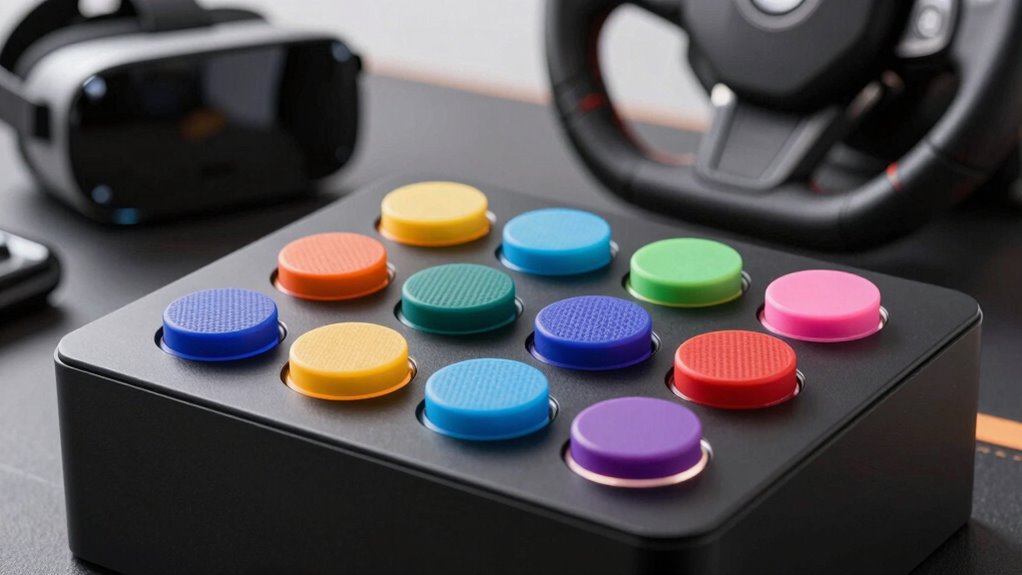

If you’re looking for a button box for sim racing VR, you’re likely seeking a way to enhance your immersion and control. The best button boxes offer quick access to essential functions without cluttering your cockpit, but they vary greatly in layout, build quality, and price. The Sim-Panel Classic 2 Button Box with a premium black finish stands out for its durability and sleek design, making it ideal for serious sim racers. Meanwhile, the PXN CB1 for PC delivers a versatile, feature-rich experience at a more accessible price point. Tradeoffs in this category often involve balancing build quality, customization options, and ease of use. Keep reading to see how these options compare to help you choose the perfect button box for your VR sim racing setup.

Get home appliances delivered free with Prime
- Fast, free delivery on millions of items
- Prime Video, Amazon Music and more included
- Member-only deals all year
Complete the kit


Key Takeaways
- Top-tier models like the Sim-Panel Classic offer premium build quality and aesthetic appeal, but come at a higher cost.
- Programmable options such as the MiYee Button Box provide extensive customization, ideal for advanced sim racers.
- Layout matters: horizontal and vertical configurations suit different cockpit setups and accessibility preferences.
- Compatibility varies—ensure the button box supports your specific sim racing hardware and VR system before purchasing.
- Price ranges from budget-friendly to premium, so balancing features against your budget is key for the best value.
| Sim-Panel Classic 2 Button Box for ATS/ETS2 (Premium Black Brush Aluminum Finish) |  | Best Premium Build and Realism | Operation Mode: manual | Contact Type: Normally Open, Normally Closed | VIEW ON AMAZON | See Our Full Breakdown | |
| Sim-Panel Classic 2 Button Box for ATS/ETS2 (Premium Woodgrain Finish) |  | Best for Realism and Durability | Operation Mode: ON-OFF | Contact Type: Normally Open | Connector Type: USB | VIEW ON AMAZON | See Our Full Breakdown |
| SIM-PANEL PC Sim Racing Gen 2 Button Box Horizontal Layout |  | Best for PC Racing Precision | Compatibility: PC only | Mounting: Horizontal | Programmable Buttons: Yes | VIEW ON AMAZON | See Our Full Breakdown |
| Obokidlyamor Simulator American Truck Button Box for G27/G29/G920/G923 with Mic PTT Microphone for PC |  | Best for Realistic Truck Simulation with Voice Communication | Number of Buttons: 16 | Microphone: PTT for voice communication | Material: PLA plastic and metal switches | VIEW ON AMAZON | See Our Full Breakdown |
| PXN CB1 Sim Racing Button Box |  | Best Compact Multi-Button Control | Compatible Devices: Windows | Controller Type: Button Box | Connectivity Technology: USB C | VIEW ON AMAZON | See Our Full Breakdown |
| Sim-Panel Classic 2 Button Box for ATS/ETS2 (Matte Black Finish) |  | Best for Realistic Trucking Simulation Setup | Compatibility: ATS, ETS2 | Finish: Matte Black | Mounting Options: Desk Clamps, VESA Mount | VIEW ON AMAZON | See Our Full Breakdown |
| MiYee Programmable Button Box for Sim Racing with Rotary Encoders and Carbon Fiber Panel |  | Best for High-Performance PC Racing Customization | Compatible Devices: PC | Controller Type: Push Button | Connectivity Technology: USB | VIEW ON AMAZON | See Our Full Breakdown |
| PXN CB1 Sim Racing Button Box for PC, 19 Controls (9 Input Types) |  | Best for Versatile, Multi-Game Compatibility | Compatible Devices: PC, Windows | Controller Type: Push Button | Connectivity Technology: USB | VIEW ON AMAZON | See Our Full Breakdown |
| SIM-PANEL PC Sim Racing Gen 2 Button Box Vertical Layout |  | Best for Ergonomic, Cockpit-Style Racing | Compatibility: PC only | Mounting Style: Vertical | Programmable Buttons: Yes | VIEW ON AMAZON | See Our Full Breakdown |
| Sim Racing Button Box for PC, 37 Programmable Controls |  | Best for Extensive Customization and Control Expansion | Number of Controls: 37 | Control Types: Buttons, knobs, switches, engine-start | Faceplate Material: Carbon fiber | VIEW ON AMAZON | See Our Full Breakdown |
| PXN CB1 Racing Button Box USB PC Racing Simulator Center Control Button Box |  | Best for Extensive Customization and Multi-Platform Use | Compatible Devices: Windows, Windows PC/Computer | Controller Type: PC Racing Simulator Center Control Button Box | Connectivity Technology: USB | VIEW ON AMAZON | See Our Full Breakdown |
| PXN CB1 PC Sim Racing Button Box with 19 Controls |  | Best for Sim Racing Beginners and Moderate Setups | Compatibility: PC, PXN V9 Gen2 steering wheel | Button Quantity: 30 | Input Types: Push Button, Joystick | VIEW ON AMAZON | See Our Full Breakdown |
More Details on Our Top Picks
Sim-Panel Classic 2 Button Box for ATS/ETS2 (Premium Black Brush Aluminum Finish)
This button box stands out for its high-quality brushed aluminum finish, vibrant backlighting, and realistic ignition and brake knobs, making it ideal for serious trucking sim enthusiasts who want a premium feel. Compared with the woodgrain version, this model offers a sleeker, more modern look and enhanced durability, though it may be less versatile in aesthetics for some setups. The manual operation mode and specialized game focus mean it’s less suited for casual users or those playing broader racing titles. Its premium stainless steel buttons provide excellent tactile feedback, and the customizable backlighting enhances late-night gaming. However, its setup is manual and may require extra space for mounting, which could be a drawback for smaller desks.Pros:- Vibrant customizable backlighting enhances late-night gaming
- Premium stainless steel buttons provide a tactile feel
- Versatile mounting options for a stable setup
- Realistic ignition switch and brake knobs
Cons:- Limited to specific simulation games (ATS/ETS2)
- Requires manual setup and mounting for stability
Best for: Dedicated sim truckers seeking a premium, realistic control panel with customizable lighting.
Not ideal for: Casual gamers or those using multi-platform setups who need plug-and-play versatility.
- Operation Mode:manual
- Contact Type:Normally Open, Normally Closed
Our verdict“This is best suited for dedicated truck sim players who prioritize realism and premium build quality.”
Sim-Panel Classic 2 Button Box for ATS/ETS2 (Premium Woodgrain Finish)
The woodgrain finish gives this button box a classic, authentic look that appeals to traditional simulation enthusiasts, especially those focused on American or Euro Truck Simulator titles. It offers the same vibrant backlighting and sturdy stainless steel buttons as the black version, with the added aesthetic appeal of a woodgrain surface. Its versatility is evident in the mounting options, including VESA compatibility, but it shares the same game-specific limitations as the black model. The inclusion of a realistic ignition switch and brake knobs enhances immersion, yet the lack of detailed info on extra button functions might limit customization for some users. It’s ideal for players who want a durable, stylish control panel with a focus on realism.Pros:- Vibrant backlighting with customizable colors
- Durable stainless steel buttons for long-term use
- Versatile mounting options including VESA
- Authentic ignition switch and brake knobs
Cons:- Limited info on additional button functions
- No details on software customization options
Best for: Sim racers who value aesthetic authenticity and durability within truck simulation games.
Not ideal for: Gamers seeking multi-platform compatibility or a more modern aesthetic.
- Operation Mode:ON-OFF
- Contact Type:Normally Open
- Connector Type:USB
- Switch Type:Ignition
Our verdict“This model is ideal for users wanting a sturdy, realistic truck sim control with a classic look.”
SIM-PANEL PC Sim Racing Gen 2 Button Box Horizontal Layout
The GEN 2 Horizontal Button Box is designed specifically for PC racers seeking quick, ergonomic access to controls. Its horizontal layout makes it easier to glance at and reach buttons during high-speed racing, which sets it apart from vertical or compact models like the PXN CB1. Fully programmable, it offers a level of customization that appeals to advanced sim racers who want to tailor their controls precisely. However, its exclusivity to PC and lack of wireless connectivity limit its flexibility for console users or casual setups. The ergonomic design improves race performance, but the absence of wireless options may be inconvenient for some players who prefer a cleaner desk without wires.Pros:- Fully customizable button modes for versatile control
- Ergonomic horizontal layout for easy visibility and access
- Designed specifically for PC setups for optimal compatibility
Cons:- Not compatible with consoles or wireless setups
- Limited to PC systems only
Best for: PC sim racers who prioritize control customization and ergonomic layout for competitive racing.
Not ideal for: Console players or those preferring wireless, plug-and-play solutions.
- Compatibility:PC only
- Mounting:Horizontal
- Programmable Buttons:Yes
- Design:Ergonomic, streamlined layout
Our verdict“This pick makes the most sense for serious PC racers who want a tailored, ergonomic control layout.”
Obokidlyamor Simulator American Truck Button Box for G27/G29/G920/G923 with Mic PTT Microphone for PC
This button box combines multiple features to enhance truck simulation, offering 16 programmable buttons, a realistic ignition switch, parking brake, and a PTT microphone, making it a comprehensive control setup. Compared to the PXN CB1, which focuses solely on button quantity, the Obokidlyamor provides a more immersive experience with voice communication, which is crucial for multiplayer trucking games. Its high-quality construction from PLA plastic and metal switches ensures durability, but the complexity of setup and small print lines due to 3D printing might deter beginners. It’s best for dedicated truck sim players who want both control and voice communication in a single device, though it may be overkill for casual users.Pros:- Highly customizable with 16 programmable buttons
- Realistic ignition and parking brake enhance immersion
- Supports multiple wheel bases for versatility
- Includes PTT microphone for voice chat
Cons:- Small print lines may affect aesthetics
- Requires software for lighting customization
- Setup complexity might challenge beginners
Best for: Truck sim enthusiasts who want a highly functional, immersive control and communication setup.
Not ideal for: Casual racers or those who prefer simple, plug-and-play controllers without voice features.
- Number of Buttons:16
- Microphone:PTT for voice communication
- Material:PLA plastic and metal switches
- Lighting:LED backlit, customizable
- Compatibility:G27, G29, G920, G923, T248, T300, MOZA R3/R5/R9/R12, PXN V99/V10/V12 LITE
- Mounting Hole Spacing:45-102mm
Our verdict“This is ideal for serious truck sim fans who want detailed controls and voice communication in one package.”
PXN CB1 Sim Racing Button Box
The PXN CB1 offers a straightforward, USB-connected solution with 30 programmable buttons, making it one of the most versatile options for expanding control options on a desktop or laptop. Its compact and lightweight design is ideal for users who need a multi-button setup without cluttering their space, but it’s limited to Windows PCs and lacks wireless support, which could reduce flexibility. Compared to the Obokidlyamor, the PXN CB1 doesn’t include voice communication or specialized truck controls, focusing instead on sheer button quantity. This makes it a strong choice for multi-platform users who want a broad array of controls but are less concerned with realism or integrated features.Pros:- 30 programmable buttons for extensive customization
- Compact and lightweight for easy placement
- USB C connection for quick setup
Cons:- Limited to Windows platform only
- No wireless or Bluetooth options
- No detailed info on included software for customization
Best for: PC users seeking a large number of programmable controls in a compact form factor for multi-genre racing or general control expansion.
Not ideal for: Console gamers or those wanting wireless connectivity and integrated voice chat.
- Compatible Devices:Windows
- Controller Type:Button Box
- Connectivity Technology:USB C
- Additional Features:Multiuse
- Button Quantity:30
- Hardware Platform:Desktop, Laptop
- Power Source:Corded Electric
- Item Weight:1.2 pounds
- Dimensions:7.2 x 5.6 x 3.1 inches
Our verdict“This is a practical choice for PC racers who want a high-button count without occupying much space.”
Sim-Panel Classic 2 Button Box for ATS/ETS2 (Matte Black Finish)
This button box stands out for its premium tactile controls and authentic design, making it an ideal choice for serious truck simulation enthusiasts. Compared to the Sim-Panel Classic 2 Button Box for ATS/ETS2 (Premium Black Brush Aluminum Finish), it offers a matte finish that reduces glare and a more subdued aesthetic, though the latter’s premium materials might appeal to those seeking a more upscale look. Its true-to-life ignition switch and brake knobs provide tactile feedback that enhances immersion, while the vibrant backlighting allows for easy visibility in low-light conditions. The versatile mounting options—desk clamps or VESA—allow stable placement on a variety of rigs. However, setup complexity may challenge beginners, and it’s primarily tailored for truck sims, limiting versatility for other game types.
Pros:- Authentic tactile controls and switches
- Vibrant, customizable backlighting
- Flexible mounting options for stability
- High-quality materials and craftsmanship
Cons:- Setup can be complex for newcomers
- Limited to truck simulation games only
Best for: Dedicated truck sim players who want realistic controls and customizable lighting.
Not ideal for: Casual gamers or those seeking a multi-game control panel without complex setup.
- Compatibility:ATS, ETS2
- Finish:Matte Black
- Mounting Options:Desk Clamps, VESA Mount
- Lighting:11 colors, full-spectrum via Simlink
- Buttons:Brushed stainless steel
- Controls:Ignition switch, brake knobs
Our verdict“This button box suits serious truck sim enthusiasts who value realism and customization over convenience.”
MiYee Programmable Button Box for Sim Racing with Rotary Encoders and Carbon Fiber Panel
This model excels thanks to its durable carbon fiber faceplate and full-metal housing, making it ideal for racers seeking a rugged, highly customizable setup. Unlike the PXN CB1 Sim Racing Button Box, which offers a broader array of controls but with simpler build quality, the MiYee provides a sturdier, premium feel that withstands intense use. Its multiple programmable buttons and rotary encoders enable granular control tailored to specific racing needs, while the plug-and-play USB setup simplifies installation. However, its PC-only compatibility and potentially complex configuration process make it less suitable for casual or console racers, and the metal construction adds weight and cost.
Pros:- Robust carbon fiber and metal construction
- Numerous programmable buttons and encoders
- Easy USB setup with quick installation
- High durability for intense use
Cons:- Limited to PC compatibility
- Setup may be complex for some users
Best for: PC racers who prioritize durability and extensive customization in their button box.
Not ideal for: Console players or beginners seeking a straightforward, plug-and-play solution.
- Compatible Devices:PC
- Controller Type:Push Button
- Connectivity Technology:USB
- Additional Features:Multiuse, Rotary Encoders
- Button Quantity:16
- Materials:Carbon Fiber, Metal
Our verdict“This pick is perfect for experienced PC racers needing a tough, highly customizable control panel.”
PXN CB1 Sim Racing Button Box for PC, 19 Controls (9 Input Types)
The PXN CB1 offers a broad range of controls—19 in total—across 9 input types, making it a versatile choice for various simulation genres, from racing to farming. Compared with the Sim Racing Button Box for PC, 37 Controls, it provides fewer controls but maintains a user-friendly, plug-and-play experience. Its customizable RGB lighting and up to 30 programmable inputs cater to gamers who want tailored setups without complicated software. Nevertheless, its reliance on hardware controls alone limits software customization, and the lack of wireless options might bother those seeking a clutter-free setup. Its straightforward USB connection simplifies installation but may require some initial configuration for optimal functionality.
Pros:- Supports multiple simulation types
- Up to 30 programmable controls
- Easy USB plug-and-play setup
- Customizable RGB lighting
Cons:- Limited to PC/Windows
- No wireless connectivity
- Setup can be complex for new users
Best for: Multi-genre sim racers who want a flexible, easy-to-install control panel.
Not ideal for: Hardcore racing enthusiasts demanding extensive control options or wireless connectivity.
- Compatible Devices:PC, Windows
- Controller Type:Push Button
- Connectivity Technology:USB
- Button Quantity:30
- Additional Features:RGB lighting, Programmable inputs
- Power Source:Corded Electric
Our verdict“This control panel suits gamers seeking a versatile, straightforward device compatible with multiple simulation titles.”
SIM-PANEL PC Sim Racing Gen 2 Button Box Vertical Layout
The SIM-PANEL R Gen 2’s vertical, cockpit-style layout makes it particularly appealing for drivers who want controls that mimic real motorsport dashboards. Compared with the Sim-Panel Classic 2 Button Box for ATS/ETS2, which offers a more traditional, horizontal layout, this model emphasizes ergonomic access and quick reach during intense races. Its fully programmable buttons allow tailored configurations, and the vertical orientation provides a natural driver’s perspective. However, it’s limited to PC setups and requires some technical tinkering for customization. Its design may not suit all racing rigs, especially those with smaller dashboards, and it’s less versatile for non-racing applications.
Pros:- Fully customizable, programmable buttons
- Ergonomic vertical layout for quick access
- Enhances immersion with cockpit-style design
- Ideal for dedicated sim racing rigs
Cons:- Limited to PC compatibility
- Requires technical setup and customization
- Design may not fit all rigs
Best for: PC racers who prefer cockpit-style controls for immersive, high-precision racing.
Not ideal for: Casual gamers or those using smaller racing rigs that cannot accommodate vertical mounting.
- Compatibility:PC only
- Mounting Style:Vertical
- Programmable Buttons:Yes
- Designed For:Sim racing setups
Our verdict“This button box is best suited for serious PC racers who want an authentic, cockpit-like control experience.”
Sim Racing Button Box for PC, 37 Programmable Controls
With 37 programmable controls, including engine-start buttons, knobs, and switches, this control box offers the highest level of customization among the options here. Compared to the MiYee Programmable Button Box, which emphasizes durability and a sleek design, this model prioritizes control quantity and expandability, making it ideal for racers who want to fine-tune every aspect of their setup. Its durable carbon fiber faceplate and metal enclosure add a professional look, while USB connectivity makes setup straightforward. The downside is that additional accessories are sold separately, and extensive configuration may be needed to match specific game controls, which could be daunting for beginners or those seeking a plug-and-play experience.
Pros:- 37 programmable controls for detailed customization
- Durable carbon fiber faceplate and metal enclosure
- Easy USB connection and expandable with accessories
- Supports multiple control types for complex setups
Cons:- Additional accessories are extra
- Setup and configuration can be complex
Best for: Advanced PC racers who want maximum control options and customization flexibility.
Not ideal for: Casual players or those with limited technical knowledge needing simple setups.
- Number of Controls:37
- Control Types:Buttons, knobs, switches, engine-start
- Faceplate Material:Carbon fiber
- Enclosure Material:Metal
- Connectivity:USB
- Layout Options:Horizontal, Vertical (optional)
Our verdict“This button box is perfect for seasoned racers demanding extensive control and customization options.”
PXN CB1 Racing Button Box USB PC Racing Simulator Center Control Button Box
The PXN CB1 Racing Button Box stands out for its remarkable flexibility, offering 30 programmable buttons that can be tailored for a wide range of racing games and control functions. Compared with the PXN CB1 PC Sim Racing Button Box with 19 Controls, this model provides more options, though that increased complexity might overwhelm some users. Its RGB lighting adds a customizable aesthetic, enhancing immersion without sacrificing practicality. Installing is straightforward, and its adjustable mounting options support various setups, but it requires a compatible PC and software configuration, which may be a barrier for less tech-savvy users. This pick is ideal for racers who want maximum control versatility across multiple titles and are comfortable with setup complexity. However, it is limited to PC use, so console players should look elsewhere.
Pros:- Highly customizable with 30 programmable buttons for tailored controls
- Supports multiple racing platforms and games, offering versatility
- RGB lighting creates an immersive racing atmosphere
- Flexible mounting options for various setups
Cons:- Requires compatible PC and software setup, which may be complex
- Limited to PC, not compatible with consoles
- The large number of buttons might be overwhelming for some users
Best for: Players who seek extensive customization and multi-game compatibility on PC, and are willing to handle a more elaborate setup.
Not ideal for: Casual players or console users looking for plug-and-play solutions, as this device is PC-only and involves complex configuration.
- Compatible Devices:Windows, Windows PC/Computer
- Controller Type:PC Racing Simulator Center Control Button Box
- Connectivity Technology:USB
- Button Quantity:30
- Hardware Platform:PC
- Power Source:USB
- Item Weight:1.2 pounds
- Item Dimensions:5.67 x 3.09 x 7.24 inches
- Warranty & Support:Product Warranty available
Our verdict“This button box suits advanced PC sim racers who prioritize customization and multi-game control, despite its setup complexity.”
PXN CB1 PC Sim Racing Button Box with 19 Controls
The PXN CB1 PC Sim Racing Button Box with 19 Controls offers a streamlined yet versatile control panel suitable for those new to VR racing or with limited space. While it shares the same core features of 30 programmable buttons as the larger model, its more compact design makes it easier to mount and manage. Compared to the PXN CB1 Racing Button Box USB, this version’s fewer controls might limit advanced users but simplifies the setup process. It supports popular simulators like Assetto Corsa and iRacing, and its RGB lighting adds to the immersive experience. Mounting options are flexible, but it only supports PC and specific steering wheels, and the setup may be intimidating for newcomers unfamiliar with configuration. It’s well-suited for casual racers or those starting out but less ideal for advanced control needs.
Pros:- Compact and easy to mount on various surfaces
- Supports multiple popular racing simulators
- RGB lighting enhances visual immersion
- Simpler setup suitable for beginners
Cons:- Limited to PC and specific steering wheel compatibility
- Fewer controls than larger models may restrict advanced functions
- Complex setup for first-time users could still be challenging
Best for: Beginner or casual sim racers who want reliable, customizable controls without the complexity of a larger setup.
Not ideal for: Hardcore sim racers or users seeking maximum control options, as this model provides fewer buttons and less customization scope.
- Compatibility:PC, PXN V9 Gen2 steering wheel
- Button Quantity:30
- Input Types:Push Button, Joystick
- Connectivity Technology:USB
- Color:Black
- Material:High-quality ABS resin
- Mounting:Fits surfaces up to 7 cm thick, can be mounted on monitor or table
Our verdict“This button box fits entry-level or casual VR racers seeking a manageable, customizable control panel with straightforward installation.”

How We Picked
The products in this roundup were evaluated based on several key criteria relevant to VR sim racing enthusiasts. Performance was the primary focus—how responsive and reliable the controls are during intense sessions. Build quality and durability were also critical, as a high-quality button box should withstand frequent use without wear. Usability factors like layout, programmability, and ease of installation influenced our rankings, ensuring that each option is practical for real-world racing. Finally, value was considered by comparing features against price, helping to identify options that deliver the best balance of quality and affordability.Factors to Consider When Choosing Button Box For Sim Racing Vr
Choosing the right button box for your VR sim racing setup involves more than just picking the most controls. The first consideration should be compatibility with your hardware and software to prevent connection issues or limited functionality. Layout and ergonomics are crucial—whether you prefer a horizontal or vertical design can impact ease of access during races. Programmability allows customization for specific functions, which can streamline your control scheme and enhance immersion. Build quality and materials influence durability and aesthetics, especially for long-term use. Lastly, consider your budget; investing in a higher-end model often offers better responsiveness and longevity, but there are solid budget options that serve casual racers well.Compatibility and Connectivity
Before selecting a button box, verify that it supports your racing hardware and VR system. Some models are designed specifically for PC, while others may also support consoles or particular wheel brands. USB connectivity is common, but check for features like plug-and-play setup or driver support to ensure hassle-free installation. Compatibility issues can lead to limited functionality or driver conflicts, so thorough research is worthwhile. Considering your existing hardware setup will help avoid costly returns or upgrades later.Layout and Ergonomics
The layout of your button box significantly impacts your racing experience. Horizontal layouts tend to mimic cockpit panels and are suitable for wider setups, while vertical or compact designs save space and can be more accessible in tight cockpits. Think about the placement of frequently used controls—buttons, rotary encoders, or switches—and whether they are within easy reach without disrupting your racing posture. An ergonomic design reduces fatigue and improves reaction times, making your VR experience more immersive and enjoyable.Programmability and Customization
A key feature for serious sim racers is programmability—being able to assign functions to buttons and encoders according to your preferences. Some models offer extensive customization options and software support, allowing for profiles tailored to different racing titles. However, more complex programming may require a learning curve, so consider your comfort level with software setup. A highly programmable button box can streamline your control scheme, reduce clutter, and improve reaction times during races.Build Quality and Materials
Durability is vital for a device that will see frequent use. Premium models often use high-quality materials like aluminum or carbon fiber, which resist wear and look professional. Cheaper options may feature plastic components that can degrade or break with heavy use. A well-built button box not only lasts longer but also maintains consistent tactile feedback, which is essential during intense VR sessions. Keep in mind that aesthetics matter too—matching your cockpit style can enhance overall immersion.Price and Value
Prices for button boxes vary from budget-friendly options to premium setups costing several hundred dollars. While higher-priced models typically offer better build quality, more controls, and customization features, they may be outside the budget of casual racers. Conversely, budget options can still provide significant improvements over standard controllers but might lack durability or advanced features. Evaluate your racing needs and frequency of use to determine where to invest. Sometimes, spending a bit more upfront results in long-term satisfaction and reliability.Frequently Asked Questions
Will a button box improve my VR sim racing experience?
Yes, a button box can significantly enhance your VR racing by providing quick access to essential controls without cluttering your cockpit or relying on keyboard inputs. This setup allows for more immersive gameplay and faster reactions during races. It also helps keep your focus on the virtual environment rather than fumbling for controls, making your experience more fluid and realistic. However, the benefits depend on choosing a button box that suits your specific setup and racing style.
Can I use a button box with any VR racing game?
Most modern VR racing titles support external controllers like button boxes, especially on PC. Compatibility largely depends on whether the game recognizes custom input devices and how well it supports your operating system. Many button boxes come with configurable software that allows mapping functions to specific controls, which enhances compatibility. Always check the software and driver support for your chosen game before purchasing to avoid frustration during setup.
Is a programmable button box worth the extra cost?
For serious racers who want to fine-tune their control schemes, a programmable button box offers considerable advantages. It allows customization of functions, reducing the need for complex keyboard shortcuts or multiple devices. This can lead to faster response times and a more streamlined racing experience. However, if you are a casual player or new to sim racing, a simpler, non-programmable model may be sufficient and more budget-friendly. The decision ultimately hinges on your level of commitment and desire for customization.
How do I choose between a horizontal and vertical button box layout?
The choice between horizontal and vertical layouts depends on your cockpit space and personal preference. Horizontal layouts mimic traditional instrument panels and are easier to reach across wider desks or cockpits. Vertical models tend to be more compact and suit tighter setups, making them more accessible during intense racing sessions. Consider your ergonomic needs and how frequently you’ll access certain controls to determine which layout reduces fatigue and improves reaction times.
Do I need a high-end button box, or are budget options good enough?
The answer depends on your racing frequency and goals. High-end button boxes often feature premium materials, extensive programmability, and better tactile feedback, which can last for years and improve your control precision. Budget options, however, can still provide a meaningful upgrade over standard controllers and are suitable for casual or less frequent racers. If you plan to race regularly and want a more immersive, durable experience, investing in a higher-quality model makes sense. For occasional use, budget models can suffice without breaking the bank.