
Finding the right monitor for reading and writing involves balancing screen comfort, clarity, and features that reduce eye strain. The Lenovo ThinkVision E24-40 stands out as a versatile overall choice, offering a sharp Full HD display with eye-friendly tech. For those prioritizing larger screens, the LG 32U631A-B provides a spacious viewing area with high resolution and multiple comfort modes. Meanwhile, portable options like the WGK 15.6-inch Portable Monitor excel for writers on the go but may lack the size or features for prolonged desk work. The main tradeoffs revolve around screen size, resolution, and whether portability or ergonomics take precedence. Continue reading for a detailed breakdown to find your ideal fit.

Get home appliances delivered free with Prime
- Fast, free delivery on millions of items
- Prime Video, Amazon Music and more included
- Member-only deals all year
Complete the kit



Key Takeaways
- Size and resolution directly impact reading comfort; larger screens with higher resolutions reduce eye strain.
- Features like flicker-free technology and blue light filters significantly improve long-term eye health.
- Portability options excel for mobility but often compromise on size and ergonomic features.
- Higher refresh rates and HDR support are less critical for reading/writing but can enhance overall comfort.
- Budget considerations influence the choice between basic models and premium displays with advanced eye-care features.
| Lenovo ThinkVision E24-40 24-inch Full HD LED Monitor |  | Best Overall for Extended Reading and Writing Sessions | Screen Size: 23.8 inches | Resolution: 1920 x 1080 | Brightness: 250 Nit | VIEW ON AMAZON | See Our Full Breakdown |
| LG 32U631A-B 32-inch QHD IPS Monitor, 100Hz, HDR10, USB-C | 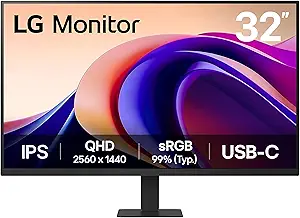 | Best for Vivid Visuals and Multitasking in a Larger Format | Screen Size: 32 inches | Resolution: 2560 x 1440 | Brightness: 350 Nit | VIEW ON AMAZON | See Our Full Breakdown |
| Philips 221V8LB 22 inch Full HD Monitor, 100Hz, VESA |  | Best for Budget-Conscious Users Needing Clear Text and Basic Features | Screen Size: 22 inches | Resolution: 1920 x 1080 | Brightness: 250 Nit | VIEW ON AMAZON | See Our Full Breakdown |
| WGK 15.6 inch Portable Monitor 1080P FHD Travel Display |  | Best Compact Travel Monitor for Reading and Light Productivity | Screen Size: 15.6 inches | Resolution: 1920 x 1080 | Refresh Rate: 60 Hz | VIEW ON AMAZON | See Our Full Breakdown |
| Anyuse Portable Monitor for Laptop 15.6 Inch 1080P USBC-C HDMI |  | Best Versatile Travel Companion for Reading and Light Editing | Screen Size: 15.6 inches | Resolution: 1920 x 1080 | Response Time: 0 ms | VIEW ON AMAZON | See Our Full Breakdown |
| MNN 15.6-inch FHD Portable Monitor with Smart Cover and Speakers |  | Best Portable for Reading and Writing | Display Size: 15.6 inches | Resolution: 1920×1080 (Full HD) | Refresh Rate: 60Hz | VIEW ON AMAZON | See Our Full Breakdown |
| Samsung 27″ S3 (S32GF) FHD High Resolution 120Hz Monitor with IPS Panel, Flicker Free, Eye Saver Mode, LS27F320GANXZA |  | Best for Versatile Desktop Use with Smooth Visuals | Size: 27 inches | Resolution: Full HD (FHD) | Refresh Rate: 120Hz | VIEW ON AMAZON | See Our Full Breakdown |
| Yxk Portable Monitor 15.6 Inch 1080P 60Hz IPS HDR Ultra-Slim Travel Monitor with Dual Speakers USB-C HDMI Second Screen for Laptop PC Mac Phone Xbox PS4/5 Switch, VESA Kickstand, Zero Frame Gaming |  | Best for On-the-Go Multi-Device Use | Display Size: 15.6 inches | Resolution: 1920×1080 | Refresh Rate: 60Hz | VIEW ON AMAZON | See Our Full Breakdown |
| Lenovo ThinkVision T22i-30 22″ Full HD LED Monitor – Raven Black |  | Best Ergonomic Desktop Monitor | Screen Size: 21.5 inches | Resolution: 1920 x 1080 | Display Technology: IPS | VIEW ON AMAZON | See Our Full Breakdown |
| ASUS VT229H 21.5″ Full HD IPS Touch Monitor |  | Best Touch Monitor for Interactive Reading and Writing | Screen Size: 21.5 inches | Resolution: 1080P Full HD | Touch Capability: 10-point multi-touch | VIEW ON AMAZON | See Our Full Breakdown |
| Philips 24 inch 100Hz Frameless Full HD Computer Monitor |  | Best Overall for Extended Reading and Writing Sessions | Size: 24 inches | Resolution: 1920 x 1080 | Refresh Rate: 100Hz | VIEW ON AMAZON | See Our Full Breakdown |
| LG 27U631A-B 27-inch QHD IPS Computer Monitor, 100Hz, HDR10, USB Type-C, Black |  | Best for Vivid Visuals and Smooth Motion in a Larger Screen | Display Size: 27 inches | Resolution: 2560 x 1440 (QHD) | Panel Type: IPS | VIEW ON AMAZON | See Our Full Breakdown |
| LG Electronics 24BK430H-B 24-Inch IPS FHD Monitor |  | Best Budget-Friendly IPS for Comfortable Reading and Writing | Display Size: 24 inches | Resolution: 1920 x 1080 | Panel Type: IPS | VIEW ON AMAZON | See Our Full Breakdown |
| Lenovo L15 Portable Monitor, 15.6” Display, Full HD Resolution, IPS Panel, 250 nits Brightness, 60Hz Refresh Rate, USB-C Ports, Height-Adjustable Stand, Flicker-Free Technology, Grey |  | Best Portable Solution for Reading and Writing on the Go | Display Size: 15.6 inches | Resolution: 1920 x 1080 | Panel Type: IPS | VIEW ON AMAZON | See Our Full Breakdown |
| monitor for reading and writing | Resolution | Refresh Rate | Panel Type | Screen Size |
|---|---|---|---|---|
| Lenovo ThinkVision E24-40 24-i | 1920 x 1080 | 100 Hz | — | 23.8 inches |
| LG 32U631A-B 32-inch QHD IPS M | 2560 x 1440 | 100 Hz | — | 32 inches |
| Philips 221V8LB 22 inch Full H | 1920 x 1080 | 100 Hz | VA | 22 inches |
| WGK 15.6 inch Portable Monitor | 1920 x 1080 | 60 Hz | IPS | 15.6 inches |
| Anyuse Portable Monitor for La | 1920 x 1080 | — | — | 15.6 inches |
| MNN 15.6-inch FHD Portable Mon | 1920×1080 (Full HD) | 60Hz | IPS | — |
| Samsung 27" S3 | Full HD (FHD) | 120Hz | IPS | — |
| Yxk Portable Monitor 15.6 Inch | 1920×1080 | 60Hz | — | — |
| Lenovo ThinkVision T22i-30 22" | 1920 x 1080 | — | — | 21.5 inches |
| ASUS VT229H 21.5" Full HD IPS | 1080P Full HD | — | IPS | 21.5 inches |
| Philips 24 inch 100Hz Frameles | 1920 x 1080 | 100Hz | VA | — |
| LG 27U631A-B 27-inch QHD IPS C | 2560 x 1440 (QHD) | 100Hz | IPS | — |
| LG Electronics 24BK430H-B 24-I | 1920 x 1080 | 60Hz | IPS | — |
| Lenovo L15 Portable Monitor | 1920 x 1080 | 60Hz | IPS | — |
More Details on Our Top Picks
Lenovo ThinkVision E24-40 24-inch Full HD LED Monitor
This Lenovo model stands out for its reliable 23.8-inch Full HD display with accurate colors, making it a solid choice for those who prioritize clear text and vibrant visuals. Compared to the LG 32U631A-B, it offers a more compact setup suitable for smaller desks but sacrifices 4K resolution and wider color gamuts. Its 4 ms response time and 100Hz refresh rate ensure smooth scrolling, reducing eye strain during long reading or editing sessions. However, the lack of built-in speakers and basic design may feel limiting for users seeking multimedia versatility or a more aesthetic workspace. This monitor is ideal for writers, students, and professionals who need dependable clarity without unnecessary extras. It’s less suited for graphic designers or gamers requiring higher resolution or advanced features.
Pros:- Vivid Full HD display with accurate sRGB colors
- Fast 4 ms response time minimizes motion blur
- Reliable performance for all-day use
- Compact size ideal for limited workspace
Cons:- Limited to 1080p resolution, not 4K
- No built-in speakers or advanced aesthetic features
Best for: Writers, students, and professionals who need a dependable, no-fuss monitor for extended reading and writing.
Not ideal for: Graphic designers or gamers who require 4K resolution or fast-paced visual performance.
- Screen Size:23.8 inches
- Resolution:1920 x 1080
- Brightness:250 Nit
- Response Time:4 ms
- Refresh Rate:100 Hz
- Aspect Ratio:16:9
- Color Coverage:sRGB
Our verdict“This monitor makes the most sense for users who prioritize clarity and reliability over resolution and multimedia features.”
LG 32U631A-B 32-inch QHD IPS Monitor, 100Hz, HDR10, USB-C
This LG monitor excels with its expansive 32-inch QHD IPS display, offering wide viewing angles and rich colors, ideal for multitasking and detailed reading. It’s a step up from the Lenovo ThinkVision E24-40 in resolution and size, providing sharper text and more workspace, but it comes with a larger footprint and potentially higher cost. The 100Hz refresh rate and 5ms GTG response time mean smoother scrolling and less flicker, reducing eye fatigue during extended sessions. Its HDR10 support and 99% sRGB coverage make it suitable for visual work, though it’s less optimized for gaming compared to dedicated gaming monitors with higher refresh rates. This pick suits professionals and researchers who want a larger, vibrant screen for reading, editing, and casual media consumption, but not those with limited desk space or seeking ultra-high resolution or gaming focus.
Pros:- Large 32-inch QHD IPS display with sharp visuals
- Wide viewing angles and vibrant color reproduction
- 100Hz refresh rate with smooth motion
- HDR10 support enhances picture quality
Cons:- Larger physical size may require more desk space
- Higher price compared to smaller 1080p monitors
Best for: Professionals, researchers, and multi-taskers who value larger, vibrant displays for detailed reading and editing.
Not ideal for: Gamers or users with limited space who don’t need the larger, more detailed screen.
- Screen Size:32 inches
- Resolution:2560 x 1440
- Brightness:350 Nit
- Response Time:5 ms
- Refresh Rate:100 Hz
- Color Coverage:99% sRGB
- HDR Support:HDR10
Our verdict“Ideal for users seeking a bigger, color-rich display for reading, multitasking, and media, with some tradeoffs in space and cost.”
Philips 221V8LB 22 inch Full HD Monitor, 100Hz, VESA
This 22-inch Philips monitor offers crisp Full HD visuals with a 100Hz refresh rate, making it suitable for reading and general use at a budget. Its VA panel delivers strong contrast, ensuring text and images are clear and easy on the eyes. Compared to larger or higher-resolution options, it’s more compact and affordable, ideal for small workspaces or secondary setups. The 178-degree wide viewing angle maintains color consistency from different positions, which is helpful during collaborative work. However, it lacks advanced calibration features or high-end design, and its 22-inch size may be limiting for multitasking or extensive reading. It also includes lowBlue mode and adaptive sync for eye comfort and smoother visuals. This monitor works best for students or casual users who need a reliable display without extra bells and whistles.
Pros:- Crisp Full HD display with strong contrast
- Wide 178-degree viewing angle
- Affordable price point
- Includes LowBlue mode and Adaptive Sync
Cons:- Limited to 22 inches, restricting multitasking
- No advanced calibration or premium design
Best for: Students or casual users seeking a compact, affordable monitor for reading, browsing, and basic multitasking.
Not ideal for: Designers or power users needing color accuracy or a larger workspace.
- Screen Size:22 inches
- Resolution:1920 x 1080
- Brightness:250 Nit
- Refresh Rate:100 Hz
- Response Time:5 ms
- Panel Type:VA
Our verdict“A practical choice for budget-conscious users who prioritize clarity and contrast for everyday reading and media.”
WGK 15.6 inch Portable Monitor 1080P FHD Travel Display
This WGK 15.6-inch portable monitor is a versatile, lightweight option for reading and light productivity on the go. Its Full HD IPS display offers decent color and wide viewing angles, comparable to larger, stationary monitors like the Philips 221V8LB but with a much smaller footprint. The 60Hz refresh rate is sufficient for reading and browsing but less ideal for fast-paced gaming or video editing. Its portability, with a weight of just 2.7 pounds and built-in stand, makes it perfect for travelers or remote workers who need a secondary screen without bulk. The inclusion of speakers and VESA compatibility adds convenience, though the smaller screen limits multitasking space. This monitor suits students, travelers, or remote workers who need a portable, easy-to-use display for reading, emails, and light multitasking, but it’s less suited for intensive editing or gaming.
Pros:- Lightweight and highly portable
- IPS panel with 178° viewing angles
- Includes stand and speakers
- VESA mount compatible
Cons:- Limited to 60Hz refresh rate
- Small 15.6-inch size may restrict multitasking
Best for: Travelers, remote workers, and students needing a portable, secondary display for reading and light tasks.
Not ideal for: Power users or gamers requiring higher refresh rates or larger screens for multitasking or fast visuals.
- Screen Size:15.6 inches
- Resolution:1920 x 1080
- Refresh Rate:60 Hz
- Response Time:0 ms
- Viewing Angle:178°
- Panel Type:IPS
Our verdict“Perfect for on-the-go reading and light productivity, with some limitations in speed and multitasking capacity.”
Anyuse Portable Monitor for Laptop 15.6 Inch 1080P USBC-C HDMI
This 15.6-inch portable monitor from Anyuse offers broad compatibility with a range of devices, thanks to its dual Type-C ports and Mini HDMI. It shares similar features with the WGK portable monitor but with slightly better connectivity options for users with Thunderbolt 3/4 or USB 3.1 devices. Its FHD resolution and 178° viewing angles make text clear and comfortable during extended reading sessions. The lightweight design and included kickstand make it easy to carry and set up wherever needed. The response time of 0 ms ensures smooth visuals for casual browsing and reading, but it’s not intended for gaming or high-speed editing. This monitor is well-suited for travelers, students, or remote workers who want an affordable, flexible secondary display for reading, emails, and light multitasking on multiple devices.
Pros:- Supports a wide range of devices with USB-C and HDMI
- Lightweight and portable
- Clear FHD display with wide angles
- Includes kickstand for easy setup
Cons:- Limited to 60Hz refresh rate
- Not designed for fast-paced gaming or heavy editing
Best for: Travelers, students, and remote workers needing a flexible, portable second screen for reading and light tasks.
Not ideal for: Gaming enthusiasts or power users needing high refresh rates or color accuracy for editing.
- Screen Size:15.6 inches
- Resolution:1920 x 1080
- Response Time:0 ms
- Viewing Angle:178°
- Ports:2 x Type-C, 1 x Mini HDMI
- Aspect Ratio:16:9
Our verdict“A versatile, portable monitor ideal for reading and light productivity on the move, with some limitations in speed.”
MNN 15.6-inch FHD Portable Monitor with Smart Cover and Speakers
This 15.6-inch portable monitor excels in providing a crisp, Full HD display with accurate colors, making it ideal for reading and writing on the go. Compared with the larger Samsung 27″ S3, it sacrifices size for portability, which benefits users who need flexibility rather than a giant screen. Its IPS panel ensures wide viewing angles, essential for collaborative work, while the multiple connection options support a variety of devices. However, its reliance on device support for USB-C and HDMI can limit compatibility, and the smart cover, while protective, doesn’t withstand rough handling. This pick makes the most sense for remote workers or students needing a lightweight secondary screen for reading documents and taking notes.
Pros:- High-resolution 15.6-inch display with accurate colors
- Versatile connection options including USB-C and HDMI
- Lightweight and portable, perfect for travel
Cons:- Requires device support for USB-C with DisplayPort Alt Mode
- HDR mode dependent on device compatibility
- Smart cover offers limited protection in rough conditions
Best for: Travelers, remote workers, students needing a portable secondary display for reading and writing tasks.
Not ideal for: Users requiring a larger screen for intensive multitasking or fast-paced gaming, due to its 60Hz refresh rate and smaller size.
- Display Size:15.6 inches
- Resolution:1920×1080 (Full HD)
- Refresh Rate:60Hz
- Connectivity:USB-C, HDMI
- Color Support:HDR
- Viewing Angle:178°
- Panel Type:IPS
- Included Accessories:Smart cover with stand
Our verdict“This portable monitor is best suited for those who prioritize mobility and clarity for reading and writing on the go.”
Samsung 27″ S3 (S32GF) FHD High Resolution 120Hz Monitor with IPS Panel, Flicker Free, Eye Saver Mode, LS27F320GANXZA
The Samsung 27″ S3 monitor offers a vibrant IPS display with a 120Hz refresh rate, making it excellent for reading, writing, and casual multimedia tasks. Its high refresh rate and flicker-free technology help reduce eye fatigue during extended sessions, outperforming many standard 60Hz monitors like the Lenovo T22i-30, especially for prolonged reading and writing. The ultra-thin bezels and modern design enhance a multi-monitor setup, but its Full HD resolution limits clarity for detailed editing or large fonts, which can be a drawback for some. The absence of built-in speakers can be inconvenient for those who want an all-in-one experience. This monitor makes sense for users who seek a sleek, eye-friendly screen for daily tasks with occasional media consumption.
Pros:- Vivid colors with wide viewing angles
- 120Hz refresh rate for smooth scrolling and transitions
- Eye-friendly features like flicker-free and blue light reduction
Cons:- Limited to Full HD resolution, not 4K
- No built-in speakers
- Specific gaming features may require customization
Best for: Office workers, students, and casual users who want a stylish, smooth, and eye-friendly 27-inch display.
Not ideal for: Gamers or content creators needing 4K resolution or fast response times, as it prioritizes color and eye comfort over gaming performance.
- Size:27 inches
- Resolution:Full HD (FHD)
- Refresh Rate:120Hz
- Panel Type:IPS
- Features:Flicker Free, Eye Saver Mode
Our verdict“This monitor is ideal for users who want a large, comfortable display for reading and writing with smooth performance.”
Yxk Portable Monitor 15.6 Inch 1080P 60Hz IPS HDR Ultra-Slim Travel Monitor with Dual Speakers USB-C HDMI Second Screen for Laptop PC Mac Phone Xbox PS4/5 Switch, VESA Kickstand, Zero Frame Gaming
This 15.6-inch portable monitor combines a lightweight, ultra-slim design with HDR support and dual speakers, making it a versatile choice for reading, writing, and light multimedia tasks while traveling. Its 60Hz refresh rate is comparable to the MNN monitor but with added HDR, which enhances image brightness and color realism. Its wide compatibility with devices via USB-C and HDMI ensures flexibility, especially for those who need a second screen for multiple devices like laptops, phones, or gaming consoles. Compared to larger monitors like the Samsung S3, it sacrifices size for portability but still offers features like VESA mounting. The main tradeoff is its lower refresh rate, which isn’t ideal for gaming or fast-motion content. This pick is perfect for users needing a portable second screen in various environments.
Pros:- Ultra-lightweight at 1.43 lbs and 0.31 inch thick
- HDR support for better image quality
- Multiple input options including USB-C and HDMI
Cons:- Limited to 60Hz, not ideal for gaming or fast motion
- Requires device support for Thunderbolt 3.0/4.0 or USB 3.1 DP Alt Mode
- HDR performance depends on connected device
Best for: Travelers, students, and remote workers who require a compact, versatile second display compatible with multiple devices.
Not ideal for: Hardcore gamers or video editors who need high refresh rates and 4K resolution, due to its 60Hz limit and non-4K display.
- Display Size:15.6 inches
- Resolution:1920×1080
- Refresh Rate:60Hz
- Display Technology:IPS
- HDR:Yes
- Weight:1.43 lbs
Our verdict“This monitor suits people who need a portable, flexible second screen for reading, writing, and light multimedia tasks on the go.”
Lenovo ThinkVision T22i-30 22″ Full HD LED Monitor – Raven Black
The Lenovo ThinkVision T22i-30 offers a 21.5-inch IPS display with excellent color accuracy and a high contrast ratio, making it suitable for detailed reading and writing tasks. Its ergonomic features—height adjustment, pivot, swivel, and tilt—set it apart from many basic monitors like the ASUS VT229H, providing customizable comfort during long hours of work. The multiple connectivity ports, including HDMI, VGA, and VESA mount, enhance versatility for various setups. However, its 60Hz refresh rate and average response time limit its suitability for fast-paced gaming or video editing. While it lacks built-in speakers or USB-C, its focus on ergonomics and image quality makes it a solid choice for professional reading and writing environments where comfort matters.
Pros:- High contrast ratio and color accuracy with IPS technology
- Adjustable height, pivot, swivel, and tilt for ergonomic comfort
- Multiple connectivity options and VESA compatibility
Cons:- Limited to 60Hz refresh rate, not suitable for fast-paced gaming
- No built-in speakers or USB-C port
- Average response time for gaming or motion-heavy tasks
Best for: Office professionals, writers, and students who prioritize ergonomics and color accuracy for long reading and writing sessions.
Not ideal for: Gamers or content creators requiring 4K resolution or higher refresh rates for fast motion content.
- Screen Size:21.5 inches
- Resolution:1920 x 1080
- Display Technology:IPS
- Brightness:856.5 nits
- Contrast Ratio:3,000,000:1
- Ports:HDMI, VGA, VESA
Our verdict“This monitor is ideal for users who need a comfortable, color-accurate display for extended reading and writing tasks.”
ASUS VT229H 21.5″ Full HD IPS Touch Monitor
The ASUS VT229H combines a 21.5-inch Full HD IPS touchscreen with a sleek, frameless design, making it especially suitable for interactive reading, annotation, and creative writing. The 10-point multi-touch support allows for natural gestures, offering a more dynamic experience than non-touch monitors like the Lenovo T22i-30. Its wide viewing angles and eye care technology help reduce fatigue during extended use. However, its 1080P resolution limits sharpness compared to 4K options, and the lack of built-in speakers might require external audio. This monitor is best for users who prefer a tactile, interactive experience for reading and writing tasks, especially in creative or educational settings.
Pros:- IPS display with wide viewing angles
- Multi-touch support for interactive tasks
- Eye care technology reduces fatigue
Cons:- Limited to 1080P resolution, not 4K
- No built-in speakers
- Design may be less suited for non-touch use
Best for: Creative professionals, students, and educators who benefit from touch interaction during reading and writing activities.
Not ideal for: Users seeking ultra-high-resolution displays or gaming-focused features, as it emphasizes touch support over resolution and response time.
- Screen Size:21.5 inches
- Resolution:1080P Full HD
- Touch Capability:10-point multi-touch
- Panel Type:IPS
- Viewing Angles:178°
- Connectivity:HDMI, VGA
Our verdict“This touchscreen monitor is perfect for those who want an interactive experience for reading, writing, and creative applications.”
Philips 24 inch 100Hz Frameless Full HD Computer Monitor
This Philips monitor stands out for its crisp Full HD visuals combined with a VA panel that delivers high contrast and vibrant colors, making text and images clear for prolonged reading or writing tasks. Its wide 178/178 degree viewing angles minimize color distortion when viewed from different positions, which is essential during long sessions. The bezel-free design creates a seamless multi-monitor setup, enhancing productivity. However, its limited port selection—only HDMI and VGA—might require additional adapters for versatile connectivity, and it lacks built-in speakers or advanced features like USB-C. Compared to larger or more feature-rich options, this monitor prioritizes visual clarity and comfort over expandability. Best suited for users who focus on detailed reading and writing in dedicated workspaces, where high contrast and wide angles matter most. Not ideal for users who need multiple ports or multimedia features at their fingertips.
Pros:- Crisp Full HD display with high contrast for sharp text and images
- Wide viewing angles prevent color shifting during long sessions
- Bezel-free design creates a seamless multi-monitor experience
- Eye Care features reduce eye strain during extended use
Cons:- Limited port options may require adapters for some devices
- No built-in speakers or advanced connectivity like USB-C
Best for: Users who need a dedicated, comfortable monitor for extensive reading and writing, such as students or writers working in fixed setups.
Not ideal for: Those seeking a versatile multi-purpose monitor with a variety of ports or multimedia features, or a more expandable workspace.
- Size:24 inches
- Resolution:1920 x 1080
- Refresh Rate:100Hz
- Panel Type:VA
- Viewing Angle:178/178 degrees
- Ports:HDMI x1, VGA x1
Our verdict“This monitor is perfect for users who prioritize visual clarity and comfort for long reading or writing sessions in dedicated workspaces.”
LG 27U631A-B 27-inch QHD IPS Computer Monitor, 100Hz, HDR10, USB Type-C, Black
The LG 27U631A-B offers a larger 27-inch QHD IPS display that excels in producing vibrant, accurate colors and wide viewing angles, making it ideal for detailed reading and writing tasks that benefit from crisp, clear visuals. Its 100Hz refresh rate and 5ms response time support smooth scrolling and reduced motion blur, which can lessen eye fatigue during extended work. The inclusion of USB Type-C with 15W power delivery simplifies connectivity and reduces cable clutter, especially for users with compatible laptops. However, its 27-inch size might be too large for users with limited desk space or those preferring smaller screens. The HDR10 support is basic, and professional color grading users might find it inadequate. Compared to the Philips, it emphasizes color vibrancy and connectivity over a more modest form factor. This pick makes the most sense for those who want a larger, vibrant display with modern connectivity for extended reading and writing tasks. Not suitable for users with small desks or those requiring advanced color accuracy for professional editing.
Pros:- Vivid, accurate colors with wide viewing angles thanks to IPS panel
- Smooth motion and reduced eye fatigue with 100Hz refresh rate and flicker-safe technology
- Versatile connectivity including USB Type-C with power delivery
- Sleek and adjustable design enhances workspace ergonomics
Cons:- Limited to 27 inches, which may not suit those wanting larger screens
- HDR support is basic and not suitable for professional color grading
Best for: Content creators or students who need a larger, color-accurate display with smooth motion for detailed reading and editing tasks.
Not ideal for: Users with limited space or those needing a simple, budget-friendly monitor without HDR or advanced features.
- Display Size:27 inches
- Resolution:2560 x 1440 (QHD)
- Panel Type:IPS
- Refresh Rate:100Hz
- Response Time:5ms (GTG)
- HDR:HDR10
Our verdict“This monitor is well-suited for users who prioritize vibrant visuals, smooth motion, and modern connectivity in a larger display for reading and writing tasks.”
LG Electronics 24BK430H-B 24-Inch IPS FHD Monitor
This 24-inch LG monitor offers a full HD IPS display with accurate colors and wide viewing angles, making it a reliable choice for everyday reading and writing. Its flicker-safe technology and Eye Comfort modes help reduce eye strain during long hours, which is vital for extended use. The on-screen control simplifies adjustments, and its wall-mount compatibility saves desk space. However, at only 60Hz, it falls behind in providing super-smooth motion for fast-paced scrolling or multimedia tasks. The basic stand lacks height adjustment, which could impact ergonomics. Compared with the more feature-rich LG 27U631A-B, this model focuses on affordability and fundamental comfort rather than advanced features. This monitor is best for budget-conscious users who need a dependable, comfortable display for daily reading and writing tasks. Not ideal for those who want higher refresh rates or more ergonomic stand options.
Pros:- Accurate colors and wide viewing angles with IPS technology
- Eye comfort modes and flicker-safe technology minimize eye strain
- Easy on-screen controls and wall-mountable for space efficiency
- Reliable for everyday productivity tasks
Cons:- Limited to 60Hz, not ideal for fast scrolling or gaming
- Basic stand lacks height or tilt adjustments
Best for: Students or office workers seeking a reliable, affordable monitor with eye-friendly features for long reading and writing sessions.
Not ideal for: Power users or multimedia enthusiasts who need higher refresh rates or adjustable stands for better ergonomics.
- Display Size:24 inches
- Resolution:1920 x 1080
- Panel Type:IPS
- Refresh Rate:60Hz
- Features:Flicker Safe, Eye Comfort, Wall Mountable
Our verdict“This monitor is a practical choice for those who want a budget-friendly, comfortable display optimized for extended reading and writing tasks.”
Lenovo L15 Portable Monitor, 15.6” Display, Full HD Resolution, IPS Panel, 250 nits Brightness, 60Hz Refresh Rate, USB-C Ports, Height-Adjustable Stand, Flicker-Free Technology, Grey
The Lenovo L15 portable monitor stands out for its compact size and portability, making it ideal for users who need to read or write from different locations. Its 15.6-inch Full HD IPS display provides sharp visuals with accurate colors, while the 250 nits brightness ensures decent visibility even in brighter environments. The height-adjustable stand allows for ergonomic positioning, reducing strain during prolonged use. Its dual USB-C ports streamline connectivity, and flicker-free technology supports eye comfort during extended periods. Compared to larger, fixed monitors like the LG 27U631A-B, this model sacrifices size for mobility, making it perfect for remote work or travel. The main tradeoff is its smaller screen, which might feel limiting for intense multitasking or detailed editing. This monitor is best for mobile professionals or students who need a functional, portable display for reading and writing outside a traditional workspace. Not suitable for those requiring larger screens or fixed setups.
Pros:- Compact, lightweight design for portability
- Sharp Full HD visuals with accurate colors via IPS panel
- Height-adjustable stand for ergonomic positioning
- Dual USB-C ports for versatile connectivity
Cons:- Smaller 15.6-inch screen may limit multitasking
- Limited to 60Hz refresh rate, less ideal for fast-paced use
- Brightness at 250 nits may be insufficient in very bright environments
Best for: Frequent travelers, remote workers, or students needing a lightweight, portable monitor for reading and writing on the go.
Not ideal for: Users who prefer large screens or stationary setups, especially those involved in detailed tasks like professional editing.
- Display Size:15.6 inches
- Resolution:1920 x 1080
- Panel Type:IPS
- Brightness:250 nits
- Refresh Rate:60Hz
Our verdict“This portable monitor excels for on-the-move reading and writing, offering a compact size without sacrificing visual quality and ergonomic options.”

How We Picked
To determine the best monitors for reading and writing, I evaluated each model based on screen clarity, eye comfort features, build quality, and usability. Performance factors like flicker-free technology, blue light reduction, and resolution were prioritized because they directly affect long-term eye health and reading comfort. I also considered size and ergonomics, since adjustable stands and screen dimensions influence user posture and fatigue. Value for money was a key criterion, ensuring each recommended monitor balances features with cost. The ranking reflects a combination of these factors, favoring models that offer the best overall experience for extended reading and writing sessions.Factors to Consider When Choosing Monitor For Reading And Writing
Choosing a monitor for reading and writing requires attention to several key factors that influence comfort, clarity, and usability. Beyond basic specs, understanding how features like flicker-free technology, resolution, and ergonomics impact your daily use can help you avoid common pitfalls. A good monitor should reduce eye strain, support your posture, and fit your workspace and budget. Here are the main considerations to keep in mind when selecting a monitor for long reading and writing sessions.Screen Size and Resolution
Screen size and resolution are fundamental for comfortable reading. Larger screens, such as 27 inches or more, provide a more natural reading experience with less need to squint or lean forward. Higher resolutions like QHD (2560 x 1440) or Full HD (1920 x 1080) ensure text appears sharp and clear, reducing eye fatigue. However, larger and higher-res screens can come at a higher cost and may demand more powerful hardware. Balancing these factors based on your workspace and budget is key to a satisfying choice.
Eye Comfort Features
Look for monitors with flicker-free technology and blue light filters, as these features significantly diminish eye strain during extended use. Flicker-free screens eliminate the flickering effect caused by PWM dimming, which can cause headaches and eye fatigue. Blue light reduction modes help minimize exposure to potentially harmful wavelengths, especially in low-light settings. Investing in these features can make a notable difference in long-term comfort, even if they add slightly to the price.
Ergonomics and Adjustability
An adjustable stand that offers height, tilt, and swivel adjustments can prevent poor posture and reduce neck and shoulder strain. Monitors with VESA compatibility expand mounting options, allowing for better positioning. Consider your workspace setup—if you work long hours, prioritize ergonomics to ensure comfort and maintain good posture. Failing to choose a monitor with adjustable features can lead to discomfort over time, impacting your productivity and well-being.
Connectivity and Compatibility
Ensure the monitor has the ports you need, such as HDMI, USB-C, or DisplayPort, for seamless connection to your devices. USB-C is especially convenient for modern laptops, allowing for both video and power through a single cable. Compatibility with your existing hardware can streamline your workflow and reduce clutter. Also, check if the monitor supports daisy-chaining or has built-in USB hubs, which can enhance your workspace organization.
Budget and Long-Term Value
While budget models can suffice for casual writing and reading, investing a bit more in a monitor with advanced eye-care features pays off over time. Consider the durability and warranty coverage—longer warranties can save costs on repairs. Sometimes, paying extra for a larger, higher-resolution screen or better ergonomics results in a more satisfying experience and less fatigue. Be mindful of the tradeoffs—saving money upfront may lead to discomfort or limited features that hinder long-term use.
Frequently Asked Questions
Is a higher resolution necessary for reading and writing?
Higher resolutions like QHD or 4K provide sharper text and images, which can reduce eye strain during long reading or writing sessions. However, for many users, a good Full HD display with proper scaling and comfort features suffices. The key is ensuring the text appears clear without having to squint or lean forward. If your budget allows, a higher resolution can enhance overall clarity, but it’s not strictly essential for effective reading and writing tasks.
Should I prioritize size or resolution?
Size and resolution should work together to optimize your comfort. A larger screen with a lower resolution might result in pixelation, reducing clarity. Conversely, a smaller high-resolution display can be sharp but may require you to sit very close. Generally, a 27-inch monitor with at least QHD resolution offers a good balance for extended reading and writing, providing ample space and sharp text without overwhelming your workspace.
What eye-care features are most important?
Flicker-free technology and blue light filters are the most impactful features for reducing eye fatigue. Flicker-free screens eliminate the flickering caused by PWM dimming, which can cause headaches and discomfort over time. Blue light filters help minimize exposure to potentially harmful wavelengths, especially useful for late-night work. When choosing a monitor, prioritize these features to support your eye health during long periods of use.
Are portable monitors suitable for long-term reading and writing?
Portable monitors are excellent for mobility and quick setups but may lack ergonomic features like height adjustment and large screen sizes. They often have smaller displays, which can cause eye strain over extended periods. If portability is a priority, look for models with good resolution and eye-care features. For long-term desk work, dedicated larger monitors with adjustable stands tend to provide a more comfortable and sustainable experience.
Is a curved monitor better for reading and writing?
Curved monitors can offer a more immersive experience and reduce peripheral distortion, which some find more comfortable for long reading or writing sessions. However, they may not be suitable for all workspaces or tasks that require precise color accuracy or multiple window setups. For most users focused on comfort, a flat, high-quality IPS panel with good ergonomics tends to be a more versatile and practical choice.
Conclusion
For general users seeking a reliable, eye-friendly experience, the Lenovo ThinkVision E24-40 offers excellent value with its balanced features. Those prioritizing a larger workspace should consider the LG 32U631A-B for its high resolution and comfort modes. Beginners or casual users might find the Philips 221V8LB or portable options like the WGK and Anyuse monitors sufficient and budget-friendly. For professionals needing premium features, the LG 27U631A-B with QHD and advanced eye-care tech stands out. Ultimately, your choice depends on your workspace, budget, and how much long-term comfort matters to you.