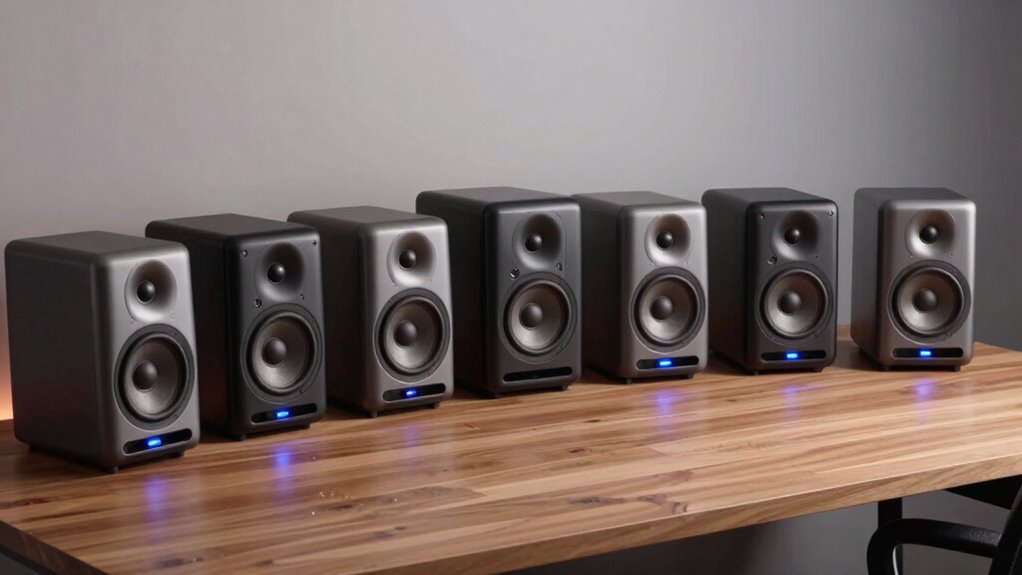

For most desk setups, I’d start with the Edifier MR3, which is the strongest fit here for listeners who want a focused stereo presentation and monitor-style controls. The Klipsch ProMedia 2.1 stands out when fuller bass matters more than keeping the setup simple, while the Creative Pebble 2.0 suits a compact, USB-powered workspace. Choosing among powered speakers means balancing desk space, bass, connection options, and how much control you want over sound. Read on for the full breakdown of all 10 picks and the tradeoffs that separate them.

Get home appliances delivered free — and shop member deals
- Fast, free delivery on millions of items
- Access to Prime Big Deal Days deals on October 6–7
- Prime Video, Amazon Music and more included
Complete the kit


Key Takeaways
- Edifier MR3 is the most balanced desk-first pick: its powered monitor format prioritizes stereo listening and control, while the ProMedia adds a subwoofer at the cost of more floor and cable space.
- Subwoofer systems solve a different problem: the amazon.com/dp/B000062VUO?tag=tweedot-20&ascsubtag=dc-846734″ target=”_blank” rel=”nofollow sponsored noopener”>Klipsch ProMedia 2.1 and Logitech Z313 suit bass-focused listening better than compact 2.0 pairs, but their extra component can crowd a small workstation.
- USB power favors simple, compact setups: Creative Pebble and Amazon Basics avoid a separate speaker power supply, though that convenience is a different priority from the fuller capabilities of powered bookshelf and monitor speakers.
- Bluetooth appears across several bookshelf-style options: the IBALL·BOX Harmony H1, Sanyun SW208, and OHAYO give wireless playback a role, but buyers should still check whether their computer’s wired output is the better everyday connection.
- Wattage alone does not decide desk suitability: speaker footprint, listening distance, connection needs, and bass expectations separate these options more clearly than headline power figures.
| NSY Audio 60W Powered Computer Speakers, Black Pair |  | Best for Flexible Connections | Power: 60W | Audio output: Stereo | Drivers: 3 inches | VIEW ON AMAZON | See Our Full Breakdown |
| IBALL·BOX Harmony H1 60W Powered Stereo Computer Speakers with Bluetooth |  | Best for Desktop Tone Control | System: 2.0 powered stereo | Output: 60W | Drivers: Dual 3-inch carbon-fiber woofers and dual 1-inch silk-dome tweeters | VIEW ON AMAZON | See Our Full Breakdown |
| Sanyun SW208 3″ Active Bluetooth 5.0 Bookshelf Speakers with Built-in 24bit DAC |  | Best for USB Digital Audio | Power output: 60W | Driver size: 3 inches | Driver material: Carbon fiber | VIEW ON AMAZON | See Our Full Breakdown |
| Klipsch ProMedia 2.1 THX Certified Computer Speaker System, Black |  | Best for Gaming and Bass | System configuration: 2.1 | Peak power: 200 watts | Satellite drivers: 3-inch midrange drivers | VIEW ON AMAZON | See Our Full Breakdown |
| OHAYO 60W Bluetooth 5.3 Bookshelf Computer Speakers, Stereo 2.0, Black |  | Best Compact 2.0 Pair | Audio output: Stereo 2.0 | Maximum output power: 60 watts (30W × 2) | Drivers: 3-inch carbon-fiber full-range drivers | VIEW ON AMAZON | See Our Full Breakdown |
| Edifier MR3 Powered Studio Monitor Speakers |  | Best for Flexible Desk Listening | Speaker type: Active studio monitor | Channels: 2 (stereo) | Output power: 18 W × 2 RMS; 42 W maximum | VIEW ON AMAZON | See Our Full Breakdown |
| FUNLOGY 14W Stereo USB Computer Speakers | 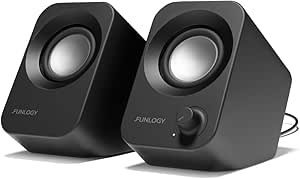 | Best for Compact, Angled Sound | Audio output: 14 W stereo | Drivers: Dual 48 mm dynamic drivers | Connectivity: USB power and 3.5 mm auxiliary input | VIEW ON AMAZON | See Our Full Breakdown |
| Creative Pebble 2.0 USB Desktop Stereo Speakers, Black |  | Best for Minimal USB Setup | Audio output: Stereo | Power source: Corded electric; USB-powered | Frequency response: 100 Hz–17 kHz | VIEW ON AMAZON | See Our Full Breakdown |
| Logitech Z313 2.1 Multimedia Speaker System with Subwoofer | 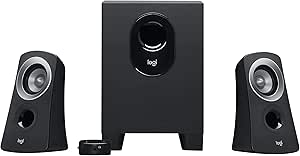 | Best for Bass from a Subwoofer | Audio output: 25 watts RMS | Audio channels: 2.1 | Connectivity: 3.5 mm auxiliary input | VIEW ON AMAZON | See Our Full Breakdown |
| Amazon Basics Stereo 2.0 USB-Powered Speakers for PC and Laptop |  | Best for Basic Wired PC Audio | Speaker type: Multimedia | Audio output mode: Stereo | Connectivity: 3.5 mm auxiliary, USB power | VIEW ON AMAZON | See Our Full Breakdown |
| powered speakers for a desk setup | Connectivity | Dimensions | Audio output | Drivers |
|---|---|---|---|---|
| NSY Audio 60W Powered Computer | Bluetooth 5.3, RCA, USB-C, 3.5mm AUX | 6 × 9 × 6 inches | Stereo | 3 inches |
| IBALL·BOX Harmony H1 60W Power | Bluetooth 5.3, USB-C DAC, optical, 3.5mm AUX | — | — | Dual 3-inch carbon-fiber woofers and dual 1-inch silk-dome tweeters |
| Sanyun SW208 3" Active Bluetoo | Bluetooth 5.0, USB, 3.5mm AUX | — | — | — |
| Klipsch ProMedia 2.1 THX Certi | — | — | — | — |
| OHAYO 60W Bluetooth 5.3 Booksh | Bluetooth 5.3, RCA, AUX, USB | 6.5 × 4.33 × 4.72 inches (D × W × H) | Stereo 2.0 | 3-inch carbon-fiber full-range drivers |
| Edifier MR3 Powered Studio Mon | Bluetooth, balanced TRS, RCA, AUX | 6.9 × 12.1 × 16.2 in (D × W × H) | — | 3.5-inch mid-low drivers and 1-inch tweeters |
| FUNLOGY 14W Stereo USB Compute | USB power and 3.5 mm auxiliary input | 5.2 × 2.71 × 4.3 in (D × W × H) | 14 W stereo | Dual 48 mm dynamic drivers |
| Creative Pebble 2.0 USB Deskto | — | 4.5 × 4.5 × 4.8 inches | Stereo | — |
| Logitech Z313 2.1 Multimedia S | 3.5 mm auxiliary input | 12.9 × 9.4 × 6.2 inches | 25 watts RMS | — |
| Amazon Basics Stereo 2.0 USB-P | 3.5 mm auxiliary, USB power | — | — | — |
More Details on Our Top Picks
NSY Audio 60W Powered Computer Speakers, Black Pair
The NSY Audio pair earns its place as a connection-friendly desk option: Bluetooth 5.3 sits alongside USB-C, RCA, and 3.5mm AUX, so a computer, phone, or other wired source can share the speakers. The front-panel power and volume dial is easier to reach than controls tucked behind the cabinets, while the wooden enclosure and 3-inch drivers keep the setup compact. Compared with the IBALL·BOX Harmony H1, this model offers RCA but gives up the H1’s optical input and dedicated bass and treble controls. Its listed Bluetooth range is inconsistent, so I would not choose it around a specific long-distance wireless requirement. The compact cabinets also make more sense for near-field listening than for deep bass or room-filling sound.
Pros:- USB-C, RCA, 3.5mm AUX, and Bluetooth 5.3 support several desk audio sources
- Front-panel power and volume dial is easy to reach
- Compact wooden cabinets suit desktops and small rooms
Cons:- Bluetooth range information is inconsistent in the product data
- No dedicated bass or treble controls are specified
- Three-inch drivers are a limited fit for buyers seeking weighty low bass
Best for: Desk users who switch between a USB-C computer, analog sources, and Bluetooth devices and want accessible front controls.
Not ideal for: Buyers who need a clearly specified Bluetooth range, dedicated tone adjustment, or substantial bass from small desktop speakers.
- Power:60W
- Audio output:Stereo
- Drivers:3 inches
- Enclosure:Wood
- Connectivity:Bluetooth 5.3, RCA, USB-C, 3.5mm AUX
- Dimensions:6 × 9 × 6 inches
- Weight:6.6 pounds
- Mounting:Tabletop
Our verdict“Choose the NSY Audio pair if broad input choice and easy front-panel control matter more than detailed tone adjustment or powerful bass.”
IBALL·BOX Harmony H1 60W Powered Stereo Computer Speakers with Bluetooth
The Harmony H1 is the strongest fit here for listeners who want to shape sound without opening software: front-panel bass and treble controls let you adjust playback from the desk. Its two 3-inch carbon-fiber woofers and two 1-inch silk-dome tweeters make it a more explicitly two-way design than the NSY Audio pair, whose supplied details list 3-inch drivers without separate tweeters. Inputs cover Bluetooth 5.3, USB-C DAC, optical, and 3.5mm AUX, giving the H1 a useful advantage for connecting a computer or compatible display. The tradeoff is that it needs corded power and is not waterproof, much like the other tabletop speakers here. I would favor it over the Sanyun SW208 if optical input and hands-on tone controls matter more than the Sanyun’s stated 24-bit USB DAC.
Pros:- Front-panel master volume, bass, and treble controls
- USB-C DAC and optical input join Bluetooth 5.3 and 3.5mm AUX
- Separate woofers and silk-dome tweeters provide a defined two-way layout
- Two-year manufacturer warranty is specified
Cons:- Requires corded electric power
- Not waterproof
- Compact 3-inch woofers are not a substitute for a separate subwoofer
Best for: Computer and display users who want multiple digital inputs plus quick, physical bass and treble adjustment at the desk.
Not ideal for: People seeking a portable or moisture-resistant speaker, or buyers who want a listed wireless option without a power cord.
- System:2.0 powered stereo
- Output:60W
- Drivers:Dual 3-inch carbon-fiber woofers and dual 1-inch silk-dome tweeters
- Frequency response:40Hz–20kHz
- Signal-to-noise ratio:≥95dB
- Connectivity:Bluetooth 5.3, USB-C DAC, optical, 3.5mm AUX
- Controls:Front-panel master volume, bass, and treble
- Power source:Corded electric
- Warranty:2-year manufacturer warranty
Our verdict“Pick the Harmony H1 if accessible tone controls and optical connectivity are higher priorities than portability or subwoofer-level bass.”
Sanyun SW208 3″ Active Bluetooth 5.0 Bookshelf Speakers with Built-in 24bit DAC
The Sanyun SW208 stands out for buyers whose desk audio runs mainly through USB: its built-in 24-bit DAC accepts a digital connection while Bluetooth 5.0 and 3.5mm AUX cover wireless and analog sources. Physical treble and bass controls add hands-on adjustment, and the carbon-fiber drivers keep the design focused on compact stereo listening. Compared with the IBALL·BOX Harmony H1, the Sanyun lists a USB DAC but not optical input or separate tweeters; the H1 is the more flexible pick for connecting different digital sources. The SW208’s 3-inch drivers also limit low-end weight, making it less suitable for bass-heavy gaming or music without a subwoofer. Its listed frequency response is only “20 KHz,” so the supplied data does not give a full range for comparison.
Pros:- Built-in 24-bit DAC supports USB digital audio
- Bluetooth 5.0 and 3.5mm AUX offer wireless and analog alternatives
- On-speaker treble, bass, and volume controls allow direct adjustments
- Energy-saving standby mode is specified
Cons:- Three-inch drivers may fall short for deep bass
- No waterproof rating is listed
- The stated frequency response of 20 KHz does not provide a complete range
Best for: Desk listeners who connect a computer over USB and want a compact pair with onboard bass and treble controls.
Not ideal for: Buyers who need optical input, a clearly stated full frequency range, or stronger bass than small 3-inch speakers can provide.
- Power output:60W
- Driver size:3 inches
- Driver material:Carbon fiber
- Connectivity:Bluetooth 5.0, USB, 3.5mm AUX
- DAC:Built-in 24-bit DAC via USB
- Audio channels:2
- Power source:AC
- Maximum Bluetooth range:10 meters
Our verdict“Choose the SW208 for a USB-centered desktop setup with direct tone controls, but look elsewhere if you need optical connectivity or substantial bass.”
Klipsch ProMedia 2.1 THX Certified Computer Speaker System, Black
The ProMedia 2.1 is the clear choice in this group when dedicated bass output matters more than keeping the desk footprint small. Its two satellite speakers pair with a ported 6.5-inch subwoofer, unlike the compact 2.0 systems such as the OHAYO, which put all their output into two small cabinets. THX certification and MicroTractrix horn technology distinguish the satellites, while a control pod gives quick access to main volume and subwoofer gain. That extra low-frequency presence can suit games, films, and music, but the subwoofer takes up floor or under-desk space and adds another component to place. Connectivity is also more limited than the NSY Audio or Harmony H1: the listed input is 3.5mm, with no Bluetooth or USB specified. This is a desk system for impact, not minimal clutter.
Pros:- Separate 6.5-inch ported subwoofer provides a dedicated bass channel
- THX certification and MicroTractrix horn technology
- Control pod adjusts main volume and subwoofer gain
- Works with computers, gaming consoles, TVs, and music players with compatible connections
Cons:- Subwoofer needs extra floor or under-desk space
- Only 3.5mm input is specified; Bluetooth and USB are not listed
- Requires corded electric power
Best for: PC gamers and movie watchers with room beside or beneath the desk for a subwoofer and a 3.5mm connection.
Not ideal for: Small-desk users who need a compact 2.0 setup, wireless playback, or USB and optical inputs.
- System configuration:2.1
- Peak power:200 watts
- Satellite drivers:3-inch midrange drivers
- Subwoofer:6.5-inch side-firing, ported
- Maximum output:110 dB in room
- Input:3.5mm
- Satellite dimensions:8.5 × 4.2 × 5.67 inches
- Subwoofer dimensions:9.5 × 9.8 × 10.2 inches
- Power source:Corded electric
Our verdict“Pick the ProMedia 2.1 if you want a subwoofer-led gaming and movie setup and can spare the extra space and cable connections.”
OHAYO 60W Bluetooth 5.3 Bookshelf Computer Speakers, Stereo 2.0, Black
The OHAYO is the most space-conscious full stereo pair in this batch, with cabinets measuring 6.5 × 4.33 × 4.72 inches and a 2.0 layout that avoids a separate subwoofer. Bluetooth 5.3, RCA, AUX, and USB give it a broad set of connections for a computer-centered desk, while front volume control keeps everyday adjustments close at hand. Its 3-inch carbon-fiber drivers and 0.75-inch silk-dome tweeters make the driver setup more specific than the NSY Audio pair’s listed 3-inch drivers, though both target compact near-field listening. Compared with the Klipsch ProMedia 2.1, the OHAYO takes far less space but cannot match the appeal of a dedicated subwoofer for bass-heavy games or films. It also needs corded power and has no waterproof rating.
Pros:- Compact cabinet dimensions fit space-limited desktops
- Bluetooth 5.3, RCA, AUX, and USB support varied sources
- Front-panel volume control is easy to access
- Separate 3-inch carbon-fiber drivers and 0.75-inch silk-dome tweeters are specified
Cons:- Corded power limits placement flexibility
- No waterproof rating
- Two-speaker 2.0 layout lacks the dedicated subwoofer bass of the Klipsch ProMedia 2.1
Best for: Desk owners who want a compact stereo pair with Bluetooth and several wired inputs but do not want a separate subwoofer.
Not ideal for: Listeners who need powerful low bass, portable battery operation, or water resistance.
- Audio output:Stereo 2.0
- Maximum output power:60 watts (30W × 2)
- Drivers:3-inch carbon-fiber full-range drivers
- Tweeters:0.75-inch carbon-fiber silk dome
- Connectivity:Bluetooth 5.3, RCA, AUX, USB
- Enclosure material:MDF wood
- Dimensions:6.5 × 4.33 × 4.72 inches (D × W × H)
- Power source:Corded electric
- Quantity:2 speakers
Our verdict“Choose the OHAYO if desk space and flexible connections matter more than a subwoofer or wireless power.”
Edifier MR3 Powered Studio Monitor Speakers
The Edifier MR3 is the most adaptable pick here for a desk that serves both focused listening and everyday computer audio. Its balanced TRS, RCA, AUX, and Bluetooth connections suit a wider mix of sources than the single 3.5 mm input on the Logitech Z313, while app EQ and three sound modes let you tune playback to your setup. The 3.5-inch drivers and stated 52 Hz–40 kHz response give it a monitor-style focus, but the compact USB speakers in this group are easier to fit on a crowded desk. The tradeoff is that these are larger speakers, and their 10-meter listed Bluetooth range limits wireless placement. Choose the MR3 for input flexibility and sound adjustment, not minimum footprint.
Pros:- TRS, RCA, AUX, Bluetooth, and headphone connections support varied desk sources
- Music, Monitor, and Custom modes provide different listening options
- App-based EQ allows sound adjustments
- Multipoint Bluetooth can connect with more than one device
Cons:- Larger than compact options such as the Creative Pebble 2.0
- Bluetooth range is listed as 10 meters
- No waterproofing is specified
Best for: Desk listeners who switch among a computer, wired audio sources, and Bluetooth devices and want EQ controls.
Not ideal for: People with very limited desk space or buyers seeking the simplest, smallest USB-powered speaker setup.
- Speaker type:Active studio monitor
- Channels:2 (stereo)
- Output power:18 W × 2 RMS; 42 W maximum
- Drivers:3.5-inch mid-low drivers and 1-inch tweeters
- Frequency response:52 Hz–40 kHz
- Connectivity:Bluetooth, balanced TRS, RCA, AUX
- Dimensions:6.9 × 12.1 × 16.2 in (D × W × H)
- Weight:9.9 lb
Our verdict“Choose the MR3 if you want multiple connection options and adjustable sound and have room for larger desktop monitors.”
FUNLOGY 14W Stereo USB Computer Speakers
The FUNLOGY 14W speakers suit a desk where compact size and listener-facing placement matter more than wireless features or deep bass. Their 30-degree upward tilt aims the drivers toward someone seated at a desk, while USB power and a 3.5 mm input keep setup straightforward across computers and other compatible devices. Compared with the Creative Pebble 2.0, the FUNLOGY uses a less steep stated angle, but both are small wired options; neither offers the multi-input flexibility or sound modes of the Edifier MR3. A volume dial is easy to reach, though the lack of wireless connectivity means the audio source remains tethered. No subwoofer is listed, so buyers seeking more pronounced low-end should look at the Logitech Z313 instead.
Pros:- Compact dimensions help preserve desk space
- 30-degree tilt directs sound upward toward a seated listener
- USB power and 3.5 mm audio simplify wired setup
- Volume dial provides direct control
Cons:- No wireless connectivity
- No subwoofer is listed
- Requires both USB power and a wired audio connection
Best for: Laptop and desktop users who want small speakers aimed toward their seated listening position and are comfortable with wired audio.
Not ideal for: Listeners who need Bluetooth, a subwoofer, or stronger low-frequency output for music and games.
- Audio output:14 W stereo
- Drivers:Dual 48 mm dynamic drivers
- Connectivity:USB power and 3.5 mm auxiliary input
- Wireless:No
- Tilt angle:30 degrees
- Controls:Volume dial
- Dimensions:5.2 × 2.71 × 4.3 in (D × W × H)
- Warranty:1 year
Our verdict“Pick the FUNLOGY pair for compact, listener-aimed desktop sound when wired connections and modest bass are acceptable.”
Creative Pebble 2.0 USB Desktop Stereo Speakers, Black
The Creative Pebble 2.0 is a sensible fit for a laptop or desktop user who wants a small stereo pair without a separate power adapter. Its USB-powered design keeps the setup simple, and the 45-degree elevated drivers angle sound toward the listener; rear passive radiators are intended to add bass without a separate subwoofer. The front-facing volume control is more convenient to reach than an inline control, such as the one on the Amazon Basics pair. Against the FUNLOGY speakers, the Pebble’s stated driver angle is steeper, though neither model adds Bluetooth or a dedicated subwoofer. Its computer-focused design and stated 100 Hz–17 kHz response make it less suited to buyers seeking broader connectivity or room-filling playback.
Pros:- USB power means no separate power adapter
- 45-degree drivers angle sound toward the desk listener
- Rear passive radiators are designed to enhance bass
- Front-facing volume control is easy to reach
Cons:- No Bluetooth connectivity is specified
- Designed primarily for tabletop computer audio
- Stated frequency response starts at 100 Hz
Best for: Laptop and desktop users who want a compact, USB-powered stereo pair with easy-to-reach volume control.
Not ideal for: Buyers who need wireless connections, a subwoofer, or speakers suited to a range of non-computer audio setups.
- Audio output:Stereo
- Power source:Corded electric; USB-powered
- Frequency response:100 Hz–17 kHz
- Driver angle:45 degrees
- Enclosure material:Plastic
- Dimensions:4.5 × 4.5 × 4.8 inches
- Compatible devices:Laptop, personal computer
- Controls:Front-facing volume control
Our verdict“Choose the Pebble 2.0 for a tidy, compact computer setup with angled drivers and simple front-access volume control.”
Logitech Z313 2.1 Multimedia Speaker System with Subwoofer
The Logitech Z313 stands apart from the compact 2.0 options by adding a wired subwoofer to its desktop stereo pair. That makes it the better fit for listeners who want more bass presence for music, films, or games than the Creative Pebble 2.0 or Amazon Basics speakers are designed to provide. The 25-watt RMS output and wired control pod offer a straightforward powered setup, but connectivity is limited to a 3.5 mm input. Unlike the Edifier MR3, it has no Bluetooth or multiple source connections, and the subwoofer takes up space that small desks may not have. It is a practical choice for a fixed, wired setup where fuller bass matters more than flexibility or a minimal footprint.
Pros:- 2.1 configuration adds a wired subwoofer for enhanced bass
- 25 watts RMS output
- Wired pod offers power and volume control
- 3.5 mm input supports compatible desktop and other audio devices
Cons:- Subwoofer adds another component and takes up desk or floor space
- Audio connection is limited to 3.5 mm auxiliary
- Wired setup offers no Bluetooth
Best for: Desktop users with room for a separate subwoofer who want more bass for games, films, and music.
Not ideal for: People with small desks, frequent source switching, or a need for Bluetooth and multiple audio inputs.
- Audio output:25 watts RMS
- Audio channels:2.1
- Connectivity:3.5 mm auxiliary input
- Subwoofer:Wired
- Dimensions:12.9 × 9.4 × 6.2 inches
- Weight:3.4 kg
- Compatible devices:Desktop, MP3 player, television
Our verdict“Choose the Z313 if a dedicated subwoofer and stronger bass matter more than a compact setup or flexible connectivity.”
Amazon Basics Stereo 2.0 USB-Powered Speakers for PC and Laptop
The Amazon Basics Stereo 2.0 is a straightforward choice for a PC or laptop user who wants a powered stereo pair with a small footprint and simple inline volume control. USB supplies power while a 3.5 mm auxiliary connection carries audio, so it avoids the separate power adapter some desk speakers require. The metal-and-plastic enclosure and padded bases give it a different feel from the all-plastic Creative Pebble 2.0, while a bottom radiator is intended to add bass. But this remains a basic wired setup: it has no Bluetooth, and the Logitech Z313 is a better match if a subwoofer is the priority. The listed frequency-response data is only 20 kHz, so it offers limited guidance for buyers comparing audio range.
Pros:- USB power avoids a separate speaker power adapter
- Inline volume control provides a direct adjustment
- Compact pair has padded bases
- Bottom radiator is designed to add bass
Cons:- Requires a wired 3.5 mm audio connection
- No wireless connectivity
- Listed frequency-response information is limited
Best for: PC and laptop users who want a compact, wired stereo pair with USB power and an inline volume control.
Not ideal for: Buyers seeking Bluetooth, a subwoofer, or clearly specified full-range audio performance.
- Speaker type:Multimedia
- Audio output mode:Stereo
- Connectivity:3.5 mm auxiliary, USB power
- Wireless:No
- Enclosure materials:Metal, plastic
- Speaker size:3.9 inches
- Frequency response:20 kHz
- Water resistance:Not water resistant
Our verdict“Pick the Amazon Basics pair for simple wired PC audio if Bluetooth and a dedicated subwoofer are not priorities.”

How We Picked
I ranked these powered speakers for a desk setup by how well their design fits near-field listening: usable stereo sound at a short distance, practical placement, manageable wiring, and controls that make sense at a workstation. I also weighed connectivity, power method, system format, and whether each product’s design matches a clear buyer need. A compact USB pair has an advantage for a crowded desk, while a subwoofer system can serve bass-focused listening better if there is room for the extra unit.
The ranking favors balanced desk usability over one isolated specification. That puts the Edifier MR3 first for a more monitor-oriented listening role, while the Klipsch ProMedia ranks higher for shoppers who specifically want a 2.1 system. The small USB speakers rank as convenience picks rather than substitutes for larger, more capable systems. Product names and listed features guide this comparison; I do not treat wattage or wireless support alone as proof of better sound.
| powered speakers for a desk setup | Power source |
|---|---|
| NSY Audio 60W Powered Computer | — |
| IBALL·BOX Harmony H1 60W Power | Corded electric |
| Sanyun SW208 3" Active Bluetoo | AC |
| Klipsch ProMedia 2.1 THX Certi | Corded electric |
| OHAYO 60W Bluetooth 5.3 Booksh | Corded electric |
| Edifier MR3 Powered Studio Mon | — |
| FUNLOGY 14W Stereo USB Compute | — |
| Creative Pebble 2.0 USB Deskto | Corded electric; USB-powered |
| Logitech Z313 2.1 Multimedia S | — |
| Amazon Basics Stereo 2.0 USB-P | — |
Factors to Consider When Choosing Powered Speakers For A Desk Setup
Before choosing a pair, I’d match the speaker system to the way the desk is used, rather than buying around a single headline spec. These broader tradeoffs can prevent common mismatches, such as placing a subwoofer where it cannot fit or choosing wireless features that add little to a computer-first setup.
Match Speaker Size to Your Listening Distance
Desk speakers sit close to the listener, so physical size and placement can matter as much as maximum output. Measure the usable width on both sides of your screen, including space needed for stands, monitor arms, and cables. Speakers placed too close together can narrow the stereo image, while pushing them far apart may make the sound feel disconnected at a short listening distance. A small pair can be the better choice when the desk is shallow, even if a larger model seems more capable on paper. Avoid buying bookshelf-style speakers before checking their depth and the space behind them for connections.
Choose 2.0 or 2.1 Around Your Bass Needs
A 2.0 pair keeps the setup straightforward, but it cannot place a separate subwoofer under the desk for added low-frequency impact. A 2.1 system can suit games, films, and bass-heavy music, yet the subwoofer needs a stable location and adds another object and cable to manage. On a shared or compact desk, that trade can become annoying even if deeper bass is a priority. Do not assume a subwoofer automatically improves every kind of listening; vocals and everyday video may matter more than low-end weight. Pick the format based on your room, desk, and listening habits, not the number of components alone.
Treat Connectivity as a Daily Workflow Choice
USB, analog audio, and Bluetooth each solve different problems. USB can simplify a computer-focused setup, while an analog input may make it easier to connect a desktop, monitor, or other audio source. Bluetooth is useful for playing from a phone without moving cables, but wireless convenience may be less valuable if the speakers stay beside one computer all day. Check which inputs are available and how you will switch sources before choosing. A common mistake is to focus on the presence of Bluetooth while overlooking whether the speaker can connect cleanly to the computer you already own.
Decide How Much Sound Control You Need
Some buyers want a simple volume knob and a clear audio path; others benefit from controls that let them tailor output for music, editing, or different placements. Monitor-style speakers may appeal to listeners who value a more direct presentation, while multimedia systems often put convenience and entertainment features first. Neither approach is automatically better for a desk. If you edit audio, prioritize consistent stereo placement and a listening setup that helps you hear details; if you mainly attend calls and watch videos, easy volume access may matter more. Avoid paying attention to control labels without checking whether you will actually use them.
Plan for Power, Cables, and Desk Clutter
Powered speakers need a power source, but their power arrangements can differ: some draw power over USB, while others use a separate supply. USB-powered models may reduce outlet demands and simplify a laptop setup, though they still need desk space and a suitable USB connection. Larger pairs and 2.1 systems can add power bricks, audio leads, and a subwoofer cable to an already busy workstation. Map the route from your computer to each speaker before buying, especially if the desk is against a wall or you use a sit-stand frame. The neatest setup is often the one with the fewest cables you need to manage every day.
Pay for Features That Match Your Use
Spending more makes sense when it buys a real fit for your routine, such as monitor-oriented listening, broader connection options, or a dedicated subwoofer for bass-led entertainment. If the speakers are mainly for system sounds and video calls, a compact, simple pair may cover the job without adding unused controls or components. Set priorities before comparing feature lists: sound role, available space, input needs, and ease of adjustment are more useful than wattage by itself. Also account for any accessories or placement changes you may need. A speaker that technically fits the desk but blocks a screen or crowds a keyboard is a poor match at any feature level.
Frequently Asked Questions
Should I choose a 2.1 speaker system if I listen to music at my desk?
Choose 2.1 if stronger bass is a leading priority and you have a practical place for the subwoofer. The Klipsch ProMedia 2.1 and Logitech Z313 serve that system format in this roundup, but the added unit takes up room and brings extra wiring. For a simpler workstation or more balanced everyday listening, a 2.0 pair may fit better. Think about your most common listening—music, games, calls, or video—before deciding that more bass is always an upgrade. Placement matters too: a subwoofer tucked into an awkward corner may not suit the room or desk.
Are USB-powered speakers enough for a laptop desk setup?
USB-powered speakers can be a practical fit when you want a compact setup and do not need a separate speaker power supply. The Creative Pebble 2.0 and Amazon Basics Stereo 2.0 are the clearest convenience-oriented choices in this lineup. Check whether your laptop has the right ports and whether the audio connection method suits your setup. USB power does not tell you everything about sound quality or loudness, so it should not be your only selection criterion. If you listen at higher levels or want more adjustment options, compare them with powered bookshelf or monitor-style pairs.
Is Bluetooth useful if my speakers will stay connected to one computer?
Bluetooth is useful when you expect to play audio from a phone or another device without reconnecting cables. If the speakers will serve one computer almost all the time, a wired connection may be simpler for everyday playback. Models such as the Sanyun SW208, IBALL·BOX Harmony H1, and OHAYO make wireless playback part of their feature set, but that feature does not by itself make them a better computer speaker. Check what other inputs are available and how easily you can switch between sources. Choose wireless support for a real second-device use, not just because it appears on a feature list.
Do I need studio monitor speakers for a home office?
No. Monitor-style speakers make the most sense when you value a more direct listening presentation or need to hear music and audio work with greater attention. For calls, system notifications, and casual video, simple multimedia speakers may better match the job and take less effort to place. The Edifier MR3 is the roundup’s monitor-oriented pick, while compact USB options emphasize straightforward desk use. Your listening habits and available space matter more than the word “monitor” on a product name. If you are unsure, prioritize comfortable placement and the inputs you will actually use.
How much desk space should I reserve before ordering speakers?
Measure the width and depth available on both sides of your monitor, then include room for cables and any controls you need to reach. For a 2.1 system, also identify a separate spot for the subwoofer and its wiring before ordering. Speaker spacing affects stereo listening, so do not plan to squeeze both units directly against a screen if that leaves them almost touching. Check the product’s listed dimensions rather than estimating from photos. If the desk is already crowded, compact USB speakers may be easier to place than larger bookshelf-style pairs.
Conclusion
For the best overall desk fit, I’d choose the Edifier MR3 if monitor-oriented listening and a balanced workstation setup are the priorities. The best premium-style system for bass-focused use is the Klipsch ProMedia 2.1, provided there is room for its subwoofer; the Logitech Z313 is another 2.1 option to compare when that format is the main need. For best value in a compact, simple setup, look at the Creative Pebble 2.0 or Amazon Basics USB pair, choosing by the connections and placement that suit your desk. Beginners who want uncomplicated computer audio can start with the Creative Pebble 2.0; buyers who want wireless playback should compare the Sanyun SW208, IBALL·BOX Harmony H1, and OHAYO. My final rule is simple: pick for the space and sources you have, then pay for extra bass or control only when you will use it.
Halloween Picks
halloween
As an affiliate, we earn on qualifying purchases.