Get home appliances delivered free with Prime
- Fast, free delivery on millions of items
- Prime Video, Amazon Music and more included
- Member-only deals all year
Complete the kit


Key Takeaways
- Higher-end models like the Logitech G X56 H.O.T.A.S deliver superior realism and build quality but come at a premium price.
- Compatibility with VR headsets varies; some controls integrate seamlessly while others require additional adapters or configurations.
- Joystick and throttle combos are generally better for flight accuracy, but space and complexity may favor simpler models.
- Build quality and durability are critical, especially with frequent use; premium options tend to last longer and feel more realistic.
- Budget options can still offer good performance for casual VR flight simmers but often lack advanced features and customization.
| PXN 2113PRO PC Joystick USB Gaming Flight Simulator Controller Flight Stick |  | Best Value for Basic VR Flight Control | Compatibility: Windows 7/8/10/11 | Supported Platforms: PC | Vibration Function: Yes | VIEW ON AMAZON | See Our Full Breakdown |
| Logitech G X56 H.O.T.A.S Throttle and Joystick Flight Simulator Game Controller + Pro Flight Rudder Pedals Bundle |  | Best for High-Precision VR Flight Enthusiasts | Control Surfaces: All control surface options | Mini Analog Stick: Yes | RGB Backlighting: Yes | VIEW ON AMAZON | See Our Full Breakdown |
| Thrustmaster T-Flight Hotas One MSFS 2024 Collector Edition – Xbox & PC |  | Best for Console and PC VR Pilots Seeking Precision | Compatibility: Xbox Series X|S and PC | Axes: 5 axes including Z-axis rudder | Action Buttons: 14 | VIEW ON AMAZON | See Our Full Breakdown |
| Logitech G Saitek X52 Pro Flight Control System – Black/Silver |  | Best for Advanced VR Pilots Wanting Customization | System requirements: Windows 10, 8.1, 7; 2 USB 2.0 ports | Handle adjustment: 5 positions | Grip: Soft-touch, contoured | VIEW ON AMAZON | See Our Full Breakdown |
| Logitech G Pro Flight Switch Panel |  | Best for Realistic Landing Gear and Modular Setup | Compatibility: Windows 7/8/8.1/10 or newer | Features: LED gear indicators, customizable controls, modular design | VIEW ON AMAZON | See Our Full Breakdown | |
| Thrustmaster Sol-R1 Hall-Effect Space Combat Flight Sim Joystick | 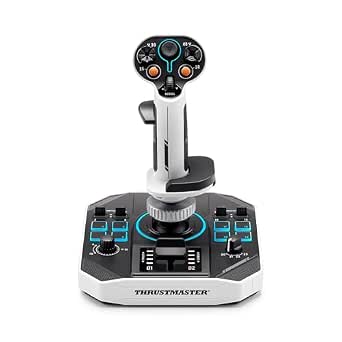 | Best for Precision in Space Combat | Number of Action Buttons: 21 | Trigger Buttons: 2 | Hat Switches: 2 | VIEW ON AMAZON | See Our Full Breakdown |
| Logitech G PRO Flight Yoke System |  | Best for Realistic Atmospheric Flight | Compatible Devices: Windows | Controller Type: Yoke | Connectivity Technology: USB | VIEW ON AMAZON | See Our Full Breakdown |
| Thrustmaster T-Flight Hotas X USB Flight Sim Stick & Throttle |  | Best for Beginners and Casual Pilots | Number of Action Buttons: 12 | Number of Axes: 5 | Detachable Throttle: Yes | VIEW ON AMAZON | See Our Full Breakdown |
| Logitech G Pro Flight Yoke System + Pro Flight Rudder Pedals Bundle |  | Best for Complete Flight Control Immersion | Rudder Pedals: Self-centering with adjustable footrests | Yoke Controls: 14 buttons, 3-position mode switch, POV hat | Programmable Controls: At least 54 | VIEW ON AMAZON | See Our Full Breakdown |
| Logitech G Pro Flight Rudder Pedals |  | Best for Precise Rudder Control in VR | Platform Compatibility: Windows 7, 8, 8.1, 10 | Axis: 9-bit Rudder, 7-bit Toe Brake | Dimensions: 31x41x17 cm | VIEW ON AMAZON | See Our Full Breakdown |
| Logitech G X56 H.O.T.A.S Throttle and Joystick Flight Simulator Game Controller |  | Best for Customization and Advanced Pilots | Control Surface Options: All control surfaces required for flight simulation | Programmable Controls: 189 | Lighting: RGB backlighting | VIEW ON AMAZON | See Our Full Breakdown |
More Details on Our Top Picks
PXN 2113PRO PC Joystick USB Gaming Flight Simulator Controller Flight Stick
The PXN 2113PRO stands out for offering a realistic flying experience at a budget-friendly price. Its vibration feedback adds immersion, making it a step above simpler controllers like the basic Hotas X. While it lacks force feedback and is not compatible with Mac or consoles, its programmable buttons and ergonomic design make it a practical choice for casual VR flight enthusiasts who want a tactile experience without breaking the bank. Compared to the more complex Logitech X52 Pro, this model is simpler to set up and use, but it sacrifices some precision and advanced features.
Pros:- Realistic flight experience with vibration feedback
- Multiple programmable buttons for customization
- Ergonomic and comfortable to hold
- Easy to set up without driver installation
Cons:- Not compatible with Mac, Apple devices, or consoles
- Vibration intensity may require driver adjustment
- Force feedback not supported
Best for: VR pilots seeking an affordable yet immersive joystick for casual flight simulation.
Not ideal for: Advanced simmers or those needing force feedback and extensive customization, who should consider higher-end options.
- Compatibility:Windows 7/8/10/11
- Supported Platforms:PC
- Vibration Function:Yes
- Number of Buttons:12 programmable
- Control Axes:4 axes
- Hat Switch:8-Way
- Additional Features:Rapid fire trigger, ergonomic design, suction cups for stability
Our verdict“This joystick is best suited for casual VR flight fans who want a realistic feel without complex features.”
Logitech G X56 H.O.T.A.S Throttle and Joystick Flight Simulator Game Controller + Pro Flight Rudder Pedals Bundle
The Logitech G X56 bundle offers a level of customization and immersion that surpasses the PXN 2113PRO, especially with its RGB backlighting and full control surface options. Its self-centering rudder pedals with adjustable tension and differential toe brakes make it ideal for VR pilots who demand authentic control. Compared to the Thrustmaster T-Flight Hotas One, the X56 provides more control options and a richer visual experience, though it’s more complex to set up and requires ample space. For serious enthusiasts, the tradeoff is its higher price and learning curve, but the payoff is a more immersive VR flying experience.
Pros:- Highly customizable controls for realistic flight simulation
- RGB backlighting enhances aesthetics
- Includes both throttle/joystick and rudder pedals
- Perfect for VR with full control surface integration
Cons:- Complex setup may challenge beginners
- Premium price point
- Large footprint requires ample space
Best for: Experienced VR flight simmers seeking a highly customizable and immersive control setup.
Not ideal for: Beginners or those with limited space, due to its complexity and size.
- Control Surfaces:All control surface options
- Mini Analog Stick:Yes
- RGB Backlighting:Yes
- VR Compatibility:Yes
- Rudder Pedals:Self-centering with adjustable tension
- Toe Brakes:Differential
Our verdict“This bundle is ideal for dedicated VR pilots who prioritize control fidelity and visual immersion over simplicity.”
Thrustmaster T-Flight Hotas One MSFS 2024 Collector Edition – Xbox & PC
The Thrustmaster T-Flight Hotas One Collector’s Edition offers an official, high-precision control system compatible with both Xbox and PC. Its multiple axes and 14 action buttons provide detailed control, making it suitable for VR pilots who want a comprehensive setup without the complexity of full cockpit arrays. Unlike the Logitech X52, which offers more control surface options, this model’s simplicity and console compatibility make it more accessible for casual to intermediate users. However, its rudder system is sold separately, and some may find its controls overwhelming at first. It balances ease of use with solid precision, ideal for VR enthusiasts who want a ready-to-go setup for console and PC flights.
Pros:- Officially licensed for Xbox and PC
- High precision with 10-bit controls and multiple axes
- Detachable throttle for flexible setup
- Expandable with additional pedals
Cons:- Rudder pedals sold separately
- Control complexity may be daunting for beginners
- Requires some setup time to optimize
Best for: VR pilots who fly on Xbox or PC and want a reliable, precise control system with room for expansion.
Not ideal for: Those seeking a full cockpit experience or complex control surface customization, who should consider higher-end bundles like the X56.
- Compatibility:Xbox Series X|S and PC
- Axes:5 axes including Z-axis rudder
- Action Buttons:14
- Precision:10-bit
- Detachable Throttle:Yes
- Rudder System:Dual rudder
- Adjustable Resistance:Yes
Our verdict“This pick is best for VR pilots who want reliable, high-precision controls that work seamlessly on both Xbox and PC.”
Logitech G Saitek X52 Pro Flight Control System – Black/Silver
The Logitech G Saitek X52 Pro excels in providing detailed control with its illuminated buttons, LCD display, and a progressive throttle with detents for realism. It is more complex than the PXN joystick, making it suitable for VR pilots who want deep customization and real-time information display. Unlike the simpler PXN, its software allows for extensive control remapping, but this requires a dedicated setup process. It’s less ideal for users with limited USB ports or those who prefer plug-and-play solutions. The X52 Pro is a solid choice for serious VR pilots who appreciate detailed feedback and customization, though it demands a bit more effort to set up and optimize.
Pros:- Illuminated buttons improve low-light visibility
- Fully customizable with software
- Ergonomic design for extended use
- Progressive throttle with resistance and detents
Cons:- Requires multiple USB ports
- Software download needed for full customization
- Setup can be time-consuming
Best for: Experienced VR flight enthusiasts who prioritize control depth and customization.
Not ideal for: Casual users or those with limited USB ports, who may find the setup cumbersome and the features excessive.
- System requirements:Windows 10, 8.1, 7; 2 USB 2.0 ports
- Handle adjustment:5 positions
- Grip:Soft-touch, contoured
Our verdict“This system is tailored for advanced VR pilots who want detailed control and extensive customization at the cost of simplicity.”
Logitech G Pro Flight Switch Panel
The Logitech G Pro Flight Switch Panel offers a specialized addition to a VR flight setup, focusing on realistic landing gear control with LED indicators. Its modular design allows integration into larger control arrangements, making it suitable for pilots who want specific, tactile gear management. Compared with broader control systems like the X56, it excels in functionality for a dedicated task but requires compatible software for full operation. Its compact size makes it easy to incorporate into a VR cockpit setup, but it may need extra space and additional components for full control coverage. This panel is a smart upgrade for those prioritizing landing gear realism and modular flexibility.
Pros:- Realistic landing gear control with LED indicators
- Highly customizable and modular
- Compatible with multiple flight sim software
- Compact and easy to integrate into existing setups
Cons:- Requires compatible software for full features
- May need additional mounting space
- Limited control functions beyond gear management
Best for: VR pilots who want authentic landing gear control with a modular, customizable setup.
Not ideal for: Pilots seeking a complete, all-in-one control system, who should consider larger bundles like the X56 or T-Flight Hotas.
- Compatibility:Windows 7/8/8.1/10 or newer
- Features:LED gear indicators, customizable controls, modular design
Our verdict“This panel is ideal for VR pilots aiming for authentic gear control within a modular cockpit environment.”
Thrustmaster Sol-R1 Hall-Effect Space Combat Flight Sim Joystick
The Thrustmaster Sol-R1 stands out for its Hall-Effect technology, delivering extremely smooth and accurate input that’s ideal for space combat scenarios where precision is vital. Compared to the Logitech G PRO Flight Yoke System, which excels in atmospheric flight, the Sol-R1’s ambidextrous, customizable grips make it better suited for intense, fast-paced battles. However, its complex array of 21 buttons might overwhelm beginners and limits compatibility to PC only. This joystick makes the most sense for gamers focused on space simulations who value control fidelity over plug-and-play simplicity.Pros:- High-precision Hall-Effect technology for smooth, accurate input
- Multiple buttons and controls for extensive customization
- Ambidextrous design with adjustable grips for comfort during long sessions
- Sci-fi inspired backlit aesthetic enhances immersive setup
Cons:- Complex control layout may intimidate beginners
- Limited to PC, reducing versatility for console users
Best for: Space combat enthusiasts who prioritize high-precision input and customizable controls
Not ideal for: Casual flight sim players or those seeking a straightforward, plug-and-play experience
- Number of Action Buttons:21
- Trigger Buttons:2
- Hat Switches:2
- Mini Stick:1
- Thumbwheel:1
- Technology:Hall-Effect AccuRate Technology
- Design:Ambidextrous
- Backlit:Yes
- Compatibility:PC
Our verdict“This pick is best for dedicated space combat fans who want top-tier precision and don’t mind a complex setup.”
Logitech G PRO Flight Yoke System
The Logitech G PRO Flight Yoke System offers a highly realistic control experience thanks to its multiple axes and programmable buttons, making it suitable for serious flight simulation fans. Compared with the Thrustmaster T-Flight Hotas X, which is more beginner-friendly and versatile, the G PRO Yoke emphasizes authentic control, but its larger size and weight can be a drawback for limited space setups. It’s compatible with popular flight simulators and features a modular design that appeals to both casual and advanced pilots. For those seeking immersive, true-to-life flight experiences, this bundle is a strong contender, but it may be overkill for casual VR pilots.Pros:- Realistic and precise control with multiple axes
- Highly programmable controls for customization
- Modular, interchangeable design for flexibility
- Compatible with popular flight sim software
Cons:- Requires software setup and calibration
- Hefty at 6.2 pounds, less portable
Best for: Serious flight sim enthusiasts seeking authentic, customizable control for atmospheric flying
Not ideal for: Casual gamers or VR users with limited space who prefer simple, compact controllers
- Compatible Devices:Windows
- Controller Type:Yoke
- Connectivity Technology:USB
- Additional Features:USB Button Quantity 14
- Hardware Platform:Desktop, pc
- Weight:6.2 pounds
Our verdict“Ideal for dedicated flight sim players craving realism and customization in a sturdy, full-featured setup.”
Thrustmaster T-Flight Hotas X USB Flight Sim Stick & Throttle
The Thrustmaster T-Flight Hotas X provides a straightforward, ergonomic design with fully programmable controls, making it accessible for newcomers. Its 12 action buttons and 5 axes cover most basic flight needs, but it lacks the advanced realism and customization found in higher-end options like the Logitech G PRO Flight Yoke System. The detachable throttle adds flexibility, and its plug-and-play setup means less time configuring and more time flying. This model suits those new to VR flight sims or casual pilots who want a reliable, easy-to-use controller without a steep learning curve.Pros:- Ergonomic, comfortable design for long sessions
- Fully programmable controls for customization
- Detachable throttle for flexible configurations
- Plug-and-play setup for quick use
Cons:- Limited to PC, reducing platform flexibility
- Basic feature set may not satisfy advanced flight sim needs
Best for: VR beginners or casual pilots seeking a simple, ergonomic control setup
Not ideal for: Advanced users or VR pilots requiring highly detailed, programmable controls
- Number of Action Buttons:12
- Number of Axes:5
- Detachable Throttle:Yes
- Adjustable Resistance:Yes
- Compatibility:PC
- Memory:Built-in
Our verdict“A solid choice for VR newcomers who want an easy, reliable flight stick with some customization options.”
Logitech G Pro Flight Yoke System + Pro Flight Rudder Pedals Bundle
This bundle combines a detailed yoke with self-centering rudder pedals, providing a comprehensive flight experience. Compared to the Logitech G PRO Flight Yoke System alone, the addition of rudder pedals enhances control fidelity, especially for realistic landings and taxiing. The extensive programmable controls and adjustable footrests make it suitable for both beginners and seasoned pilots. While the setup offers high immersion, it demands space and can be complex to configure, which might deter casual VR users. This bundle makes the most sense for those committed to a full cockpit feel, rather than casual VR flying.Pros:- Realistic, accurate flight control with multiple programmable buttons
- Self-centering rudder pedals with adjustable footrests
- Full control over throttle, pitch, yaw, and more
- Enhances immersion for VR flight sims
Cons:- High price point for the bundle
- Setup complexity and space requirements
Best for: Pilots wanting an immersive, full-flight setup with rudder control for VR
Not ideal for: Limited space users or those new to flight sims who prefer minimal setup
- Rudder Pedals:Self-centering with adjustable footrests
- Yoke Controls:14 buttons, 3-position mode switch, POV hat
- Programmable Controls:At least 54
- Toe Brakes:Differential
Our verdict“Best suited for VR pilots seeking an immersive, full-control cockpit experience with rudder pedals.”
Logitech G Pro Flight Rudder Pedals
The Logitech G Pro Flight Rudder Pedals excel at delivering smooth, self-centering rudder input, essential for realistic VR flight. Compared to the bundle with the Yoke System, these pedals focus solely on rudder control, making them ideal for pilots who want precise, customizable toe brakes and rudder feedback without extra controls. The adjustable tension and differential toe brakes add to the realism, but the lack of a yoke or stick limits use to specific flight aspects. They are perfect for VR pilots who prioritize pedal accuracy, but not suited as a standalone control for full flight immersion.Pros:- Smooth, self-centering rudder pedals for realistic control
- Adjustable tension for personalized feel
- Differential toe brakes for precise steering
- Compatible with multiple Windows versions
Cons:- Requires USB 2.0 port, which may limit compatibility on some systems
- No included software or calibration tools for fine-tuning
Best for: VR pilots needing precise, customizable rudder and toe brake controls
Not ideal for: Users seeking a full control setup or those with limited desk space
- Platform Compatibility:Windows 7, 8, 8.1, 10
- Axis:9-bit Rudder, 7-bit Toe Brake
- Dimensions:31x41x17 cm
- Weight:2.3 kg
Our verdict“Ideal for VR pilots who want high-quality, adjustable rudder pedals for precise control, but not for standalone full-flight setups.”
Logitech G X56 H.O.T.A.S Throttle and Joystick Flight Simulator Game Controller
The Logitech G X56 H.O.T.A.S stands out for its extensive customization options, with 189 programmable controls that rival the flexibility of the Thrustmaster T-Flight Hotas X. Its hall-effect sensors and multiple spring choices deliver precise, smooth control, making it ideal for serious flight and space sims in VR. Compared to simpler controllers like the PXN 2113PRO, the X56 offers a more immersive experience, though its complex setup and higher price can be daunting for newcomers. The RGB lighting adds a visual flair that enhances the VR cockpit feel, but the need for multiple USB ports and specific system requirements might limit compatibility for some users. This pick makes the most sense for veteran sim pilots who want deep customization and high fidelity, accepting a steeper learning curve and setup effort.Pros:- Extensive customization with 189 programmable controls
- Hall-effect sensors provide smooth, accurate axes response
- Multiple spring options for tailored stick feel
- RGB lighting enhances immersion
Cons:- Requires multiple USB ports and specific system compatibility
- Complex setup may be overwhelming for beginners
- Premium price may be a barrier for casual users
Best for: Experienced flight sim enthusiasts who prioritize control precision and customization in VR
Not ideal for: Casual players or newcomers seeking a straightforward, plug-and-play setup
- Control Surface Options:All control surfaces required for flight simulation
- Programmable Controls:189
- Lighting:RGB backlighting
- USB Ports:2x USB 2.0
- System Requirements:Windows 7, 8.1, 10, 11
- Cable Length:2 meters
- Sensors:Hall-effect sensors for axes
- Spring Options:4 spring options for stick force adjustment
- Throttle:Twin throttles with friction adjuster and throttle lock
Our verdict“This controller is best suited for dedicated flight sim fans in VR who want maximum control and don’t mind a complex setup.”

How We Picked
I evaluated these products based on performance, build quality, VR compatibility, ease of setup, and value. Since pro flight controls are meant for immersive VR experiences, I prioritized realistic feedback, precision, and durability. Ease of integration with popular flight sim software and VR headsets was also key, along with overall user feedback and reputation. The ranking reflects a balance of these factors, favoring models that provide a premium experience without unnecessary complexity or cost, so buyers can find options suited for different levels of engagement and budgets.Factors to Consider When Choosing Pro Flight Sim Controls For Vr
When selecting pro flight sim controls for VR, understanding the core factors can help you avoid common pitfalls and maximize your investment. Not all controllers are equally compatible with VR setups, and features like force feedback, build quality, and configurability significantly impact your experience. Consider your space, budget, and the types of aircraft you want to simulate most often. The following sections highlight key considerations to guide your purchase beyond just specifications, helping you choose a setup that truly elevates your VR flying sessions.VR Compatibility and Integration
Ensuring your flight controls work seamlessly with your VR headset and flight sim software is essential. Some controllers require additional drivers or software tweaks, which can introduce lag or setup headaches. Look for models that explicitly mention VR compatibility or have a proven track record with popular platforms like Oculus, HTC Vive, or Valve Index. Compatibility issues can diminish immersion, so prioritize products with strong community support and positive user feedback.Precision and Force Feedback
Realistic force feedback adds physical sensations that mirror aircraft movements, greatly enhancing immersion. However, high-quality force feedback systems tend to be more expensive and complex. Cheaper models may lack this feature or offer weaker feedback, which can diminish realism. If you’re serious about VR flying, investing in a control with strong, precise force feedback makes a noticeable difference, but be prepared for potential increased maintenance and calibration needs.Build Quality and Durability
VR flight controllers undergo frequent, vigorous use, so durability matters. Cheaper plastic components might wear out or break faster, especially with intense use. Premium materials, metal components, and solid mounting options ensure your setup stays stable and feels authentic over time. Think about your space and whether you prefer a mounted system or a portable setup, as this influences durability and convenience.Ease of Customization and Setup
A control system that’s easy to configure and customize allows you to tailor your experience without frustration. Look for models with accessible software for remapping buttons, adjusting sensitivity, and setting profiles for different aircraft. Complex setups may require more time to calibrate, which can disrupt your immersion. Balance the desire for advanced features with your comfort level in setting up and maintaining your controls.Price and Value
High-end controls come with a hefty price tag but often include features like force feedback, extensive customization, and superior build quality. Cheaper options may sacrifice some realism and durability but can be suitable for casual VR pilots or those on a budget. Evaluate how much you’re willing to invest based on your level of commitment, available space, and how much realism matters to you. Sometimes, spending more upfront saves money in the long run due to better longevity and performance.Frequently Asked Questions
Can I use a standard flight stick for VR flying?
While a standard flight stick can work for VR, it generally lacks the advanced features needed for an immersive experience, such as force feedback and multiple axes of control. For VR, pro controls are designed to match the physical sensations of flying, which significantly enhances realism. If you’re casual or new to flight sims, a basic stick might suffice, but for serious VR pilots, investing in a dedicated system offers a much richer experience.Do I need a special setup for VR compatibility?
Most pro flight controls are compatible with VR setups, but some may require additional drivers, software tweaks, or specific configurations to work smoothly. It’s important to check the manufacturer’s specifications and user reviews to confirm VR support. Ensuring compatibility prevents frustrating delays or calibration issues that can break immersion. Sometimes, a dedicated VR plugin or profile is needed for optimal performance.Is force feedback worth the extra cost?
Force feedback significantly enhances realism by simulating aircraft vibrations, turbulence, and control resistance. If you’re serious about VR flight simulation, this feature makes a noticeable difference in immersion and control accuracy. However, it adds to the complexity and cost of the setup, and may require more maintenance. For casual use or beginners, a non-force feedback controller can still deliver a satisfying experience without the added expense.How much space do I need for a pro flight control system?
Pro systems vary in size, with some setups requiring ample desk space or mounting options for stability. Joystick and throttle combos can be bulky, and some models need dedicated mounting brackets or stands. Consider your available space and whether you prefer a portable setup or a mounted station. Smaller, more compact controllers may be better suited for limited spaces but might lack some features or realism of larger systems.Are there maintenance concerns with high-end flight controls?
Premium flight controls with force feedback and multiple moving parts often require periodic calibration and maintenance to keep them functioning smoothly. Dust, dirt, and repeated use can affect accuracy over time. Choosing a model with robust build quality and easy access to internal components can reduce hassle. Regular software updates and gentle handling extend the lifespan of your control system, preserving your investment and immersion.Conclusion
For dedicated VR pilots seeking the best overall experience, the Logitech G X56 H.O.T.A.S offers a blend of versatility, build quality, and VR compatibility. Those on a budget or new to VR flight sims might prefer the Thrustmaster T-Flight Hotas One for its straightforward setup and affordability. If you prioritize premium realism and durability, investing in a high-end system like the Logitech G PRO Flight Yoke System makes sense. For casual users or beginners, a simpler, less expensive model can still deliver plenty of fun, while advanced users should look for customizable setups with force feedback for the most immersive experience.NFL season / tailgating Picks
team gear
As an affiliate, we earn on qualifying purchases.