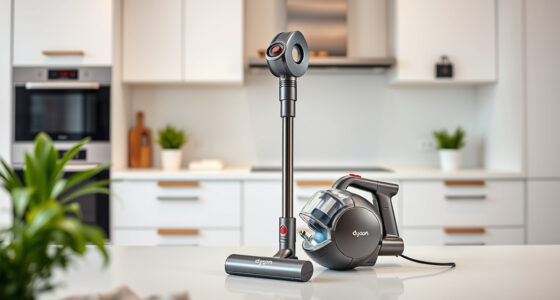
The Dyson V15 Detect™ Origin Cordless Vacuum is a powerful, intelligent cleaning tool designed for whole-home deep cleaning. To keep it performing at its best, regular maintenance and troubleshooting are essential. This guide provides practical, step-by-step instructions to help you troubleshoot common issues and care for your vacuum safely and effectively.

Get home appliances delivered free — and shop member deals
- Fast, free delivery on millions of items
- Access to Prime Big Deal Days deals on October 6–7
- Prime Video, Amazon Music and more included
Whether you’re experiencing reduced suction, filter issues, or needing to replace parts, this guide will walk you through the necessary steps to resolve problems quickly and maintain your vacuum’s peak performance.
Key Takeaways
| Regular filter cleaning extends vacuum life | Clean and replace filters periodically for optimal suction. |
| Check for blockages | Clear obstructions in the cleaner head and wand. |
| Battery and power issues | Ensure proper charging and inspect for damage. |
| Proper attachment care | Clean and inspect attachments to prevent debris buildup. |
Routine Cleaning and Filter Maintenance
- Unplug your Dyson V15 Detect™ from charging before starting any maintenance.
- Remove the pre-filters and main filters from the vacuum. For the V15, the filters are located near the cyclone and motor area, accessible by removing the filter cover.
- Rinse the filters under cold water until the water runs clear. Do not use detergents or brushes. Allow the filters to air dry completely for at least 24 hours before reinstalling.
- Replace the filters if they show signs of damage or do not dry thoroughly. Use the 3Pack Pre Filters Replacement if replacement is needed.
- Regular cleaning of filters helps maintain strong suction and prolongs the life of your vacuum.
Clearing Blockages and Debris
- Inspect the cleaner head, wand, and wand attachments for visible blockages or debris buildup.
- Remove any tangled hair or debris from the brushes and nozzles. Use the crevice tool to reach into tight spots.
- If you notice reduced airflow, check for obstructions in the cyclone or filter area.
- Clear any blockages carefully to avoid damaging internal components.
- Test the vacuum after clearing to ensure proper suction.
Battery and Power Troubleshooting
If your vacuum isn’t powering on or the runtime is significantly reduced, start by inspecting the charging connection.
- Ensure the charger is plugged into a functioning outlet and securely connected to the vacuum.
- Check for any visible damage to the charging port or cable.
- Leave the vacuum to charge fully, which may take several hours. If it still doesn’t turn on, consider resetting the battery or contacting Dyson support.
Note: The LCD screen provides real-time info on remaining run time and alerts for maintenance or issues, helping you diagnose problems.
Replacing Filters and Attachments
Over time, filters can lose efficiency. Replace filters using compatible parts like the 3Pack Pre Filters Replacement or the Replacement V10 Filters as needed.
To replace, remove the old filter, rinse thoroughly, dry completely, and install the new one. For attachments, clean with water and ensure they are dry before use to prevent damage.
Using the correct filters and attachments ensures peak performance and prolongs the lifespan of your vacuum.
Storing and General Care Tips
- Store the vacuum in a cool, dry place away from direct sunlight.
- Ensure the vacuum is fully charged before storing for long periods.
- Regularly check for loose or damaged parts and replace as necessary.
- Clean the cleaner head and attachments after each use to prevent debris buildup.
The Products in This Guide

Dyson V15 Detect™ Origin Cordless Vacuum
- ✔ Battery Life: Up to 60 minutes
- ✔ Filter Type: HEPA and washable filters
- ✔ Weight: Approx. 6.8 lbs

LANMU Crevice Tool Vacuum Attachments Compatible
- ✔ Compatibility: Multiple Dyson models
- ✔ Material: Durable plastic
- ✔ Length: 12 inches
Dyson V15 Detect™ Origin Cordless Vacuum
The Dyson V15 Detect™ Origin Cordless Vacuum offers powerful suction, intelligent debris detection, and a range of features that make deep cleaning effortless. Proper maintenance ensures it continues to perform at its best, from filter care to clearing blockages.
Pros:
- Powerful suction with 100% more power
- Intelligent LCD feedback
- Long 60-minute runtime
- Includes advanced cleaner heads
Cons:
- Filters require regular cleaning
- Battery replacement can be costly
- Some users find filter maintenance frequent
Best for: Homeowners needing deep, efficient cleaning with smart features
Not ideal for: Users seeking a lightweight or budget vacuum
Bottom line: The Dyson V15 Detect™ Origin is a powerful, intelligent vacuum that benefits from regular maintenance for optimal longevity.
LANMU Crevice Tool Vacuum Attachments Compatible
The LANMU Crevice Tool Vacuum Attachments are a versatile addition to your Dyson, helping reach tight spots like corners, upholstery, and car interiors. Its slim, flexible design makes it easier to clean those hard-to-access areas.
Pros:
- Narrow nozzle fits into tight spaces
- Compatible with many Dyson models
- Easy to attach and use
- Perfect for cars and furniture
Cons:
- May require careful handling in tight corners
- Nozzle may be too slim for larger debris
- Not compatible with V6 or canister models
Best for: Detail cleaning in hard-to-reach spots
Not ideal for: Heavy-duty cleaning or large debris removal
Bottom line: A versatile accessory that makes cleaning tight spots easier and more effective.
Frequently Asked Questions
How often should I clean the filters on my Dyson V15?
It is recommended to rinse your filters every 1-2 months and replace them every 6-12 months depending on usage. Always ensure they are fully dry before reinstallation.
What should I do if my vacuum has reduced suction?
First, check for blockages in the cleaner head, wand, and filters. Clean or replace filters if dirty or clogged. Ensure the cyclone area is free of debris and that the filters are properly installed.
Can I wash the filters with soap?
No, Dyson filters should be rinsed with cold water only. Do not use detergents or brushes. Let them air dry completely before reinstalling.
How do I reset my Dyson V15 after cleaning filters or clearing blockages?
Most resets involve turning off the vacuum, disconnecting the charger, and then turning it back on after a few seconds. Refer to your user manual for model-specific reset instructions.
What is the best way to store my Dyson V15?
Store in a cool, dry place, fully charged if not used for a while. Keep attachments clean and check for any damage periodically.
Keep Your Dyson V15 Detect™ in Peak Condition
Proper maintenance ensures your Dyson V15 Detect™ Origin continues to deliver powerful and efficient cleaning. Regular filter cleaning, clearing blockages, and using compatible attachments will extend its lifespan and improve overall performance. Follow these steps consistently, and you’ll enjoy a cleaner home with less hassle.
Remember, a well-maintained vacuum not only performs better but also saves you money in the long run by avoiding costly repairs or replacements. Happy cleaning!
Affiliate disclosure: As an Amazon Associate we earn from qualifying purchases. Prices and availability are accurate as of the time of publishing.
Cold & flu season Picks
humidifiers
As an affiliate, we earn on qualifying purchases.