
TL;DR

Get home appliances delivered free with Prime
- Fast, free delivery on millions of items
- Prime Video, Amazon Music and more included
- Member-only deals all year
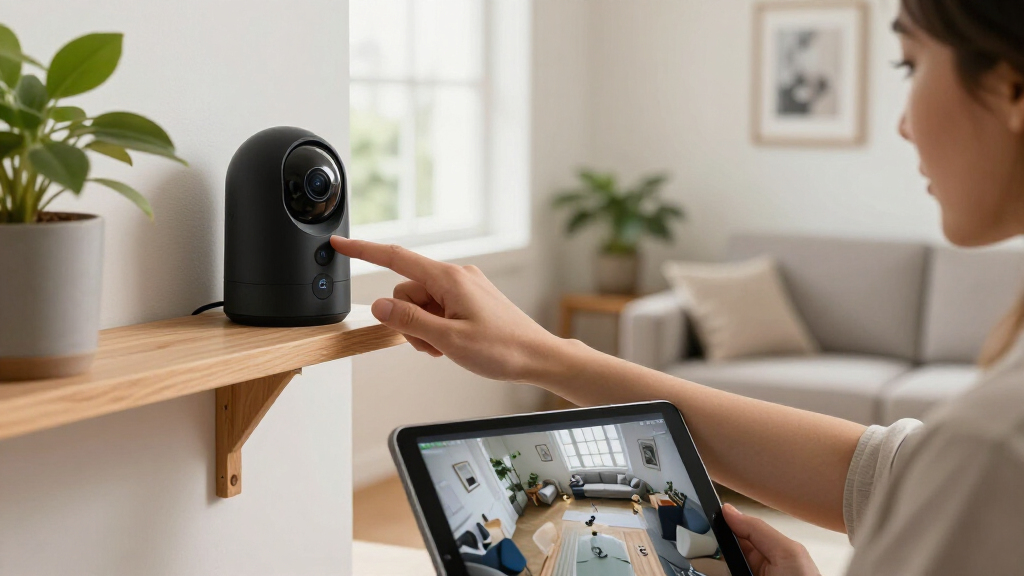
Smart home security cameras offer vital surveillance with features like high resolution, night vision, and smart alerts. Choosing the right model depends on understanding their capabilities, privacy safeguards, and storage options, along with recent industry advances.
You want to protect your home without turning your space into a surveillance zone. Smart home security cameras have become more than just eye-in-the-sky—they’re smart, connected, and packed with features that can catch intruders, monitor loved ones, or check on pets from anywhere. But with so many options and technical details, how do you know which camera really fits your home?
This guide breaks down everything you need to know—core features, privacy concerns, recent tech trends, and practical tips—so you can pick a camera that keeps your home safe and respects your privacy. Let’s get started.
Prioritize features like resolution, field of view, night vision, and smart detection for effective monitoring.
Secure your cameras with strong passwords, encryption, and network segmentation to protect your privacy.
Recent advances like local AI and hybrid storage options give you more control and better privacy.
Indoor and outdoor placements should be strategic—cover vulnerable points without invading privacy.
Remember, cameras are a tool—combine them with good locks, lighting, and habits for real security.
What features should I look for in a security camera?
When choosing a smart home security camera, the core features matter more than the brand name. You want clear video, reliable alerts, and easy control. For example, a 1080p camera offers crisp footage, but 2K or 4K models capture more detail—think clearer faces or license plates. Just remember, higher resolution demands more storage and bandwidth.
Field of view is critical. A wide-angle lens covers more ground, but can distort edges or make distant objects look tiny. Night vision is essential for 24/7 security; infrared is common but produces monochrome footage, while integrated spotlights can give you color images even in darkness. Motion detection is another must-have—advanced models can distinguish between people, animals, vehicles, and packages, reducing false alarms.
Consider how footage is stored: cloud, SD card, or local recorder. Two-way audio turns your camera into a virtual gatekeeper or pet monitor. Power options vary: wired cameras stay on constantly, but battery-powered models are portable and easier to install—though they may need regular charging.
Finally, check compatibility with your smart home system—Alexa, Google, Apple—and weather resistance for outdoor cameras. These details make a difference in daily use and long-term reliability.
As an affiliate, we earn on qualifying purchases.
How do privacy and cybersecurity affect your camera choices?
Security cameras can boost your home’s safety but also pose digital privacy risks. Hackers, data breaches, or even accidental sharing can expose your footage or give intruders a window into your home. Protect yourself with strong, unique passwords, multifactor authentication, and regular firmware updates.
End-to-end encryption makes sure your footage stays private, while creating a separate Wi-Fi network for your cameras adds an extra layer of security. Be cautious with cloud storage—some companies retain recordings or share data for research or advertising. Disabling microphones, facial recognition, or cloud uploads when not needed reduces exposure.
Always review vendor security policies. Do they support security updates? Are they transparent about government access or third-party sharing? Cameras installed in private spaces like bedrooms or bathrooms should be avoided, respecting both legality and ethics.
Safeguarding your digital privacy is crucial because a breach could allow hackers to access live feeds or recorded footage, potentially leading to theft, harassment, or blackmail. Poorly secured cameras can become entry points into your entire home network, risking broader security compromises. The tradeoff is between convenience and vulnerability—choosing reputable brands with strong security practices and enabling all recommended protections minimizes these risks and ensures your privacy remains intact.
What are the latest trends shaping smart home security cameras?
Industry innovations are rapidly transforming what cameras can do. On-device AI now allows cameras to analyze footage locally—no more lag or unnecessary cloud uploads. Recognize faces, detect packages, or tell a pet from a person, all on the device itself. This speeds up alerts and reduces cloud storage needs, but also raises questions about data privacy and device complexity, so choosing models with transparent AI policies is key.
More cameras now offer detailed alerts—familiar face recognition, vehicle detection, or even identifying if a package has arrived. Subscription plans often unlock these features, but local storage options like SD cards and hubs are gaining popularity for privacy-conscious users. The trend toward hybrid storage—combining cloud and local options—gives users greater flexibility and control over their footage.
Battery and solar power have improved, with longer-lasting batteries, removable cells, and solar panels that keep cameras charged with minimal fuss. Some models combine radar or infrared sensors with cameras to boost detection accuracy—filtering out bugs, weather effects, or other false alarms, which is vital for reliable security in challenging conditions.
Interoperability standards like Matter are slowly expanding, making it easier to connect cameras with other smart devices. Privacy controls—physical shutters, privacy zones, local processing—are becoming common to address concerns about constant recording. High-res imaging—2K and 4K—are standard now, but beware: they increase data use and power consumption, so balance quality with efficiency.
Finally, AI-generated summaries or search functions let you find specific events quickly, saving time and reducing stress. Staying current means checking compatibility, security policies, and user reviews before buying new tech, ensuring you get the most secure and feature-rich options available.
Indoor vs. outdoor cameras: Where should you place them?
Indoor cameras are smaller, less weather-resistant, and often have privacy features like shutters or pet modes. Outdoor cameras are built tough—weatherproof, with brighter night vision, stronger mounts, and sometimes sirens to deter intruders. For example, a front porch camera should cover the door and driveway, mounted about 8-10 feet high for a clear view.
Indoor placement requires sensitivity. Position cameras in common areas, hallways, or near entrances, avoiding private spaces like bedrooms or bathrooms. Pet owners often use indoor cameras to check on furry friends without invading their privacy. Proper placement ensures you capture the necessary footage while respecting privacy boundaries and legal considerations.
Outdoor cameras should focus on vulnerable points—main entrances, backyards, garages—while avoiding recording neighbors’ property or public spaces to stay legal. Mounting height, angle, and field of view are key. For instance, placing a camera too high might miss details, while too low could invade privacy or be vulnerable to tampering. Strategically positioning cameras maximizes coverage and minimizes false triggers, creating a comprehensive security setup.
Cloud vs. local storage: Which suits your needs?
Storing footage in the cloud is convenient—access from anywhere, easy sharing, and automatic backups. But it often comes with a recurring subscription fee and privacy concerns. Local storage, like SD cards or network video recorders, offers more control and eliminates monthly costs but may require technical setup and manual access. Consider your comfort with technology and need for control when choosing.
Here’s a quick comparison:
| Consideration | Cloud Storage | Local Storage |
|---|---|---|
| Remote access | Usually straightforward | May need network setup |
| Recurring cost | Often subscription-based | One-time hardware purchase |
| Theft protection | Footage remains accessible | Potential loss if camera is stolen |
| Privacy | Handled by provider | Greater control if secured properly |
Hybrid systems—combining cloud and local storage—are increasingly popular, offering the best of both worlds: convenience and control. Your choice should weigh factors like internet reliability, budget constraints, and privacy priorities to create a tailored security system that fits your needs perfectly.
What are the real limits of smart cameras?
Smart cameras aren’t infallible—they have inherent limitations that can impact their effectiveness. A visible camera might deter some intruders, but it cannot physically stop or intervene in a break-in. If Wi-Fi signals are weak or disrupted, alerts may be delayed or fail altogether, which could leave you unaware of an ongoing incident. Battery-powered models may miss initial events if they are in standby mode or lack immediate power, reducing their responsiveness.
Motion alerts are prone to false positives—shadows, weather conditions, insects, or passing vehicles can trigger unnecessary notifications, leading to alert fatigue. Facial recognition technology, while advanced, still struggles with poor lighting, obstructions, or identical faces, resulting in misidentifications or missed detections. Wireless signals are susceptible to interference or jamming, which can temporarily disable or degrade camera performance.
Even recorded footage has limitations; if faces or details are blurry or obscured, the footage becomes less useful for identification or evidence. Cameras should be viewed as part of a broader security strategy—complemented by physical locks, adequate lighting, alarms, and vigilant habits. Relying solely on cameras without addressing these basic security measures can create a false sense of safety.
Legal and ethical pitfalls to watch out for
Installing cameras isn’t just a technical decision—it’s a legal and moral one. Laws vary widely—some places require notifying neighbors, or avoiding recording private spaces without consent. In shared buildings, rules exist about common area surveillance. Ignoring these laws can lead to fines or legal action, and breach of privacy can damage relationships or reputations.
Police or authorities may request access to footage, sometimes without your direct permission—being aware of local laws protects you from inadvertent violations. Recording audio often needs explicit consent, and facial recognition raises significant privacy concerns, especially if used without proper safeguards. Always inform household members and visitors if cameras are active, and consider posting visible notices as a deterrent and transparency measure.
Sharing or storing footage responsibly is crucial—avoid uploading sensitive videos to insecure platforms or sharing with untrusted parties. Respecting privacy isn’t just an ethical stance; it’s essential for maintaining legal compliance and trust. Failing to consider these ethical and legal aspects can result in lawsuits, fines, or loss of credibility, undermining the purpose of your security system.
Frequently Asked Questions
Do I need a subscription to use a security camera?
Not always. Many cameras work with basic features without a subscription, but advanced detection, cloud storage, and alerts often require a monthly plan. Review your needs and compare models accordingly.Is 1080p sufficient, or should I buy a 2K or 4K model?
1080p provides clear footage for most home monitoring needs. If you want finer details—like license plates or facial features—consider 2K or 4K, but remember these increase storage and bandwidth demands.Are wired cameras more reliable than battery-powered cameras?
Wired cameras offer continuous power and generally more stable connections, but they require installation effort. Battery models are easier to set up and move—just keep an eye on battery life and charging needs.Can footage be recorded without using the cloud?
Yes. Many cameras support local storage via SD cards or network recorders. This gives you more control and privacy, especially if you’re wary of cloud providers or want to avoid ongoing fees.Where should indoor and outdoor cameras be positioned?
Place outdoor cameras near entrances, driveways, and vulnerable points about 8-10 feet high for a clear view. Indoor cameras should cover main hallways or common rooms, avoiding private spaces like bedrooms unless necessary.Conclusion
Your home’s safety depends on understanding what your cameras can and can’t do. Picking a model with the right features, security safeguards, and storage options makes all the difference. When used responsibly, smart cameras become a powerful part of your safety toolkit—just don’t forget the basics.
Imagine a camera that not only spots trouble but also respects your privacy, responds quickly, and blends seamlessly into your home. That’s the goal: smart, safe, and smartly secure.
Fall Picks
fall essentials
As an affiliate, we earn on qualifying purchases.