Smart refrigerator temperature sensors track fridge or freezer conditions and alert you when temperatures move beyond a set range. My best overall pick is the YoLink Freezer Thermometer and Hygrometer Kit with Hub and 3 Sensors, which stands out for covering multiple storage areas in one system. The MOCREO Wi-Fi Refrigerator and Freezer Thermometer with Pass-Through Hub suits buyers who want a compact setup, while the GoveeLife WiFi Refrigerator Thermometer with Gateway and LCD Display pairs remote monitoring with an at-a-glance readout. The main tradeoffs are sensor count, Wi-Fi versus hub-based connectivity, and whether you need a local display or just phone alerts. Read on for the full breakdown and help matching a sensor system to your kitchen, freezer, and monitoring needs.

Get home appliances delivered free with Prime
- Fast, free delivery on millions of items
- Prime Video, Amazon Music and more included
- Member-only deals all year
Complete the kit


Key Takeaways
- Multi-sensor kits offer the widest coverage: several YoLink and MOCREO options include two or three remote sensors, which can help monitor separate compartments or appliances without buying a second system.
- A hub changes where alerts can reach you: hub-based Wi-Fi kits support remote monitoring, while Bluetooth options such as the GoveeLife 2-Pack are better suited to nearby checks than away-from-home notifications.
- Displays matter when you want a quick local check: GoveeLife and MOCREO models with LCD hubs reduce reliance on opening an app, while simpler sensor-and-hub setups prioritize remote tracking.
- YoLink’s lineup emphasizes coverage and hub-based monitoring: buyers should distinguish its single-sensor option from the three-sensor kits rather than treating the product names as interchangeable.
- Alarm features do not replace checking alert behavior: these products vary in included sensors, gateways, and displays, so buyers should confirm what is in the box and how alerts work for their chosen setup.
| YoLink Freezer Thermometer and Hygrometer Kit, 3 Sensors with Hub | 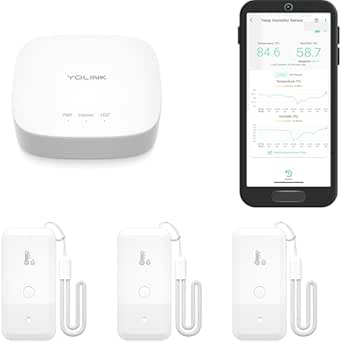 | Best for Multi-Zone Monitoring | Included: 1 hub and 3 sensors | Wireless technology: LoRa | Maximum range: Up to 2,034 feet in open air | VIEW LATEST PRICE | See Our Full Breakdown |
| MOCREO Wi-Fi Refrigerator and Freezer Thermometer with Two Sensors and Pass-Through Hub |  | Best for Refrigerator-and-Freezer Pairing | Sensors included: 2 | Connectivity: 2.4 GHz Wi-Fi and Bluetooth | Probe thickness: 0.9 mm | VIEW LATEST PRICE | See Our Full Breakdown |
| YoLink Freezer Temperature Sensor (YS8017) |  | Best Single-Sensor Add-On | Model: YS8017 | Wireless technology and range: LoRa; up to 2,034 feet in open air | Temperature range: -4°F to 122°F (-20°C to 50°C) | VIEW LATEST PRICE | See Our Full Breakdown |
| MOCREO WiFi Refrigerator Thermometer with LCD Hub and 2 Sensors |  | Best for a Readable Local Hub | Included system: H5Pro hub and 2 LS1 sensors | Hub display: 2-inch color LCD | Connectivity: Ethernet or 2.4 GHz Wi-Fi | VIEW LATEST PRICE | See Our Full Breakdown |
| GoveeLife WiFi Refrigerator Thermometer with Gateway and LCD Display |  | Best for Fast-Refreshing Probe Readings | Model: H5108 | Included components: Wi-Fi gateway, thermometer with battery, probe, lanyard, holder, and 4 pieces of tape | Temperature range and accuracy: -40°F to 158°F; ±0.9°F | VIEW LATEST PRICE | See Our Full Breakdown |
| TempPro TempAir Wireless Refrigerator and Freezer Thermometer with Alarm |  | Best for Simple, Screen-Based Monitoring | Connectivity: 433 MHz radio frequency | Wireless range: Up to 80 ft (24 m); varies with placement | Temperature range: -40°F to 158°F | VIEW LATEST PRICE | See Our Full Breakdown |
| GoveeLife Wi-Fi Refrigerator Thermometer with Alarm, Gateway and 1 Sensor |  | Best for Remote Alerts and App History | Connectivity: 2.4 GHz Wi-Fi and Bluetooth | Included components: Wi-Fi gateway, thermometer sensor, 2 AAA batteries, holder, lanyard, and 2 FDA tapes | Temperature range: -40°F to 158°F (-40°C to 70°C) | VIEW LATEST PRICE | See Our Full Breakdown |
| YoLink Freezer Temperature Sensor, 3-Pack, YS8017 |  | Best for Adding Sensors to an Existing YoLink System | Pack size: 3 sensors | Wireless technology: LoRa | Open-air range: Up to 2,034 feet | VIEW LATEST PRICE | See Our Full Breakdown |
| YoLink Freezer Temperature Sensor Kit with Hub, 3 Sensors |  | Best for Multi-Freezer Coverage Without Wi-Fi | Package contents: 1 hub and 3 sensors | Wireless technology: LoRa | Maximum open-air range: 2,034 feet | VIEW LATEST PRICE | See Our Full Breakdown |
| GoveeLife Bluetooth Refrigerator Thermometer with Alarm, 2-Pack | 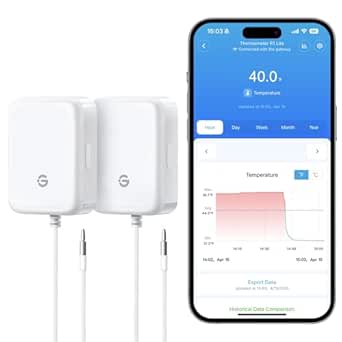 | Best Two-Sensor Starter Set | Pack size: 2 sensors | Connectivity: Bluetooth | Temperature range: -40°F to 158°F (-40°C to 70°C) | VIEW LATEST PRICE | See Our Full Breakdown |
| MOCREO WiFi Freezer Thermometer Alarm with Digital Monitor Hub and 2 Remote Sensors |  | Best for Long-Term Temperature Records | Included sensors: 2 remote temperature sensors | Temperature range: -40°F to 158°F | Accuracy: ±0.9°F | VIEW LATEST PRICE | See Our Full Breakdown |
| GoveeLife WiFi Refrigerator Thermometer 2-Pack with Gateway and LCD Display | 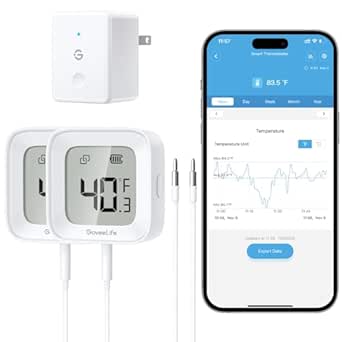 | Best for Fast-Refreshing Readings | Package contents: 2 temperature sensors, Wi-Fi gateway, LCD display | Temperature range: -40°F to 158°F | Accuracy: ±0.9°F / 0.5°C | VIEW LATEST PRICE | See Our Full Breakdown |
| MOCREO WiFi Freezer Thermometer Alarm with Hub and 2 Wireless Sensors |  | Best for a Loud Local Alarm | Included sensors: 2 wireless temperature sensors | Temperature range: -40°F to 158°F | Accuracy: ±0.9°F | VIEW LATEST PRICE | See Our Full Breakdown |
| GoveeLife Wi-Fi Refrigerator Thermometer with Alarm, 2 Sensors and Gateway | 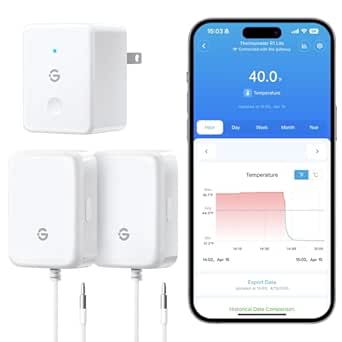 | Best for Combined Audible and App Alerts | Included components: Wi-Fi gateway, 2 thermometer sensors, 4 AAA batteries, holders, lanyards, and FDA tapes | Temperature range: -40°F to 158°F | Accuracy: ±0.9°F / ±0.5°C | VIEW LATEST PRICE | See Our Full Breakdown |
| smart refrigerator temperature sensor | Temperature range | Connectivity | Accuracy |
|---|---|---|---|
| YoLink Freezer Thermometer and | -4°F to 129°F (-20°C to 54°C) | — | — |
| MOCREO Wi-Fi Refrigerator and | — | 2.4 GHz Wi-Fi and Bluetooth | — |
| YoLink Freezer Temperature Sen | -4°F to 122°F (-20°C to 50°C) | — | — |
| MOCREO WiFi Refrigerator Therm | — | Ethernet or 2.4 GHz Wi-Fi | — |
| GoveeLife WiFi Refrigerator Th | — | 2.4 GHz Wi-Fi and Bluetooth | — |
| TempPro TempAir Wireless Refri | -40°F to 158°F | 433 MHz radio frequency | ±0.9°F |
| GoveeLife Wi-Fi Refrigerator T | -40°F to 158°F (-40°C to 70°C) | 2.4 GHz Wi-Fi and Bluetooth | ±0.9°F (±0.5°C) |
| YoLink Freezer Temperature Sen | -4°F to 122°F (-20°C to 50°C) | — | ±0.36°F from 32°F to 129°F; ±0.72°F from -20°F to 32°F |
| YoLink Freezer Temperature Sen | -4°F to 122°F (-20°C to 50°C) | — | ±0.36°F from 32°F to 129°F; ±0.72°F from -20°F to 32°F |
| GoveeLife Bluetooth Refrigerat | -40°F to 158°F (-40°C to 70°C) | Bluetooth | — |
| MOCREO WiFi Freezer Thermomete | -40°F to 158°F | — | ±0.9°F |
| GoveeLife WiFi Refrigerator Th | -40°F to 158°F | 2.4 GHz Wi-Fi and Bluetooth | ±0.9°F / 0.5°C |
| MOCREO WiFi Freezer Thermomete | -40°F to 158°F | 2.4 GHz Wi-Fi and wireless sensors | ±0.9°F |
| GoveeLife Wi-Fi Refrigerator T | -40°F to 158°F | 2.4 GHz Wi-Fi and Bluetooth | ±0.9°F / ±0.5°C |
More Details on Our Top Picks
YoLink Freezer Thermometer and Hygrometer Kit, 3 Sensors with Hub
For households that want to watch several cold-storage spots at once, this kit pairs three sensors with the required hub, so a refrigerator, freezer, and pantry or outbuilding can each have their own reading. Its LoRa connection reaches much farther in open air than the GoveeLife WiFi Refrigerator Thermometer with Gateway and LCD Display, and it avoids relying on Wi-Fi between sensors and hub. Temperature and humidity thresholds can trigger text, email, or push alerts, giving it broader environmental monitoring than the temperature-only YoLink YS8017. The tradeoff is that there is no on-device display, so readings and alerts depend on the app, and Alexa support is limited to temperature queries. Its long battery life is appealing, but actual runtime varies with use and conditions.
Pros:- Includes a hub and three sensors for monitoring multiple locations.
- LoRa communication offers up to 2,034 feet of range in open air without using Wi-Fi between sensors and hub.
- Measures both temperature and humidity with configurable alerts.
- Each sensor uses two AA batteries and can run for up to five years, depending on conditions.
Cons:- No display is included, so readings are accessed through the app.
- Alexa support covers temperature queries only, not humidity queries or routine triggers.
- Battery life depends on use and environmental conditions.
Best for: Households monitoring a refrigerator, freezer, and another storage area that want long-range sensors and humidity readings.
Not ideal for: Buyers who want a screen at the sensor or hub, or who need Alexa routines or voice access to humidity readings.
- Included:1 hub and 3 sensors
- Wireless technology:LoRa
- Maximum range:Up to 2,034 feet in open air
- Temperature range:-4°F to 129°F (-20°C to 54°C)
- Temperature accuracy:±0.36°F from 0°C to 54°C; ±0.72°F from -20°C to 0°C
- Humidity measurement:0% to 100%; ±3% accuracy from 10% to 90% RH
- Power and battery life:2 AA batteries per sensor; up to 5 years depending on use and conditions
- Alerts and integrations:Custom temperature and humidity thresholds; text, email, and push alerts; IFTTT and Alexa temperature queries
Our verdict“Choose this kit to monitor several storage zones with long-range temperature and humidity alerts, but skip it if a local display or broader Alexa controls matter more.”
MOCREO Wi-Fi Refrigerator and Freezer Thermometer with Two Sensors and Pass-Through Hub
The included two sensors and ultra-thin probes make this a practical match for checking a refrigerator and freezer without choosing between the two. The probes are just 0.9 mm thick, which helps them pass through a door seal with less bulk than the cable-and-probe setup of the GoveeLife WiFi Refrigerator Thermometer with Gateway and LCD Display. Its pass-through hub leaves an outlet available for another appliance, while app, email, and 80 dB hub alerts provide more than one way to notice a temperature problem. Two years of exportable history can help users track patterns rather than rely on a single reading. The tradeoffs: it requires 2.4 GHz Wi-Fi for remote access, and its ±0.9°F accuracy is less precise than the YoLink kit’s stated accuracy. Home Assistant setup also requires compatible nearby hardware.
Pros:- Two sensors make it straightforward to monitor a refrigerator and freezer at the same time.
- Ultra-thin 0.9 mm probes are designed to pass through door seals.
- Hub provides an 80 dB alarm, alongside app and email alerts.
- Stores up to two years of temperature history for export.
Cons:- Remote monitoring requires 2.4 GHz Wi-Fi.
- Battery life is up to two years, shorter than the stated maximum for the YoLink options.
- Home Assistant integration requires manual setup and a compatible Bluetooth receiver within range.
Best for: People who want to monitor a refrigerator and freezer together, with a thin door-seal probe and a hub alarm.
Not ideal for: Buyers who need Wi-Fi-free monitoring, very long sensor battery life, or plug-and-play Home Assistant support.
- Sensors included:2
- Connectivity:2.4 GHz Wi-Fi and Bluetooth
- Probe thickness:0.9 mm
- Temperature range and accuracy:-40°F to 221°F; ±0.9°F
- Response time and resolution:5 seconds; 0.1°
- Hub alarm:80 dB
- Battery:3 AAA batteries; up to 2 years
- Temperature history:Up to 2 years of free, exportable storage
- Power outage alert:Within 25 minutes
Our verdict“Pick this for a two-zone refrigerator-and-freezer setup with a loud local alarm, provided 2.4 GHz Wi-Fi and some integration setup are acceptable.”
YoLink Freezer Temperature Sensor (YS8017)
This standalone sensor suits buyers who already own a YoLink Hub and need one more temperature point, not a complete monitoring system. Its LoRa range of up to 2,034 feet in open air makes it a better fit for a detached freezer or a location where Wi-Fi coverage is unreliable than the MOCREO Wi-Fi Refrigerator Thermometer with Two Sensors and Pass-Through Hub. Custom alerts can arrive by text, email, or push notification, and two AA batteries are rated for up to five years of operation under suitable conditions. Unlike the three-sensor YoLink kit, though, this package does not include a hub, so it cannot provide app functionality on its own. It also monitors temperature only, and its stated range stops at 122°F, making it less versatile than broader-range alternatives.
Pros:- Long-range LoRa communication does not depend on Wi-Fi between the sensor and hub.
- Custom temperature alerts are available by text, email, and push notification.
- Two included AA batteries are rated for up to five years, depending on conditions.
- Supports IFTTT applets and Alexa temperature queries.
Cons:- A YoLink Hub is required for app functionality and is not included.
- Measures temperature only, unlike the YoLink three-sensor kit, which also monitors humidity.
- Temperature range is limited to -4°F to 122°F.
Best for: Existing YoLink Hub owners who need a single remote freezer or refrigerator temperature reading with customizable alerts.
Not ideal for: First-time buyers without a YoLink Hub, or anyone who needs multiple sensors, humidity readings, or an included local display.
- Model:YS8017
- Wireless technology and range:LoRa; up to 2,034 feet in open air
- Temperature range:-4°F to 122°F (-20°C to 50°C)
- Temperature accuracy:±0.36°F from 32°F to 129°F; ±0.72°F from -20°F to 32°F
- Resolution:0.1°F or 0.1°C
- Power and battery life:2 AA batteries included; up to 5 years depending on use and conditions
- Hub requirement:YoLink Hub required for app functionality; not included
- Alerts and integrations:Custom temperature thresholds; text, email, and push alerts; IFTTT and Alexa temperature queries
Our verdict“Buy this as a long-range add-on for an existing YoLink system; choose a bundled kit instead if you still need a hub or several sensors.”
MOCREO WiFi Refrigerator Thermometer with LCD Hub and 2 Sensors
When checking readings at home matters as much as remote alerts, this MOCREO set pairs two sensors with a 2-inch color LCD hub that displays information locally. That screen is the clearest distinction from the app-dependent YoLink Freezer Thermometer and Hygrometer Kit, while a 95 dB hub alarm adds an audible warning if a temperature crosses its threshold. The sensors are cable-free and IP66 water-resistant, so they can suit damp or splash-prone storage areas; two years of online history and CSV export also help with record keeping. The system can expand to as many as 100 compatible MOCREO sensors, a much larger capacity than the GoveeLife gateway’s 10-sensor limit. The compromises are dependence on Ethernet or 2.4 GHz Wi-Fi for remote monitoring and reduced wireless reliability around metal enclosures or thick freezer doors.
Pros:- 2-inch color LCD displays readings at the hub without opening an app.
- 95 dB hub alarm supplements app and email alerts.
- IP66-rated, cable-free sensors suit humid or splash-prone locations.
- Stores up to two years of history with CSV export and supports up to 100 compatible sensors.
Cons:- Remote monitoring requires Ethernet or 2.4 GHz Wi-Fi at the hub.
- Metal containers and thick freezer doors can disrupt the sensor signal.
- Battery life may be shorter than two years in temperatures below 32°F.
Best for: Households that want a visible hub reading, a loud local alarm, and room to add sensors across several storage areas.
Not ideal for: Buyers who cannot place the hub near Ethernet or 2.4 GHz Wi-Fi, or whose freezer placement blocks the wireless signal.
- Included system:H5Pro hub and 2 LS1 sensors
- Hub display:2-inch color LCD
- Connectivity:Ethernet or 2.4 GHz Wi-Fi
- Sensor temperature range and accuracy:-4°F to 131°F (-20°C to 55°C); ±0.9°F
- Wireless range:Up to 1,640 feet in open areas
- Alerts:App push, email, and 95 dB hub alarm
- Sensor protection and power:IP66 water-resistant; 3 replaceable AAA batteries per sensor
- Battery life:Up to 2 years above 32°F
- History and expansion:Up to 2 years of online history with CSV export; supports up to 100 compatible sensors
Our verdict“Choose this when a readable hub and loud local alarm matter more than Wi-Fi independence or guaranteed signal through a thick freezer door.”
GoveeLife WiFi Refrigerator Thermometer with Gateway and LCD Display
This GoveeLife model is a good fit when a buyer wants to watch a specific spot inside a refrigerator or freezer and see updates quickly. Its two-second response time and slim probe cable make placement more flexible than the cable-free sensors in the MOCREO WiFi Refrigerator Thermometer with LCD Hub and 2 Sensors. A built-in LCD display shows readings locally, while gateway-linked app alerts cover remote monitoring; two years of data storage adds useful history. The broad -40°F to 158°F range also suits other monitored spaces such as fish tanks or hot tubs. Compared with the MOCREO Wi-Fi Refrigerator and Freezer Thermometer, however, this package includes one thermometer rather than two, and it lacks that model’s listed loud hub alarm. Remote alerts also rely on the included gateway and 2.4 GHz Wi-Fi.
Pros:- Two-second response time and 0.1°F resolution support frequent, detailed readings.
- LCD displays the temperature locally.
- Probe holder and slim cable help position and manage the sensor.
- Provides two years of data storage and measures from -40°F to 158°F.
Cons:- Remote app alerts require the included gateway and a 2.4 GHz Wi-Fi connection.
- Includes one thermometer, while the MOCREO LCD hub system includes two sensors.
- No loud hub alarm is specified.
Best for: People who want quick probe readings and a local LCD for one refrigerator, freezer, or other monitored space.
Not ideal for: Buyers who need two included sensors, a loud hub alarm, or remote alerts without 2.4 GHz Wi-Fi and the gateway.
- Model:H5108
- Included components:Wi-Fi gateway, thermometer with battery, probe, lanyard, holder, and 4 pieces of tape
- Temperature range and accuracy:-40°F to 158°F; ±0.9°F
- Response time and resolution:2 seconds; 0.1°F
- Connectivity:2.4 GHz Wi-Fi and Bluetooth
- Gateway range and capacity:Up to 131 feet / 40 m; up to 10 sensors per gateway
- Display:Digital LCD
- Power:2 AAA batteries included
- Data and use:2 years of data storage; indoor and outdoor use
Our verdict“Pick this for fast, locally visible probe readings in one monitored space, but choose a two-sensor system if you need to cover both refrigerator and freezer.”
TempPro TempAir Wireless Refrigerator and Freezer Thermometer with Alarm
TempPro TempAir is the straightforward choice for buyers who want a receiver they can check at home without setting up Wi-Fi or an app. Its pre-paired sensor sends readings to a backlit display, with customizable high and low alarms and maximum/minimum records to help show whether temperatures have strayed between checks. The stated ±0.9°F accuracy and broad -40°F to 158°F range suit both refrigerator and freezer monitoring.
Compared with the GoveeLife Wi-Fi Refrigerator Thermometer with Alarm, Gateway and 1 Sensor, TempPro gives up remote notifications and stored app history in exchange for a simpler local setup. Its 80-foot radio range can also vary with placement, and the receiver needs AAA batteries. I’d choose it for a nearby kitchen display, not for alerts while away from home.
Pros:- Pre-paired setup works without Wi-Fi or registration.
- Customizable high and low alarms can flag temperature changes.
- Backlit receiver shows readings and maximum/minimum records.
- Receiver and transmitter offer several placement options.
Cons:- No app, email, or remote alerts when nobody is near the receiver.
- The stated 80-foot wireless range varies with placement conditions.
- The receiver relies on two AAA batteries.
Best for: Households that want a simple receiver display and local temperature alarms without Wi-Fi, accounts, or app notifications.
Not ideal for: People who need to check refrigerator temperatures remotely or receive alerts while away from home; this model has no Wi-Fi or app connectivity.
- Connectivity:433 MHz radio frequency
- Wireless range:Up to 80 ft (24 m); varies with placement
- Temperature range:-40°F to 158°F
- Accuracy:±0.9°F
- Alerts:Customizable high and low audio-visual alarms
- Display:Backlit digital display with maximum/minimum records and low-battery indicator
- Power:Receiver: 2 AAA batteries included; transmitter: rechargeable lithium battery
- Placement:Receiver: hook, stand, or magnet; transmitter: clip or stand
Our verdict“Choose TempPro if you want an easy-to-read local monitor with alarms and do not need remote access.”
GoveeLife Wi-Fi Refrigerator Thermometer with Alarm, Gateway and 1 Sensor
GoveeLife Wi-Fi Refrigerator Thermometer earns this spot for buyers who want more than a warning at the appliance: it can send app notifications and email alerts, while an 80 dB buzzer provides an at-home signal. Its probe responds in two seconds and has stated ±0.9°F accuracy, and the app stores data for two years—useful for reviewing temperature changes rather than relying on a single reading.
Compared with the TempPro TempAir, this package adds remote monitoring and longer-term records but requires 2.4 GHz Wi-Fi and app setup. It also includes only one sensor, whereas the YoLink Freezer Temperature Sensor Kit with Hub, 3 Sensors covers several locations from the start. The gateway can support up to 10 sensors, but expanding means adding compatible units, and the buzzer must be silenced at the device or muted in settings.
Pros:- App notifications, email alerts, and an audible alarm provide several warning routes.
- Two-second response time and stated ±0.9°F accuracy support frequent monitoring.
- Two years of data storage helps track temperature changes over time.
- Gateway supports up to 10 sensors and has a stated range of up to 230 feet.
Cons:- Works with 2.4 GHz Wi-Fi only.
- Includes one sensor, so monitoring several locations requires additional sensors.
- The buzzer must be silenced using the device button or muted.
Best for: People who want refrigerator or freezer alerts on their phone and email, plus temperature history they can review later.
Not ideal for: Buyers without 2.4 GHz Wi-Fi or those who want multiple refrigerator and freezer locations monitored from the included package.
- Connectivity:2.4 GHz Wi-Fi and Bluetooth
- Included components:Wi-Fi gateway, thermometer sensor, 2 AAA batteries, holder, lanyard, and 2 FDA tapes
- Temperature range:-40°F to 158°F (-40°C to 70°C)
- Accuracy:±0.9°F (±0.5°C)
- Response time:2 seconds
- Gateway capacity and range:Up to 10 sensors; up to 230 ft (70 m)
- Audible alarm:80 dB
- Data storage:2 years
Our verdict“Pick this GoveeLife kit if remote app and email alerts matter more than having several sensors in the box.”
YoLink Freezer Temperature Sensor, 3-Pack, YS8017
This three-sensor YoLink pack suits buyers who already own a YoLink hub and want to monitor several freezers or other indoor spaces without adding devices to their Wi-Fi network. Its LoRa connection has a stated open-air range of up to 2,034 feet, and alerts can arrive by app push notification, email, or SMS. Two AA batteries per sensor are rated for up to five years, reducing routine battery changes, though actual life depends on conditions and use.
Unlike the YoLink Freezer Temperature Sensor Kit with Hub, 3 Sensors, this package does not include the hub, so it makes sense as an expansion purchase rather than a complete setup. Its -4°F to 122°F measurement range is also narrower than the -40°F to 158°F range of the TempPro TempAir. Check that your freezer stays within its stated range before choosing it.
Pros:- Three sensors let one system cover multiple locations.
- LoRa communication avoids using the home Wi-Fi network.
- Custom thresholds can trigger app, email, and SMS alerts.
- Two AA batteries per sensor are rated for up to five years, depending on use and conditions.
Cons:- A YoLink hub is required and is not included.
- The -4°F to 122°F range is narrower than some alternatives in this roundup.
- Alexa routines are not supported.
Best for: Existing YoLink users who need to add temperature monitoring across several freezers or indoor spaces.
Not ideal for: First-time YoLink buyers without a hub, or anyone needing a sensor whose stated range extends below -4°F.
- Pack size:3 sensors
- Wireless technology:LoRa
- Open-air range:Up to 2,034 feet
- Temperature range:-4°F to 122°F (-20°C to 50°C)
- Accuracy:±0.36°F from 32°F to 129°F; ±0.72°F from -20°F to 32°F
- Power and battery life:2 AA batteries per sensor; up to 5 years depending on use and conditions
- Connectivity requirements:YoLink hub required; hub not included
- Alerts and integrations:Custom thresholds, app push notifications, email, SMS, IFTTT, and Alexa temperature queries
Our verdict“Choose this pack to expand an existing YoLink system across multiple locations, but select the hub-included kit if you are starting from scratch.”
YoLink Freezer Temperature Sensor Kit with Hub, 3 Sensors
With a hub and three sensors included, this YoLink kit is the more complete choice for households that need to monitor several refrigerators, freezers, or other indoor and outdoor locations. LoRa communication does not use the home Wi-Fi network, and the stated open-air range reaches up to 2,034 feet. Custom temperature thresholds can send text, email, and push notifications, while each sensor’s two AA batteries are rated for up to five years depending on conditions.
Compared with the three-sensor YoLink YS8017 3-Pack, this kit includes the hub, making it suitable for a new setup rather than only an expansion. It shares that model’s -4°F to 122°F measurement limits, so the GoveeLife Wi-Fi Refrigerator Thermometer with Alarm, Gateway and 1 Sensor offers a wider stated temperature range. YoLink also lacks Alexa routine triggering, despite supporting temperature queries.
Pros:- Includes one hub and three sensors for a complete multi-location setup.
- LoRa communication operates without using the home Wi-Fi network.
- Custom thresholds can send text, email, and push alerts.
- Sensors are rated for up to five years of battery life, depending on use and conditions.
Cons:- The measurement range is limited to -4°F to 122°F.
- Alexa temperature queries are supported, but Alexa routines are not.
- Actual battery life varies with usage and environmental conditions.
Best for: Households monitoring multiple refrigerators or freezers that want app and text alerts without relying on home Wi-Fi.
Not ideal for: Buyers who need readings below -4°F, Alexa routine triggers, or only want a single sensor for one appliance.
- Package contents:1 hub and 3 sensors
- Wireless technology:LoRa
- Maximum open-air range:2,034 feet
- Temperature range:-4°F to 122°F (-20°C to 50°C)
- Accuracy:±0.36°F from 32°F to 129°F; ±0.72°F from -20°F to 32°F
- Power and battery life:2 AA batteries per sensor; up to 5 years depending on use and conditions
- Alerts:Custom thresholds with text, email, and push notifications
- Integrations:IFTTT and Alexa temperature queries
Our verdict“Choose this kit for multi-location monitoring with a hub included, provided its temperature range fits your appliances.”
GoveeLife Bluetooth Refrigerator Thermometer with Alarm, 2-Pack
The GoveeLife Bluetooth 2-Pack gives buyers two probe sensors for separating refrigerator and freezer readings, with live app data and historical records for up to two years. Each unit has a stated two-second response time, ±0.9°F accuracy, and an 80 dB buzzer. That makes it a practical starting point when both compartments need monitoring but remote access is not yet a requirement.
Compared with the GoveeLife Wi-Fi Refrigerator Thermometer with Alarm, Gateway and 1 Sensor, this set provides a second sensor but lacks the included gateway and remote app notifications. Remote monitoring and push or email alerts require a compatible H5151 gateway, sold separately. The Bluetooth set can also connect to that gateway, which supports up to 10 sensors, but the added requirement makes it less convenient than the gateway-included option for buyers who want alerts away from home immediately.
Pros:- Two sensors make it easier to monitor refrigerator and freezer temperatures separately.
- App provides live readings and historical data storage for up to two years.
- Two-second response time and stated ±0.9°F accuracy support frequent checks.
- Each unit has an 80 dB buzzer that can be muted.
Cons:- Remote monitoring and push or email alerts require a separately purchased H5151 gateway.
- Gateway compatibility is limited to the H5151.
- The buzzer must be silenced at the device unless it has been set to mute.
Best for: People who want to monitor a refrigerator and freezer with two probes and are comfortable checking readings through Bluetooth nearby.
Not ideal for: Buyers who need remote alerts out of the box or do not want to add a compatible H5151 gateway for off-site monitoring.
- Pack size:2 sensors
- Connectivity:Bluetooth
- Temperature range:-40°F to 158°F (-40°C to 70°C)
- Accuracy and response time:±0.9°F (±0.5°C); 2 seconds
- Alarm:80 dB audible buzzer; can be muted
- Gateway compatibility:H5151 only; gateway not included; up to 230 ft (70 m) range and 10 sensors
- Power:4 AAA batteries included
- Probe immersion depth:2.5 inches
- Data storage:2 years
Our verdict“Pick this two-sensor set for nearby Bluetooth checks of both compartments, but choose the gateway-included GoveeLife kit for remote alerts from the start.”
MOCREO WiFi Freezer Thermometer Alarm with Digital Monitor Hub and 2 Remote Sensors
I’d choose this MOCREO when keeping a record of refrigerator or freezer conditions matters as much as getting an alert. Its two-year CSV history is exportable without a subscription, giving it an advantage over alarm-first setups when you want temperature records for your own tracking. The hub adds an 80 dB audible alarm alongside app and email alerts, while slim probe cables can pass through door seals. The LCD also shows sensor readings and temperature trends at a glance. Compared with the GoveeLife Wi-Fi Refrigerator Thermometer with Alarm, 2 Sensors and Gateway, this model has a more information-rich hub display and supports more sensors, but its specified open-area range is shorter. The tradeoffs are 2.4 GHz-only Wi-Fi and a separately sold external hub probe.
Pros:- Exports up to two years of temperature history as CSV without a subscription.
- Combines app and email notifications with an 80 dB hub alarm.
- Slim 0.9 mm probe cables are designed to pass through refrigerator and freezer door seals.
- Can expand to as many as 30 compatible MOCREO sensors.
Cons:- Connects to 2.4 GHz Wi-Fi only.
- The hub’s external probe is sold separately.
- Each sensor uses three replaceable AAA batteries.
Best for: Households that want exportable temperature records for two refrigerator or freezer zones and a hub screen for local checks.
Not ideal for: Buyers who need 5 GHz Wi-Fi, want to use an external probe immediately, or prefer a sensor system powered by fewer than three AAA batteries per sensor.
- Included sensors:2 remote temperature sensors
- Temperature range:-40°F to 158°F
- Accuracy:±0.9°F
- Hub alarm:80 dB
- Wi-Fi:2.4 GHz
- Maximum compatible sensors:30
- Open-area range:Up to 230 ft
- Temperature history:Up to 2 years; CSV export
- Sensor power:3 replaceable AAA batteries per sensor; up to 2 years of battery life
Our verdict“Choose this MOCREO if downloadable temperature history and a detailed hub display matter more than 5 GHz Wi-Fi or a bundled external probe.”
GoveeLife WiFi Refrigerator Thermometer 2-Pack with Gateway and LCD Display
For buyers who want frequent updates and a simple way to compare readings, this GoveeLife set pairs two sensors with a gateway and LCD display. Its two-second response time and ±0.9°F accuracy make it a good fit for checking temperature changes without waiting long between updates. The system also keeps up to two years of graphs and exportable data. Unlike the MOCREO WiFi Freezer Thermometer Alarm with Digital Monitor Hub and 2 Remote Sensors, however, the GoveeLife device does not sound an alarm itself; a temperature warning depends on an app alert, so it is less suitable when someone nearby needs an audible warning. It supports up to 10 sensors rather than MOCREO’s 30, and remote alerts require a 2.4 GHz Wi-Fi connection and gateway.
Pros:- Two-second response time helps show temperature changes promptly.
- Includes two sensors, a gateway, and an LCD display.
- Provides app alerts for readings outside preset limits.
- Offers up to two years of online graphs and data export.
Cons:- The device itself has no audible alarm.
- Remote app alerts require both a gateway and 2.4 GHz Wi-Fi.
- Each gateway supports up to 10 sensors, fewer than the 30 supported by the listed MOCREO systems.
Best for: People monitoring a refrigerator and freezer who value quick readings, a local LCD, and app-based temperature alerts.
Not ideal for: Buyers who need an audible alarm at the device, plan to monitor many zones, or cannot use a 2.4 GHz Wi-Fi network with a gateway.
- Package contents:2 temperature sensors, Wi-Fi gateway, LCD display
- Temperature range:-40°F to 158°F
- Accuracy:±0.9°F / 0.5°C
- Response time:2 seconds
- Connectivity:2.4 GHz Wi-Fi and Bluetooth
- Gateway range:Up to 197 ft / 60 m
- Maximum sensors per gateway:10
- Data history:Up to 2 years of online graphs and export
- Alarm:App alerts; no device alarm
Our verdict“Pick this GoveeLife set for rapid updates and an LCD, but choose an alarm-equipped alternative if you need sound at the device.”
MOCREO WiFi Freezer Thermometer Alarm with Hub and 2 Wireless Sensors
If a nearby audible warning is a priority, this MOCREO’s 90 dB hub alarm gives it a clear role among these remote-monitoring kits. It also sends app and email alerts, and its thin probe cables can pass through refrigerator door seals to keep the sensors outside the cold compartment. Temperature history can be viewed and exported as CSV, with up to two years of records and no subscription listed. Compared with the newer MOCREO WiFi Freezer Thermometer Alarm with Digital Monitor Hub and 2 Remote Sensors, this model offers a louder specified alarm but a slower eight-second response time; the newer model also lists an LCD with more on-screen information. Both support up to 30 compatible sensors. One caution: outage or internet-loss alerts may arrive about 25 minutes after the hub goes offline.
Pros:- 90 dB hub alarm is the loudest specified among these four picks.
- Sends app and email alerts, including hub-offline and low-battery notifications.
- Supports CSV temperature-history export for up to two years.
- Can expand to up to 30 compatible BLE sensors.
Cons:- Response time is 8 seconds, slower than the two-second GoveeLife models in this batch.
- Power-outage and internet-loss alerts may arrive about 25 minutes after the hub goes offline.
- Uses 2.4 GHz Wi-Fi only, and included sensors are intended for indoor use.
Best for: Owners who want a loud hub alarm, app and email notifications, and room to add compatible sensors across multiple cold-storage zones.
Not ideal for: Buyers who need fast outage notifications, 5 GHz Wi-Fi, or sensors rated for use outside indoor settings.
- Included sensors:2 wireless temperature sensors
- Temperature range:-40°F to 158°F
- Accuracy:±0.9°F
- Response time:8 seconds
- Hub alarm:90 dB
- Connectivity:2.4 GHz Wi-Fi and wireless sensors
- Hub range:Up to 230 ft
- Sensor capacity:Up to 30 compatible BLE sensors
- Data and power:Up to 2 years of CSV-exportable data; 3 replaceable AAA batteries per sensor
Our verdict“Choose this MOCREO if a loud local alarm and broad sensor expansion outweigh faster readings or quicker outage alerts.”
GoveeLife Wi-Fi Refrigerator Thermometer with Alarm, 2 Sensors and Gateway
This GoveeLife is the strongest match here for buyers who want a local buzzer and remote notifications in one setup. It combines an 80 dB alarm with app and email alerts, while its two-second response time and ±0.9°F accuracy help flag temperature changes quickly. The gateway supports up to 10 sensors across a stated range of 230 feet, making it a practical choice for a refrigerator-and-freezer pair or a few additional zones. Compared with the MOCREO WiFi Freezer Thermometer Alarm with Hub and 2 Wireless Sensors, it responds faster but has a lower specified alarm volume and supports fewer sensors. The GoveeLife also lacks a hub display, so readings are checked through the app. Its buzzer must be muted or turned off with the device’s side button, and Wi-Fi is limited to 2.4 GHz.
Pros:- Combines an 80 dB buzzer with app notifications and email alerts.
- Two-second response time and ±0.9°F accuracy support prompt temperature checks.
- Gateway supports up to 10 sensors within a stated range of 230 feet.
- Includes holders, lanyards, and FDA tapes for different sensor placements.
Cons:- Provides no hub display; readings are shown in the app.
- The buzzer must be muted or turned off using a side button.
- Supports 2.4 GHz Wi-Fi only and a maximum of 10 sensors.
Best for: Households that want fast refrigerator and freezer monitoring with audible, app, and email alerts from a gateway system.
Not ideal for: Buyers who want a hub screen, need to add more than 10 sensors, or require 5 GHz Wi-Fi.
- Included components:Wi-Fi gateway, 2 thermometer sensors, 4 AAA batteries, holders, lanyards, and FDA tapes
- Temperature range:-40°F to 158°F
- Accuracy:±0.9°F / ±0.5°C
- Response time:2 seconds
- Alarm:80 dB buzzer, app alerts, and email alerts
- Connectivity:2.4 GHz Wi-Fi and Bluetooth
- Gateway capacity:Up to 10 sensors
- Gateway range:Up to 230 ft / 70 m
- Data storage:2 years of free data storage
Our verdict“Choose this GoveeLife for quick readings and layered audible and remote alerts, but look elsewhere if you need an LCD hub or larger sensor capacity.”
How We Picked
I ranked these smart refrigerator temperature sensors by how well their included hardware supports dependable day-to-day monitoring: the number of sensors, the role of the gateway or hub, alert access, and whether the system offers a useful local display. I also weighed practical fit, including whether a buyer can monitor more than one appliance or compartment without piecing together extra equipment. Product names and configurations can be similar, so I treated each listed bundle as its own purchase rather than assuming that two kits from the same brand include identical parts.
The top position goes to the YoLink three-sensor kit because its bundled coverage is a strong match for households monitoring several cold-storage locations. MOCREO and GoveeLife models rank highly when their combination of remote monitoring, included sensors, and display options better fits common home use. Single-sensor or Bluetooth-focused options rank lower for buyers who need broad coverage or alerts while away, though they can make sense for narrower monitoring needs. I also considered setup simplicity, maintenance implications, and how clearly each product’s configuration serves a distinct buyer.
| smart refrigerator temperature sensor | Temperature range | Accuracy |
|---|---|---|
| YoLink Freezer Thermometer and | -4°F to 129°F (-20°C to 54°C) | — |
| MOCREO Wi-Fi Refrigerator and | — | — |
| YoLink Freezer Temperature Sen | -4°F to 122°F (-20°C to 50°C) | — |
| MOCREO WiFi Refrigerator Therm | — | — |
| GoveeLife WiFi Refrigerator Th | — | — |
| TempPro TempAir Wireless Refri | -40°F to 158°F | ±0.9°F |
| GoveeLife Wi-Fi Refrigerator T | -40°F to 158°F (-40°C to 70°C) | ±0.9°F (±0.5°C) |
| YoLink Freezer Temperature Sen | -4°F to 122°F (-20°C to 50°C) | ±0.36°F from 32°F to 129°F; ±0.72°F from -20°F to 32°F |
| YoLink Freezer Temperature Sen | -4°F to 122°F (-20°C to 50°C) | ±0.36°F from 32°F to 129°F; ±0.72°F from -20°F to 32°F |
| GoveeLife Bluetooth Refrigerat | -40°F to 158°F (-40°C to 70°C) | — |
| MOCREO WiFi Freezer Thermomete | -40°F to 158°F | ±0.9°F |
| GoveeLife WiFi Refrigerator Th | -40°F to 158°F | ±0.9°F / 0.5°C |
| MOCREO WiFi Freezer Thermomete | -40°F to 158°F | ±0.9°F |
| GoveeLife Wi-Fi Refrigerator T | -40°F to 158°F | ±0.9°F / ±0.5°C |
Factors to Consider When Choosing Smart Refrigerator Temperature Sensors
Choosing a sensor is less about collecting the most features and more about matching its connection method and sensor layout to the way you store food. I would start with the number of places you need to monitor, then check how alerts reach you and whether you need a screen at the appliance.
Count Monitoring Locations Before Choosing a Bundle
List the places you want to track separately: a refrigerator, a chest freezer, a second freezer, or distinct zones in a large appliance. A multi-sensor kit can cover more locations from one hub, but only if its sensor placement and range suit your layout. Buyers sometimes assume a two-sensor bundle means one sensor for each fridge and freezer; confirm the included sensor count and plan each sensor’s location before purchase. A single-sensor model can be enough for one appliance, especially if you mainly want a warning rather than a map of temperature differences. Paying for extra sensors only makes sense when you will use them or can add them to an existing compatible system.
Choose Connectivity Based on Where You Need Alerts
Bluetooth, Wi-Fi, and hub-based systems do not provide the same kind of access. Bluetooth models are often suited to nearby readings, while Wi-Fi systems with a gateway are a better fit for checking conditions when you are away from home. A hub also becomes another device that needs power and a suitable connection, so check where it will sit and how it links to your network. Do not assume that a sensor described as wireless sends alerts directly to your phone; the gateway may be the part that enables remote access. If a freezer is in a garage or basement, check the product’s stated range and connection requirements rather than relying on the word smart.
Decide Whether a Local Display Is Worth the Space
An LCD hub can show readings without requiring you to open an app, which is handy for routine checks or for household members who do not use the monitoring account. A screen adds value only if it will be visible and located where a quick glance is practical. If the hub must sit far from the appliance or in a crowded outlet area, the display may be less useful than app access. Screen-free kits can keep the setup simpler, but they make phone access more central to checking current conditions. Choose based on who needs to read the temperature and how often they will check it manually.
Check Alert Settings and Your Response Plan
A temperature alert is useful only when its limits match the appliance and someone can respond to it. Before buying, find out whether the system allows adjustable thresholds, how notifications are delivered, and whether it provides an audible alarm or app-based warning. Avoid setting limits too narrowly, since brief door openings can cause readings to fluctuate and create unnecessary notifications. Also decide what you will do if an alert arrives while you are away: a sensor can report a problem, but it cannot keep food cold or repair a failing appliance. For greater peace of mind, consider who else should receive alerts and whether the system supports that arrangement.
Plan for Sensor Placement, Power, and Upkeep
Placement affects how useful a reading is: a sensor pressed against a cold wall may not reflect the temperature around stored food, while a sensor near the door may capture frequent warm-air changes. Follow the maker’s placement guidance and keep sensors clear of spills, food containers, and moving shelves. Check what batteries or charging method each component uses and whether the hub needs a dedicated outlet. More sensors create more coverage but also mean more devices to place and maintain. A simpler kit may be the better long-term choice if you only need to watch one appliance and want fewer components to manage.
Match the System to Your Household, Not Just the Feature List
Households with several freezers, bulk food storage, or a vacation property may benefit from a hub and multiple sensors, while a renter monitoring one refrigerator may prefer a compact setup. If more than one person needs access, check whether the app supports shared monitoring before choosing a system. Compare the full bundle contents instead of relying on similar product names: some listings include a gateway, some include an LCD hub, and sensor counts differ. Paying more for a broader kit is sensible only when its extra coverage or display solves a real problem. For a straightforward warning on one appliance, a smaller setup can be easier to place and maintain.
Frequently Asked Questions
Can one smart temperature sensor monitor both my refrigerator and freezer?
One sensor measures conditions where that sensor is placed, so it cannot give separate readings for two appliances at once. Choose a kit with at least two sensors if you want independent refrigerator and freezer readings. Make sure the bundle includes the gateway or hub needed for the kind of phone access you expect. Also check whether the sensors can be assigned clear names in the app so alerts identify the right appliance. A single-sensor model remains reasonable if you only need to monitor the appliance most at risk.
Will these sensors alert me if my freezer loses power while I am away?
A sensor may notify you when its temperature crosses a configured limit, but that is not the same as a direct power-loss alert. Remote notification also depends on the sensor’s connection, its gateway or hub, your home internet, and the product’s app service. If power loss is your main concern, check the maker’s documentation for outage behavior and whether the hub can continue operating during an outage. Consider how long the freezer can hold temperature and who can respond if you receive an alert. Do not rely on temperature monitoring as a substitute for a backup power plan.
Should I choose a Wi-Fi or Bluetooth refrigerator thermometer?
Choose Wi-Fi or a hub-connected Wi-Fi system when you want to check readings and receive alerts while away from home. Bluetooth is a better fit for nearby checks when remote access is not a requirement. A gateway-based kit adds setup and another powered component, but it can extend monitoring beyond the phone’s immediate range. Before buying, verify whether the advertised system connects directly to Wi-Fi or needs a separate hub. The GoveeLife Bluetooth 2-Pack and the Wi-Fi gateway models in this roundup serve different needs, even though both are designed for refrigerator monitoring.
Do I need an LCD display if the sensor has a phone app?
No, a display is optional if you are comfortable checking readings and alerts on your phone. An LCD hub can make routine checks faster and can help household members who do not use the app. Its usefulness depends on where you can place it and whether the display shows the readings you care about. If the hub will be hidden or the appliance is in another room, app access may matter more than a screen. Compare the MOCREO and GoveeLife display bundles with their screen-free alternatives based on who will check temperatures most often.
Is a three-sensor kit a better choice than a two-sensor kit?
Three sensors are better only when you have three locations or zones that need separate monitoring. A three-sensor YoLink kit can suit a household tracking multiple freezers or a refrigerator and more than one cold-storage area. A two-sensor kit may be simpler and less wasteful if you only need one refrigerator and one freezer. Extra sensors also mean more placement decisions and battery upkeep, so unused coverage brings little benefit. Count your monitoring locations first, then compare what each exact kit includes.
Conclusion
For the best overall fit, I recommend the YoLink Freezer Thermometer and Hygrometer Kit with Hub and 3 Sensors for households that want broad coverage across several cold-storage locations. For value-focused buyers, the YoLink Freezer Temperature Sensor 3-Pack makes sense when you already have, or plan to use, a compatible hub and need multiple readings. For a premium-style setup with a local screen, I would shortlist the GoveeLife WiFi Refrigerator Thermometer with Gateway and LCD Display; it combines remote monitoring with quick on-device checks. Beginners should look at a two-sensor Wi-Fi kit such as the MOCREO model with a pass-through hub, which covers a common fridge-and-freezer setup without requiring a larger sensor bundle. For specific needs, pick the GoveeLife Bluetooth 2-Pack for nearby monitoring or a single-sensor YoLink model when one appliance is the sole concern. Match the exact sensor count, hub, and display in the listing to your setup before choosing.