Smart home energy monitors clamp onto your electrical panel and show exactly where every kilowatt-hour goes, and the differences between models are bigger than the specs sheets suggest. The Emporia Energy Monitor with 16 Sensors + 4 Smart Plugs Bundle earns the top spot for its rare combination of whole-home accuracy, per-circuit granularity, and appliance-level plug monitoring in one package. The Refoss monitor with Open API and Home Assistant support stands out for buyers who want local control with no cloud dependency, while the budget-friendly Tapo P115 smart plugs offer a low-commitment entry point for renters. The core tradeoff in this category is between installation depth and insight: whole-panel CT clamp monitors require working inside your breaker box but reveal circuit-level waste, whereas plug-based options take seconds to set up but only track one outlet at a time. Cloud reliance versus local processing, sensor amperage ratings, and app quality separate the winners from the rest. Read on for the full breakdown of all 15 options.

Get home appliances delivered free with Prime
- Fast, free delivery on millions of items
- Prime Video, Amazon Music and more included
- Member-only deals all year
Complete the kit



Key Takeaways
- The Emporia ecosystem (three Vue 3 variants plus the 16-sensor bundle) dominated the top of this comparison because its app, automation hooks, and sensor expandability are more mature than any single-product competitor here.
- Only one monitor in this lineup — the Refoss with Open API and no-cloud operation — fully frees your energy data from a manufacturer’s servers, which matters if a company shuts down its cloud or changes its subscription terms.
- CT clamp amperage ratings created real performance splits: the 120A dual-channel models (like the WiFi Home Energy Monitor with 2 x 120A CTs) handle high-load panels more safely than the 50A 16-sensor models, which are better reserved for individual branch circuits.
- The Tapo P115 plugs were the only true no-installation option and the clear pick for renters, but stacking enough plugs to approximate whole-home monitoring costs more than a panel-mounted unit.
- Several generically branded 16-sensor monitors in this roundup share nearly identical hardware; app polish, Home Assistant compatibility, and warranty support — not raw specs — are what separate them in practice.
| Meross Smart Home Energy Monitor |  | Best for Home Assistant Power Users | Certification: ETL, UL 61010 | Compatibility: Single-phase 2-wire, single-split phase 3-wire, 3-phase 4-wire Wye | Max Main Circuits: 200A | VIEW LATEST PRICE | See Our Full Breakdown |
| Smart Home Energy Monitor 2×80A, Dual-Channel WiFi Electricity Usage Tracker with App Control |  | Best Budget Starter Pick | Channels: 2 | Current per Channel: 80A | Connectivity: WiFi (2.4GHz) | VIEW LATEST PRICE | See Our Full Breakdown |
| Emporia Energy Monitor with 16 Sensors + 4 Smart Plugs Bundle |  | Best Complete Ecosystem | Sensors: 16 | Smart Plugs: 4 Wi-Fi plugs | Compatibility: iOS, Android, Alexa | VIEW LATEST PRICE | See Our Full Breakdown |
| SIEMENS Inhab Smart Home Energy Monitor with Circuit and Main Sensors |  | Best Premium Hardware Pick | Circuit Sensors: 16–50 Amp | Main Sensors: 2–200 Amp | Compatibility: US and Canada | VIEW LATEST PRICE | See Our Full Breakdown |
| Refoss Smart Home Energy Monitor with Open API, Home Assistant, No Cloud |  | Best Local-Control Pick | Model: EM16P | Control: Local via Web UI, Open API, MQTT | Accuracy: ±1% (200A: 2–200A; 60A: 1–60A) | VIEW LATEST PRICE | See Our Full Breakdown |
| Refoss Smart Home Energy Monitor with 16 60A Circuit Sensors |  | Best for Solar Homes | Number of sensors: 16 | Sensor current capacity: 60A | Supported systems: Single-phase, Split-phase, 3-phase 4-wire Wye | VIEW LATEST PRICE | See Our Full Breakdown |
| WiFi Home Energy Monitor with 2 x 120A CTs and Power Tracking |  | Best for Whole-Home Monitoring on a Budget | Current rating: 2 x 120A CTs | Connectivity: WiFi | App compatibility: Smart Life | VIEW LATEST PRICE | See Our Full Breakdown |
| Emporia Vue 3 Home Energy Monitor – Real-Time Electricity Usage and Power Consumption Meter |  | Best Overall App Experience | Certification: UL Listed | Sensors: Sixteen 50A branch sensors | Supported systems: Single phase, single-split phase, 2-wire, 3-wire, 3-phase, 4-wire Wye | VIEW LATEST PRICE | See Our Full Breakdown |
| Smart Home Energy Monitor with 16 50A Circuit Sensors, Compatible with Home Assistant |  | Best for Home Assistant Fans | Sensors: 16 x 50A | Voltage support: Single-phase up to 240VAC; three-phase up to 415Y/240VAC | Connectivity: WiFi 2.4GHz, MQTT, LAN | VIEW LATEST PRICE | See Our Full Breakdown |
| Zigbee Home Energy Monitor with 2 x 120A CTs and Live Usage Tracking |  | Best for Zigbee Smart Homes | Current rating: 120A per CT | CT type: Split-core | Protocol: Zigbee (requires Tuya hub) | VIEW LATEST PRICE | See Our Full Breakdown |
| WiFi Home Energy Monitor with 3 80A CT Clamps, Circuit-Level Monitoring, Smart App Integration |  | Best for Targeted Circuit Control | Input Voltage: AC 100–240V | CT Clamps: 3 × 80A | Relay Current: 15A | VIEW LATEST PRICE | See Our Full Breakdown |
| Emporia Vue 3 Home Energy Monitor – Smart Home Automation Module and Real-Time Electricity Usage Monitor |  | Best for Expandable Whole-Home Systems | Certification: UL Listed | Installation: Circuit panel with clamp-on sensors | Supported Systems: Single phase, split phase, 3-wire, 3-phase, 4-wire Wye | VIEW LATEST PRICE | See Our Full Breakdown |
| Emporia Vue 3 Home Energy Monitor |  | Best for Fast, Detailed Solar Insights | Certification: UL Listed | Installation: Circuit panel with clamp-on sensors | Supported Systems: Single phase, split phase, 3-wire, 3-phase, 4-wire Wye | VIEW LATEST PRICE | See Our Full Breakdown |
| Tapo Smart Plug Wi-Fi, Energy Monitoring, P115 (4-Pack), 15A | 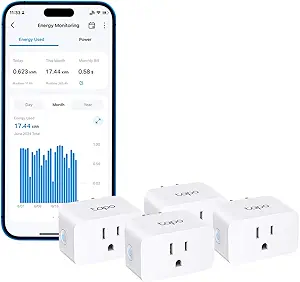 | Best No-Install Starter Pick | Number of Plugs: 4 | Maximum Current: 15A per plug | Features: Energy monitoring, scheduling, auto-shutoff | VIEW LATEST PRICE | See Our Full Breakdown |
| Smart Home Energy Monitor with App Connectivity and Circuit Sensors |  | Best Privacy-First Local Monitor | Sensor Capacity: 2 × 200A sensors included | Supported Voltages: Single-phase up to 240VAC, split-phase 120/240VAC, three-phase up to 415Y/240VAC | Connectivity: WiFi 2.4GHz (LAN operation) | VIEW LATEST PRICE | See Our Full Breakdown |
| smart home energy monitor | Connectivity | Warranty |
|---|---|---|
| Meross Smart Home Energy Monit | Open API, Web Control, Home Assistant | 2 years |
| Smart Home Energy Monitor 2×80 | WiFi (2.4GHz) | — |
| Emporia Energy Monitor with 16 | — | — |
| SIEMENS Inhab Smart Home Energ | — | — |
| Refoss Smart Home Energy Monit | — | 2 years |
| Refoss Smart Home Energy Monit | Wi-Fi with external antenna | 2 years |
| WiFi Home Energy Monitor with | WiFi | — |
| Emporia Vue 3 Home Energy Moni | 2.4 GHz WiFi | 1 year |
| Smart Home Energy Monitor with | WiFi 2.4GHz, MQTT, LAN | 1 year |
| Zigbee Home Energy Monitor wit | — | — |
| WiFi Home Energy Monitor with | WiFi 2.4GHz | — |
| Emporia Vue 3 Home Energy Moni | 2.4 GHz Wi-Fi | 1 year |
| Emporia Vue 3 Home Energy Moni | 2.4 GHz WiFi | 1 year |
| Tapo Smart Plug Wi-Fi | WiFi | — |
| Smart Home Energy Monitor with | WiFi 2.4GHz (LAN operation) | 1 year |
More Details on Our Top Picks
Meross Smart Home Energy Monitor
Where most monitors in this roundup push you toward a proprietary app, the Meross Smart Home Energy Monitor flips the script with full local control, an Open API, and web-based access. With 16 branch circuits and 200A mains coverage, it matches the sensor count of the Emporia bundle but trades smartphone convenience for privacy and zero cloud lock-in. Five years of stored data makes long-term trend analysis realistic, something the dual-channel WiFi tracker simply cannot do with only two channels. The compromise is real: there is no mobile app, so anyone who wants to check consumption from the couch will find the Refoss EM16P a friendlier local-first alternative. Setup also leans technical, which is fine for Home Assistant enthusiasts and frustrating for everyone else.
Pros:- Circuit-level monitoring on 16 branches plus 200A mains for whole-home coverage
- No subscriptions or cloud lock-in, keeping energy data fully private
- Five years of local data storage supports meaningful long-term analysis
- Native Home Assistant and Open API integration for deep automation
Cons:- No mobile app or cloud-based remote access limits casual monitoring
- Integration requires technical setup beyond plug-and-play expectations
- Limited to US home electrical system configurations
Best for: Home Assistant users and privacy-focused tinkerers who want circuit-level data stored locally for years
Not ideal for: Casual users who expect a polished mobile app and simple guided setup — neither exists here
- Certification:ETL, UL 61010
- Compatibility:Single-phase 2-wire, single-split phase 3-wire, 3-phase 4-wire Wye
- Max Main Circuits:200A
- Branch Circuits:16 circuits up to 60A
- Data Storage:Up to 5 years
- Connectivity:Open API, Web Control, Home Assistant
- Installation:Clamp-on design
- Warranty:2 years
Our verdict“This pick makes the most sense for Home Assistant hobbyists who value local data over app convenience.”
Smart Home Energy Monitor 2×80A, Dual-Channel WiFi Electricity Usage Tracker with App Control
Not everyone needs 16 circuit sensors, and this dual-channel WiFi monitor is the cheapest credible way to answer basic questions like what the HVAC or EV charger costs per month. Compared with the Emporia bundle, coverage is narrow — two channels versus sixteen plus smart plugs — but the clamp-on sensors attach without wiring changes, making it the easiest entry point in this lineup. Bi-directional tracking means solar owners can monitor export flow too, though without per-circuit granularity like the Meross unit offers. The tradeoff for the low price is ecosystem dependence: everything runs through the Tuya/Smart Life app and a 2.4GHz WiFi network, so buyers who later want local control will end up replacing rather than upgrading this device.
Pros:- Lowest-cost way to start real-time energy monitoring
- Clamp sensors install without wiring modifications
- Bi-directional tracking supports solar and backup power systems
- Works with the widely used Tuya/Smart Life ecosystem
Cons:- Only two channels, so no whole-home or per-circuit breakdown
- Requires a 2.4GHz WiFi network and depends on the Tuya cloud
- No published durability or long-term accuracy data
Best for: First-time buyers who want to track two high-draw circuits or a solar feed without a big investment
Not ideal for: Whole-home analysts — two channels can’t isolate individual appliances the way 16-sensor systems can
- Channels:2
- Current per Channel:80A
- Connectivity:WiFi (2.4GHz)
- App Compatibility:Tuya / Smart Life
- Installation:Clamp-style external sensors
- Supported Systems:Standard household circuits, solar panels, backup power
Our verdict“A sensible low-risk first monitor for two specific circuits, as long as whole-home detail isn’t the goal.”
Emporia Energy Monitor with 16 Sensors + 4 Smart Plugs Bundle
This bundle stands out for pairing 16-circuit whole-home monitoring with four smart plugs, closing the gap between seeing an energy problem and actually fixing it. Most competitors, including the dual-channel WiFi tracker, only report usage — here a suspicious always-on load can be identified on the dashboard and switched off remotely the same minute. Solar net metering support puts it on par with the Refoss EM16P for solar households, though Emporia’s data lives in its cloud rather than on your network. App and Alexa integration make this the most beginner-friendly full-coverage option in the roundup, but that convenience depends on app-based setup that can feel involved, and buyers wanting local control will prefer the Meross or Refoss route instead.
Pros:- 16 sensors deliver genuine whole-home, per-circuit visibility
- Included smart plugs add remote control and automation on top of monitoring
- Solar net metering support for homes with panels
- Polished iOS/Android apps plus Alexa compatibility
Cons:- Initial setup and app configuration take real effort
- Cloud-dependent platform offers no local-control option
- Can feel complex for buyers new to energy monitoring
Best for: Homeowners who want whole-home visibility plus remote device control in one app-driven package
Not ideal for: Privacy-minded users and Home Assistant devotees — everything runs through Emporia’s cloud platform
- Sensors:16
- Smart Plugs:4 Wi-Fi plugs
- Compatibility:iOS, Android, Alexa
- Solar Net Metering:Supported
- Control:Emporia app, remote plug control and automation
Our verdict“The most complete out-of-the-box ecosystem for mainstream smart-home owners who don’t mind a cloud platform.”
SIEMENS Inhab Smart Home Energy Monitor with Circuit and Main Sensors
Siemens brings industrial-grade credibility to a category crowded with no-name brands, measuring at both the 200A mains and 16–50A branch circuits with the kind of build quality an electrician will actually vouch for. Compared with the Emporia bundle, you give up the smart plugs and solar-specific features but gain personalized alerts and a professionally supported ecosystem — a meaningful difference for buyers who plan to have an electrician do the panel work anyway. The mobile app works across the US and Canada, though buyers elsewhere are out of luck. Panel-level installation means this is not a weekend DIY project for most people, and that professional install cost should be factored into an already premium price.
Pros:- Siemens engineering quality and established support network
- Monitors both panel mains and individual circuits simultaneously
- Personalized usage alerts drive actionable savings
- Reliable mobile app for remote monitoring
Cons:- Panel installation realistically requires an electrician
- Premium price without extras like smart plugs or local API access
- Available only in US and Canada markets
Best for: Owners who want trusted brand-name hardware and are budgeting for professional panel installation
Not ideal for: DIYers and international buyers — installation demands panel work and support is US/Canada only
- Circuit Sensors:16–50 Amp
- Main Sensors:2–200 Amp
- Compatibility:US and Canada
- Features:Real-time monitoring, personalized notifications, energy management
- Installation:Electrical panel mount, professional install recommended
- Remote Access:Mobile app
Our verdict“The right choice when brand trust and professional installation matter more than ecosystem extras.”
Refoss Smart Home Energy Monitor with Open API, Home Assistant, No Cloud
The Refoss EM16P takes the local-first philosophy of the Meross monitor and refines it: MQTT, an Open API, and a web UI give Home Assistant users multiple integration paths, while ±1% accuracy and five years of storage make the data trustworthy enough to act on. Unlike the cloud-based Emporia bundle, nothing leaves your network, and unlike the Meross, there’s a friendlier path to automation through OpenClaw AI support. Solar automation to maximize self-consumption is a genuine differentiator for PV owners. The costs of going local are the same as always: some electrical knowledge helps during installation, and the absence of Wi-Fi or cellular connectivity means the monitor must sit on a wired local network — a non-starter for anyone wanting phone alerts away from home without a server in between.
Pros:- Fully local control via Web UI, Open API, and MQTT — no cloud dependency
- ±1% measurement accuracy across main and branch circuits
- Solar automation features maximize self-consumption
- Five years of stored data and ETL/UL 61010 certification
Cons:- No built-in Wi-Fi or cellular — requires a wired local network
- Installation demands basic electrical knowledge
- Branch sensors capped at 60A, mains at 200A
Best for: Solar owners and smart-home automators who want accurate, private, fully local energy data
Not ideal for: Buyers wanting app-based remote access without running a Home Assistant server or local network setup
- Model:EM16P
- Control:Local via Web UI, Open API, MQTT
- Accuracy:±1% (200A: 2–200A; 60A: 1–60A)
- Main Circuit Sensors:2 (2–200A each)
- Branch Sensors:16 (1–60A each)
- Data Storage:Up to 5 years
- Certification:ETL, UL 61010
- Warranty:2 years
Our verdict“The strongest local-control option for technical solar households that refuse to hand their data to a cloud.”
Refoss Smart Home Energy Monitor with 16 60A Circuit Sensors
Among the circuit-level monitors in this lineup, the Refoss 16-sensor system stands out for its dedicated solar optimization and 60A sensor capacity, which outclasses the 50A sensors on the similar 16-channel Home Assistant model. That extra headroom matters for homes with high-draw circuits or larger solar arrays feeding power back through the panel. Compared with the Emporia Vue 3, Refoss leans harder into local control — a web UI and open API mean no subscription and no cloud dependency, though the Vue 3’s app-driven automation is friendlier for non-technical owners. The 5-year data storage is the longest retention in this batch, which serious energy analysts will appreciate. The tradeoff: getting the most from the API and smart home integrations takes real setup effort, and it only fits specific electrical systems.
Pros:- 60A sensors handle high-draw circuits and solar feeds better than 50A alternatives
- Fully local operation with web UI and API — no cloud or subscription required
- 5-year data storage supports serious long-term trend analysis
- Smart alerts flag appliance faults before they balloon your bill
Cons:- Advanced features require technical integration work
- Limited to single-phase, split-phase, and 3-phase 4-wire Wye electrical systems
Best for: Solar-equipped homeowners and technical users who want long-term, locally stored analytics without subscription fees
Not ideal for: Renters or casual users — it covers only single-phase, split-phase, and 3-phase Wye systems and demands technical setup for its best features
- Number of sensors:16
- Sensor current capacity:60A
- Supported systems:Single-phase, Split-phase, 3-phase 4-wire Wye
- Data storage duration:5 years
- Connectivity:Wi-Fi with external antenna
- Certification:ETL certified
- Warranty:2 years
Our verdict“If solar monitoring and cloud-free data ownership top your list, this is the most capable circuit-level option here — provided you’re comfortable with a technical setup.”
WiFi Home Energy Monitor with 2 x 120A CTs and Power Tracking
Not everyone needs sixteen branch circuits tracked — sometimes two main feeds tell the whole story. This dual-CT monitor goes where the Vue 3 and Refoss units go deeper: instead of per-circuit granularity, it delivers whole-home accuracy at 120A per channel, plenty for a typical service panel and bidirectional solar flow. The pluggable terminals and split-core CTs make installation noticeably less fiddly than panel-mounted branch sensors, since there’s no need to clamp sixteen individual wires. Its dynamic load balancing feature is a genuine differentiator for homes with EV chargers, helping shift load to avoid peak pricing. The tradeoff is obvious: compared with the Emporia Vue 3, you lose circuit-level breakdown, so you’ll know your total spend but not which appliance caused it. It also leans entirely on WiFi and the Smart Life app.
Pros:- 120A CTs cover most residential service panels with headroom
- Bi-directional monitoring handles solar and battery systems
- Dynamic load balancing helps manage EV charging and peak rates
- Split-core CTs and pluggable terminals make DIY installation straightforward
Cons:- Whole-home view only — no circuit-level breakdown
- Fully dependent on WiFi and the Smart Life app ecosystem
Best for: Budget-minded homeowners who want accurate whole-home and solar tracking, especially with EV charging
Not ideal for: Data-hungry users who want per-circuit attribution — two CTs only capture mains-level totals
- Current rating:2 x 120A CTs
- Connectivity:WiFi
- App compatibility:Smart Life
- Power monitoring:Bi-directional
- Features:Configurable reporting, dynamic load balancing
- Installation:Split-core CTs with pluggable terminals
Our verdict“The simplest path to knowing exactly what your home consumes each day, as long as you don’t need per-appliance detail.”
Emporia Vue 3 Home Energy Monitor – Real-Time Electricity Usage and Power Consumption Meter
The Emporia Vue 3 earns its place by making circuit-level monitoring genuinely approachable — something the Refoss and the MQTT-based Home Assistant monitor can’t claim. Sixteen 50A branch sensors plus a polished app with automated energy management mean most buyers can install it and get useful insights the same afternoon. Its UL listing is the strongest safety credential in this batch, and native solar and net metering support covers growing households without extra hardware. The tradeoffs are real, though: unlike the Refoss, it depends on Emporia’s cloud — there’s no local API — and the 1-second data view only works while the app is open. Data retention is also thinner: one-minute granularity disappears after 7 days, versus years of local storage on the Refoss. Homes with unusual 3-phase wiring may need an extra sensor too.
Pros:- UL-listed for safety — rare among monitors in this price range
- Mature app with automated energy management that actively cuts bills
- Sixteen circuit sensors plus native solar and net metering support
- Installs in most standard home panels without adapters
Cons:- Cloud-dependent with no local control or open API
- 1-minute data only retained 7 days; 1-second data requires open app
- 3-phase systems with earthed neutral need an additional sensor
Best for: Homeowners who want the easiest circuit-level monitoring with strong automation and a mature app
Not ideal for: Privacy-focused users and tinkerers — cloud dependency and no local API make it a poor fit for Home Assistant setups
- Certification:UL Listed
- Sensors:Sixteen 50A branch sensors
- Supported systems:Single phase, single-split phase, 2-wire, 3-wire, 3-phase, 4-wire Wye
- Connectivity:2.4 GHz WiFi
- Data retention:7 days (1-minute data), indefinite (1-hour data)
- Warranty:1 year
Our verdict“The best pick for buyers who value a smooth, guided experience over local control and raw data ownership.”
Smart Home Energy Monitor with 16 50A Circuit Sensors, Compatible with Home Assistant
This 16-channel monitor occupies the same niche as the Refoss — circuit-level tracking with zero cloud dependency — but leans fully into the Home Assistant ecosystem via MQTT and LAN. For anyone already running a smart home server, that’s a decisive advantage over the Emporia Vue 3, which offers no local access at all. Its standout use case is cost allocation: real-time per-circuit cost tracking makes it unusually well suited to rental homes, shared apartments, and property managers who need to bill tenants fairly — a scenario the other monitors here don’t explicitly target. Compared with the Refoss, you give up the 60A sensor rating and 5-year storage, and you’ll need your own MQTT server running for anything beyond basic readings. Busbar panels may also require extra sensors.
Pros:- Native MQTT and LAN support integrates cleanly with Home Assistant
- Per-circuit cost tracking ideal for tenant billing and shared housing
- Fully local operation protects data privacy
- Clamp-on sensors install in most standard circuit panels
Cons:- Requires MQTT server and Home Assistant setup for full functionality
- 50A sensors are weaker than Refoss’s 60A units
- Busbar panels may need additional sensors
Best for: Home Assistant users, landlords, and property managers who need per-circuit cost allocation without cloud services
Not ideal for: Plug-and-play buyers — without an MQTT server and Home Assistant, most of its value stays locked away
- Sensors:16 x 50A
- Voltage support:Single-phase up to 240VAC; three-phase up to 415Y/240VAC
- Connectivity:WiFi 2.4GHz, MQTT, LAN
- Monitoring range:Power, electricity cost, historical data
- Cloud dependency:None — fully local operation
- Warranty:1 year
Our verdict“The clear choice if Home Assistant already runs your home — just don’t expect much without it.”
Zigbee Home Energy Monitor with 2 x 120A CTs and Live Usage Tracking
The Zigbee version of the dual-CT monitor solves the exact problem its WiFi sibling (the Smart Life 2 x 120A model) creates: WiFi crowding and dropouts. If your home already runs a Zigbee mesh, this monitor rides the same network, pairing through Tuya or Zigbee2MQTT — the latter making it a quiet favorite for Home Assistant builds that prefer Zigbee over WiFi. Like its WiFi counterpart, it delivers 120A bidirectional monitoring with the same split-core, plug-in installation, so it handles solar and battery systems without breaking a sweat. The catches are structural: it requires a Tuya Zigbee hub to function at all, it’s locked to that ecosystem, and — like the dual-channel WiFi model — it offers no circuit-level detail, putting it behind the Emporia Vue 3 for attribution. Advanced Zigbee2MQTT setup also assumes some technical comfort.
Pros:- Runs on Zigbee mesh, avoiding WiFi congestion and dropouts
- 120A split-core CTs handle whole-home and bidirectional solar flow
- Zigbee2MQTT support opens advanced Home Assistant integration
- Plug-in terminals make installation tool-light and quick
Cons:- Requires a Tuya Zigbee hub — non-negotiable
- Locked to Zigbee/Tuya ecosystem with no circuit-level monitoring
- Advanced configuration demands technical knowledge
Best for: Zigbee smart home owners who want whole-home energy data on their existing mesh, especially with solar or batteries
Not ideal for: WiFi-only households or buyers without a Zigbee hub — it simply won’t operate in either case
- Current rating:120A per CT
- CT type:Split-core
- Protocol:Zigbee (requires Tuya hub)
- Compatibility:Tuya Smart / Smart Life app, Zigbee2MQTT
- Power monitoring:Voltage, current, power, total energy
- Applications:Home energy management, solar, battery systems
Our verdict“A natural fit for established Zigbee households; everyone else should look at the WiFi version or the Vue 3 instead.”
WiFi Home Energy Monitor with 3 80A CT Clamps, Circuit-Level Monitoring, Smart App Integration
Most monitors in this roundup are read-only — they tell you what your HVAC is doing, but they can’t do anything about it. This option stands out for pairing circuit-level monitoring with remote relay control, meaning a homeowner can actually switch off a water heater or pool pump from the Smart Life app instead of just watching it drain money. Compared with the Emporia Vue 3, it covers fewer circuits (three versus up to sixteen with add-ons), but none of the Vue’s sensors can act on what they measure. The temperature alerts at 50°C add a safety layer the Tapo P115 plugs can’t touch, since those are limited to 15A outlet devices. The tradeoff is real, though: wiring both CT clamps and relays into a panel is more invasive than clamp-only installs, and whole-home coverage is off the table.
Pros:- Combines monitoring with remote circuit control, not just data collection
- Temperature alerts add equipment protection beyond usage tracking
- Works with widely used Smart Life and Tuya app ecosystems
- Suitable for solar and net-metering setups at the circuit level
Cons:- Requires professional electrician installation for the relay wiring
- Capped at three circuits, far short of whole-home visibility
- Fixed 50°C alert threshold can’t be adjusted to equipment needs
Best for: Homeowners and small business operators who want to monitor AND remotely shut off specific heavy loads like water heaters, HVAC, or solar circuits
Not ideal for: Buyers wanting whole-home consumption data — this tracks only three selected circuits and can’t see the rest of the panel
- Input Voltage:AC 100–240V
- CT Clamps:3 × 80A
- Relay Current:15A
- Connectivity:WiFi 2.4GHz
- App Compatibility:Smart Life, Tuya
- Temperature Alert Threshold:50°C (fixed)
Our verdict“This pick makes the most sense for anyone who wants to act on their energy data, not just collect it — as long as three circuits is enough coverage.”
Emporia Vue 3 Home Energy Monitor – Smart Home Automation Module and Real-Time Electricity Usage Monitor
The UL-listed Vue 3 is the scalable backbone of this roundup. Out of the box it monitors your mains, but its real strength is expansion — up to 16 branch circuit sensors (sold separately) let you build toward per-appliance granularity over time, something fixed-configuration units like the 3-clamp WiFi monitor simply can’t match. Compared with the Home Assistant-friendly LAN monitor (B0H7N13HQ8), the Vue 3 leans fully into cloud and app-based automation rather than local-first privacy, which is a genuine drawback for self-hosted smart home builders. Its electrical flexibility is unusually broad — single-split phase through 3-phase and 4-wire Wye — so odd panel setups that stump cheaper monitors are handled here. Just know that the 16-sensor ambition costs extra, and live data only streams while the app is actively open.
Pros:- UL Listed certification for safety and insurance peace of mind
- Scales from mains-only up to 16 branch sensors over time
- Handles solar and net metering natively
- Supports an unusually wide range of electrical systems including 3-phase
Cons:- Branch circuit sensors sold separately, raising total cost quickly
- Real-time data only displays while the app is open
- Minute-level data is retained for just 7 days
Best for: Homeowners who want to start with whole-home monitoring and gradually expand to 16-circuit detail, especially with solar or net metering
Not ideal for: Privacy-focused Home Assistant users — the cloud-dependent app design conflicts with local-first setups
- Certification:UL Listed
- Installation:Circuit panel with clamp-on sensors
- Supported Systems:Single phase, split phase, 3-wire, 3-phase, 4-wire Wye
- Sensor Capacity:Up to 16 branch sensors (sold separately)
- Connectivity:2.4 GHz Wi-Fi
- Data Retention:7 days minute data, indefinite hourly data
- Warranty:1 year
Our verdict“This model is better suited to buyers who want a certified, expandable platform they can grow into rather than a one-shot purchase.”
Emporia Vue 3 Home Energy Monitor
This Vue 3 variant earns its place for data resolution: one-second live readings when the app is open, three hours of that high-resolution history retained, and indefinite hourly archives. For solar owners watching panel output shift minute to minute, that granularity beats the coarser updates of the 3×80A WiFi monitor and the plug-level Tapo approach entirely. It shares the same UL listing, app, and solar/net-metering support as the other Vue 3 listing, so the choice between them comes down to how you’ll use the data — this one prioritizes real-time responsiveness over expansion out of the box. The Refoss monitors in this roundup offer local API access the Vue lacks, so tinkerers should weigh that trade. A stable 2.4GHz WiFi connection is non-negotiable, and 3-phase setups with earthed neutral need an extra sensor.
Pros:- One-second live data resolution for precise solar and load tracking
- UL Listed with a year of warranty coverage
- Native solar and net metering support
- Long-term hourly data retained indefinitely for trend analysis
Cons:- Full functionality depends on a stable 2.4GHz WiFi connection
- 3-phase systems with earthed neutral require an additional sensor
- One-second data only available while the app is actively open
Best for: Solar owners and data-driven homeowners who want second-level resolution to track production and consumption in near real time
Not ideal for: Homes with unreliable WiFi or buyers unwilling to pay extra for 3-phase sensor support
- Certification:UL Listed
- Installation:Circuit panel with clamp-on sensors
- Supported Systems:Single phase, split phase, 3-wire, 3-phase, 4-wire Wye
- Connectivity:2.4 GHz WiFi
- Data Resolution:1 second (live), 3 hours retained
- Data Retention:7 days minute data, indefinite hourly data
- Warranty:1 year
Our verdict“Compared with similar options, this version makes the most sense when live resolution — not sensor count — is the priority.”
Tapo Smart Plug Wi-Fi, Energy Monitoring, P115 (4-Pack), 15A
Every other product here lives inside your circuit panel and demands an electrician. The Tapo P115 four-pack delivers per-device energy data with zero wiring and zero risk — plug in a dehumidifier, space heater, or old fridge, and you immediately see what it costs to run. Compared with the Emporia Vue 3, the coverage is narrower: you only see what’s plugged into these four outlets, not your HVAC, water heater, or dryer. But that limitation is also the point — it’s the cheapest, fastest way to answer ‘is that ancient freezer eating $20 a month?’ The auto-shutoff overload protection adds genuine safety value the panel monitors can’t offer at the outlet level, and Alexa and Google voice control come standard. The 15A ceiling rules out high-draw hardwired appliances.
Pros:- No electrician or panel access required — works out of the box
- Auto-shutoff protects against overloads at the outlet
- Alexa and Google Assistant voice control included
- Scheduling features can automate savings on top of monitoring
Cons:- Capped at 15A, excluding most large appliances
- Only monitors devices physically plugged into it
- Requires steady WiFi for remote control and data sync
Best for: Renters and curious first-timers who want per-device cost data on suspect appliances without touching the breaker panel
Not ideal for: Homeowners seeking whole-home or hardwired-appliance monitoring — outlet-level coverage can’t see HVAC, water heaters, or dryers
- Number of Plugs:4
- Maximum Current:15A per plug
- Features:Energy monitoring, scheduling, auto-shutoff
- Voice Control:Alexa, Google Assistant
- Connectivity:WiFi
- Installation:None — outlet plug-in
Our verdict“If the goal is a low-commitment first step into energy monitoring rather than a whole-home overhaul, this is the obvious entry point.”
Smart Home Energy Monitor with App Connectivity and Circuit Sensors
In a roundup crowded with cloud-dependent apps, this monitor takes the opposite path: it runs on your LAN with no cloud dependence, so your household consumption data never leaves the building. For Home Assistant users, that local-first design is exactly what the Emporia Vue 3 refuses to offer, and it sidesteps the Vue’s quirk of only streaming live data while the app is open. The bundled 2×200A sensors cover both mains of a typical split-phase panel out of the box, and retention is generous — 90 days of hourly data plus permanent daily, monthly, and yearly summaries. Compared with the Tapo P115 plugs, installation is the obvious hurdle: panel access and competent wiring skills are required, and the ecosystem reach beyond Home Assistant is thin, so Alexa-native households may feel stranded.
Pros:- No cloud dependence — all data stays on the local network
- 2×200A sensors cover both mains of a split-phase service included
- Handles single-, split-, and three-phase electrical configurations
- 90 days of hourly data plus permanent long-term summaries
Cons:- Requires panel access and solid DIY electrical skills
- Only two sensors included; per-appliance monitoring costs extra
- Smart home compatibility effectively limited to Home Assistant
Best for: Self-hosted smart home enthusiasts and privacy-conscious homeowners who want whole-home data kept entirely local
Not ideal for: Smart home users invested in Alexa, Google, or Tuya ecosystems — integration beyond Home Assistant isn’t supported
- Sensor Capacity:2 × 200A sensors included
- Supported Voltages:Single-phase up to 240VAC, split-phase 120/240VAC, three-phase up to 415Y/240VAC
- Connectivity:WiFi 2.4GHz (LAN operation)
- Cloud Dependence:None — local operation
- Data Storage:90 days hourly, permanent day/month/year
- Smart Home Compatibility:Home Assistant
- Warranty:1 year
Our verdict“For buyers whose first question is ‘where does my data live,’ this local-first option answers it better than anything cloud-based in this lineup.”
How We Picked
I evaluated each monitor against the criteria that actually change the ownership experience: measurement accuracy and sensor coverage, installation complexity, app and software quality, local versus cloud data control, and long-term value. Sensor amperage ratings and channel count determined whether a unit could safely monitor a main feed or only branch circuits. Software weighed heavily — a monitor is only as good as the interface that turns raw current readings into actionable insights, so I prioritized models with responsive apps, reliable historical data, and documented Home Assistant or API support.
The ranking rewards ecosystems over one-off hardware. Products from manufacturers with proven track records of firmware updates and app maintenance placed higher than generic units with similar specs but uncertain support. Price was judged relative to sensor count and capability, not as a standalone factor — a $150 monitor with 16 circuit sensors often beats three $40 devices at the same job. Finally, I flagged every product’s honest weakness, because in this category the wrong choice usually means either an unread app dashboard or a unit that stops working when its cloud does.
Factors to Consider When Choosing Smart Home Energy Monitors
Before picking a specific monitor, it helps to understand the structural choices in this category — choices that matter more than brand names or spec-sheet numbers. These are the factors I weighed, plus the mistakes I saw repeated across buyer reviews.Whole-Panel Monitoring vs. Plug-Level Tracking
The first decision is architectural. Panel-mounted CT clamp monitors read your entire electrical system at the source, catching hard-wired loads like HVAC, water heaters, and EV chargers that no smart plug can ever see. Plug-based monitors like the Tapo P115 invert that trade: zero electrical work, perfect portability, but blind spots everywhere except the outlet they occupy. A common mistake is assuming a handful of monitoring plugs approximates whole-home data — large appliances on dedicated 240V circuits typically account for 40–60% of household consumption and remain invisible to plugs. If you own your home and can safely access your panel, a clamp-based monitor delivers dramatically more insight per dollar. Renters or anyone uncomfortable opening a breaker box should start with plugs and accept the limited picture.
Sensor Count and Amperage Ratings
Two numbers govern what a monitor can actually measure: how many CT sensor channels it has and the amperage rating of each clamp. Main feeds on typical homes draw up to 100–200 amps, so a 50A sensor on a main line will clip readings and underreport usage — a surprisingly common misconfiguration. Sensors rated 80A and above (like the dual-channel 120A units in this roundup) belong on mains and heavy circuits; 50A sensors are fine for lighting, outlets, and standard branch circuits. Channel count determines granularity: a two-channel unit tells you total consumption, while a 16-sensor unit can attribute your bill to specific rooms and appliances, which is where the behavioral savings happen. Buy more channels than you think you need, because retrofitting sensors to a maxed-out unit often means replacing the whole device.
Cloud Dependence and Local Control
This is the factor most buyers regret ignoring. Many monitors route all data through the manufacturer’s cloud, which means your dashboard dies if the company discontinues service, changes its free tier, or suffers an outage — a pattern that has killed several budget monitor brands outright. Local-control options like the Refoss Open API model push data over your own network to Home Assistant or other platforms, keeping your setup functional regardless of the vendor’s business fortunes. Cloud-based systems do offer conveniences: easier remote access, automatic updates, and polished mobile apps without any configuration work. If you’re already running a smart home hub or value data privacy, lean local. If you want an app that just works out of the box and never want to read a setup guide, cloud-based is the pragmatic choice — just choose a vendor with an established user base.
Installation Requirements and Electrical Safety
Every panel-mounted monitor in this category involves clipping sensors around live bus bars, and that reality should shape your buying decision honestly. Some manufacturers effectively require or strongly recommend professional installation by a licensed electrician, which can add $100–$300 to the true cost of ownership — a hidden expense that erases the price gap between budget and premium units. Check your local code too; some jurisdictions mandate electrician installation for any work inside a panel, even plug-in sensor clamps. The physical layout of your panel matters as well: crowded or tandem-breaker panels may not accommodate wide CT clamps on every circuit you want to track. Budget for the installation labor when comparing prices, not just the sticker on the box.
Software Ecosystem and Integration
Energy data only creates savings when it triggers action, and that’s where software ecosystems diverge sharply. Monitors with Home Assistant, Alexa, Google Home, or IFTTT integration can automate responses — throttling water heaters, adjusting thermostats, or alerting you when the dryer finishes. Closed ecosystems limit you to the manufacturer’s app, and app quality varies wildly between the polished Emporia experience and the barebones dashboards on some generic imports. Check whether historical data retention is free or subscription-gated, because a year of monthly trends is far more useful for spotting seasonal waste than a seven-day scrollback. Also verify API documentation exists if you ever want to export data or build custom dashboards — undocumented APIs tend to break silently.
Realistic Savings and Payback Expectations
Industry data consistently shows households cut 5–15% of electricity usage simply by making consumption visible, but the payback math depends on your bill. At $300/month bills, even a 10% reduction pays back a $150 monitor in five months; at $80/month, the same monitor takes over a year and a half. The biggest wins come from finding always-on phantom loads, identifying failing appliances drawing excess current, and shifting usage off peak-rate hours where time-of-use billing applies. If your utility doesn’t offer time-of-use rates and your bill is modest, a basic two-channel monitor may capture most available savings without paying for 16-sensor granularity. Match the hardware investment to the size of your bill, not to the feature list.
Frequently Asked Questions
Do I need an electrician to install a smart home energy monitor?
For any panel-mounted monitor with CT clamps, the answer is usually yes or at least strongly advised. Clamps must be attached around the main feed lines or branch circuit wires, which are live even with the main breaker off in many panel configurations. Some experienced DIYers do the branch-circuit sensor installs themselves after shutting off the main breaker, but the main feed lines typically remain energized upstream of the breaker, and a mistake there is genuinely dangerous. Several jurisdictions also require licensed electricians for any work inside a panel regardless of complexity. Budget $100–$300 for professional installation when comparing prices — the Tapo smart plugs are the only option in this roundup that avoids the question entirely, since they just plug into an outlet.
What happens to my monitor if the company’s cloud service shuts down?
For cloud-dependent monitors, the realistic outcome is a bricked or severely degraded product — history has several examples of budget monitor brands discontinuing servers and leaving customers with useless hardware. This is precisely why the Refoss Open API model ranks so well in this comparison: it operates fully locally, so your data pipeline runs through your own network and survives any vendor decision. Cloud-based units from larger companies like Emporia carry lower risk because their scale makes sudden shutdowns less likely, but the risk never reaches zero. If long-term reliability matters more than app polish, prioritize monitors with documented local control, Home Assistant support, or an open API. If you choose cloud anyway, prefer vendors with large active user communities that would raise alarm early.
How many circuit sensors do I actually need?
A useful rule of thumb: monitor every 240V appliance circuit, then the highest-consumption 120V circuits, and let the unmonitored remainder be captured by the main feed sensors. In a typical home that means 8–14 circuits — the well pump, HVAC, water heater, dryer, oven, kitchen outlets, and laundry. A 16-sensor unit like the Emporia bundle or Refoss covers this comfortably with room to expand, while a dual-channel unit only gives you the two main feeds and total consumption with no circuit attribution. The value of granular sensors is behavioral: knowing the basement freezer costs $14/month changes decisions in a way a single total number never does. If your panel uses tandem breakers, physically check clamp fit before buying, because crowded panels can make full sensor coverage impossible.
Can smart plugs replace a whole-panel energy monitor?
Only for a narrow slice of use cases. Plugs like the Tapo P115 measure individual appliances accurately, but they cannot see 240V hard-wired loads — HVAC, water heating, cooking ranges, EV charging — which typically dominate a household bill. Where plugs excel is targeted diagnosis: measuring one suspicious refrigerator, quantifying a home theater setup, or controlling and measuring devices simultaneously. A practical hybrid approach many households use is a panel monitor for the big picture plus two or three plugs for automation and appliance-level detail. Buying a dozen plugs to approximate whole-home coverage costs more than a panel unit and still misses the largest loads, so treat plugs as a complement or an entry point, not a substitute.
Are subscription fees required to see my energy data?
Across this roundup, the mainstream monitors — Emporia, Refoss, and most generic WiFi units — provide full app access and historical data without subscriptions, but the fine print varies on how long data is retained and how fast it refreshes. Some brands gate second-by-second real-time data or extended history behind paid tiers while keeping basic daily totals free, so check the retention policy before buying rather than after. Local-control monitors sidestep the question entirely since data lives on your own hardware or Home Assistant instance. The subscription pattern is more common with newer brands trying to build recurring revenue, so an established free-tier product is usually the safer long-term bet. If any recurring fee exists, factor a year of it into your cost comparison upfront.
Conclusion
The right choice here depends less on specs and more on your living situation and how deep you want to go. For best overall, the Emporia Energy Monitor with 16 Sensors + 4 Smart Plugs Bundle is the most complete package in this roundup — panel-level granularity, plug-level detail, and the most polished app ecosystem, provided you’re comfortable with its cloud dependency and a professional installation. The Refoss with Open API and no-cloud operation is the best pick for smart home enthusiasts who run Home Assistant and want their energy data to outlive any vendor’s servers.
For best value, the WiFi Home Energy Monitor with 2 x 120A CTs delivers whole-home accuracy and safe main-feed monitoring at a budget price, ideal if you want totals and trends without per-circuit detail. The Refoss 16-channel model offers the best value specifically at the circuit level. For beginners and renters, the Tapo P115 four-pack is the obvious starting point — no panel work, instant setup, and a gentle way to learn what energy monitoring can do before committing to installed hardware. And for the premium buyer who wants an integrated ecosystem, the Siemens Inhab brings brand-name build quality and coordinated sensors for those already invested in a professional-grade smart home. Whatever you pick, match the sensor count to your bill size and decide your cloud tolerance first — those two choices eliminate most of this list on their own.
Fall Picks
fall essentials
As an affiliate, we earn on qualifying purchases.