
Smart home study lighting needs to do three jobs at once: provide bright, even illumination for reading and screen work, protect your eyes during long study sessions, and integrate cleanly with the way you actually work—whether that’s app control, voice commands, wireless charging, or a simple touch panel. After comparing 15 popular options, the Micomlan LED Desk Lamp with Auto Dimming stands out as the best overall pick because its sensor-driven brightness adjustment removes the guesswork from eye care, while its 24W clamp design frees up desk space. For tighter budgets, the Lepro LED Desk Lamp delivers solid 750LM output and touch controls at a fraction of the price, and the Hifree Smart Table Lamp is the clear choice if RGB color scenes and app/voice control top your list. The main tradeoff in this category is between smart features and light quality: many app-connected lamps lag behind clamped architect models in brightness and evenness, while the best-performing workhorses often skip connectivity entirely. Clamp-mounted lamps also trade desk real estate for setup flexibility. Read on for the full breakdown of all 15 options, including who each one suits and which ones to skip.

Get home appliances delivered free with Prime
- Fast, free delivery on millions of items
- Prime Video, Amazon Music and more included
- Member-only deals all year
Complete the kit



Key Takeaways
- Clamp-mounted architect lamps (Pzloz dual-head, Micomlan, Motumen) consistently outperformed traditional table lamps in brightness and desk-space efficiency, making them the better choice for serious study setups with dual monitors.
- True smart home features were rarer than expected: only the Hifree Smart Table Lamp offers full app and voice control with RGB scenes, while most ‘smart’ features in this roundup are limited to auto-dimming, memory functions, or remote controls.
- Auto-dimming (Micomlan) and full-spectrum lighting (Honeywell HWT-H2) emerged as the two standout approaches to eye care—sensor-driven adjustment beats manual presets for all-day comfort.
- The multi-function lamp with wireless charger, clock, and alarm (product #9) is the best space-saver for nightstand-style study corners, but its lighting output falls short of dedicated work lamps.
- Two LEPOWER 800LM models and two Honeywell entries appeared with near-identical specs, a sign that this category has consolidated—differentiation now comes from clamp design, dimming granularity, and extras like USB charging ports.
| Hifree Smart Table Lamp |  | Best for Smart Home Integration | Control Modes: App, Voice, Touch | Color Options: RGB, Color Changing | Lighting Type: LED | VIEW LATEST PRICE | See Our Full Breakdown |
| Pzloz LED Desk Lamp with Clamp, Dual Screen Compatibility | 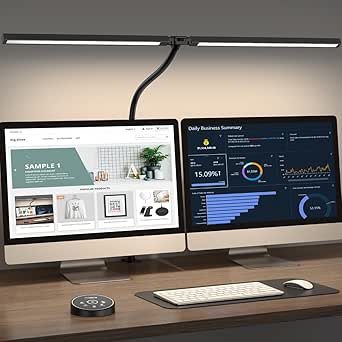 | Best for Dual-Monitor Workstations | Power: 24W | Color Modes: 5 | Color Temperatures: 3000K-5500K | VIEW LATEST PRICE | See Our Full Breakdown |
| White Crown LED Desk Lamp | 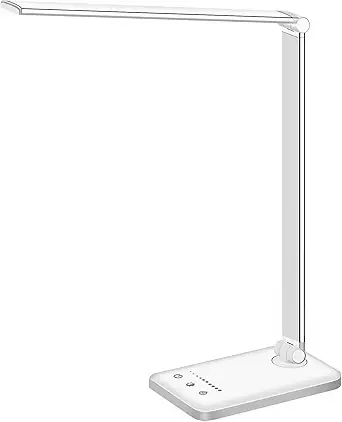 | Best Value Pick | Lighting Modes: 5 | Brightness Levels: 5 | LED Lifespan: 50,000 hours | VIEW LATEST PRICE | See Our Full Breakdown |
| Honeywell HWT-H2 LED Desk Lamp |  | Best Premium Light Quality | CRI: 94 | Color Modes: 4 (2700K to 5700K) | Dimming: Stepless 10%-100% | VIEW LATEST PRICE | See Our Full Breakdown |
| LEPOWER Desk Lamp, 800LM Eye-Caring Reading Light |  | Best Budget Gooseneck | Brightness: 800 LM | Color Temperatures: 5 options | Brightness Levels: 10 levels | VIEW LATEST PRICE | See Our Full Breakdown |
| Pzloz LED Desk Lamp for Home Office – Eye-Caring Architect Lamp with Clamp, Double Head, 24W |  | Best for Multi-Monitor Setups | Power: 24W | Lamp Heads: 4 | Color Temperatures: 3000K–5500K | VIEW LATEST PRICE | See Our Full Breakdown |
| Motumen LED Desk Lamp for Home Office, Eye-Care Clamp Light |  | Best Value Clamp Lamp | Brightness Modes: 5 | Color Temperatures: 3000K–6500K | Dimmable Brightness: 20%–100% | VIEW LATEST PRICE | See Our Full Breakdown |
| Micomlan LED Desk Lamp with Clamp, Auto Dimming, 24W, Adjustable Architect Light | 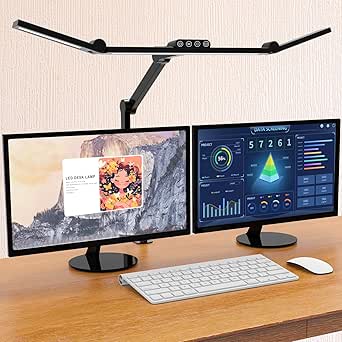 | Best Smart Features | Power: 24W | Dimming: Stepless, 20%–100% | Color Temperature: Stepless, 3000K–6500K | VIEW LATEST PRICE | See Our Full Breakdown |
| Desk Lamp with Wireless Charger, USB Port, Dimmable Office Light, Clock, Alarm, Temperature, Foldable |  | Best All-in-One Desk Hub | Lighting Modes: 3 color modes, 5 brightness levels | Wireless Charging: 10W | Charging Ports: USB port | VIEW LATEST PRICE | See Our Full Breakdown |
| LEPOWER Desk Lamp, 800LM LED for Home Office, Eye-Caring |  | Best for Eye Comfort | Brightness: 800 lumens | Power: 12W | Lighting Area: Up to 50 inches | VIEW LATEST PRICE | See Our Full Breakdown |
| Honeywell LED Desk Lamp for Home Office Eye-Caring Dimmable Reading Light |  | Best for Full-Spectrum Color Accuracy | Color Modes: 2700K, 4000K, 5000K, 5700K | Dimming: Stepless touch dimming | USB Ports: USB-A and USB-C | VIEW LATEST PRICE | See Our Full Breakdown |
| LitONES Tall LED Desk Lamp with 50 Light Modes, Eye-Care, Adjustable Height, and Smart Memory |  | Best for Dual-Monitor and Standing Desk Setups | Power: 15W | Light Modes: 50 | Color Temperatures: 2700K–6500K | VIEW LATEST PRICE | See Our Full Breakdown |
| Motumen LED Desk Lamp for Home Office, Eye-Care Desk Light Clamp, Black | 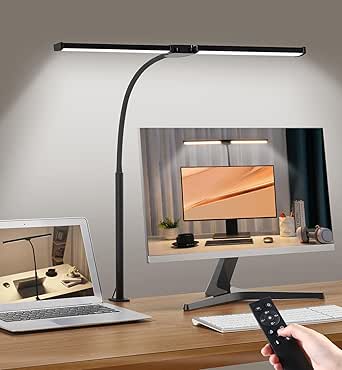 | Best Hands-Free Control Pick | Color Temperature: 3000K–6500K | Brightness Levels: 20%–100% | Remote Range: 32.8 ft | VIEW LATEST PRICE | See Our Full Breakdown |
| LED Desk Lamp with Adjustable Swing Arm and Dimmable Eye Care Lighting |  | Best Precision Positioning | Adjustable Joints: 4 rotatable joints | Color Temperatures: 3000K–6500K | Brightness Levels: 5 levels (20%–100%) | VIEW LATEST PRICE | See Our Full Breakdown |
| Lepro LED Desk Lamp for Home Office, 9.5W 750LM Touch Desk Light, Black |  | Best Budget Minimalist Pick | Power: 9.5W | Brightness: 750 lumens | Lighting Modes: 5 | VIEW LATEST PRICE | See Our Full Breakdown |
| smart home study lighting | Brightness Levels | Power |
|---|---|---|
| Hifree Smart Table Lamp | — | — |
| Pzloz LED Desk Lamp with Clamp | 5 | 24W |
| White Crown LED Desk Lamp | 5 | — |
| Honeywell HWT-H2 LED Desk Lamp | — | — |
| LEPOWER Desk Lamp | 10 levels | 12W |
| Pzloz LED Desk Lamp for Home O | 5 | 24W |
| Motumen LED Desk Lamp for Home | — | — |
| Micomlan LED Desk Lamp with Cl | — | 24W |
| Desk Lamp with Wireless Charge | — | — |
| LEPOWER Desk Lamp | 10 | 12W |
| Honeywell LED Desk Lamp for Ho | — | Plug-in, not rechargeable |
| LitONES Tall LED Desk Lamp wit | 10 | 15W |
| Motumen LED Desk Lamp for Home | 20%–100% | — |
| LED Desk Lamp with Adjustable | 5 levels (20%–100%) | — |
| Lepro LED Desk Lamp for Home O | 5 | 9.5W |
More Details on Our Top Picks
Hifree Smart Table Lamp
Most lamps in this roundup are dim, warm, and workmanlike — the Hifree is the only one that treats lighting as part of a smart home ecosystem. Alexa and Google Assistant control works reliably, and the eight built-in scene modes can be triggered by voice, app, or touch depending on how connected you want to be. Compared with the White Crown lamp, which offers no wireless control at all, this model makes a study corner scriptable: schedule a focus scene at 9 a.m., a warmer wind-down at night.
The tradeoff is focus. This is an RGB mood lamp first, not a task light — brightness output and color accuracy details are thin, so serious late-night study sessions may leave you wanting more punch. The app is genuinely required for customization, which adds setup friction the touch-only lamps here avoid.
Pros:- Genuine Alexa and Google Assistant voice control
- 8 customizable scene modes with scheduling and timers
- Flicker-free, eye-protective LED rated for 10,000+ hours
- Three control options: app, voice, or touch
Cons:- Full customization locked behind the smartphone app
- No published lumen output or detailed brightness specs
- Setup and app navigation can confuse less tech-savvy buyers
Best for: Smart home enthusiasts who want their study lighting tied into Alexa or Google routines and enjoy ambient color scenes
Not ideal for: Students who need bright, even task lighting for long reading sessions — this prioritizes atmosphere over output
- Control Modes:App, Voice, Touch
- Color Options:RGB, Color Changing
- Lighting Type:LED
- Scene Modes:8 built-in, customizable
- Compatibility:Alexa, Google Assistant
- Lifespan:Over 10,000 hours
- Material:ABS and PC
Our verdict“Buy this if your study lighting needs to live inside your smart home setup; skip it if you just need a bright, dependable task lamp.”
Pzloz LED Desk Lamp with Clamp, Dual Screen Compatibility
The clamp-mounted architect design is what separates this Pzloz from every freestanding lamp in this lineup — it frees up the entire desk surface while throwing light across a dual-monitor workspace. At 24W with a 3000K–5500K range across 25 mode combinations, it covers the full working color spectrum, from warm evening reading to cool, focused daylight. The White Crown and Honeywell lamps simply can’t reach this kind of coverage area from a small base.
Flexibility is the headline: 360° stand rotation, 180° foldable arms, and a 270° rotatable head mean you can position light exactly where screens create glare. The compromise is mechanical complexity — getting the geometry right takes patience, and if the remote fails, you lose convenient control since there’s no app fallback like the Hifree offers.
Pros:- Clamp mount keeps the entire desk surface clear
- 25 mode combinations across a 3000K-5500K range
- Extremely flexible 360°/180°/270° positioning to fight screen glare
- 24W output covers wide, multi-monitor workspaces
Cons:- Initial positioning and adjustment takes real setup time
- Remote control is a single point of failure with no app backup
- No smart home or voice integration
Best for: Remote workers and students with dual monitors or a large desk who need wide, adjustable, eye-safe coverage without sacrificing surface space
Not ideal for: Small desks or renters who can’t clamp to a surface — and anyone who wants app or voice control
- Power:24W
- Color Modes:5
- Color Temperatures:3000K-5500K
- Brightness Levels:5
- Adjustments:360° stand, 180° foldable arms, 270° rotatable head
- Mounting:Clamp
- Control:Remote
Our verdict“This pick makes the most sense for dual-screen setups where desk space and glare control matter more than smart features.”
White Crown LED Desk Lamp
The White Crown lands on this list because it covers the essentials without charging for extras. Five lighting modes, five brightness levels, a 30/60-minute auto-off timer, and a USB charging port — for study sessions, that’s the working checklist. The 50,000-hour LED lifespan and aluminum build also outclass the plasticky Hifree in durability, even if it lacks that lamp’s color tricks.
Where it cuts corners is power and versatility. There’s no battery, no color RGB mode, and the USB-only power supply means you’re tethered to an outlet — the LEPOWER gooseneck and the Honeywell both offer more physical flexibility for similar money. The touch controls with memory function are the quiet win here: your preferred setting is waiting when you sit down, something pricier lamps in this roundup forget to include.
Pros:- 5 modes x 5 brightness levels with touch memory function
- Built-in USB charging port for phones
- 50,000-hour LED lifespan in a durable aluminum body
- 30/60-minute auto-off timer for study discipline
Cons:- USB-powered only — no battery, always tethered to an outlet
- No RGB or color temperature range published
- Lacks any smart home or voice control
Best for: Budget-conscious students who want reliable dimmable study lighting with a timer and phone-charging port for under the price of smart models
Not ideal for: Buyers who want smart home control or ambient color scenes — this is strictly a straightforward white-light task lamp
- Lighting Modes:5
- Brightness Levels:5
- LED Lifespan:50,000 hours
- USB Port:5V/1A
- Power Supply:5V/2A adapter
- Timer:30/60 minutes
- Material:Aluminum alloy
Our verdict“The best balance of price and practical features for students who need dependable task lighting, not a gadget.”
Honeywell HWT-H2 LED Desk Lamp
If light quality itself is the priority — not features, not smarts — this is the pick. A CRI of 94 means colors and text render nearly as accurately as under natural daylight, which matters for long study stints, design work, and reading fine print. That’s a spec the Hifree and White Crown don’t even publish, and it’s where the premium price actually goes. The stepless 10–100% dimming also beats the stepped brightness levels on the White Crown, letting you dial in exactly the right output.
Four color modes from 2700K to 5700K cover the useful range, and both USB-A and USB-C charging ports are included — a more future-proof setup than the White Crown’s USB-A only. The compromises are familiar: it’s plug-in only, the 11-inch head suits a single desk rather than the wide coverage the clamped Pzloz achieves, and there’s no voice or app control whatsoever.
Pros:- CRI 94 full-spectrum light for near-natural color accuracy
- Stepless 10%-100% dimming instead of fixed steps
- Both USB-A and USB-C charging ports built in
- Foldable design with 4 color modes from 2700K to 5700K
Cons:- Plug-in only, no battery or portable use
- Light coverage limited to a desk-sized area
- No smart home, voice, or app control
Best for: Readers, designers, and long-session students who prioritize accurate, flicker-free full-spectrum light over smart features
Not ideal for: Smart home tinkerers and dual-monitor users — there’s no wireless control, and coverage is limited to a single-desk footprint
- CRI:94
- Color Modes:4 (2700K to 5700K)
- Dimming:Stepless 10%-100%
- Lamp Head Size:11 inches
- Charging Ports:USB-A and USB-C
- Timer:30-minute auto-off
- Power Source:Plug-in
Our verdict“Worth the premium if eye comfort and light fidelity for marathon study sessions are your top criteria.”
LEPOWER Desk Lamp, 800LM Eye-Caring Reading Light
What the LEOWER does that the White Crown and Honeywell don’t is physical positioning: a 360° gooseneck that points light exactly where your book or keyboard is, with 800 lumens spread across a 50-inch lighting area. Ten brightness levels and five color temperatures give it more granular adjustment than the White Crown’s five steps, and the RG0-certified LED rating means minimal blue-light hazard — a genuinely reassuring spec for parents setting up a student’s desk.
The smart memory function means settings survive power cycles, matching the White Crown’s best convenience feature. But this is a deliberately dumb lamp in the connected sense: no app, no voice, no timer, no USB charging. Compared with the Hifree, it sits at the opposite end of the spectrum — pure manual simplicity over ecosystem integration. If your study routine changes location and angle constantly, though, that gooseneck earns its keep.
Pros:- 360° gooseneck aims light exactly where needed
- 10 brightness levels and 5 color temperatures for fine tuning
- RG0 certified LEDs minimize blue-light hazard
- Smart memory function retains last-used settings
Cons:- No smart features, timer, or USB charging at all
- LED-only design with no replaceable parts
- Gooseneck styling won’t suit formal office aesthetics
Best for: Students, crafters, and readers who frequently reposition their light and want precise manual control at a low price
Not ideal for: Anyone building a connected study setup — there’s no app, voice control, timer, or charging port here
- Brightness:800 LM
- Color Temperatures:5 options
- Brightness Levels:10 levels
- Power:12W
- Lighting Area:50 inches
- Lamp Beads:RG0 certified LED
- Adjustability:360° gooseneck
Our verdict“The affordable pick if adjustable aim matters more to you than smart connectivity — just don’t expect a single connected feature.”
Pzloz LED Desk Lamp for Home Office – Eye-Caring Architect Lamp with Clamp, Double Head, 24W
With four independently adjustable heads, this Pzloz model covers more desk real estate than almost anything else in this roundup, which is exactly why it earns its spot. Where the Motumen dual-head clamp light illuminates a standard workspace, this one spreads light across dual monitors and scattered paperwork without hotspots. The 3000K–5500K range and remote with memory and timer let you dial in a study setting once and forget it. The tradeoff is complexity: four heads and 270° swing arms mean you’ll spend real time dialing in angles, and at 24W it draws more power than simpler picks like the LEOWER-style basic lamps. This option makes the most sense for wide desks where a single-head lamp simply leaves corners dark.
Pros:- Four adjustable heads cover wide desks and multi-monitor setups evenly
- Flicker-free, eye-friendly light suitable for long study sessions
- Remote control with memory and timer functions saves repetitive setup
- Wide 3000K–5500K color temperature range for different tasks
Cons:- Adjusting four heads and swing arms takes noticeably more effort than single-head lamps
- 24W power consumption is higher than simpler 10–12W alternatives
Best for: Students and remote workers with dual monitors or extra-wide desks who need even light across the whole surface
Not ideal for: Anyone with a small desk or single screen — four heads is overkill and the adjustment complexity isn’t worth it
- Power:24W
- Lamp Heads:4
- Color Temperatures:3000K–5500K
- Brightness Levels:5
- Controls:Remote with memory and timer
- Adjustability:360° standing, 270° swing arms
- Mounting:Desk clamp
Our verdict“Buy this if your workspace is wide enough to justify four heads; skip it if a single lamp would cover your desk anyway.”
Motumen LED Desk Lamp for Home Office, Eye-Care Clamp Light
This Motumen clamp lamp delivers the dual-head coverage of pricier architect lamps at a friendlier price, making it the value anchor of this batch. Its 3000K–6500K range actually stretches wider than the Pzloz four-head model, and the 168 lamp beads produce soft, even light across a study desk. The 32.8 ft remote range sounds generous on paper, but it requires line of sight — point the lamp heads away and you’re walking over to adjust manually. Compared with the Micomlan auto-dimming lamp, you give up the smart sensor and stepless dimming, settling for 5 fixed modes and 20%–100% presets instead. Still, for a student who wants broad, comfortable light without paying for sensors, this pick makes the most sense.
Pros:- Dual-head design spreads light across a full desk for less than architect-style competitors
- Wide 3000K–6500K color temperature range suits both daytime focus and evening wind-down
- Remote control with timer works from across the room
- Clamp mount frees up desk space and installs quickly
Cons:- Remote requires line of sight to the lamp
- Fixed 5-mode steps rather than stepless dimming found on the Micomlan
Best for: Budget-conscious students who want wide dual-head desk coverage without paying premium prices
Not ideal for: Buyers who want app control, voice control, or automatic dimming — none of that is here
- Brightness Modes:5
- Color Temperatures:3000K–6500K
- Dimmable Brightness:20%–100%
- Remote Control Range:32.8 ft / 10 m
- Lamp Beads:168
- Design:Dual-head with flexible gooseneck and clamp
Our verdict“A sensible mid-range choice for students who want coverage and comfort over smart features.”
Micomlan LED Desk Lamp with Clamp, Auto Dimming, 24W, Adjustable Architect Light
The Micomlan is the closest thing to a genuinely smart study lamp in this batch, and its built-in light sensor that auto-adjusts brightness is what separates it from the Pzloz and Motumen clamp lamps, which rely entirely on manual input. Its asymmetric optics reduce screen glare — a real benefit if your study sessions involve a laptop — and the CRI above 90 renders colors more faithfully than most budget picks here. With 7 adjustable joints, positioning is more granular than the Motumen’s gooseneck, though that same flexibility means a steeper learning curve before the lamp feels intuitive. Stepless dimming from 20%–100% also outclasses the fixed modes on cheaper options. The compromise is price and fuss: you pay more, and you’ll fiddle before it feels right.
Pros:- Auto-dimming light sensor keeps brightness comfortable as room light changes
- Asymmetric lighting design cuts glare on monitors and screens
- CRI above 90 delivers accurate, natural color rendering
- Stepless dimming and color temperature control with 7 adjustable joints
Cons:- Seven joints and multiple modes take time to learn compared with simpler lamps
- Requires a stable desk edge for secure clamping
Best for: Tech-leaning students and home-office workers who want automatic brightness and glare-free laptop lighting
Not ideal for: Buyers who want a plug-in-and-go lamp — seven joints and auto-dimming settings add setup friction
- Power:24W
- Dimming:Stepless, 20%–100%
- Color Temperature:Stepless, 3000K–6500K
- CRI:>90
- Adjustable Joints:7
- Sensor:Built-in light sensor for auto brightness
- Mounting:Desk clamp
Our verdict“The pick for buyers who want the lamp to adapt to them — as long as they’re patient with setup.”
Desk Lamp with Wireless Charger, USB Port, Dimmable Office Light, Clock, Alarm, Temperature, Foldable
This lamp thinks beyond lighting: the 10W wireless charging pad, USB port, clock, alarm, calendar, and temperature display make it a compact bedside-and-desk hybrid rather than a pure study light. Compared with the LEPOWER 800LM lamp, which focuses entirely on light quality and reach, this one trades lighting depth for convenience — its 3 color modes and 5 brightness levels are more limited, and the frosted shade prioritizes evenness over raw output. The foldable design makes it the only genuinely portable option in this batch, easy to move between dorm desk and nightstand. The catch is the touch-only control panel: no physical buttons means fumbling in the dark until muscle memory kicks in. This model is better suited to students in small spaces who want one device doing three jobs.
Pros:- Built-in 10W wireless charger and USB port reduce cable clutter
- Digital display with clock, alarm, calendar, and temperature doubles as a desk clock
- Foldable design makes it easy to transport and store
- Frosted shade produces even, flicker-free light for short sessions
Cons:- Touch-only controls with no physical buttons can be frustrating, especially at night
- Only 3 color modes and 5 brightness levels versus 10-level lamps elsewhere in this roundup
Best for: Dorm students and small-space dwellers who want lighting, phone charging, and a clock in one device
Not ideal for: Serious readers wanting fine-grained brightness control or wide desk coverage — the modes are too limited
- Lighting Modes:3 color modes, 5 brightness levels
- Wireless Charging:10W
- Charging Ports:USB port
- Display:Clock, alarm, calendar, temperature
- Controls:Touch panel, no physical buttons
- Design:Foldable, frosted shade
Our verdict“Choose this if desk space is scarce and you value the charging and clock extras; pass if light quality is your only priority.”
LEPOWER Desk Lamp, 800LM LED for Home Office, Eye-Caring
If eye strain is your primary complaint after long study sessions, the LEOWER’s RG0 certification — the highest rating for blue light hazard protection — puts it ahead of every other lamp in this batch on paper. Add an 800-lumen output covering up to 50 inches of desk and a 360° metal gooseneck, and you get simple, wide, gentle light without the complexity of the Micomlan’s seven joints or the Pzloz’s four heads. Its 10 brightness levels and 5 color temperatures offer finer control than the foldable all-in-one lamp’s 3-and-5 setup. What you give up is everything beyond lighting: no wireless charging, no remote, no smart sensor. At 12W it’s also less powerful than the 24W architect models, so very deep evening study at max brightness may feel dimmer by comparison. This pick makes the most sense for readers, not gadget collectors.
Pros:- RG0 certification means the lowest-risk blue light classification available
- 800 lumens spreads across up to 50 inches of desk for wide, even coverage
- 10 brightness levels and 5 color temperatures offer fine manual control
- 360° metal gooseneck holds its position reliably over years of adjustments
Cons:- No extras like USB charging, remote control, or app connectivity
- 12W output is half the power of 24W architect lamps, so maximum brightness is lower
Best for: Avid readers and long-session studiers whose main concern is reducing eye fatigue and blue light exposure
Not ideal for: Gadget hunters who want smart features, charging, or remote control — this lamp deliberately does none of that
- Brightness:800 lumens
- Power:12W
- Lighting Area:Up to 50 inches
- Color Temperatures:5 options
- Brightness Levels:10
- Gooseneck:360° adjustable metal
- Eye Safety:RG0 certified, blue light hazard free
Our verdict“The straightforward pick for anyone who cares most about eye comfort and nothing else.”
Honeywell LED Desk Lamp for Home Office Eye-Caring Dimmable Reading Light
Where most lamps in this roundup treat color rendering as an afterthought, this Honeywell leans on a CRI of 94 or higher and full-spectrum output, which means printed pages and color-coded notes look the way they actually should under daylight. The four preset color temperatures (2700K to 5700K) cover late-night reading through focused study sessions, and stepless touch dimming gives finer control than the fixed five-level steps on the Lepro 9.5W model. The built-in USB-A and USB-C ports are a genuine convenience the Lepro lacks, keeping a phone charger off your power strip. The tradeoff is strictly tethered operation: unlike rechargeable options, it needs an outlet at all times, and the 30-minute timer is shorter than the one-hour timer on the Motumen clamp lamp.
Pros:- CRI of 94+ for true-to-life color rendering
- Four preset color temperatures plus stepless touch dimming
- USB-A and USB-C ports built into the base
- Flicker-free LEDs rated for 30,000 hours
Cons:- Plug-in only — no battery or rechargeable option
- No smart home, app, or voice control
Best for: Students and readers who need accurate color rendering for textbooks, art reference, or detailed paperwork
Not ideal for: Anyone wanting app or voice control — there is no smart home integration, unlike the Hifree Smart Table Lamp
- Color Modes:2700K, 4000K, 5000K, 5700K
- Dimming:Stepless touch dimming
- USB Ports:USB-A and USB-C
- LED Lifespan:30,000 hours
- Power:Plug-in, not rechargeable
- Timer:30-minute timer
- CRI:≥94
Our verdict“This pick makes the most sense for study sessions where color accuracy and flicker-free comfort matter more than smart features.”
LitONES Tall LED Desk Lamp with 50 Light Modes, Eye-Care, Adjustable Height, and Smart Memory
The LitONES solves a problem most desk lamps ignore: standard lamps sit too low to light a dual-monitor or standing-desk workspace evenly. Extending from 14 to 40 inches on a metal base, it throws a wide, glare-free wash that a compact lamp like the Honeywell LED Desk Lamp simply cannot match. Its CRI of 97.8 edges out even the Honeywell’s 94, and the 2700K–6500K range with 50 mode combinations is the broadest in this batch. Compared with the Motumen clamp light, you avoid clamp compatibility headaches entirely — but you pay more, and the mode count can feel excessive if you just want a warm and a cool setting. Full extension also demands real desk real estate.
Pros:- Height range of 14 to 40 inches suits standing desks and dual monitors
- CRI of 97.8 for excellent color fidelity
- 50 customizable modes across a 2700K–6500K range
- Smart memory and 45-minute auto-off timer
Cons:- Pricier than basic desk lamps in this lineup
- Requires significant space at full 40-inch extension
- Feature set may overwhelm users who want simple controls
Best for: Remote workers and streamers with dual monitors or sit-stand desks who need broad, even coverage
Not ideal for: Small-desk users or minimalists who find 50 modes overkill and the footprint too large at full extension
- Power:15W
- Light Modes:50
- Color Temperatures:2700K–6500K
- Brightness Levels:10
- CRI:97.8
- Adjustable Height:14 to 40 inches
- Base Material:Metal
- Timer:45 minutes
Our verdict“If your workspace outgrew a single monitor, this tall lamp is the one option here built to scale with it.”
Motumen LED Desk Lamp for Home Office, Eye-Care Desk Light Clamp, Black
The standout feature here is the remote control with a 32.8-foot range — you can adjust brightness or set the one-hour timer from across the room without leaving your chair, something no touch-controlled lamp in this roundup offers. The dual-head design with a flexible gooseneck lets you angle light at two work zones at once, where the single-head LitONES spreads light but cannot target two spots independently. With 168 LED beads and a 3000K–6500K range, coverage is generous for a clamp lamp. The catch: the remote is essentially required for full functionality, so losing it means losing convenience, and the clamp will not fit every desk edge — thick countertops and some standing desks are out.
Pros:- Remote control works up to 32.8 feet away
- Dual gooseneck heads aim light at two separate areas
- 168 LED beads deliver broad, even coverage
- One-hour timer for study sessions
Cons:- Remote is required for full functionality and easy to misplace
- Clamp compatibility limits which desks it fits
Best for: Students and multitaskers who want to adjust lighting from bed or across the room without touching the lamp
Not ideal for: Owners of thick-topped or irregular desks where the clamp will not seat securely
- Color Temperature:3000K–6500K
- Brightness Levels:20%–100%
- Remote Range:32.8 ft
- Timer:1 hour
- Number of LED Beads:168
- Mounting:Desk clamp
Our verdict“Choose this if remote adjustability and two-zone lighting outweigh the clamp’s desk-fit restrictions.”
LED Desk Lamp with Adjustable Swing Arm and Dimmable Eye Care Lighting
Four rotatable joints set this lamp apart from everything else here. Where the Motumen clamp light relies on a gooseneck and the Lepro offers basic angle adjustment, this swing-arm design positions light with architect-lamp precision — useful when you need to dodge monitor glare or illuminate a specific corner of a drafting surface. The all-aluminum build with an anti-slip base feels more durable than plastic-bodied rivals, and the CRI of 95 sits between the Honeywell’s 94 and the LitONES’ 97.8. Be aware that none of that precision comes with smart home integration: no app, no voice control, unlike the Hifree Smart Table Lamp. The feature set also pushes the price above simpler alternatives.
Pros:- Four rotatable joints for highly precise light placement
- All-aluminum construction with a stable anti-slip base
- CRI of 95 for accurate color rendering
- Timer and memory functions for repeatable settings
Cons:- No smart home, app, or voice compatibility
- Higher price than simpler desk lamps
- Desk-bound design with no portability
Best for: Detail-oriented workers — drafters, crafters, note-takers — who need light aimed at an exact spot
Not ideal for: Smart home enthusiasts who want app or voice control integrated with their setup
- Adjustable Joints:4 rotatable joints
- Color Temperatures:3000K–6500K
- Brightness Levels:5 levels (20%–100%)
- Material:All-aluminum
- Base:Anti-slip
- Timer:30-minute auto shut-off
- CRI:95
Our verdict“This model is better suited to buyers who value mechanical precision and build quality over connected features.”
Lepro LED Desk Lamp for Home Office, 9.5W 750LM Touch Desk Light, Black
Sometimes a study lamp just needs to turn on, feel comfortable, and stay out of the way — and that is exactly the Lepro’s appeal. At 9.5W it is the lowest-power lamp in this batch, yet 750 lumens is plenty for a single desk, and the diffused non-flickering panel handles eye comfort without the complexity of the LitONES’ 50 modes. Compared with the Honeywell LED Desk Lamp, you lose the USB charging ports and finer stepless dimming; compared with the swing-arm lamp, you lose articulation. What you get in exchange is a low price, a sleek footprint, and controls a houseguest could figure out in five seconds. There is no smart control of any kind, and the black-only finish limits matching with lighter décor.
Pros:- Affordable with no confusing extra features
- Diffused, non-flickering light reduces eye strain
- Sleek, space-saving design fits crowded desks
- Fully adjustable head for focused task lighting
Cons:- No smart features, app, or voice control
- Limited color and finish options
- Five fixed brightness levels instead of stepless dimming
Best for: Students and first-time buyers who want reliable eye-care lighting at the lowest possible complexity and price
Not ideal for: Smart home tinkerers or anyone who wants USB charging and app control built in
- Power:9.5W
- Brightness:750 lumens
- Lighting Modes:5
- Brightness Levels:5
- Light Quality:Diffused, non-flickering
- Color:Black
Our verdict“A sensible, no-frills choice for anyone who wants comfortable study light without paying for features they will never touch.”
How We Picked
I evaluated each lamp through the specific lens of study and home-office work: sustained reading comfort, brightness and coverage across a desk, glare control for screen use, and how genuinely ‘smart’ the controls are. Lamps with even light distribution, flicker-free output, multiple color temperature modes, and memory functions scored highest for eye care. I also weighed physical design heavily—clamp-mounted architect lamps that free up desk space and reach over dual monitors ranked above compact table lamps for serious study setups, while bedside-style lamps scored on ambiance and convenience instead.
Smart functionality was judged honestly rather than by marketing labels: genuine app/voice integration, auto-dimming sensors, and remote controls earned real credit, while lamps with only basic touch dimming were ranked as conventional options regardless of packaging. Finally, I factored in value—extras like USB charging, wireless charging, clocks, and alarms only boosted a ranking when the core lighting quality was already strong. The ordering reflects this hierarchy: light quality and eye comfort first, smart integration second, convenience features third, and price-to-performance as the tiebreaker throughout.
Factors to Consider When Choosing Smart Home Study Lighting
Before choosing a smart study lamp, it helps to understand what actually separates a good study light from a mediocre one—and where the common buying mistakes happen. These are the factors that shaped my rankings and should shape your decision too.Brightness and Light Distribution Over Raw Wattage
The most common mistake buyers make is chasing wattage numbers instead of light distribution. A 24W clamp lamp that spreads light evenly across a full desk will feel more comfortable and reduce eye strain more than a brighter lamp that concentrates light in a hot spot. Look for wide heads, dual-source designs like the Pzloz double-head model, or architect arms that let you position light where work actually happens. Coverage matters most if you read physical books or paperwork alongside a screen, because your eyes constantly readjust between lit and shadowed zones—each readjustment is small strain that compounds over a multi-hour study session. For single-monitor setups, 800–1000 lumens is usually plenty; for wide desks, prioritize the shape of the light pool over the lumen count.
Color Temperature Modes and Eye Care Claims
Nearly every lamp in this category advertises ‘eye-caring,’ but the claims vary enormously in substance. What actually protects eyes is flicker-free output, even diffusion, and multiple color temperature presets—cooler light (5000–6500K) for focused daytime study, warmer light (2700–4000K) for evening reading that won’t disrupt sleep. Full-spectrum lamps like the Honeywell HWT-H2 take a different approach, mimicking natural daylight for better color rendering, which matters if you do design work or read color-coded materials. Auto-dimming sensors, as on the Micomlan, are the most underrated eye-care feature: they adjust brightness to your ambient light automatically, so you stop straining when the room darkens at dusk. Treat vague ‘eye-caring’ labels as marketing until you see specifics on flicker, diffusion, and color modes.
What ‘Smart’ Actually Means in This Category
Smart features in desk lamps fall into a spectrum, and knowing where you sit on it saves money. At the top is genuine smart home integration—app control, voice assistant compatibility, and scheduling, which in this lineup really only the Hifree offers alongside RGB scenes. In the middle sit auto-dimming, remote controls, and memory functions that recall your last brightness setting, all of which add daily convenience without requiring a hub or Wi-Fi. At the bottom are simple touch panels and stepless dimming, which are pleasant but not smart. Paying a premium for app control only makes sense if you already use Alexa or Google Home routines; otherwise, a memory function delivers most of the daily benefit at a lower price and with fewer points of failure.
Clamp vs. Base: Desk Space and Setup Tradeoffs
Clamp-mounted architect lamps have become the default for home offices for a practical reason: they reclaim your entire desk surface and position light directly over your work. The tradeoff is that clamps require a desk edge of suitable thickness, won’t work on some glass or thick bullnose desktops, and take a few minutes to position well. They also visually dominate a small room. Base-style lamps like the LEPOWER and Lepro models are plug-and-play, easy to move between rooms, and better suited to nightstands, shared desks, or renters who reconfigure often. If you work with dual monitors, a swing-arm or dual-head clamp lamp is almost always the right call; if your study spot doubles as a bedside table, a base lamp with a clock and wireless charger serves you better.
Convenience Extras: When They Help and When They’re Distractions
USB charging ports, wireless charging pads, clocks, alarms, and temperature displays are now common add-ons, and they’re worth evaluating honestly. A USB port is genuinely useful because it keeps your phone charging within reach without occupying a wall outlet. Wireless charging is excellent if your phone supports it and your lamp placement suits a phone drop spot—but it adds cost and can fail as a feature if the coil placement is finicky. Clocks and alarms sound useful but become distractions in a focused study environment; the glowing display can pull attention during deep work and add light pollution at night. My advice: pay for extras only when they match an existing habit, not an imagined one.
Dimming Granularity and Memory Functions
How a lamp dims matters as much as how bright it gets. Stepless dimming lets you match brightness precisely to the time of day and your task, while three- or five-step presets force compromises—one step is always slightly too dim or too bright for someone. Memory functions are the quiet differentiator: a lamp that recalls your last brightness and color setting when you turn it on removes a small daily friction that adds up over a semester of late-night study sessions. Several budget lamps in this roundup skip memory entirely, which means reconfiguring the light every single time. If you study at consistent hours in a room with changing daylight, prioritize stepless dimming plus memory over raw brightness—you’ll notice the difference far more than an extra 100 lumens.
Frequently Asked Questions
Do I really need app or voice control in a study lamp, or is it a gimmick?
For most study use, app and voice control are convenient but not necessary—you typically turn a desk lamp on when you sit down and adjust it once, so a touch panel handles 95% of the interaction. Where smart control genuinely earns its place is in routines and automation: scheduling a lamp to warm up its color temperature in the evening protects your sleep, and voice control helps if your hands are busy or you use the lamp in a smart home scene alongside other lights. If you already run Alexa or Google Home routines, the Hifree Smart Table Lamp integrates naturally. If not, you’ll get more lighting quality per dollar from a lamp with auto-dimming or a memory function, like the Micomlan, than from paying extra for an app you’ll open twice.
Is a clamp-mounted lamp better than a regular desk lamp for studying?
A clamp lamp is better for most dedicated study setups because it positions light directly over your work, frees your entire desk surface, and avoids the glare you get from a lamp base sitting beside a monitor. Architect-style arms also let you reposition light as you shift between screen, paper, and keyboard tasks. The catch is that clamps need a compatible desk edge—very thick tops, some glass desks, and certain standing desk frames can make mounting awkward or unstable. A traditional base lamp wins when your study spot is shared or temporary: it moves between rooms in seconds, works on any surface, and suits nightstand-style study corners. Choose based on whether your desk is a fixed workstation or a flexible space.
What brightness level do I need for reading and computer work?
For a single-monitor desk with occasional reading, 750–1000 lumens is a comfortable range—both LEPOWER 800LM models sit right in this sweet spot and have enough headroom for detailed paperwork. If you run dual monitors or a wide desk, look for 24W-class lamps like the Pzloz dual-head or Micomlan, not because you need more raw brightness, but because the larger head spreads light across a wider area without hot spots. Equally important is adjustability: a lamp that dims down to a low evening level is more versatile than a brighter one that only runs at full power. And remember that ambient light matters—your lamp should complement room lighting, not replace it entirely, because high contrast between a bright desk and a dark room causes more fatigue than dim light alone.
Are lamps with built-in wireless chargers and clocks worth the extra cost?
They’re worth it for a specific buyer: someone whose study spot doubles as a bedside table or a compact corner where every outlet and surface counts. In that scenario, one device replacing a lamp, a charger, and an alarm clock is a real space win, and waking up to study at a glanceable clock has genuine value. For a dedicated work desk, the calculus changes—clock displays become visual distractions during focused sessions, and a separate wireless charging pad costs little and sits anywhere you like. The bigger caution is that multifunction lamps often compromise on core lighting quality, with fewer color modes and less even output than dedicated work lamps at the same price. Prioritize light quality first, then decide whether the extras match habits you already have.
How much should color temperature flexibility influence my choice?
More than most buyers expect, especially if you study at different times of day. Cooler light around 5000–6500K supports alertness and focus for daytime study and fine detail work, while warmer light around 3000–4000K in the evening reduces the blue light exposure that interferes with sleep. A lamp with five color modes, like the Pzloz office models, covers this full range and adapts as your schedule shifts; single-temperature lamps force you into one compromise setting. Full-spectrum options like the Honeywell add better color rendering, which matters for art, design coursework, or anything where accurate colors matter. If you only ever study in the evening, a warm-dimmable lamp is fine—but if your hours vary, flexible color temperature is one of the highest-value features you can buy.
Conclusion
The right pick here depends less on price and more on how you actually study. For the best overall choice, the Micomlan LED Desk Lamp with Auto Dimming earns the top spot by combining 24W clamp-mount coverage with sensor-driven brightness adjustment—set it once and it adapts to your room all day. For best value, the Lepro LED Desk Lamp delivers dependable 750LM output and touch dimming at a budget price, with the LEPOWER 800LM models as strong runner-ups if you prefer a classic base design. On the premium end, the Pzloz Dual-Head Architect Lamp justifies its higher cost for dual-monitor workstations, matched by the Honeywell HWT-H2 if full-spectrum daylight quality is your priority. For beginners and casual users, the White Crown LED Desk Lamp with its dimming, USB charging, and timer keeps things simple without overspending. For specific needs: choose the Hifree Smart Table Lamp if genuine app and voice control with RGB ambiance is the goal, and the multifunction lamp with wireless charger and clock if your study corner doubles as a bedside setup. Whatever you choose, favor even light distribution and flexible dimming over headline features—that’s what separates lamps you’ll forget about because they just work from ones you’ll replace within a year.
Fall yard work Picks
leaf blowers
As an affiliate, we earn on qualifying purchases.