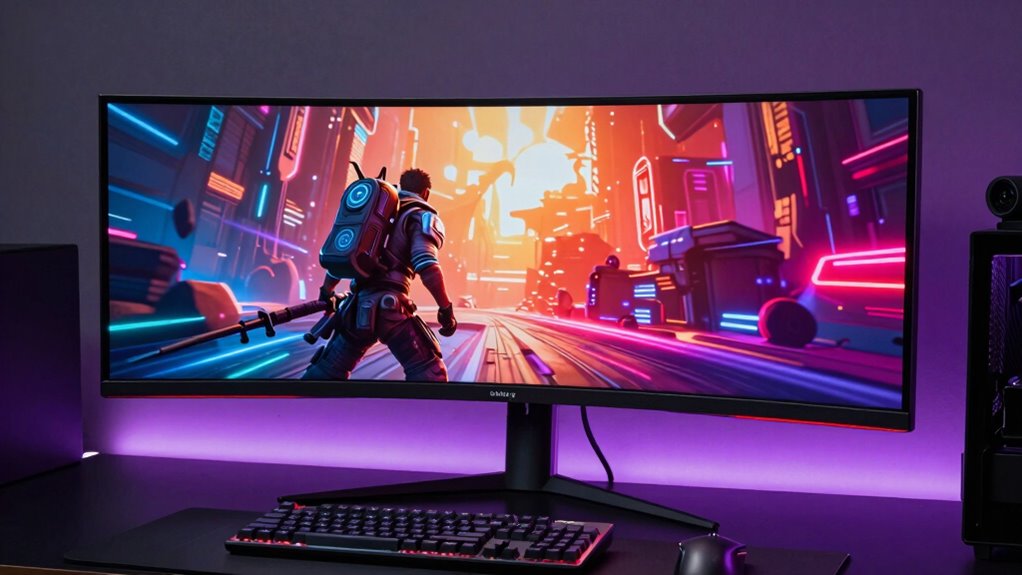

Searching for a 34 inch ultrawide gaming monitor? The best models blend expansive screens with fast refresh rates and vibrant visuals, but they differ significantly in features like resolution, response times, and connectivity. The LG 34G630A-B stands out as the overall top pick thanks to its high refresh rate and excellent color accuracy, while the SANSUI 34-Inch Curved UWQHD offers a compelling value with solid performance at a lower price. For those seeking premium features, the Alienware AW3425DWM provides a fast 1ms response and a high-quality build. The main tradeoffs involve balancing price against performance, with some models excelling in gaming responsiveness and others prioritizing visual quality. Continue reading for the full breakdown of these top options and find the best fit for your gaming needs.
Complete the kit


Key Takeaways
- High refresh rates (165Hz to 240Hz) are common among top gaming monitors but vary in real-world responsiveness.
- Curved screens (1500R to 1000R) enhance immersion, yet some users prefer flatter panels for productivity or reduced distortion.
- Resolution differences (WQHD vs. Ultra-Wide 3440×1440) impact clarity and desktop space, influencing game and multitasking experience.
- Connectivity options like HDMI, DisplayPort, and USB-C vary, affecting compatibility with gaming PCs and consoles.
- Premium models often offer faster response times and HDR support, but at a higher price point.


| inch ultrawide gaming monitor | Resolution | Refresh Rate | Curvature | Response Time |
|---|---|---|---|---|
| SANSUI 34-Inch Curved Ultrawid | 3440 x 1440P UWQHD | 200Hz | 1500R | 1ms OD |
| CRUA 34-inch WQHD Ultrawide Cu | 3440×1440P | 165Hz | 1500R | — |
| LG 34G630A-B 34-Inch Ultragear | 3440 x 1440 (WQHD) | 240Hz | — | 1ms (GtG) |
| SANSUI 34 Inch Curved Gaming M | 3440×1440 UWQHD | 240Hz | — | 1ms MRPT |
| Dell 34 Monitor S3425DW | WQHD | 120Hz | — | — |
| Gawfolk 34-Inch Ultrawide Curv | 3440 x 1440 (UWQHD) | 165Hz | 1500R | — |
| Sceptre 34-inch Prime Gaming U | 3440 x 1440 | 180Hz | 1500R | — |
| Sceptre 34-Inch Curved Ultrawi | 3440 x 1440 | 165Hz | 1500R | 1ms |
| LG 34U60ZB-B 34-inch UltraWide | 3440×1440 | 120Hz | 1800R | — |
| KTC 34 Inch Ultrawide Curved G | 3440 x 1440 | 180Hz | 1500R | — |
| ASUS TUF Gaming VG34WQML5A 34- | 3440 x 1440 | 250Hz | 1500R | 0.5ms |
| Alienware 34 Curved Gaming Mon | WQHD | 180Hz | 1500R | 1ms |
| Sceptre 34-inch Curved Prime G | 3440 x 1440 | 240Hz | 1500R | 1ms |
| Samsung 34" ViewFinity S50GC S | Ultra-WQHD | 100Hz | — | 5ms |
| Samsung 34′ Odyssey G5 Ultra-W | WQHD | 165Hz | 1000R | 1ms |
More Details on Our Top Picks
SANSUI 34-Inch Curved Ultrawide Gaming Monitor UWQHD 3440 x 1440P 200Hz
This SANSUI monitor stands out for its high 200Hz refresh rate combined with a curved 1500R display, delivering exceptionally smooth visuals for fast-paced gaming. Its UWQHD resolution offers crisp, immersive images that rival the LG 34G630A-B’s 240Hz, but with slightly lower response time at 1ms. The AI-enhanced features like blue light reduction and crosshair add to its appeal, though it lacks built-in speakers and requires a VESA mount for full ergonomic customization. Compared to the CRUA model, it provides a higher refresh rate but with less tilt adjustment, making it better suited for gamers prioritizing performance over flexibility. This monitor is ideal for competitive players who want top-tier smoothness and immersive visuals but are comfortable with external audio solutions.
Pros:- Exceptional 200Hz refresh rate for ultra-smooth motion
- Curved 1500R screen enhances immersion
- AI features reduce eye strain during long gaming sessions
- Multiple high-quality inputs including HDMI 2.1 and DisplayPort
Cons:- No built-in speakers, requiring external audio setup
- Limited tilt adjustment range for ergonomic flexibility
- VESA mount needed for full height and tilt customization
Best for: Hardcore gamers seeking ultra-smooth gameplay and immersive visuals with AI enhancements
Not ideal for: Casual users or those needing built-in speakers or extensive ergonomic adjustments
- Size:34 inches
- Resolution:3440 x 1440P UWQHD
- Refresh Rate:200Hz
- Response Time:1ms OD
- Curvature:1500R
- Panel Type:FastVA
- Viewing Angle:178°
- Inputs:DP 1.4, HDMI2.1 x 2
Our verdict“This monitor suits competitive gamers who prioritize high refresh rates and immersive visuals over built-in audio and extensive stand adjustments.”
CRUA 34-inch WQHD Ultrawide Curved Gaming Monitor, 165Hz, FreeSync, Black
Compared with the SANSUI, the CRUA offers a slightly lower 165Hz refresh rate but remains an attractive option for budget-conscious gamers who want a curved ultrawide display. Its 3440×1440 resolution and 1500R curvature deliver immersive visuals, while the wide viewing angles and adjustable tilt (-15° to 15°) enhance comfort. However, its HDMI port supports only up to 100Hz, limiting the maximum refresh rate via that connection, and it lacks built-in speakers, requiring external audio. This model is better suited for casual or mid-tier gamers who value a balance of performance and affordability, but it may not satisfy those needing the highest refresh rates or a more extensive ergonomic stand.
Pros:- Good 3440×1440 resolution for immersive gameplay
- 165Hz refresh rate supports smooth motion
- Adjustable tilt for ergonomic comfort
- Wide viewing angles with 178°
Cons:- HDMI only supports up to 100Hz, limiting full 165Hz performance
- No built-in speakers, requiring external audio setup
- Curved design may not appeal to all users
Best for: Budget-conscious gamers seeking a curved ultrawide with good image quality and decent refresh rates
Not ideal for: Pro gamers or streamers who need full 165Hz support over HDMI and integrated audio
- Size:34 inches
- Resolution:3440×1440P
- Refresh Rate:165Hz
- Curvature:1500R
- Brightness:300 cd/m²
- Contrast Ratio:4000:1
- Color Gamut:120% sRGB
- Connectivity:2x HDMI, 2x DisplayPort, 3.5mm audio
Our verdict“This monitor works well for gamers wanting a curved, high-resolution display with solid performance at an accessible price point.”
LG 34G630A-B 34-Inch Ultragear WQHD Curved Gaming Monitor, 240Hz, 1ms, FreeSync Premium, HDR400, HDMI, DisplayPort, USB-C, Adjustable Stand
The LG 34G630A-B stands out for its impressive 240Hz refresh rate and 1ms response time, making it ideal for fast-paced competitive gaming. Its HDR400 support and 95% DCI-P3 color coverage ensure vibrant visuals that surpass the more basic options like the Dell S3425DW. Unlike the SANSUI, it offers extensive stand adjustments—height, tilt, and swivel—though its curved design may not appeal to all users. The inclusion of USB-C adds future-proof connectivity, but the higher price tag reflects its premium features. This model is better suited for enthusiasts who want both speed and rich visuals, but it may be less appealing to casual gamers or those with limited budgets.
Pros:- High 240Hz refresh rate for ultra-smooth gameplay
- Fast 1ms response time minimizes ghosting
- Vivid HDR400 support and wide color coverage
- USB-C port offers versatile connectivity
Cons:- Curved monitor may not suit all preferences
- Premium price point
- Limited stand adjustments compared to some competitors
Best for: Serious gamers and enthusiasts wanting high-speed performance with rich, accurate colors
Not ideal for: Casual users or those needing a budget-friendly, simple monitor with limited stand adjustments
- Size:34 inches
- Resolution:3440 x 1440 (WQHD)
- Refresh Rate:240Hz
- Response Time:1ms (GtG)
- HDR:DisplayHDR 400
- Color Gamut:95% DCI-P3
- Connectivity:HDMI, DisplayPort, USB Type-C
- Stand:Height, Tilt, Swivel
Our verdict“This monitor is a prime choice for gamers seeking top-tier speed, vibrant visuals, and flexible connectivity, even at a higher cost.”
SANSUI 34 Inch Curved Gaming Monitor 240Hz UWQHD 3440×1440
This SANSUI model closely resembles the earlier one but emphasizes a 240Hz refresh rate, making it highly appealing for competitive gaming. Its 3440×1440 resolution and 21:9 HDR400 display deliver sharp, immersive images, with AI-enhanced features like Crosshair and Blue Light for prolonged gaming comfort. Its multiple ports—including HDMI 2.1 and DisplayPort 1.4—offer excellent connectivity options, though it lacks built-in speakers. Compared with the LG 34G630A-B, it provides a higher refresh rate but shares similar limitations in stand adjustability. It’s best suited for gamers who prioritize speed and feature set over ergonomic flexibility and built-in audio.
Pros:- Exceptional 240Hz refresh rate for competitive play
- Ultra-wide 3440×1440 resolution for immersive experience
- Multiple ports including HDMI 2.1 and DisplayPort 1.4
- AI-enhanced features for sustained comfort
Cons:- No built-in speakers, external audio needed
- Limited stand adjustments
- Premium price for high-performance features
Best for: Competitive gamers wanting ultra-fast, feature-rich ultrawide performance
Not ideal for: Casual users or those requiring extensive ergonomic adjustments and integrated sound
- Size:34 inches
- Resolution:3440×1440 UWQHD
- Refresh Rate:240Hz
- Response Time:1ms MRPT
- HDR:HDR400
- Ports:HDMI 2.1×2, DP 1.4×2
- Viewing Angle:178°
- Panel Type:VA
Our verdict“This monitor excels for gamers prioritizing ultra-fast refresh rates and feature-rich gameplay at a premium, with minimal ergonomic flexibility.”
Dell 34 Monitor S3425DW, WQHD VA, 120Hz, FreeSync Premium, Eye Comfort
The Dell S3425DW offers a more modest 120Hz refresh rate and a VA panel that emphasizes color depth and contrast, making it a good fit for mixed use—both gaming and productivity. Compared to the higher-refresh LG 34G630A-B, this model sacrifices some speed but gains in contrast ratio and color accuracy, with 99% sRGB and 95% DCI-P3 coverage. Its Eye Comfort technology reduces blue light, supporting extended usage, though it lacks adjustable stand features, which may limit ergonomic comfort. This monitor is best for users who want a balanced display for work and casual gaming without the need for ultra-high refresh rates or extensive stand adjustments.
Pros:- Vivid, true-to-life colors with high sRGB and DCI-P3 coverage
- Blue light reduction technology enhances long-term comfort
- Good contrast ratio with VA panel for deep blacks
- Single USB-C connection simplifies setup
Cons:- Limited to 120Hz refresh rate, less ideal for high-speed gaming
- No adjustable stand or ergonomic features
- Built-in speakers’ quality not specified
Best for: Multimedia users and casual gamers seeking color accuracy and eye comfort
Not ideal for: Fast-paced competitive gamers or those needing high refresh rates for esports
- Display Size:34 inches
- Resolution:WQHD
- Refresh Rate:120Hz
- Panel Type:VA
- Contrast Ratio:3000:1
- Color Coverage:99% sRGB, 95% DCI-P3
- HDR:Yes
- Connectivity:USB-C (up to 65W)
Our verdict“This monitor strikes a balance for users wanting vibrant visuals and eye comfort over raw gaming speed.”
Gawfolk 34-Inch Ultrawide Curved Gaming Monitor, UWQHD 3440×1440, 165Hz, 1500R
This monitor stands out for its deeply curved 1500R design, creating an immersive experience that rivals the flatter screens like the LG 34U60ZB-B. Its high 165Hz refresh rate ensures smooth gameplay, making it ideal for fast-paced titles. The multiple ports, including HDMI and DisplayPort, add versatility, though it demands a capable graphics card to reach full 165Hz support. Its vibrant colors with HDR support enhance both gaming visuals and creative workflows, but the large size might be challenging for smaller desks. Compared to the Sceptre 34-inch Prime, this model offers a more immersive curvature and better build quality, yet it comes with a shorter warranty period. This pick makes the most sense for gamers seeking immersive quality without sacrificing multitasking ability.
Pros:- Deep 1500R curvature for immersive viewing
- High 165Hz refresh rate for smooth gameplay
- Multiple connectivity options including HDMI and DisplayPort
- Vivid colors with HDR support
Cons:- Requires a compatible graphics card to utilize full 165Hz
- Large footprint may not fit in smaller spaces
- Limited to 12 months warranty
Best for: Gamers who want an immersive experience and a versatile monitor for both gaming and productivity
Not ideal for: Users with limited desk space or those who prefer flatter screens for a more subtle setup
- Screen Size:34 inches
- Resolution:3440 x 1440 (UWQHD)
- Refresh Rate:165Hz
- Curvature:1500R
- Brightness:300 cd/m²
- Ports:2 x HDMI, 2 x DisplayPort
Our verdict“This monitor is ideal for gamers seeking immersive visuals and versatile connectivity in a curved ultrawide design.”
Sceptre 34-inch Prime Gaming Ultrawide Monitor 3440×1440 180Hz with Built-in Speakers
Compared with the KTC 34-inch, this Sceptre offers an impressive 180Hz refresh rate, making it well-suited for competitive gaming. Its ultrawide 34-inch curved display enhances immersion and multitasking, while built-in speakers reduce the need for external audio. However, its connectivity options are somewhat limited to HDMI and DisplayPort, lacking USB-C, which may be a drawback for some setups. Its 3-year warranty is a notable plus over many competitors with shorter coverage. The power consumption and potential support concerns are tradeoffs for the high refresh rate and affordability. This monitor makes the most sense for budget-conscious gamers who prioritize high refresh rates and integrated audio without needing extensive ports or premium features.
Pros:- High 180Hz refresh rate for fast-paced gaming
- Built-in speakers reduce desk clutter
- Large 34-inch curved display enhances immersion
- Three-year warranty offers peace of mind
Cons:- Limited connectivity options without USB-C
- No adjustable stand or height customization
- Power consumption may be higher
Best for: Competitive gamers seeking a high-refresh, budget-friendly ultrawide with built-in speakers
Not ideal for: Creative professionals or users needing extensive USB-C ports or adjustable stands
- Screen Size:34 inches
- Resolution:3440 x 1440
- Refresh Rate:180Hz
- Curvature:1500R
- Built-in Speakers:Yes
- Warranty:3 years
Our verdict“This monitor is best suited for gamers wanting high refresh rates at a competitive price with integrated audio.”
Sceptre 34-Inch Curved Ultrawide WQHD Monitor (3440 × 1440), R1500, up to 180Hz/165Hz, DisplayPort x2, 99% sRGB, 1ms, Built-in Speakers, Machine Black, 2025
This model strikes a balance between gaming and productivity, with a 3440×1440 resolution, 165Hz refresh rate, and a rapid 1ms response time. Its 1500R curvature creates an immersive experience similar to the Gawfolk, but at a more competitive price point. The dual DisplayPorts and high color coverage make it suitable for creative tasks, unlike the LG 34U60ZB-B which focuses more on color accuracy. Its luminous backcover lights add a modern aesthetic, though some may find the design less subtle. The power consumption and warranty support are typical tradeoffs for high-performance features. It’s a smart choice for those who want a versatile ultrawide that handles gaming and creative work well without a premium price.
Pros:- Rapid 1ms response time for gaming precision
- High color coverage with 99% sRGB
- Dual DisplayPort inputs for flexible connectivity
- Immersive 1500R curvature
Cons:- Power consumption could be high for some users
- Limited support details on warranty
- Design includes luminous backcover lights that may not appeal to all
Best for: Creative professionals and gamers requiring high speed and color accuracy in a curved ultrawide
Not ideal for: Users with very limited desk space or who prefer a more neutral, understated design
- Screen Size:34 inches
- Resolution:3440 x 1440
- Refresh Rate:165Hz
- Response Time:1ms
- Color Gamut:99% sRGB
- Curvature:1500R
Our verdict“This monitor caters to users seeking a high-performance, visually immersive ultrawide for gaming and creative tasks at a competitive price.”
LG 34U60ZB-B 34-inch UltraWide WQHD Curved Monitor
Compared to the gaming-focused KTC 34-inch, the LG 34U60ZB-B emphasizes color fidelity and ergonomic versatility, with a 120Hz refresh rate better suited to work and casual media viewing. Its adjustable stand, split-screen features, and HDR10 support make it appealing for productivity and creative tasks. The 1800R curvature is slightly less aggressive than the 1500R options, providing a more subtle immersive effect. While it lacks the ultra-high refresh rates of gaming monitors, it compensates with features like Black Stabilizer and Reader Mode, aimed at reducing eye strain. Its price may be higher for some, and limited ports could be a downside for multi-device setups. For users prioritizing color accuracy and ergonomic features over ultra-high refresh rates, this model is a strong choice.
Pros:- Up to 99% sRGB color coverage for accurate visuals
- Adjustable stand with tilt and height options
- Split-screen and eye comfort features like Reader Mode
- HDR10 support for enhanced media
Cons:- Limited to 120Hz, less ideal for fast-paced gaming
- Higher price point relative to gaming models
- Less aggressive curvature may reduce immersion for some gamers
Best for: Creative professionals and office users needing vibrant display and ergonomic flexibility
Not ideal for: Competitive gamers seeking ultra-high refresh rates and aggressive curvature
- Screen Size:34 inches
- Resolution:3440×1440
- Refresh Rate:120Hz
- Curvature:1800R
- Color Coverage:up to 99% sRGB
- Additional Features:Reader Mode, Black Stabilizer
Our verdict“This monitor excels for users who need color precision and ergonomic features over ultra-high refresh rates and aggressive curves.”
KTC 34 Inch Ultrawide Curved Gaming Monitor, 3440×1440 UWQHD, 180Hz
This model is designed for gamers who prioritize high refresh rates and customization, with a 180Hz refresh rate and an ergonomic stand offering tilt, swivel, pivot, and height adjustments. Its 1500R curvature creates a more immersive experience, comparable to the Gawfolk, but with a more flexible setup. The vibrant colors and HDR support boost visual quality, though the power consumption and lack of detailed warranty information are considerations. It’s more affordable than some premium options, yet VESA compatibility for mounting may require additional accessories. Compared to the Sceptre Prime, it offers more ergonomic flexibility but may lack some advanced features like built-in speakers. This monitor makes sense for gamers who want a highly adjustable ultrawide with high refresh rates and vibrant visuals.
Pros:- High 180Hz refresh rate for competitive gaming
- Full ergonomic stand with tilt, swivel, pivot, and height adjustments
- Vibrant colors with HDR support
- 1500R curvature for immersive gaming
Cons:- VESA mount compatibility may require extra accessories
- Price not specified, potentially higher than budget models
- Power consumption could be a concern
Best for: Competitive gamers who want customization and high refresh rates in an ultrawide format
Not ideal for: Users seeking a basic, plug-and-play setup without VESA mounting or extensive adjustments
- Size:34 inches
- Resolution:3440 x 1440
- Refresh Rate:180Hz
- Curvature:1500R
- Stand Adjustments:Tilt, swivel, pivot, height
- Inputs:HDMI 2.0 x 2, DisplayPort 1.4 x 2
Our verdict“This monitor is well-suited for gamers seeking high refresh rates and maximum ergonomic flexibility in an ultrawide setup.”
ASUS TUF Gaming VG34WQML5A 34-Inch Ultrawide Curved Gaming Monitor
The ASUS TUF Gaming VG34WQML5A stands out for its combination of a highly immersive 1500R curvature, a blistering 250Hz refresh rate, and a 0.5ms response time, making it ideal for fast-paced gaming and creative tasks. Compared to the Samsung Odyssey G5 with a slightly lower refresh rate, this model offers a flatter curve that some users prefer for clarity and less distortion. Its HDR-10 support and 95% DCI-P3 coverage deliver vibrant visuals, though it doesn’t support higher HDR standards, which could limit color depth for some content creators. The monitor’s comprehensive connectivity options and three-year warranty add to its appeal, but its higher price tag might be prohibitive for casual gamers or budget-conscious buyers. This pick makes the most sense for gamers who seek a blend of speed and color accuracy without compromise, especially if they also do content creation.Pros:- Exceptional 250Hz refresh rate and 0.5ms response time for ultra-smooth gameplay
- Curved 1500R display immerses you deeply into gaming worlds
- Supports HDR-10 and wide color coverage for vibrant, accurate visuals
- Includes a solid 3-year warranty for peace of mind
Cons:- Price may be steep for casual or budget-oriented buyers
- Limited to HDR-10, lacking support for higher HDR standards which could benefit content creators
Best for: Dedicated gamers and content creators who want high-speed performance combined with vivid visuals
Not ideal for: Casual users or those with limited desk space, as the monitor’s premium features come at a premium cost and size
- Display Size:34 inches
- Resolution:3440 x 1440
- Refresh Rate:250Hz
- Response Time:0.5ms
- Curvature:1500R
- HDR:DisplayHDR 400
Our verdict“This monitor suits gamers and creatives who prioritize speed, color, and immersive experience, despite its higher cost.”
Alienware 34 Curved Gaming Monitor – AW3425DWM – 34-inch WQHD 180Hz 1ms Display, 1500R, AMD FreeSync Premium, VESA AdaptiveSync
The Alienware AW3425DWM delivers a well-rounded gaming experience with its 180Hz refresh rate and 1ms response time, providing responsiveness that rivals the ASUS and Samsung options. Its 1500R curvature enhances immersion without overly distorting the visual field, making it more comfortable for extended sessions. The 95% DCI-P3 color coverage and HDR support ensure vibrant, lively visuals, though it doesn’t push beyond HDR-10 support like some competitors. Its built-in eye strain reduction features make it a strong choice for long gaming or multimedia sessions. However, the monitor’s premium price and large size may be a barrier for those with more modest setups or tighter budgets. This model appeals to gamers seeking a balance of speed, color, and comfort, with a slight edge in responsiveness.Pros:- Fast 180Hz refresh rate with 1ms response time for responsive gaming
- Curved 1500R display enhances immersion comfortably
- Vivid DCI-P3 color coverage and HDR support boost visual quality
- Includes eye strain reduction features for longer play sessions
Cons:- Higher price point may deter budget-conscious buyers
- Limited to HDR-10, missing out on higher HDR standards
Best for: Gamers who want high responsiveness with vibrant, immersive visuals and are willing to pay a premium
Not ideal for: Users with limited desk space or looking for a more budget-friendly or productivity-focused monitor
- Size:34 inches
- Resolution:WQHD
- Refresh Rate:180Hz
- Response Time:1ms
- Curvature:1500R
- HDR:VESA DisplayHDR 400
Our verdict“This monitor is ideal for gamers who prioritize responsiveness and vivid visuals in a premium package.”
Sceptre 34-inch Curved Prime Gaming Monitor 3440 x 1440 240Hz 1ms sRGB DisplayPort HDMI Built-in Speakers
The Sceptre Prime Gaming Monitor offers an impressive 240Hz refresh rate and 1ms response time, making it a top choice for competitive gaming. Its 34-inch curved display with 3440×1440 resolution provides a wide, immersive view, comparable to the ASUS but with a slightly lower price advantage. While it doesn’t support HDR, the 100% sRGB color gamut ensures vibrant and accurate colors for gaming and multimedia. The inclusion of built-in speakers adds convenience, and multiple connectivity options allow flexible setup. The curve, though beneficial for immersion, might not suit everyone’s preference, especially those who favor flat screens for productivity. This model is best for fast-paced gamers who want high performance and good color fidelity without paying a premium for brand name or extra features.Pros:- Extremely fast 240Hz refresh rate with 1ms response time for competitive gaming
- Wide 34-inch curved screen enhances immersion
- Vibrant colors with 100% sRGB for multimedia
- Built-in speakers for added convenience
Cons:- Lacks HDR support, limiting color depth for some content
- Curve design might not appeal to users preferring flat screens
Best for: Competitive gamers seeking ultra-fast response and immersive visuals with integrated audio
Not ideal for: Those who prioritize HDR support or need a monitor primarily for productivity tasks
- Screen Size:34 inches
- Resolution:3440 x 1440
- Refresh Rate:240Hz
- Response Time:1ms
- Curvature:1500R
- HDR:None
Our verdict“This monitor is a great fit for competitive gamers who need speed and immersion, especially with built-in audio.”
Samsung 34″ ViewFinity S50GC Series Ultra-WQHD Monitor, 100Hz, HDR10, AMD FreeSync, Black
The Samsung ViewFinity S50GC excels at multitasking thanks to its ultra-wide 21:9 aspect ratio and Ultra WQHD resolution, making it a versatile choice beyond gaming. Its 100Hz refresh rate is more modest compared to the previous options but still smooth enough for most multimedia tasks. The HDR10 support and over a billion colors provide vibrant, detailed visuals suitable for professional work or entertainment. Its borderless, sleek design adds to its aesthetic appeal, and eye care features make long hours comfortable. However, the 100Hz rate may not satisfy those seeking ultra-responsiveness for competitive gaming, and the price could be high for users who don’t need the extensive multitasking features. This monitor makes the most sense for professionals or multitaskers who want color accuracy and immersive screens for work and play.Pros:- Generous 21:9 aspect ratio ideal for multitasking and immersive viewing
- Vivid HDR10 support with over a billion colors for vibrant visuals
- Minimalist borderless design enhances aesthetics
- Eye care technology reduces fatigue during long use
Cons:- Limited to 100Hz, less ideal for fast-paced gaming
- Higher price point for advanced features and wide screen
Best for: Professionals and multitaskers needing detailed visuals and color accuracy for work and entertainment
Not ideal for: Hardcore gamers seeking ultra-high refresh rates for competitive play or users with limited desk space
- Size:34 inches
- Resolution:Ultra-WQHD
- Refresh Rate:100Hz
- Response Time:5ms
- HDR:HDR10
- Inputs:2 x HDMI 2.2, 1 x DisplayPort 1.2
Our verdict“This monitor is perfect for professionals and multitaskers who value detailed visuals and a wide workspace over ultra-high refresh rates.”
Samsung 34′ Odyssey G5 Ultra-Wide Gaming Monitor with 1000R Curved Screen
The Odyssey G5’s defining feature is its 1000R curvature, providing an almost wrapping experience that elevates immersion during gaming. Coupled with a WQHD resolution, 165Hz refresh rate, and 1ms response time, it offers smooth, responsive gameplay comparable to higher-priced models. Its 34-inch curved display enhances peripheral engagement, though some users find the aggressive curve less suitable for productivity or multitasking. The HDR10 support and vivid colors make visuals pop, but it’s primarily designed for gaming rather than content creation or professional use. The size and curvature might prove unsuitable for compact desks or users preferring flat screens. This monitor is ideal for gamers seeking a highly immersive experience with high responsiveness at a more accessible price point.Pros:- Deep 1000R curvature creates an immersive gaming experience
- High 165Hz refresh rate and 1ms response time for responsiveness
- Vivid colors with HDR10 support for vibrant visuals
- Affordable compared to some high-end curved monitors
Cons:- 1000R curve may not be comfortable or suitable for all users
- Limited to gaming and multimedia, less suited for productivity
Best for: Gamers who prioritize deep immersion and high responsiveness in a curved display
Not ideal for: Users who need flat screens for productivity or have limited desk space
- Size:34 inches
- Curvature:1000R
- Resolution:WQHD
- Refresh Rate:165Hz
- Response Time:1ms
- HDR:HDR10
Our verdict“This monitor is a top choice for gamers seeking immersive visuals and fast response times with a deep curved screen.”
How We Picked
To determine the best 34 inch ultrawide gaming monitors, I evaluated each model based on key performance factors like refresh rate, response time, and panel quality. Usability features such as connectivity options, ergonomic adjustments, and built-in speakers were also considered. Build quality and user reviews helped identify reliability and value, while price served as a balancing factor to highlight models that deliver the best performance for their cost. The rankings reflect a combination of these criteria, prioritizing monitors that excel in gaming responsiveness, visual fidelity, and overall user experience for this specific size category.Factors to Consider When Choosing 34 Inch Ultrawide Gaming Monitor
Choosing the right 34 inch ultrawide gaming monitor involves balancing several important factors. Beyond raw specifications, understanding how features affect real-world gaming and multitasking can help you avoid costly mistakes. This guide highlights key considerations that can influence your satisfaction and ensure you pick a model that truly fits your needs.Refresh Rate and Response Time
High refresh rates, typically 165Hz or higher, create smoother gameplay, especially in fast-paced games. Response time indicates how quickly pixels change, with 1ms to 3ms being ideal for minimizing motion blur. However, very high refresh rates also demand a powerful GPU to fully benefit from the increased smoothness. Be cautious if your hardware can’t keep up, as the extra frame rate may not translate into a perceptible difference.
Panel Type and Visual Quality
Most models use IPS or VA panels, which balance color accuracy and contrast. IPS panels generally provide better color consistency and wider viewing angles, making them ideal for immersive gaming. VA panels excel in contrast and black levels, enhancing dark scenes. Some monitors include HDR support, which can boost visual richness, but the effectiveness depends on the HDR standard and panel capabilities. Consider your primary use—gaming, content creation, or both—when selecting panel type.
Resolution and Screen Curvature
WQHD (3440×1440) resolution offers a sharp, detailed view suitable for gaming and multitasking. Curved screens (1500R or 1000R) improve immersion by matching natural eye movement, but some users find them less suitable for desk work. Flat panels can reduce distortion and are easier for productivity tasks. Evaluate whether immersive curvature enhances your gameplay experience or if a flatter design better suits your workspace setup.
Connectivity and Ergonomics
Ensure the monitor offers sufficient ports like HDMI, DisplayPort, and USB-C to connect your devices seamlessly. USB-C is especially convenient for modern setups and can carry power and data. Ergonomic features such as height adjustment, tilt, and swivel are vital for comfortable long gaming sessions. Some models include built-in speakers, but sound quality varies; dedicated speakers or external audio are often preferable for a richer experience.
Price and Additional Features
Premium monitors with high refresh rates, HDR, and fast response times come at a higher cost, but they deliver a more responsive and visually stunning experience. For budget-conscious buyers, models that focus on core gaming specs without extras can still provide excellent performance. Consider which features are necessary for your gaming style and whether extra perks like anti-glare coatings or integrated hardware justify the price difference.
Frequently Asked Questions
Is a 34 inch ultrawide monitor suitable for competitive gaming?
While a 34 inch ultrawide monitor offers an immersive experience, it may not be ideal for competitive gaming due to its size and curve, which can hinder quick reactions and precise aiming. However, models with high refresh rates (around 165Hz or more) and fast response times can still perform well and provide a competitive edge for casual or immersive gaming. It’s important to consider your gaming style and whether you prioritize reaction speed over immersion.
Do I need a powerful GPU to run a 34 inch ultrawide monitor at high settings?
Yes, especially if you want to maximize the benefits of high refresh rates and high resolutions like WQHD or ultra-wide 3440×1440. A capable GPU ensures you can push frame rates to match the monitor’s capabilities, providing smooth gameplay without stuttering. Lower-end GPUs may struggle to deliver consistent performance, leading to less fluid visuals or the need to reduce game settings.
Should I choose a curved or flat ultrawide monitor for gaming?
Curved monitors enhance immersion by wrapping the display around your field of view, which can be especially engaging for gaming. Flat monitors, however, tend to be more versatile for multitasking and productivity, with less distortion. The choice depends on your primary use—if gaming is the focus, a curved model often offers a more immersive experience; for mixed use, flat might be more practical.
Is HDR worth it on a 34 inch ultrawide monitor?
HDR can significantly improve visual detail and color vibrancy, but its effectiveness varies widely depending on the monitor’s HDR standard and panel quality. Many ultrawide monitors support HDR400 or HDR10, which can enhance gaming visuals, but not all models deliver substantial improvements. Consider whether the HDR feature adds enough value for your gaming and viewing experience relative to its cost.
How important are ergonomic features on a gaming monitor?
Ergonomics are essential for comfort during extended gaming sessions. Features like height adjustment, tilt, and swivel help you find a comfortable viewing position, reducing strain on your neck and eyes. A monitor with adjustable ergonomics is particularly beneficial if you spend many hours gaming or working, ensuring you can customize the setup to your preferences and avoid discomfort.
Conclusion
For most gamers seeking the best overall experience, the LG 34G630A-B offers a balance of high refresh rate, good color accuracy, and versatile connectivity. Budget-conscious buyers will appreciate the SANSUI 34-Inch Curved UWQHD for its value, while enthusiasts who prioritize responsiveness should consider the Alienware AW3425DWM with its rapid 1ms response time and premium build. Beginners or casual gamers will benefit from models with straightforward features and reliable performance, whereas competitive players should look for high refresh rates and low response times. Ultimately, your choice depends on your priorities—whether it’s immersive gaming, multitasking, or a blend of both.