The Honeycomb Alpha and Bravo bundle is my best overall flight yoke and throttle bundle pick for simmers who want a dedicated yoke and a flexible throttle quadrant. The Thrustmaster TCA Boeing Edition is a stronger fit for Boeing-style controls, while the Turtle Beach VelocityOne suits buyers who want a more integrated setup. The main tradeoffs are platform compatibility, included controls, desk space, and how closely a system matches the aircraft you fly. Some bundles include rudder pedals, while others leave them as a separate purchase. Read on for how the ten options compare and which one fits your setup.

Get home appliances delivered free with Prime
- Fast, free delivery on millions of items
- Prime Video, Amazon Music and more included
- Member-only deals all year
Complete the kit


Key Takeaways
- Honeycomb Alpha and Bravo stands out as the most balanced dedicated yoke-and-throttle pairing; its separate components offer more flexibility than an all-in-one control system.
- Thrustmaster TCA Boeing Edition is the clearest aircraft-specific choice, while its Boeing focus is less suitable for buyers seeking a more neutral layout.
- Turtle Beach VelocityOne puts multiple flight controls in one system, which can reduce setup complexity but makes its integrated format less modular than separate yoke and quadrant hardware.
- Several listed Logitech options overlap: the Pro Flight Yoke System with Throttle Quadrant appears more than once, so the model name alone may not distinguish separate bundles or included accessories.
- Rudder pedals are not included across every option. Check the exact package contents before buying, especially when comparing yoke-and-quadrant bundles with kits that explicitly add pedals.
| Honeycomb Alpha Flight Controls Yoke and Bravo Throttle Quadrant Bundle |  | Best Overall | Included components: Honeycomb Alpha Flight Controls Yoke and Switch Panel; Bravo Throttle Quadrant | Compatible devices: Windows | Connectivity: USB | VIEW ON AMAZON | See Our Full Breakdown |
| Thrustmaster T-Flight Full Kit HOTAS with Rudder Pedals – Xbox & PC |  | Best for Xbox and PC Stick-Flyers | Platform compatibility: PC and Xbox Series X|S | Control system: HOTAS: throttle and stick | Rudder pedals: Included, with S.M.A.R.T slide rail system | VIEW ON AMAZON | See Our Full Breakdown |
| Logitech Pro Flight Rudder Pedals & Flight Throttle Quadrant |  | Best Modular Pedal-and-Throttle Add-On | Rudder pedals: Self-centering with adjustable tension | Toe brakes: Differential | Control levers: 3-axis | VIEW ON AMAZON | See Our Full Breakdown |
| Logitech G Pro Flight Yoke System and Rudder Pedals Bundle |  | Best for Coordinated Yoke-and-Pedal Control | Compatible devices: Windows | Connectivity: USB | Controller types: Yoke, throttle quadrant, pedals | VIEW ON AMAZON | See Our Full Breakdown |
| Thrustmaster TCA Yoke and Quadrant Boeing Edition Flight Pack for Xbox and PC |  | Best for Boeing Cockpit Fans | Compatible devices: Windows, Xbox Series S, Xbox Series X | Connectivity: USB | Button quantity: 35 | VIEW ON AMAZON | See Our Full Breakdown |
| Logitech G PRO Flight Yoke System with Throttle Quadrant |  | Best Value for a Traditional Yoke-and-Throttle Setup | Controller type: Yoke | Connectivity: USB | Axes: 5 | VIEW ON AMAZON | See Our Full Breakdown |
| Honeycomb Alpha Flight Controls Yoke & Switch Panel |  | Best for Cockpit Switch Access | Yoke rotation: 180° | Control shaft: Solid steel with linear ball bearings | Switch panel: Main, alternator, avionics, and light switches; 5-position ignition switch | VIEW ON AMAZON | See Our Full Breakdown |
| Logitech G PRO Flight Yoke System, Professional Simulation Yoke and Throttle Quadrant |  | Best for Extensive Control Programming | Programmable controls: 75 | Modes: 3 | Throttle: Separate three-axis lever throttle with configurable knobs | VIEW ON AMAZON | See Our Full Breakdown |
| Turtle Beach VelocityOne Flight Universal Control System for Xbox and Windows PC | 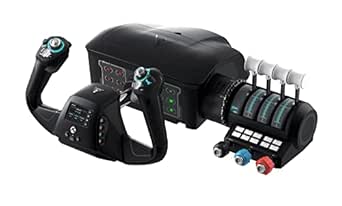 | Best All-in-One for Xbox and PC | Compatibility: Xbox Series X|S, Xbox One, Windows 10 and 11 PCs | Yoke rotation: 180° | Yoke sensor: Non-contact Hall effect | VIEW ON AMAZON | See Our Full Breakdown |
| Logitech G PRO Flight Yoke System with Throttle Quadrant |  | Best Renewed Yoke-and-Throttle Bundle | Condition: Renewed | Compatible device: PC | Connectivity: USB | VIEW ON AMAZON | See Our Full Breakdown |
More Details on Our Top Picks
Honeycomb Alpha Flight Controls Yoke and Bravo Throttle Quadrant Bundle
I rank this bundle first for buyers who want a coordinated yoke-and-throttle setup with controls that reach beyond basic pitch and power. The Alpha yoke and switch panel pair with the Bravo’s configurable levers, autopilot, trim wheel, and flap and landing-gear controls, giving general aviation and commercial sim pilots room to shape the cockpit around different aircraft. Its six GA and six commercial levers make it more adaptable than the Boeing-focused Thrustmaster TCA Yoke and Quadrant Boeing Edition, while the dedicated annunciator and warning lights add clear cockpit feedback. The tradeoff is a substantial, corded desktop setup, and compatibility is listed for Windows only. Choose this over a stick-and-pedals kit when yoke control and a broad throttle panel matter more than Xbox support or compact storage.
Pros:- Pairs a yoke and switch panel with a full throttle quadrant.
- Six general aviation and six commercial levers support different aircraft layouts.
- Autopilot, trim, flap, and gear controls keep common cockpit tasks within reach.
- Programmable annunciator switches and warning lights provide additional cockpit feedback.
Cons:- Windows is the only listed compatible platform.
- The 12.13 kg, 23.8 x 17.8 x 19-inch setup needs substantial desktop space.
- Requires a corded power connection and does not include rudder pedals.
Best for: Windows flight-sim pilots who want one yoke-and-throttle bundle with configurable controls for both general aviation and commercial aircraft.
Not ideal for: Xbox players, compact-desk users, or pilots who want rudder pedals included; this bundle is Windows-focused, large, and does not list pedals.
- Included components:Honeycomb Alpha Flight Controls Yoke and Switch Panel; Bravo Throttle Quadrant
- Compatible devices:Windows
- Connectivity:USB
- Levers:6 commercial levers and 6 general aviation levers
- Annunciator panel:7 programmable switches
- Warning lights:14
- Additional controls:Autopilot with backlit buttons, flap lever, gear lever with LED indicators, trim wheel
- Dimensions and weight:23.8 x 17.8 x 19 inches; 12.13 kg
Our verdict“Choose this if you want the most adaptable yoke-and-throttle bundle here for Windows and have the desk space for a full cockpit-style control set.”
Thrustmaster T-Flight Full Kit HOTAS with Rudder Pedals – Xbox & PC
This kit earns a distinct place for pilots who prioritize Xbox and PC compatibility and want rudder control included. Its stick, detachable throttle, and adjustable pedals form a complete HOTAS setup, while the 14 programmable buttons and five axes give players a range of inputs without buying separate pedals. Unlike the Honeycomb Alpha and Bravo bundle, it uses a flight stick rather than a yoke, so it is a better match for stick-flying aircraft and players who value console support over a yoke-style cockpit. The rudder pedals and calibration options add setup work, and the full kit takes up more room than a simple stick-and-throttle pair. Skip it if a yoke and configurable quadrant are the defining parts of your flight-sim setup; choose it when broad platform support and included pedals come first.
Pros:- Supports PC and Xbox Series X|S.
- Includes a flight stick, detachable throttle, and rudder pedals.
- Adjustable pedals use a S.M.A.R.T slide rail system and removable heel rests.
- Offers five axes and 14 programmable buttons.
Cons:- Does not include a yoke, unlike the Honeycomb Alpha and Bravo bundle.
- The separate pedal unit makes the overall setup bulky.
- Calibration may take time for buyers unfamiliar with flight controls.
Best for: PC and Xbox Series X|S pilots who prefer a stick, want rudder pedals in the same kit, and need a ready-made HOTAS layout.
Not ideal for: Yoke-focused sim pilots or buyers seeking a compact desktop bundle; this is a stick-based kit with separate pedals that need space and calibration.
- Platform compatibility:PC and Xbox Series X|S
- Control system:HOTAS: throttle and stick
- Rudder pedals:Included, with S.M.A.R.T slide rail system
- Pedal design:Ergonomic, with removable heel rests
- Axes:5
- Programmable buttons:14
- Additional features:Rapid-fire trigger, multidirectional hat switch, detachable throttle quadrant
Our verdict“Pick this kit if you fly on Xbox or PC with a stick and want pedals included, rather than building around a yoke and throttle quadrant.”
Logitech Pro Flight Rudder Pedals & Flight Throttle Quadrant
This Logitech set suits sim pilots who already have a yoke and want to add rudder pedals and a configurable throttle quadrant rather than replace their existing controls. Self-centering pedals with adjustable tension and differential toe brakes provide separate inputs for steering and braking, while the three-axis lever set can be arranged for throttle, flaps, mixture, or prop pitch. That makes it a more focused expansion than the Logitech G Pro Flight Yoke System and Rudder Pedals Bundle, which includes a yoke, but it also means this package is not a complete yoke-and-throttle bundle by itself. Top- or front-of-desk mounting gives owners more placement options; buyers still need to check compatibility with their sim and existing hardware, since the supplied details do not specify it. Best for gradual cockpit building, not a one-box start.
Pros:- Self-centering pedals have adjustable tension.
- Differential toe brakes allow separate left and right braking inputs.
- Three-axis levers and additional lever heads support several aircraft controls.
- Can mount on the top or front of a desk.
Cons:- Does not include a yoke, so it is not a complete yoke-and-throttle bundle alone.
- Compatibility with specific devices and flight simulators is not stated in the supplied details.
- The assortment of levers and mounting choices may take time to configure.
Best for: Existing yoke owners who want rudder pedals, differential toe brakes, and configurable lever inputs as a modular cockpit expansion.
Not ideal for: First-time buyers seeking a complete yoke-and-throttle bundle, or pilots who need clearly specified compatibility with a particular simulator.
- Rudder pedals:Self-centering with adjustable tension
- Toe brakes:Differential
- Control levers:3-axis
- Switches:Two-way rocker switches
- Mounting options:Top or front of desk
- Additional levers:Lever heads for throttle, flaps, mixture, and prop pitch
Our verdict“Choose this as a modular expansion if you already own a yoke and want pedals plus configurable throttle controls, not as a standalone bundle.”
Logitech G Pro Flight Yoke System and Rudder Pedals Bundle
This Logitech bundle is the pick for buyers who want a yoke, throttle quadrant, and rudder pedals together, with toe brakes included for ground handling. Its five yoke axes and 75 programmable controls give pilots many ways to map cockpit tasks, while adjustable, non-slip footrests help fit different seating positions. Compared with the Honeycomb Alpha and Bravo bundle, the Logitech adds rudder pedals and differential toe brakes, but the Honeycomb offers six commercial and six GA levers plus a dedicated annunciator panel. That makes Logitech the stronger fit for coordinated pedal control and customizable button inputs, not for buyers seeking the broadest throttle-panel layout. It is listed for Windows only and spreads across several desktop components, so the bundle suits a fixed sim station better than a shared or space-constrained desk.
Pros:- Includes a yoke, throttle quadrant, and rudder pedals.
- Differential toe brakes provide separate left and right braking.
- Seventy-five programmable yoke controls support customized input mapping.
- Adjustable, non-slip footrests accommodate different seating positions.
Cons:- Compatible devices are listed as Windows only.
- Multiple control components require both desktop and floor space.
- Compared with the Honeycomb Alpha and Bravo, it has fewer specified dedicated throttle and annunciator controls.
Best for: Windows desktop pilots who want a yoke, throttle quadrant, and rudder pedals with differential toe brakes in one bundle.
Not ideal for: Xbox users or pilots with limited desk and floor space; the listed compatibility is Windows, and the multi-part setup needs room.
- Compatible devices:Windows
- Connectivity:USB
- Controller types:Yoke, throttle quadrant, pedals
- Button quantity:14
- Yoke programmable controls:75
- Yoke axes:5
- Pedal features:Self-centering, adjustable damping, differential toe brakes
- Footrests:Adjustable with non-slip materials
Our verdict“Choose this Logitech bundle if coordinated yoke, throttle, and pedal control matters more than a more elaborate dedicated throttle panel.”
Thrustmaster TCA Yoke and Quadrant Boeing Edition Flight Pack for Xbox and PC
The Boeing Edition stands out for buyers who want a yoke-and-quadrant package shaped around the 787 Dreamliner, with official licensing, 1:1 scale styling, and pendular yoke motion. Adjustable spring tension and a metal internal structure add a more deliberate control feel, while 35 action buttons and two additional axes give pilots plenty of inputs without moving to a separate stick-and-throttle HOTAS like the Thrustmaster T-Flight Full Kit. Its clearest advantage over the Honeycomb Alpha and Bravo bundle is Xbox Series S|X support; Honeycomb, by contrast, offers more clearly described GA and commercial lever options. This Thrustmaster set is specialized rather than broadly configurable, and compatible rudder pedals are sold separately. Pick it for Boeing-focused yoke flying across PC and Xbox, not for a fully outfitted cockpit with pedals in the box.
Pros:- Officially licensed, 1:1 scale Boeing 787-inspired design.
- Pendular yoke motion and adjustable spring tension shape the control feel.
- Metal internal structure.
- Supports Windows and Xbox Series S|X, with 35 action buttons and two additional axes.
Cons:- Compatible rudder pedals are sold separately.
- Its Boeing-specific design is less broadly configurable than the Honeycomb Alpha and Bravo bundle.
- The listed power source is battery powered.
Best for: Boeing 787 fans who want a yoke and quadrant with Xbox Series S|X and Windows compatibility.
Not ideal for: Pilots who want rudder pedals included, broad aircraft-specific lever choices, or a setup not tailored to Boeing-style controls.
- Compatible devices:Windows, Xbox Series S, Xbox Series X
- Connectivity:USB
- Button quantity:35
- Additional axes:2
- Item weight:5.4 pounds
- Item dimensions:19 x 15 x 19 inches
- Power source:Battery powered
- Compatible rudder pedals:Thrustmaster TFRP or TPR, sold separately
Our verdict“Choose this for a Boeing-inspired yoke experience on PC or Xbox, and budget for separate pedals if rudder control is part of your setup.”
Logitech G PRO Flight Yoke System with Throttle Quadrant
I rank this Logitech as the best value-style traditional bundle for PC sim pilots who want a yoke and throttle quadrant in one package. Its five axes, 14 buttons, and at least 54 programmable controls give buyers room to assign common cockpit functions without starting with a larger, more involved panel. Two desk clamps also make it easier to secure the controls than a loose desktop setup. Compared with the Turtle Beach VelocityOne Flight, this system has a more straightforward control layout, but it lacks that model’s integrated rudder, toe brakes, trim wheel, and display. The tradeoff is software setup: simulator use requires optional software, and listed compatibility is Windows-based. Choose it for familiar yoke-and-quadrant handling; skip it if you need built-in rudder controls or console support.
Pros:- Includes both a flight yoke and throttle quadrant
- Five axes and at least 54 programmable controls support customized cockpit assignments
- Two desk clamps help secure the system to a suitable surface
- Supports several popular simulators with optional software
Cons:- Simulator use requires an optional software download
- Listed simulator compatibility is limited to Windows
- Does not include integrated rudder or toe-brake controls
Best for: Windows flight-sim pilots who want a conventional yoke and throttle quadrant with programmable controls and desk clamps in one package.
Not ideal for: Xbox pilots or buyers who want integrated rudder and brake controls, a trim wheel, or a built-in flight display.
- Controller type:Yoke
- Connectivity:USB
- Axes:5
- Buttons:14
- Programmable controls:At least 54
- Compatibility:Windows 11, 10, 8.1, and 7
- Included components:Flight yoke, throttle quadrant, USB cable, PS/2 cable, and 2 desk clamps
- Dimensions:18.9 × 15.8 × 9.1 in
Our verdict“Choose this Logitech for a clamp-mounted, programmable PC yoke-and-throttle setup, but pick the VelocityOne if you want more flight controls built into one unit.”
Honeycomb Alpha Flight Controls Yoke & Switch Panel
The Honeycomb Alpha is the pick for sim pilots who value yoke feel and cockpit switches more than receiving every control in a single yoke-and-throttle bundle. Its 180-degree rotation, steel shaft with linear ball bearings, and built-in switch panel put common aircraft functions within reach, while the multiple mounting options offer flexibility for different desks. Compared with the Logitech G PRO Flight Yoke System, the Alpha gives greater emphasis to the switch-panel experience, but the supplied product details do not include a throttle quadrant. That distinction matters: a buyer assembling a complete yoke-and-throttle setup will need to source a throttle separately. Its footprint and feature set may also be more than casual users want. I’d choose it for a cockpit-focused setup, not as the simplest all-in-one bundle.
Pros:- 180-degree yoke rotation supports a broad range of movement
- Steel control shaft with linear ball bearings is designed for smooth operation
- Integrated switch panel includes ignition, lighting, avionics, and other controls
- Heavy-duty clamps and a micro-suction pad provide mounting alternatives
Cons:- The listed package does not include a throttle quadrant
- Requires desk space for the yoke and switch-panel setup
- Feature-rich controls may take time for beginners to configure
Best for: Aviation enthusiasts building a desk cockpit who prioritize realistic yoke movement, accessible aircraft switches, and flexible mounting.
Not ideal for: Buyers who need a complete yoke-and-throttle bundle in one purchase or have limited desk space.
- Yoke rotation:180°
- Control shaft:Solid steel with linear ball bearings
- Switch panel:Main, alternator, avionics, and light switches; 5-position ignition switch
- Additional controls:8-way round-view switch, rocker switches, buttons, and push-to-talk
- Backlighting:Red LED
- Mounting options:Heavy-duty clamps and micro-suction pad
- Compatibility:Microsoft Flight Simulator and other flight simulation software
Our verdict“Pick the Alpha for a switch-rich yoke cockpit, but choose a bundle such as the Logitech G PRO if you need a throttle quadrant included.”
Logitech G PRO Flight Yoke System, Professional Simulation Yoke and Throttle Quadrant
This Logitech G PRO configuration stands out for buyers who want a highly assignable yoke-and-throttle setup. Its stated 75 programmable controls give more scope for mapping aircraft functions than the other Logitech G PRO listing, which specifies at least 54; that extra capacity may suit pilots who fly varied aircraft or prefer fewer keyboard shortcuts. The steel yoke shaft and separate three-axis lever throttle keep the setup focused on conventional flight controls. Compared with the Turtle Beach VelocityOne Flight, though, this model does not list integrated rudder, toe brakes, trim, or an onboard display. Its Windows compatibility and larger control set also make it less beginner-friendly than a simpler setup. I’d favor it for customization, while buyers seeking all-in-one controls or an easier starting point should compare the VelocityOne or the other Logitech bundle.
Pros:- Lists 75 programmable controls for extensive customization
- Steel yoke shaft provides a sturdy control structure
- Separate three-axis lever throttle is included
- Three modes support configurable control use
Cons:- The extensive programming options may add setup work for beginners
- Full listed compatibility is limited to Windows systems
- Does not list integrated rudder, toe brakes, or a trim wheel
Best for: Experienced Windows sim pilots who want to assign a wide range of aircraft functions across a yoke and separate three-axis throttle.
Not ideal for: New sim pilots seeking a simpler control layout, or buyers who need integrated rudder, toe brakes, and trim controls.
- Programmable controls:75
- Modes:3
- Throttle:Separate three-axis lever throttle with configurable knobs
- Yoke shaft:Steel
- USB port:1 USB 2.0
- Compatibility:Windows 7, 8.1, 10, XP/XP64, and Vista
Our verdict“Choose this Logitech when assigning many cockpit functions is the priority; choose the VelocityOne if you want more integrated flight controls.”
Turtle Beach VelocityOne Flight Universal Control System for Xbox and Windows PC
The VelocityOne Flight earns the best all-in-one pick here because its yoke and modular throttle arrive alongside controls that the Logitech G PRO bundles do not list: integrated rudder, toe brakes, and a pitch trim wheel. That can reduce the need for separate flight-control hardware and makes the system a stronger fit for Xbox users, with support also listed for Windows 10 and 11 PCs. The 180-degree yoke uses a non-contact Hall effect sensor, while the color display and configurable throttle levers add setup and control options. Compared with the Logitech G PRO, it offers a broader built-in control set, but its secure clamp may restrict placement on some desks. It also depends on compatible Xbox or Windows hardware, so it is not a platform-neutral choice.
Pros:- Works with listed Xbox consoles and Windows 10 and 11 PCs
- Includes a modular throttle quadrant with customizable handles and 10 programmable buttons
- Integrated rudder, toe brakes, and pitch trim reduce the need for separate controls
- Color flight management display and Hall effect yoke sensor add useful control and setup features
Cons:- Requires a compatible Xbox console or Windows 10/11 PC
- The secure clamp may limit placement options on some desks
- Its broad control set may be more equipment than buyers wanting only a basic yoke and throttle need
Best for: Xbox or Windows 10/11 pilots who want a yoke, modular throttle, rudder, toe brakes, and trim in one system.
Not ideal for: PC users on unsupported Windows versions, or buyers whose desk setup cannot accommodate the supplied secure clamp.
- Compatibility:Xbox Series X|S, Xbox One, Windows 10 and 11 PCs
- Yoke rotation:180°
- Yoke sensor:Non-contact Hall effect
- Analog axes:12
- Throttle quadrant:Modular, with customizable lever handles and 10 programmable buttons
- Integrated controls:Rudder, toe brakes, and pitch trim wheel
- Display:Full-color flight management display
- Connection:USB
Our verdict“Choose the VelocityOne for a single Xbox- or PC-compatible system with integrated rudder and trim; choose Logitech if you prefer a simpler Windows yoke-and-quadrant setup.”
Logitech G PRO Flight Yoke System with Throttle Quadrant
This renewed Logitech G PRO makes the most sense for a PC buyer open to refurbished hardware who wants the familiar yoke-and-throttle format without moving to a more feature-dense system. Its stainless steel shaft, three-position mode switch, desk clamps, and at least 54 programmable controls mirror the practical strengths of the other Logitech G PRO bundle in this roundup. The main difference is condition: this unit is listed as renewed and carries a 90-day limited warranty, rather than the two-year warranty specified for the B07QXMTNPB listing. Compared with the Turtle Beach VelocityOne, it has fewer integrated controls and no stated Xbox support, but its layout is more straightforward. The shorter warranty and renewed condition are meaningful tradeoffs, so buyers who want a new unit or longer listed coverage should look at the other Logitech listing.
Pros:- Includes a yoke and throttle quadrant with configurable controls
- Stainless steel shaft is specified for smooth, accurate control
- At least 54 programmable controls and a three-position mode switch
- Two-position desk clamp supports mounted use
Cons:- Renewed condition may not suit buyers who want a new product
- 90-day limited warranty is shorter than the two-year warranty listed for B07QXMTNPB
- PC-only compatibility excludes the listed Xbox support offered by the VelocityOne
Best for: PC flight-sim buyers who want a Logitech yoke and throttle quadrant and are comfortable purchasing a professionally inspected renewed unit.
Not ideal for: Buyers who require a new product, longer warranty coverage, or compatibility beyond PC.
- Condition:Renewed
- Compatible device:PC
- Connectivity:USB
- Button quantity:14
- Programmable controls:At least 54
- Shaft material:Stainless steel
- Mounting:Two-position desk clamp
- Warranty:90-day limited warranty
Our verdict“Choose this renewed Logitech if you want a familiar PC yoke-and-throttle layout and accept shorter warranty coverage; otherwise compare the two-year-warranty Logitech listing.”

How We Picked
I ranked these options by how well each package answers the specific need for a flight yoke and throttle bundle, rather than by the number of controls alone. My main criteria were the usefulness of the yoke-and-throttle pairing, the clarity of the listed bundle contents, platform fit, flexibility across aircraft styles, and whether included extras such as pedals or a switch panel meaningfully reduce additional setup needs.
The Honeycomb Alpha and Bravo leads because it pairs dedicated yoke and quadrant hardware with a versatile use case. Aircraft-specific, integrated, and entry-oriented kits follow when their focused design better serves a particular buyer. I treat repeated Logitech listings cautiously: where the supplied names do not establish a distinct configuration, they should not be read as different performance tiers. Compatibility and package contents can vary by version, so I rank on the information stated in each product name rather than assuming unlisted features.
Factors to Consider When Choosing Flight Yoke And Throttle Bundle
Before choosing a bundle, decide what you need the controls to do in your own sim setup. The biggest buying mistakes tend to come from focusing on the number of buttons or the bundle label while overlooking platform support, included accessories, and physical fit.
Match the Controls to Your Aircraft
A yoke is most relevant if you spend much of your time flying aircraft designed around yoke input; it may be a poor match if your main interest is aircraft normally flown with a stick. Throttle controls also vary in feel and layout, so aircraft-specific hardware can make certain procedures feel more natural while limiting how neutral the setup feels elsewhere. Avoid buying a themed edition solely for its appearance if you expect to switch between aircraft types often. A general-purpose yoke and quadrant can be easier to adapt, though its layout may be less closely tailored to one cockpit. Start with the aircraft you fly most, then decide whether variety or a specialized feel matters more.
Check Platform and Simulator Compatibility
Compatibility is about more than whether a product connects over USB: the listed platform must match the console or computer you actually use. Some products in this roundup name Xbox and PC support, while other listings emphasize PC, so do not assume they are interchangeable. Also check support for your flight simulator and operating system, since control recognition and configuration options can differ. If you plan to move between platforms, verify that the exact model and any required software support both. A bundle that fits your budget and desk is still the wrong choice if your simulator cannot use its controls as expected.
Read the Bundle Contents Line by Line
The word “bundle” does not guarantee the same package contents across listings. A yoke and throttle quadrant are not the same as a kit that also includes rudder pedals, and a switch panel may add useful cockpit controls without replacing either of those components. Compare the included parts against what you already own before treating one package as a complete setup. Retail listings can also use similar product names for different combinations, so confirm the model number and package contents before ordering. This check can prevent an unwanted duplicate or a missing component that changes what else you need to buy.
Plan for Desk Space and Mounting
A separate yoke and throttle quadrant can offer more flexibility, but it also takes more room and may require arranging multiple controls on a desk. An integrated system can simplify the footprint, though its fixed layout may leave fewer options for repositioning individual parts. Measure the available surface and check how the controls attach before settling on a setup. Think about whether the equipment will stay installed or need to be put away between sessions. A system that is easy to mount and store can be a better fit for a shared workspace than one with more pieces to manage.
Decide Whether You Need Rudder Pedals Now
Rudder pedals can add a separate way to control yaw and can matter for buyers who want a fuller cockpit setup, but not everyone needs to purchase them at the same time as a yoke. Some products here name pedals as part of the package, while several yoke-and-throttle listings do not. If you already own compatible pedals, paying for another set may add little value. If you do not, confirm whether the yoke or throttle system provides an alternative control method that works for your intended simulator and aircraft. Treat pedals as a planned part of the setup, not an accessory that is automatically included in every bundle.
Spend More for the Right Kind of Flexibility
A higher-feature setup makes sense when its added controls fit the way you fly, not simply because it has more switches or adjustment options. Buyers who regularly change aircraft may get more use from a flexible yoke-and-quadrant pairing, while someone focused on a single aircraft style may prefer a more tailored control layout. For a first setup, clear platform compatibility and a manageable installation can matter more than extra controls. Avoid paying for a premium component that duplicates equipment you already own. Compare the whole system you will end up with, including any missing pedals or mounting needs, rather than judging the yoke alone.
Frequently Asked Questions
Which flight yoke and throttle bundle is the strongest all-around choice?
I rank the Honeycomb Alpha and Bravo bundle first for buyers who want a dedicated yoke paired with a separate throttle quadrant. That pairing makes it a versatile starting point compared with the aircraft-focused Thrustmaster TCA Boeing Edition. The best fit still depends on your platform and whether the listed package includes everything you need. Check compatibility and included accessories for the exact version before buying.
Should I choose the Thrustmaster Boeing Edition or a more general yoke bundle?
Choose the TCA Boeing Edition if its aircraft-specific control style matches the planes you fly most and you value that tailored feel. A more general option, such as the Honeycomb Alpha and Bravo, makes more sense if you expect to switch aircraft often. The tradeoff is specialization: a themed layout can feel less natural for aircraft with different cockpit conventions. Match the choice to your regular flying rather than assuming one format suits every aircraft.
Do I need rudder pedals if a bundle includes a yoke and throttle?
Not necessarily, but a yoke-and-throttle package does not automatically include rudder pedals. The Logitech Rudder Pedals and Flight Throttle Quadrant listing and the Logitech yoke-and-rudder bundle explicitly name pedals, while several other listings do not. Check the exact package contents and your existing equipment before deciding. If pedals are a priority, compare the full kit rather than relying on the word “bundle.”
Can I use these flight control bundles with both Xbox and PC?
Do not assume cross-platform support from the product category alone. The Thrustmaster T-Flight Full Kit, Thrustmaster TCA Boeing Edition, and Turtle Beach VelocityOne listings specifically name Xbox and PC, while several Logitech and Honeycomb names emphasize PC or do not state both platforms. Verify support for the exact model, console generation, and simulator you use. If you plan to change platforms, confirm compatibility before purchasing rather than relying on a similar model name.
Why are there multiple Logitech Pro Flight Yoke listings, and how do I choose between them?
The supplied product list includes repeated or closely matching Logitech G Pro Flight Yoke System names, including multiple listings that mention a throttle quadrant. Those names alone do not establish that each listing has different hardware or package contents. Compare the model identifier, included accessories, platform support, and any stated configuration details on the specific listing. If those details match, treat them as overlapping options rather than separate performance tiers.
Conclusion
For the best overall, I recommend the Honeycomb Alpha and Bravo bundle for its dedicated yoke-and-quadrant pairing and broad appeal. For a best value pick, compare the Logitech Pro Flight listings carefully and choose the package whose included controls match what you already own; the available names do not support a confident distinction between duplicate configurations. The best premium-style choice for a focused Boeing setup is the Thrustmaster TCA Boeing Edition, while the best for beginners seeking an integrated system is the Turtle Beach VelocityOne. For specific needs, choose the Logitech bundle that explicitly includes rudder pedals if you need them, or the T-Flight Full Kit if its Xbox-and-PC support and kit format suit your setup. Before deciding, verify the exact platform support and package contents for your chosen listing.
Fall yard work Picks
leaf blowers
As an affiliate, we earn on qualifying purchases.