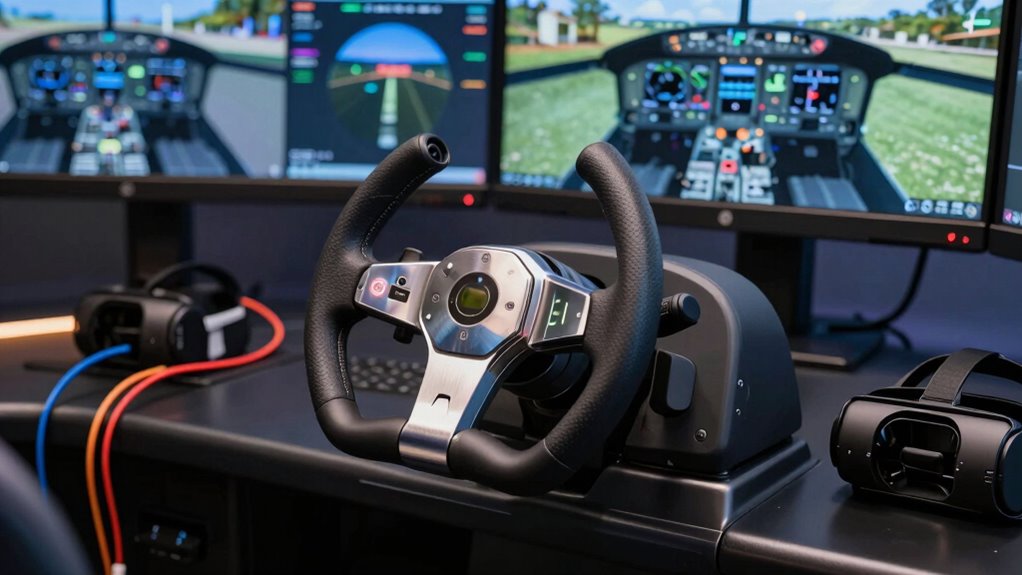
Choosing the right flight yoke for VR can significantly enhance your flying experience, but it involves balancing realism, compatibility, and budget. The Honeycomb Alpha Flight Controls Yoke & Switch Panel stands out for its professional-grade authenticity, ideal for serious enthusiasts. Meanwhile, the Logitech G PRO Flight Yoke System offers a solid entry point with good customization at a more accessible price. For those looking for a premium Boeing experience, the Thrustmaster TCA Yoke & Quadrant delivers highly detailed controls. However, each option involves tradeoffs—higher realism often comes with steeper learning curves and cost, while budget setups may lack advanced features.
Listen free for 30 days with Audible
Thousands of audiobooks and originals — cancel anytime.
Start your free trialAs an affiliate, we earn on qualifying purchases.
Complete the kit


Key Takeaways
- Professional-grade options like Honeycomb Alpha provide unmatched realism but are costly and space-intensive.
- Budget-friendly choices like Logitech G PRO deliver solid performance suitable for beginners or casual users.
- Compatibility with VR varies, so verify software support before purchasing.
- Complete bundles with rudder pedals and throttles enhance immersion but increase complexity and price.
- Mounting options and build quality are key to stable gameplay, especially in VR setups.
| Honeycomb Alpha Flight Controls Yoke & Switch Panel |  | Best Overall for Realism | Yoke Rotation: 180° | Control Mechanism: Dual linear ball bearings | Switch Panel: Master, alternator, avionics, light switches, 5-position ignition | VIEW ON AMAZON | See Our Full Breakdown |
| Honeycomb Alpha Flight Controls Yoke & Switch Panel |  | Best for Responsive Controls and Compatibility | Rotation: 180° | Material: Solid steel shaft | Switch Panel Features: Main, alternator, avionics, light switches, 5-position ignition switch | VIEW ON AMAZON | See Our Full Breakdown |
| Logitech G Pro Flight Yoke System + Pro Flight Rudder Pedals Bundle |  | Best for Beginners and Customization | Self-centering rudder pedals: Yes | Number of programmable controls: 54 | Footrest adjustability: Yes | VIEW ON AMAZON | See Our Full Breakdown |
| Thrustmaster TCA Yoke & Quadrant Boeing Edition Flight Pack – Xbox & PC |  | Best for Realistic Boeing Experience | Compatibility: Xbox & PC | Yoke Material: Metal internal structure | Yoke Range: 8.3 inches (21 cm) | VIEW ON AMAZON | See Our Full Breakdown |
| Logitech G PRO Flight Yoke System |  | Best for Versatility and Accessibility | Connector Cable Length: 5.9 ft (1.8m) | Throttle Quadrant Cable Length: 4.92 ft (1.5m) | Compatibility: Windows 11/10/8.1/7 | VIEW ON AMAZON | See Our Full Breakdown |
| flight yoke for vr | Compatibility |
|---|---|
| Honeycomb Alpha Flight Control | — |
| Honeycomb Alpha Flight Control | Microsoft Flight Simulator and other flight sim software |
| Logitech G Pro Flight Yoke Sys | — |
| Thrustmaster TCA Yoke & Quadra | Xbox & PC |
| Logitech G PRO Flight Yoke Sys | Windows 11/10/8.1/7 |
More Details on Our Top Picks
Honeycomb Alpha Flight Controls Yoke & Switch Panel
The Honeycomb Alpha stands out for its highly authentic flight control experience, featuring a full 180° yoke rotation and smooth operation via dual linear ball bearings. Its extensive switch panel mimics real cockpit controls, making it a top choice for serious flight sim enthusiasts. Compared to other options, it offers superior build quality and detailed controls, but its price and size make it less suitable for casual users or those with limited space. Designed by pilots and aerospace engineers, this yoke delivers a level of immersion few can match. Its versatile mounting options support various setups, though the cost may be prohibitive for newcomers or casual VR pilots.
Pros:- Highly realistic flight control with smooth operation
- Comprehensive switch panel for authentic simulation
- Versatile mounting options for different setups
- Designed by pilots and aerospace engineers
Cons:- Expensive for casual users
- Requires space for full setup
Best for: Serious flight sim enthusiasts and professional pilots
Not ideal for: Casual users or those with limited space
- Yoke Rotation:180°
- Control Mechanism:Dual linear ball bearings
- Switch Panel:Master, alternator, avionics, light switches, 5-position ignition
- Handle Features:8-way hat switch, two 2-way rocker switches, three buttons, push to talk button
- Mounting Options:Heavy-duty clamps and Micro-Suction Pad
Our verdict“A premium choice that delivers unmatched realism but at a higher price point, best suited for dedicated flight simmers.”
Honeycomb Alpha Flight Controls Yoke & Switch Panel
This Honeycomb Alpha model offers a highly responsive and realistic flight experience, with a solid steel shaft and integrated switch panel with backlighting for night flights. It is compatible with popular flight sim software like Microsoft Flight Simulator, making it suitable for both hobbyists and professional pilots. Compared to the previous model, this version emphasizes durability and software compatibility, though it shares similar high cost and space requirements. Its adjustable mounting options and detailed controls make it ideal for users seeking a reliable and immersive VR experience. Installation can be complex for beginners, but the responsiveness and build quality justify the effort.
Pros:- Realistic flight control with smooth, responsive mechanisms
- Integrated switch panel with backlighting for night flights
- Flexible mounting options for various tabletops
- Compatible with popular flight simulation software
Cons:- May be expensive for casual users
- Requires space for proper setup
- Complex installation for beginners
Best for: Aviation enthusiasts and professional pilots seeking durability and compatibility
Not ideal for: Casual users or those seeking a budget option
- Rotation:180°
- Material:Solid steel shaft
- Switch Panel Features:Main, alternator, avionics, light switches, 5-position ignition switch
- Backlighting:Red LED
- Handle Switches:8-way switch, 2 vertical rocker switches, 2 horizontal rocker switches, 3 buttons, push-to-talk button
- Mounting Options:Heavy-duty clamps or micro-suction pad
- Compatibility:Microsoft Flight Simulator and other flight sim software
- Build Quality:Durable materials
Our verdict“A durable, highly responsive yoke with excellent software compatibility, perfect for serious flight simmers willing to invest time and money.”
Logitech G Pro Flight Yoke System + Pro Flight Rudder Pedals Bundle
The Logitech G Pro Flight Yoke System combined with rudder pedals offers a comprehensive entry-level setup that balances realism with ease of use. Its self-centering rudder pedals and 54 programmable controls cater to both newcomers and intermediate pilots. Compared to high-end options, it does not feature full 180° rotation or switch panels, but it provides enough fidelity for most VR flight sims at a more accessible price point. Its straightforward setup and compatibility with multiple flight sim platforms make it an appealing choice for casual enthusiasts. The main tradeoff is that it lacks some of the advanced features found in premium models, which might limit immersion for dedicated simmers.
Pros:- Realistic yoke and rudder pedal controls
- Multiple programmable buttons for customization
- Adjustable footrests with non-slip materials
- Affordable compared to premium options
Cons:- May be complex for complete beginners
- Requires space for setup
- Higher price than basic models
Best for: Beginners and casual VR pilots
Not ideal for: Professional pilots or those seeking ultra-realistic controls
- Self-centering rudder pedals:Yes
- Number of programmable controls:54
- Footrest adjustability:Yes
- Control type:Yoke and pedals
- Mode switch positions:3
Our verdict“A solid, user-friendly bundle that provides good realism for newcomers, though it lacks some advanced features of high-end units.”
Thrustmaster TCA Yoke & Quadrant Boeing Edition Flight Pack – Xbox & PC
The Thrustmaster TCA Boeing Edition offers a meticulously detailed replica of the Boeing 787 cockpit, including a full-scale yoke and throttle quadrant. Its pendular motion and adjustable tension provide a highly realistic feeling of flying, especially suited for users who want an authentic Boeing experience. Compared with other options, it excels in replicating a commercial jet’s controls, but it may be overwhelming for beginners due to its complexity and the need for additional rudder pedals. Its metal construction ensures durability, and its compatibility with Xbox and PC broadens its usability. The main tradeoff involves a higher cost and the necessity of a more advanced setup for full immersion.
Pros:- Highly realistic Boeing 787 replica controls
- Durable metal construction
- Multiple action buttons and axes for complex maneuvers
- Officially licensed by Boeing and Xbox
Cons:- Requires separate rudder pedals
- May be complex for beginners
- Higher price point
Best for: Aviation enthusiasts seeking an authentic Boeing cockpit simulation
Not ideal for: Casual users or those new to flight sims
- Compatibility:Xbox & PC
- Yoke Material:Metal internal structure
- Yoke Range:8.3 inches (21 cm)
- Number of Action Buttons:35
- Additional Axes:2
- Includes:Yoke, Quadrant, Throttle with autopilot functions
- Official License:Boeing & Xbox
Our verdict“A premium, highly detailed Boeing simulation setup perfect for dedicated enthusiasts willing to invest in realism.”
Logitech G PRO Flight Yoke System
The Logitech G PRO Flight Yoke System combines precise control with straightforward setup, making it suitable for both beginners and seasoned pilots. Its 14 buttons, POV hat, and 3-position mode switch provide ample customization options, while the included clamps ensure stability during intense VR flights. Compared to premium models, it offers fewer advanced features like full rotation or switch panels but strikes a good balance between realism and ease of use. Its software integration allows for extensive customization, though full functionality may require downloading additional drivers. For those new to VR flight sims or with limited space, this model offers a reliable and accessible option.
Pros:- Realistic and precise control
- Highly customizable with programmable controls
- Includes mounting options for stability
- Compatible with various flight sim platforms
Cons:- Requires software download for full functionality
- Compatibility limited to Windows systems
- No included software for Mac or other OS
Best for: Beginners and intermediate VR pilots
Not ideal for: Advanced pilots seeking full cockpit realism
- Connector Cable Length:5.9 ft (1.8m)
- Throttle Quadrant Cable Length:4.92 ft (1.5m)
- Compatibility:Windows 11/10/8.1/7
- Controls:14 buttons, POV Hat, 3-position mode switch
- Mounting:2 desk clamps
Our verdict“A versatile, user-friendly yoke system that balances ease of use with realistic control, ideal for newcomers venturing into VR flight sims.”
How We Picked
Our selections are based on a combination of realism, build quality, compatibility with VR, user reviews, and value for money. We prioritized products that are designed specifically for immersive flight simulation and tested their versatility in different setups. Features like full 180° rotation, switch panels, and robust construction were essential, along with considerations of ease of use for both beginners and experienced pilots. Price point also played a role, ensuring options are accessible across a range of budgets.
| flight yoke for vr | Compatibility |
|---|---|
| Honeycomb Alpha Flight Control | — |
| Honeycomb Alpha Flight Control | Microsoft Flight Simulator and other flight sim software |
| Logitech G Pro Flight Yoke Sys | — |
| Thrustmaster TCA Yoke & Quadra | Xbox & PC |
| Logitech G PRO Flight Yoke Sys | Windows 11/10/8.1/7 |
Factors to Consider When Choosing Flight Yoke For Vr
When selecting a flight yoke for VR, it’s vital to consider how realistic and compatible the device is with your existing setup. Your choice depends on your budget, experience level, and the kind of flying experience you want. High-end models offer unmatched realism but require more space and a larger investment. Budget options provide good functionality with less complexity, making them perfect for beginners. Compatibility with your preferred flight sim software, ease of mounting, and build quality are also key factors to ensure your VR flight experience is immersive and comfortable.
Understanding Realism and Features
Realism in flight yokes is driven by factors like full 180° rotation, switch panels, and tactile controls. High-end options like Honeycomb Alpha excel here, providing a cockpit-like feel that enhances immersion in VR. Lower-tier models may lack some of these features but still offer sufficient control for casual flying. Consider whether you want a simple yoke or one with integrated switches and additional controls—these add to the realism but also complexity and cost.
Compatibility with VR and Flight Software
Not all yokes are created equal in terms of VR compatibility. Some models are optimized for specific platforms, such as Microsoft Flight Simulator, and might require additional software or drivers. Verify that the yoke supports your VR setup and the flight sim software you plan to use. A seamless connection ensures minimal lag and maximum immersion in your virtual cockpit.
Build Quality, Mounting, and Space Requirements
Durability and stability are essential, especially in VR where sudden movements can cause instability. Look for models with robust construction and versatile mounting options—clamps, suction pads, or bolting. Keep in mind your available space; larger yokes like Honeycomb Alpha need room for setup and operation. Ensuring your setup remains stable during VR flights will prevent frustration and improve overall experience.
Price Range and Value
Prices vary widely—from budget models under $200 to professional-grade setups exceeding $500. Balance your budget against your desired level of realism and features. While investing in a high-end model enhances immersion, budget options like Logitech G PRO still deliver respectable control and compatibility for most users. Remember, more expensive models often come with additional features like switch panels and advanced materials, but they may not be necessary for casual VR flying.
Frequently Asked Questions
Can I use a flight yoke in VR without any additional hardware?
Yes, most flight yokes are compatible with VR headsets as long as they connect to your PC and are recognized by your flight simulation software. The key is ensuring your VR headset and yoke can work together without conflicts. Some models might require specific drivers or software configurations, so it’s important to verify compatibility before purchasing.
What features should I prioritize for VR flight simulation?
In VR, immersion is crucial, so prioritize features like full 180° rotation, responsive controls, and sturdy mounting options. Switch panels and additional buttons enhance realism but are less critical if you’re just starting. The most important aspect is that the yoke feels natural and responds accurately to your movements, helping you stay immersed in the virtual cockpit.
Are high-end yokes worth the extra investment for VR?
High-end yokes like Honeycomb Alpha or Thrustmaster Boeing Edition significantly boost realism and immersion, which can make VR flying more engaging. However, they also come with higher costs and setup complexity. If you are serious about flight simulation and want the most authentic experience, investing in these models can be worthwhile. For casual users, more affordable options may suffice without sacrificing too much immersion.
Do I need additional pedals or throttle quadrants for VR?
While a yoke alone provides directional control, adding rudder pedals and throttle quadrants greatly enhances realism and control fidelity in VR. Many advanced setups include these accessories, which allow for more precise maneuvers and a more authentic flying experience. However, they also increase the complexity and cost of your setup, so consider your budget and space constraints.
How important is build quality for VR flight yokes?
Build quality directly impacts stability and durability, especially in VR where sudden movements can cause shifts or wobbling. A sturdy, well-constructed yoke ensures smooth operation and longevity, making your VR flights more comfortable and immersive. Cheaper or poorly made models may wobble or break over time, reducing the realism and increasing frustration during extended use.
Conclusion
If you’re a dedicated flight simmer seeking maximum realism in VR, investing in a high-end model like Honeycomb Alpha or Thrustmaster Boeing Edition makes sense, despite their higher price and setup requirements. Casual users or newcomers should consider more accessible options like Logitech G PRO, which offers good control and ease of use without breaking the bank. Advanced VR pilots who want a complete cockpit experience may want to combine these yokes with pedals and throttles, but beginners can start with a simple, reliable yoke and upgrade later. Ultimately, your choice depends on your budget, space, and how immersive you want your VR flying to be.
Fall Picks
fall essentials
As an affiliate, we earn on qualifying purchases.