Finding the right flight sim controls as a beginner can be overwhelming, with options ranging from simple joystick setups to full cockpit replicas. The Logitech G Saitek X52 Pro stands out for its balance of features and affordability, making it ideal for newcomers. The Thrustmaster T-Flight Hotas X offers straightforward controls for those just starting out, while the Honeycomb Alpha Yoke provides a more realistic experience for aspiring pilots ready to invest. The main tradeoffs involve complexity versus ease of use, and cost versus immersion. Continue reading for a detailed breakdown to help you choose the best flight sim controls for your needs.
Prime for Young Adults — start your free trial
Fast free delivery, streaming and member deals for eligible 18–24 year olds.
Try it freeAs an affiliate, we earn on qualifying purchases.
Complete the kit


Key Takeaways
- The best overall pick balances realism, ease of setup, and affordability, with the Logitech G Saitek X52 Pro leading the list.
- For those on a tighter budget, the Thrustmaster T-Flight Hotas X offers reliable controls without breaking the bank.
- Premium options like the Honeycomb Alpha Yoke deliver a highly authentic experience but come at a higher price point.
- Many beginners benefit from a hybrid setup that combines a stick and pedals for a more comprehensive experience.
- Ease of use and straightforward installation are key factors that separate beginner-friendly controls from more complex, advanced setups.
| IFR-1: Compact All-in-one Cockpit for Flight Simulation |  | Best Overall for Space-Conscious Beginners | Controls: COM, NAV, FMS, autopilot, XPDR, BARO, HDG, VORs | Compatibility: Microsoft Flight Simulator 2020/2024, X-Plane 11 or newer | Connectivity: USB-C to USB-A cable included | VIEW ON AMAZON | See Our Full Breakdown |
| Logitech G Saitek X52 Pro Flight Control System – Black/Silver |  | Best for Ergonomic Customization and Advanced Users | System requirements: Windows 10, Windows 8.1, Windows 7, 2 USB 2.0 ports, internet for software | Handle adjustment: 5 positions | Grip: Soft-touch, contoured | VIEW ON AMAZON | See Our Full Breakdown |
| Thrustmaster TFRP Precision Flight Sim Rudder Pedals – PS5, Xbox & PC | 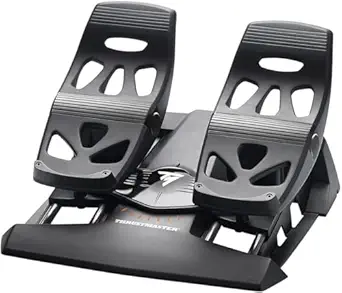 | Best for Realistic Rudder Control and Serious Enthusiasts | Compatibility: PS5, Xbox Series X|S, PC | Control Type: Rudder Pedals | Features: Self-centering axis, S.M.A.R.T. rail sliding system, ergonomic design | VIEW ON AMAZON | See Our Full Breakdown |
| Logitech G X56 H.O.T.A.S Throttle and Joystick Flight Simulator Controller |  | Best for Advanced Beginners and Customization Enthusiasts | Compatibility: Windows 7, 8.1, 10, 11 | Number of USB Ports: 2 | Control Surfaces: All including pitch, roll, yaw, throttle, weapons | VIEW ON AMAZON | See Our Full Breakdown |
| Logitech G Pro Flight Rudder Pedals |  | Best for Accurate and Customizable Rudder Control | Platform Compatibility: Windows 7, 8, 8.1, 10 | Axis: 9-bit Rudder, 7-bit Toe Brake | Dimensions: 31x41x17 cm | VIEW ON AMAZON | See Our Full Breakdown |
| Turtle Beach VelocityOne Flight Universal Control System for Xbox and Windows | 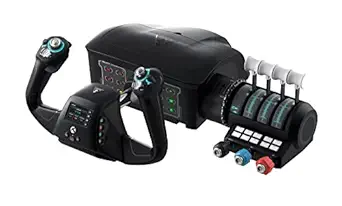 | Best Overall for Complete, Realistic Flight Simulation Experience | Compatibility: Xbox Series X, Xbox Series S, Xbox One, Windows 10 & 11 | Control Features: Yoke handle, throttle quadrant, trim wheel, rudder and brake controls | Display: Full color flight management display | VIEW ON AMAZON | See Our Full Breakdown |
| Thrustmaster T-Flight Hotas X USB Flight Sim Stick & Throttle – PC |  | Best for Beginners Who Want a Flexible, Plug-and-Play Setup | Number of action buttons: 12 | Number of axes: 5 | Detachable throttle: Yes | VIEW ON AMAZON | See Our Full Breakdown |
| Logitech G PRO Flight Yoke System |  | Best for Beginners Who Want a Realistic Yoke with Versatile Mounting | Connectivity: USB | Cable Length (Yoke): 5.9 ft (1.8m) | Cable Length (Throttle): 4.92 ft (1.5m) | VIEW ON AMAZON | See Our Full Breakdown |
| Honeycomb Alpha Flight Controls Yoke & Switch Panel |  | Best for Serious Beginners Seeking Realistic Controls and Switch Panel | Rotation: 180° | Control Shaft: Solid steel with two linear ball bearings | Switch Panel Features: Main, alternator, avionics, light switches, 5-position ignition | VIEW ON AMAZON | See Our Full Breakdown |
| Flight Simulator Digital Autopilot Panel for Home Cockpit & Desktop Setup |  | Best for Beginners Wanting Authentic Cockpit Controls with Easy Setup | VIEW ON AMAZON | See Our Full Breakdown | |||
| PXN 2113PRO PC Joystick USB Gaming Flight Simulator Controller Flight Stick |  | Best for Realistic Handheld Control and Simplicity | Compatibility: Windows 7/8/10/11 | Supported Platforms: PC | Vibration Function: Yes | VIEW ON AMAZON | See Our Full Breakdown |
| Logitech G Pro Flight Yoke System + Pro Flight Rudder Pedals Bundle |  | Best for Aspiring Pilots and Serious Beginners Ready to Invest | Number of programmable controls: 54 | Pedal type: Self-centering rudder pedals | Control type: Yoke controls | VIEW ON AMAZON | See Our Full Breakdown |
| flight sim controls for beginner | Compatibility |
|---|---|
| IFR-1: Compact All-in-one Cock | Microsoft Flight Simulator 2020/2024, X-Plane 11 or newer |
| Logitech G Saitek X52 Pro Flig | — |
| Thrustmaster TFRP Precision Fl | PS5, Xbox Series X|S, PC |
| Logitech G X56 H.O.T.A.S Throt | Windows 7, 8.1, 10, 11 |
| Logitech G Pro Flight Rudder P | — |
| Turtle Beach VelocityOne Fligh | Xbox Series X, Xbox Series S, Xbox One, Windows 10 & 11 |
| Thrustmaster T-Flight Hotas X | PC |
| Logitech G PRO Flight Yoke Sys | Windows 11/10/8.1/7 |
| Honeycomb Alpha Flight Control | — |
| Flight Simulator Digital Autop | — |
| PXN 2113PRO PC Joystick USB Ga | Windows 7/8/10/11 |
| Logitech G Pro Flight Yoke Sys | — |
More Details on Our Top Picks
IFR-1: Compact All-in-one Cockpit for Flight Simulation
The IFR-1 stands out for offering a realistic cockpit experience within a compact design, making it ideal for those with limited space who want immersive control. Compared with larger setups like the Logitech G X56 H.O.T.A.S, it sacrifices some advanced customization but provides essential controls with high tactile feedback. Its seamless USB-C connection simplifies setup, yet it lacks compatibility with Xbox, limiting versatility for console users. This makes it perfect for beginners primarily using PC and looking for an all-in-one solution that doesn’t overwhelm their space or budget.
Pros:- Realistic and tactile control experience
- Compact, space-saving design
- Easy USB connectivity with included cable
- Compatible with popular flight simulators
Cons:- Not compatible with Xbox
- Requires USB connection, may need additional setup
Best for: Beginners who want a realistic yet space-saving cockpit for PC flight sims
Not ideal for: Console users or those seeking extensive customization and modularity
- Controls:COM, NAV, FMS, autopilot, XPDR, BARO, HDG, VORs
- Compatibility:Microsoft Flight Simulator 2020/2024, X-Plane 11 or newer
- Connectivity:USB-C to USB-A cable included
- Dimensions:Space-saving design
- Rotary Encoder:High-quality dual-axis rotary encoder
Our verdict“This is a strong choice for space-conscious beginners who prioritize realism and ease of use on PC.”
Logitech G Saitek X52 Pro Flight Control System – Black/Silver
The X52 Pro offers a rich set of features like illuminated buttons, an LCD display, and a progressive throttle, making it ideal for those ready to move beyond basic controls. Compared with the IFR-1, it provides more tactile feedback and customization options, although it requires multiple USB ports and internet connectivity, which can be overwhelming for absolute beginners. Its ergonomic handle and adjustable handle positions cater to comfort during long flights, but the complexity might challenge new users who prefer straightforward setups. This pick is best for beginners eager to explore advanced features as they grow in their flight sim journey.
Pros:- Illuminated buttons and LCD display enhance usability
- Progressive throttle with resistance adjustment and detents
- Ergonomic handle with multiple positions for comfort
- Compatible with multiple Windows versions
Cons:- Requires multiple USB ports and internet connection
- May be complex for beginners to configure
Best for: Beginners with some familiarity who want a versatile, feature-rich control system
Not ideal for: Complete beginners or those with limited USB ports and minimal setup experience
- System requirements:Windows 10, Windows 8.1, Windows 7, 2 USB 2.0 ports, internet for software
- Handle adjustment:5 positions
- Grip:Soft-touch, contoured
Our verdict“Ideal for beginners ready to invest in a customizable, ergonomic control system that can evolve with their skills.”
Thrustmaster TFRP Precision Flight Sim Rudder Pedals – PS5, Xbox & PC
The TFRP Pedals excel at delivering precise, smooth rudder control with a self-centering axis and sturdy aluminum rails, making them perfect for those seeking authentic flying experiences. Unlike simpler rudder pedals, these offer an advanced sliding system and ergonomic design, but they may require secure mounting and are primarily suited for dedicated flight sim enthusiasts. While compatible across PS5, Xbox, and PC, their higher cost and need for proper setup may deter casual users. This makes them a top choice for learners who want to practice realistic footwork and control fidelity.
Pros:- Provides realistic and precise flight control
- Smooth, friction-free motion with sliding system
- Ergonomic design for comfort during long flights
- Compatible with multiple platforms
Cons:- May require secure mounting for stability
- Potentially high cost for casual users
- Requires some space for proper setup
Best for: Serious beginners or hobbyists focused on authentic flight control and long-term immersion
Not ideal for: Casual players or those with limited space for proper pedal mounting
- Compatibility:PS5, Xbox Series X|S, PC
- Control Type:Rudder Pedals
- Features:Self-centering axis, S.M.A.R.T. rail sliding system, ergonomic design
- Material:Aluminum rails
Our verdict“Best suited for learners committed to mastering realistic rudder control and seeking durable pedals for immersive simulation.”
Logitech G X56 H.O.T.A.S Throttle and Joystick Flight Simulator Controller
The X56 H.O.T.A.S delivers high-precision control with extensive customization, including RGB lighting, dual throttles, and programmable axes, making it suitable for those who want a highly detailed setup. Compared with the simpler IFR-1, it offers more control surfaces and configurability, but its complexity can be overwhelming for true newcomers without prior experience. The premium price and multiple USB requirements may also be barriers for casual users. This control is ideal for beginners willing to invest time in learning advanced features to enhance their flying experience.
Pros:- Highly customizable with multiple spring options and programmable controls
- Realistic and precise control with hall-effect sensors
- RGB lighting adds aesthetic and functional customization
- Dual throttles for complex aircraft control
Cons:- Requires multiple USB ports and compatible Windows OS
- May be complex for users new to flight controls
- Premium price may be a barrier
Best for: Beginners interested in a high level of control customization and durability for long-term use
Not ideal for: Absolute beginners or those seeking an ultra-simple, plug-and-play setup
- Compatibility:Windows 7, 8.1, 10, 11
- Number of USB Ports:2
- Control Surfaces:All including pitch, roll, yaw, throttle, weapons
- Lighting:RGB backlighting
- Control Features:16-bit axes, hall-effect sensors, adjustable springs
- Cable Length:2 meters
Our verdict“Designed for beginners ready to explore advanced control features without sacrificing realism or durability.”
Logitech G Pro Flight Rudder Pedals
The Pro Flight Rudder Pedals provide refined, smooth rudder control with adjustable tension and differential toe brakes, making them ideal for learners who want realistic footwork. Compared with the TFRP pedals, they are more straightforward to install but may lack the same advanced sliding system. Their compatibility with Windows makes them accessible for most beginners, but the need for a USB 2.0 port and limited platform support could be a concern for some users. This set is a good entry point for those focused on improving their rudder control without the complexity of high-end pedals.
Pros:- Highly accurate and smooth rudder control
- Adjustable tension for personalized feel
- Differential toe brakes for added realism
- Compatible with multiple Windows versions
Cons:- Requires USB 2.0 port
- Limited to Windows platforms
- No wireless connectivity
Best for: Beginners seeking accurate, adjustable rudder pedals for improving ground control
Not ideal for: Console players or users with limited USB ports who want a more comprehensive pedal system
- Platform Compatibility:Windows 7, 8, 8.1, 10
- Axis:9-bit Rudder, 7-bit Toe Brake
- Dimensions:31x41x17 cm
- Weight:2.3 kg
Our verdict“A practical choice for beginners wanting reliable, customizable rudder pedals to enhance their flying skills.”
Turtle Beach VelocityOne Flight Universal Control System for Xbox and Windows
This all-in-one setup stands out for its immersive, comprehensive control options, including a yoke handle, throttle, trim wheel, and rudder controls, making it ideal for those who want a realistic experience. Compared with the Honeycomb Alpha, it offers a more integrated control surface but at a higher price and with a steeper learning curve. Its full-color flight management display helps users navigate complex flights, but the setup requires ample space and patience, which could overwhelm beginners. This system is perfect for dedicated enthusiasts or serious beginners willing to invest in a full cockpit experience.
Pros:- Immersive and comprehensive control suite for realistic flying
- Customizable throttle and control options for tailored experiences
- Compatible with popular flight sim titles on both Xbox and Windows
Cons:- Complex to set up and operate, which may challenge complete beginners
- Premium price point makes it less accessible for casual users
- Requires significant space for proper installation
Best for: Aviation enthusiasts or beginners committed to a realistic flight simulation setup with space and budget flexibility
Not ideal for: Casual players or those with limited space who prefer simpler, plug-and-play controls
- Compatibility:Xbox Series X, Xbox Series S, Xbox One, Windows 10 & 11
- Control Features:Yoke handle, throttle quadrant, trim wheel, rudder and brake controls
- Display:Full color flight management display
- Axes:12 analog axes
- Switches:Two POV switch, two 4-way HAT switches
- Additional:Dedicated pitch trim wheel, Status Indicator Panel
Our verdict“This is best suited for serious beginners or enthusiasts seeking a full, realistic cockpit experience and prepared for the setup complexity.”
Thrustmaster T-Flight Hotas X USB Flight Sim Stick & Throttle – PC
This controller offers a straightforward, ergonomic design with fully programmable controls, making it an excellent choice for new pilots who want immediate usability. Unlike the more complex Honeycomb Alpha, it emphasizes ease of use with preset configurations and a detachable throttle, which simplifies setup. It’s limited to PC, but its plug-and-play nature means less fuss for newcomers. However, calibration can sometimes be tricky, and the control range may feel less precise than higher-end models like the Logitech G PRO Flight Yoke System. This pick makes the most sense for beginners who want a customizable but simple flight stick and throttle experience.
Pros:- Ergonomic design for comfortable extended play sessions
- Fully programmable controls for personalized setups
- Detachable throttle adds flexibility for different aircraft
Cons:- Limited to PC compatibility, restricting future upgrade options
- May require calibration for optimal control responsiveness
- Less precise than more advanced or dedicated yoke setups
Best for: PC gamers new to flight sim who want an adjustable, comfortable control without complex features
Not ideal for: Advanced users or those seeking multi-axis, full cockpit setups, as it’s primarily a basic stick and throttle
- Number of action buttons:12
- Number of axes:5
- Detachable throttle:Yes
- Adjustable resistance:Yes
- Compatibility:PC
- Memory:Built-in
Our verdict“Ideal for beginners seeking an affordable, easy-to-use control system with room for customization on PC.”
Logitech G PRO Flight Yoke System
This yoke system provides a convincing flight experience with a smooth, precise control mechanism that appeals to both newcomers and casual pilots. Unlike the more complex Turtle Beach VelocityOne, it focuses on realism through its sturdy, responsive yoke and multiple programmable buttons. The setup involves software integration, which might be off-putting for absolute beginners, but the flexible mounting options and extensive control set make it worth the effort for those wanting a more authentic feel. It’s less comprehensive than the Honeycomb Alpha but easier to learn for users transitioning into more detailed flight controls. This makes sense for beginners who want a step up from basic joysticks without jumping into full cockpit systems.
Pros:- Realistic and precise yoke controls for immersive flying
- Multiple programmable buttons for aircraft management
- Versatile mounting options with robust clamps
Cons:- Requires software download and setup for full functionality
- Somewhat complex for absolute beginners unfamiliar with flight controls
- Less comprehensive than full cockpit systems like Honeycomb Alpha
Best for: Entry-level flight enthusiasts wanting a realistic yoke with flexible mounting options on Windows
Not ideal for: Casual players who prefer simple, plug-and-play controls without software setup or customization
- Connectivity:USB
- Cable Length (Yoke):5.9 ft (1.8m)
- Cable Length (Throttle):4.92 ft (1.5m)
- Compatibility:Windows 11/10/8.1/7
- Control Features:14 buttons, POV hat, 3-position mode switch
- Mounting:2 desk clamps
Our verdict“Best suited for beginners wanting a realistic yoke experience that can grow with their skills and preferences.”
Honeycomb Alpha Flight Controls Yoke & Switch Panel
This setup offers a highly realistic flight experience with a 180° rotation yoke, smooth handling, and a comprehensive switch panel. Compared to the Logitech G PRO Flight Yoke, it provides more detailed switch controls and a durable build, ideal for those who want to simulate real cockpit panels. Its dual mounting options add flexibility, but the complexity can be overwhelming for absolute beginners, especially during setup. It’s also more expensive, which might deter casual users. Yet, for aviation enthusiasts aiming for authenticity, this system bridges the gap between beginner and advanced pilot equipment. It’s best for serious beginners who want to experience a cockpit’s feel without moving into full cockpit setups.
Pros:- Realistic flight control with smooth, responsive handling
- Includes a switch panel with LED backlighting for authentic cockpit feel
- Flexible mounting options for various setups
Cons:- Higher cost may be prohibitive for casual users
- Setup complexity could challenge beginners unfamiliar with controls
- Requires space for mounting and detailed setup
Best for: Aviation hobbyists and serious beginners ready to invest in realistic, switch-panel equipped yoke controls
Not ideal for: Casual flight sim players or those on a tight budget who prefer simple controls
- Rotation:180°
- Control Shaft:Solid steel with two linear ball bearings
- Switch Panel Features:Main, alternator, avionics, light switches, 5-position ignition
- Backlighting:Red LED
- Handle Switches:8-way switch, 2 vertical rocker, 2 horizontal rocker, 3 buttons, push-to-talk
- Mounting Options:Heavy-duty clamps or micro-suction pad
Our verdict“Ideal for dedicated hobbyists or serious beginners seeking a realistic yoke and switch panel experience.”
Flight Simulator Digital Autopilot Panel for Home Cockpit & Desktop Setup
This autopilot panel delivers an authentic cockpit experience with a true-to-aircraft layout and ergonomic controls, making it ideal for beginners interested in general aviation simulation. Unlike the more comprehensive Turtle Beach VelocityOne, it focuses on autopilot functions with a simplified interface and plug-and-play USB connectivity, which eases setup. The inclusion of a premium aluminum stand adds versatility for desktop or cockpit mounting. However, it’s limited to general aviation aircraft and involves software configuration, which could challenge absolute beginners. The stability of the base depends on user placement, so some may need additional support. Still, it offers a realistic feel for those wanting to simulate autopilot functions without a full cockpit system.
Pros:- Authentic cockpit feel with true-to-aircraft layout
- Easy plug-and-play setup with customizable controls
- Includes a premium aluminum stand for desktop use
Cons:- Requires software for full functionality, adding setup time
- Limited to general aviation, not suitable for commercial aircraft
- Base stability depends on user placement or additional support
Best for: Aviation beginners interested in general aviation autopilot systems with straightforward setup
Not ideal for: Players aiming for commercial or complex aircraft simulation, or those seeking a full cockpit system
Our verdict“Best for beginners interested in general aviation autopilot functions who want a realistic, easy-to-setup cockpit panel.”
PXN 2113PRO PC Joystick USB Gaming Flight Simulator Controller Flight Stick
The PXN 2113PRO stands out for offering a realistic flying feel with vibration feedback, making it a compelling choice for beginners wanting to experience flight simulation without the complexity of a full yoke setup like the Logitech G Pro Flight Yoke System. Its ergonomic design and multiple programmable buttons allow for customization, but it lacks force feedback, which limits tactile realism compared to more advanced options. Compared to simpler gamepads, this joystick offers a more immersive experience, though it requires driver installation and isn’t compatible with Mac or consoles. It’s ideal for newcomers who want a tactile experience but aren’t ready for high-end gear or extensive setup. However, those seeking a plug-and-play solution or cross-platform compatibility should look elsewhere. Pros: Realistic vibration feedback, multiple programmable controls, ergonomic single-hand operation, stable with suction cups. Cons: No force feedback support, incompatible with Mac/console, driver setup needed.
Best for beginners wanting tactile feedback and easy handling on PC.Pros:- Realistic vibration feedback enhances immersion
- Multiple programmable buttons for customization
- Ergonomic design reduces fatigue during extended use
Cons:- Lacks force feedback, limiting tactile realism
- Requires driver installation for full functionality
- Not compatible with Mac or gaming consoles
Best for: PC gamers new to flight sims who want a tactile joystick experience without complex setup
Not ideal for: Mac users or players looking for force feedback or console compatibility
- Compatibility:Windows 7/8/10/11
- Supported Platforms:PC
- Vibration Function:Yes
- Buttons:12 programmable
- Control Axes:4 axes
- Hat Switch:8-Way
- Additional Features:Rapid fire trigger, ergonomic design, four suction cups
Our verdict“This joystick is well-suited for beginners seeking a tactile, PC-only flight control that emphasizes realism over complexity.”
Logitech G Pro Flight Yoke System + Pro Flight Rudder Pedals Bundle
The Logitech G Pro Flight Yoke System paired with Pro Flight Rudder Pedals offers a highly authentic flight experience, making it ideal for beginners who are committed to a more immersive setup. Its 54 programmable controls and self-centering rudder pedals with differential toe brakes closely mimic real aircraft controls, setting it apart from simpler joystick options like the PXN 2113PRO. However, this bundle can be overwhelming for absolute newcomers due to its extensive controls and setup complexity, and it requires space for proper installation. Compared to the joystick, this setup provides greater control fidelity but at a higher cost and learning curve. It’s best suited for those willing to dedicate time to setup and calibration, aiming for a more realistic pilot-like experience. Less suitable for casual or space-constrained users. Pros: Highly programmable controls, realistic yoke feel, adjustable footrests for comfort, detailed control over flight dynamics. Cons: Can be complex for beginners, requires ample space, price is higher without a clear budget cap.
Best for beginners who want a realistic, comprehensive flight control system and are ready to invest in their setup.Pros:- Authentic flight control with yoke and rudder pedals
- Numerous programmable controls for customization
- Adjustable footrests enhance comfort during long sessions
Cons:- Setup and calibration can be complex for beginners
- Requires significant space for proper installation
- Higher price point may be a barrier for casual users
Best for: Aspiring pilots or flight sim enthusiasts prepared to invest in a detailed control setup
Not ideal for: Casual players or those with limited space and budget constraints
- Number of programmable controls:54
- Pedal type:Self-centering rudder pedals
- Control type:Yoke controls
- Footrest adjustability:Yes
- Toe brakes:Differential
- Platform compatibility:PC (Windows)
Our verdict“This bundle makes sense for newcomers eager for a realistic, comprehensive flight experience and willing to learn its setup process.”

How We Picked
The products in this roundup were evaluated based on several criteria essential for beginners. First, usability and setup simplicity were prioritized to ensure new users could get started quickly without frustration. Performance and build quality were also considered, as controls need to be reliable and durable for long-term use. Value was a key factor—beginners often seek affordable options that deliver good experience without a hefty investment. Additionally, versatility and expandability played a role, as some controls can grow with the user’s skills. The ranking reflects a balance of these factors, favoring controls that provide the best mix of ease, quality, and value for newcomers.Factors to Consider When Choosing Flight Sim Controls For Beginners
Choosing flight sim controls as a beginner involves more than just picking the most popular or cheapest option. It’s important to consider how the controls feel in your hands, how easy they are to set up, and whether they match your specific simulation goals. A well-chosen setup can make flying more immersive and enjoyable, reducing frustration and helping you learn faster. Here are the key factors to keep in mind when selecting your first flight control system.Ease of Use and Setup
For beginners, controls that are straightforward to install and intuitive to operate are essential. Look for setups with simple calibration processes and clear instructions. Overly complex systems, while potentially more realistic, can be overwhelming and discourage continued use. Prioritize controls that offer plug-and-play capabilities or minimal configuration to get flying quickly.
Compatibility and Software
Ensure the controls are compatible with your preferred simulation platform and operating system. Some devices come with dedicated software that enhances customization, but too much complexity here can be a hurdle for newcomers. Compatibility issues can lead to frustration and may require additional troubleshooting, so verify supported systems before purchase.
Build Quality and Durability
As a beginner, you want controls that can withstand regular use without breaking or losing calibration. While premium materials cost more, they often last longer and offer smoother operation. Cheaper models may work initially but can wear out quickly, leading to a poorer experience over time. Strike a balance between cost and durability to ensure your investment pays off.
Realism vs. Accessibility
More realistic controls, like yokes and pedals, enhance immersion but can be intimidating or cumbersome for newcomers. Simpler stick-and-throttle setups are easier to master and more forgiving for learning. Consider your comfort level and willingness to master complex controls when choosing, as this will influence your long-term enjoyment.
Expandability and Future Use
If you plan to grow into more advanced flying, look for controls that can be expanded with additional peripherals later. Modular setups or compatible pedals and switches can save money in the long run. However, for absolute beginners, it’s better to start simple and upgrade gradually, rather than investing heavily in a complex system right away.
Frequently Asked Questions
Are more expensive flight controls worth it for beginners?
Higher-priced controls often offer better build quality, more realism, and additional features, but they may be overwhelming for new users. For beginners, it’s generally better to start with a reasonably priced, user-friendly option that provides good value. As your skills develop, you can upgrade to more advanced systems that suit your growing needs and preferences.
Should I choose a joystick or a yoke as my first flight control?
Joysticks tend to be more versatile and easier to handle for many beginners, especially in smaller or more casual setups. Yokes, however, provide a more authentic experience, especially for flight simulator enthusiasts interested in commercial or general aviation flying. If realism is your priority, starting with a yoke might be worthwhile, but for simplicity and ease of use, a joystick is often the better initial choice.
Can I use pedals with my beginner controls?
Yes, pedals can significantly enhance your control experience by adding realism, especially for aircraft that require rudder input. Many beginner setups include pedals or are compatible with them, but they add to the cost and complexity. If you’re just starting out, consider whether pedals are necessary now or if you want to add them later as you become more comfortable.
How important is software compatibility for beginners?
Software compatibility is vital because it ensures your controls work smoothly with your chosen flight simulator. Most beginner controls are designed for easy integration, but double-check supported platforms before buying. Incompatible devices can lead to frustration and setup issues, so prioritize controls that are known to work well with your software and hardware environment.
What should I consider if I want controls that can grow with me?
Look for modular or expandable systems that support additional peripherals like pedals, switches, or throttle quadrants. This flexibility allows you to start simple and upgrade as your skills improve, spreading out the investment over time. However, be mindful of compatibility and whether the base system offers enough features to justify future upgrades, to avoid needing a complete overhaul later.
Conclusion
For newcomers seeking a straightforward, reliable, and affordable entry point, the Logitech G Saitek X52 Pro offers a well-rounded experience. If budget is your main concern, the Thrustmaster T-Flight Hotas X provides solid controls without a steep learning curve. Those ready to prioritize realism and are willing to invest more should consider the Honeycomb Alpha Yoke or the Logitech G PRO Flight Yoke System. Beginners who want an all-in-one setup for maximum immersion might prefer the VelocityOne Flight System, while casual users or those planning to upgrade later should focus on controls with good expandability. Your choice depends on your immediate needs and long-term goals as a flight sim enthusiast.
As an affiliate, we earn on qualifying purchases.Evergreen bestsellers Picks
bestsellers